-
跑一跑NeuralAnnot
【GitHub】传送阵
一.运行
这东西标注器代码西八兄弟没开源:(,我搞完之后才发现是标注结果展示
1.环境
西八兄弟好像没给环境配置,和环境有关的就这句话

(1)python 3.8或以上(不然会报错)
(2)pycocotools
(3)libglfw3-dev libgles2-mesa-dev
(4)smplx[all]
(5)vs环境1.1环境配置
建议实现创建一个虚拟环境
1.1.1 下载smplx
pip install smplx[all] git clone https://github.com/vchoutas/smplx python setup.py install- 1
- 2
- 3
- 4
1.1.2 ubantu下 下载其他依赖包
sudo apt-get install libglib2.0-0 pip install pycocotools apt-get install libglfw3-dev libgles2-mesa-dev- 1
- 2
- 3
window也是同样的,但是有些包的名字可能变了
1.2 报错
(1)Exception: pyglet 2.0.0 requires Python 3.8 or newer.

将python版本提高到 3.8以上(2)缺少c++导致的错误
error: subprocess-exited-with-error × Building wheel for psutil (pyproject.toml) did not run successfully. │ exit code: 1 ╰─> [38 lines of output] running bdist_wheel running build running build_py creating build creating build\lib.win-amd64-cpython-38 creating build\lib.win-amd64-cpython-38\psutil copying psutil\_common.py -> build\lib.win-amd64-cpython-38\psutil copying psutil\_compat.py -> build\lib.win-amd64-cpython-38\psutil copying psutil\_psaix.py -> build\lib.win-amd64-cpython-38\psutil copying psutil\_psbsd.py -> build\lib.win-amd64-cpython-38\psutil copying psutil\_pslinux.py -> build\lib.win-amd64-cpython-38\psutil copying psutil\_psosx.py -> build\lib.win-amd64-cpython-38\psutil copying psutil\_psposix.py -> build\lib.win-amd64-cpython-38\psutil copying psutil\_pssunos.py -> build\lib.win-amd64-cpython-38\psutil copying psutil\_pswindows.py -> build\lib.win-amd64-cpython-38\psutil copying psutil\__init__.py -> build\lib.win-amd64-cpython-38\psutil creating build\lib.win-amd64-cpython-38\psutil\tests copying psutil\tests\runner.py -> build\lib.win-amd64-cpython-38\psutil\tests copying psutil\tests\test_aix.py -> build\lib.win-amd64-cpython-38\psutil\tests copying psutil\tests\test_bsd.py -> build\lib.win-amd64-cpython-38\psutil\tests copying psutil\tests\test_connections.py -> build\lib.win-amd64-cpython-38\psutil\tests copying psutil\tests\test_contracts.py -> build\lib.win-amd64-cpython-38\psutil\tests copying psutil\tests\test_linux.py -> build\lib.win-amd64-cpython-38\psutil\tests copying psutil\tests\test_memleaks.py -> build\lib.win-amd64-cpython-38\psutil\tests copying psutil\tests\test_misc.py -> build\lib.win-amd64-cpython-38\psutil\tests copying psutil\tests\test_osx.py -> build\lib.win-amd64-cpython-38\psutil\tests copying psutil\tests\test_posix.py -> build\lib.win-amd64-cpython-38\psutil\tests copying psutil\tests\test_process.py -> build\lib.win-amd64-cpython-38\psutil\tests copying psutil\tests\test_sunos.py -> build\lib.win-amd64-cpython-38\psutil\tests copying psutil\tests\test_system.py -> build\lib.win-amd64-cpython-38\psutil\tests copying psutil\tests\test_testutils.py -> build\lib.win-amd64-cpython-38\psutil\tests copying psutil\tests\test_unicode.py -> build\lib.win-amd64-cpython-38\psutil\tests copying psutil\tests\test_windows.py -> build\lib.win-amd64-cpython-38\psutil\tests copying psutil\tests\__init__.py -> build\lib.win-amd64-cpython-38\psutil\tests copying psutil\tests\__main__.py -> build\lib.win-amd64-cpython-38\psutil\tests running build_ext building 'psutil._psutil_windows' extension error: Microsoft Visual C++ 14.0 or greater is required. Get it with "Microsoft C++ Build Tools": https://visualstudio.microsoft.com/visual-cpp-build-tools/ [end of output] note: This error originates from a subprocess, and is likely not a problem with pip. ERROR: Failed building wheel for psutil Failed to build psutil ERROR: Could not build wheels for psutil, which is required to install pyproject.toml-based projects- 1
- 2
- 3
- 4
- 5
- 6
- 7
- 8
- 9
- 10
- 11
- 12
- 13
- 14
- 15
- 16
- 17
- 18
- 19
- 20
- 21
- 22
- 23
- 24
- 25
- 26
- 27
- 28
- 29
- 30
- 31
- 32
- 33
- 34
- 35
- 36
- 37
- 38
- 39
- 40
- 41
- 42
- 43
- 44
- 45
- 46
- 47
- 48
- 49
-
下载vs 或者 直接 打开Visual Studio Installer,选择修改

-
选择 c++的桌面开发

(4)ModuleNotFoundError: No module named ‘pycocotools’
在linux环境下 pip install pycocotools- 1
- 2
(5)ImportError: libgthread-2.0.so.0: cannot open shared object file: No such file or directory
sudo apt-get install libglib2.0-0- 1
(6)ImportError: (‘Unable to load EGL library’, ‘EGL: cannot open shared object file: No such file or directory’, ‘EGL’, None)
apt-get install libglfw3-dev libgles2-mesa-dev- 1
如果不行可以参考其他的
如何修复"ImportError: Unable to load EGL library’(7)No module named ‘chumpy’
pip install chumpy- 1
python3跑通smpl模型_SMPL模型改用python3+numpy计算
2.参数文件
非常感谢我的学长一直不厌其烦的指导我
【区别】https://github.com/anibali/h36m-fetch/issues/13

2.1 下载data配置文件和数据集
【GitHub】传送门
基本上将常规的参数都给到了,但是需要科学上网以Human3.6M为例
data文件a)配置文件:
百度网盘
链接:https://pan.baidu.com/s/1iD3oryALqj_82AtTuH8JjQ?pwd=rm6m
提取码:rm6mb)数据集
数据集很大建议是按照大佬介绍的方法进行操作2.1.1 下载数据集
上文传送门中大佬有些细节讲的不够清楚
进入文件夹之后pip install -r requirements.txt- 1
spacepy会报错,那就
pip install spacepy- 1
记得
改路径!!!1)下载数据集
一共是需要五个文件
2)extract_all.py
同样是修改路径的问题

3) video_to_images.py
因为项目是基于https://github.com/anibali/h36m-fetch,因此还需要下载ffmpeg
【参考文档】Ubuntu安装ffmpeg教程
【参考文档】Linux如何安装并配置libxml2库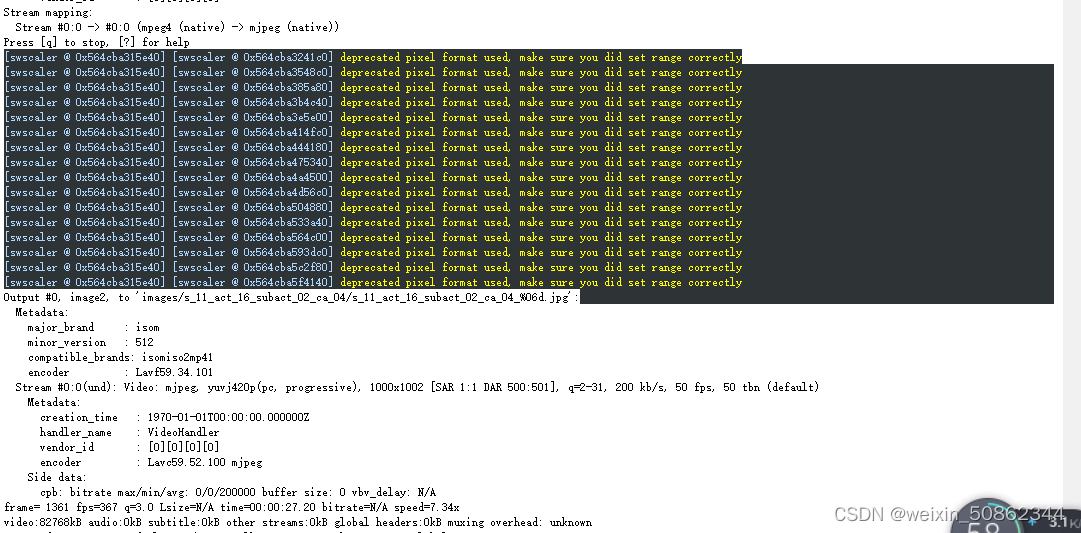
4)generate_labels.py
主要踩的坑是版本问题!
1.版本大于3.8.0会出一些奇奇怪怪的问题
【参考文档】安装spacepy
2.1.2 报错
1)可能是文件没有传完就开始操作
EOFError: Compressed file ended before the end-of-stream marker was reached- 1
重新加载一下源文件
2.2下载模型和对应参数文件
模型文件(包含smpl和smplx)
百度网盘
链接:https://pan.baidu.com/s/1Unoh7Sog-twBHx97ANF6pQ?pwd=md4h
提取码:md4h链接:https://pan.baidu.com/s/1LVL1cRiyxkRQwNFAtHU4OQ?pwd=5q10
提取码:5q10参数文件
smplx:
链接:https://pan.baidu.com/s/12l7uUf-NI_AwVuDLx3ChkQ?pwd=egrm 提取码:egrmsmpl:
链接:https://pan.baidu.com/s/135iAl8c_wIdkpTehZl7U7A?pwd=pnxn
提取码:pnxn解压之后放入NeuralAnnot_RELEASE-main下自建文件夹annotations
3.代码 修改&运行
以NeuralAnnot_RELEASE-main/Human3.6M/demo_smpl.py为例
3.1 修改所有路径
建议是修改成绝对路径

3.2 运行
直接进入对应文件夹之后
python demo_smpl.py- 1
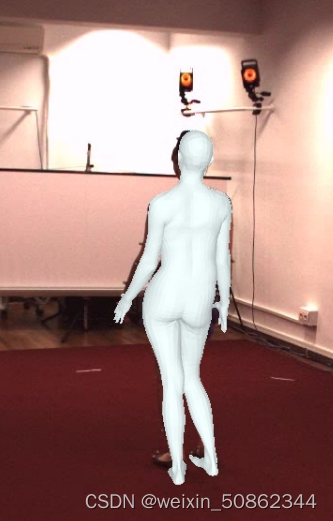
结果大概是这样!!! -
相关阅读:
ChatGPT技术或加剧钓鱼邮件攻击
【CSAPP+电流+梯度下降法】九阳神功-速览1
通过点击CheckBox实现背景变换小案例
如何搭建属于自己的查题公众号?
【iOS】导航栏的显隐与self.view.height
数据结构 - 线段树的运用
必须收藏!没有经验的程序员该怎么找工作?
axios从入门到源码分析之axios 源码分析(二)
状压dp和状态机dp题目汇总(持续更新)
解决“error #147 declaration is incompatible with xxx xxx (declared at line xx)”问题
- 原文地址:https://blog.csdn.net/weixin_50862344/article/details/127754180