-
FastDFS-02-JavaAPI
我是码赛客1024,本节我们来使用java调用FastDFS进行文件上传等操作。
一、介绍
在上一章节,咱们搭建好了fastdfs服务器,并实现了基于命令的上传测试和web访问。本节,咱们使用Java来调用API实现上传文件到FastDFS。
二、fastdfs-client-java客户端
2.1 准备fastdfs-client-java的包
fastdfs-client-java是fastdfs官方提供的客户端,但是该jar包在maven仓库中没有,需要我们手动安装到本地库后才能导入使用。① 下载源码,地址:
https://github.com/happyfish100/fastdfs-client-java
或者qq群(1109193029)中下载,github下载会比较慢。

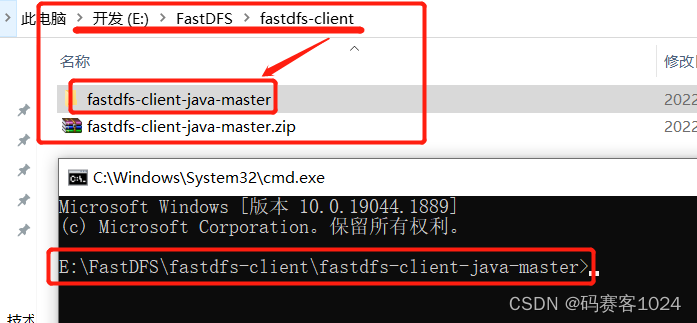
② 解压,并使用cmd进入目录
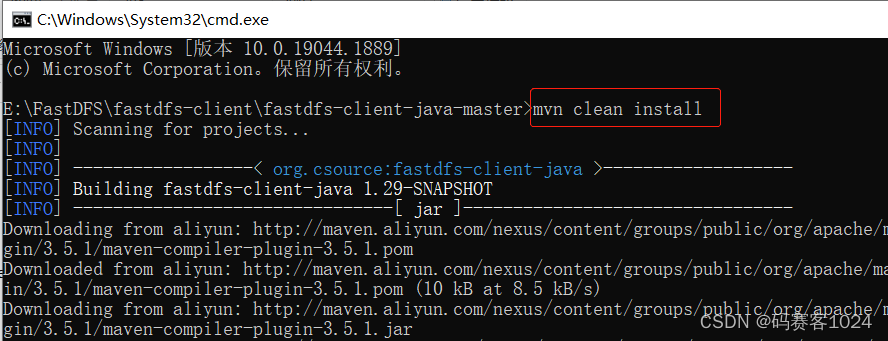
③ 编译:
mvn clean install
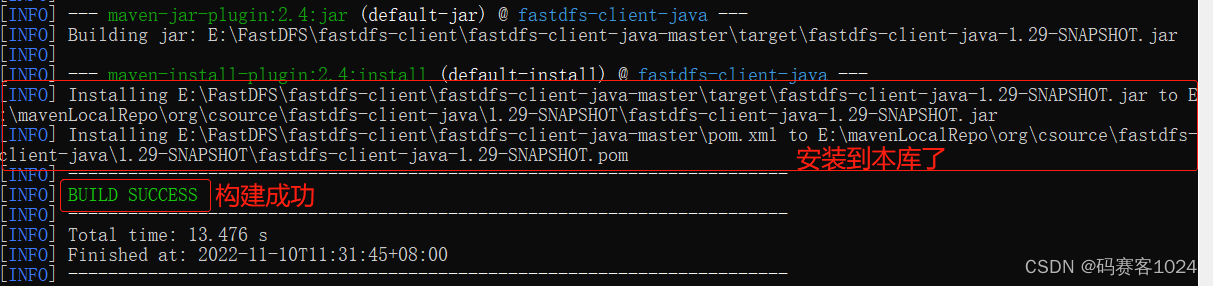
④ 安装成功
⑤ 使用如下坐标,导入项目即可<dependency> <groupId>org.csourcegroupId> <artifactId>fastdfs-client-javaartifactId> <version>1.29-SNAPSHOTversion> dependency>- 1
- 2
- 3
- 4
- 5
2.2 创建SpringBoot项目
2.2.1 相关依赖
pom.xml
<parent> <groupId>org.springframework.bootgroupId> <artifactId>spring-boot-starter-parentartifactId> <version>2.6.10version> <relativePath/> parent> ... <dependencies> <dependency> <groupId>org.springframework.bootgroupId> <artifactId>spring-boot-starter-webartifactId> dependency> <dependency> <groupId>org.csourcegroupId> <artifactId>fastdfs-client-javaartifactId> <version>1.29-SNAPSHOTversion> dependency> dependencies>- 1
- 2
- 3
- 4
- 5
- 6
- 7
- 8
- 9
- 10
- 11
- 12
- 13
- 14
- 15
- 16
- 17
- 18
- 19
application.yml
spring: servlet: multipart: enabled: true max-file-size: 5MB # 上传文件单个限制- 1
- 2
- 3
- 4
- 5
2.2.2 准备页面
resources\static\upload.htmlDOCTYPE html> <html lang="en"> <head> <meta charset="UTF-8"> <title>上传文件title> head> <body> <form id="fileForm" action="/upload" method="post" enctype="multipart/form-data"> 选择文件:<input type="file" name="file"&g- 1
- 2
- 3
- 4
- 5
- 6
- 7
- 8
-
相关阅读:
《C++ Primer》导学系列:第 4 章 - 表达式
使用Uiautomator2进行APP自动化测试
[附源码]计算机毕业设计springboot校园订餐系统
用ChatGPT自动生成流程图
地球+卫星运动轨迹
RabitMQ 发布确认
第3章:数据链路层
Gin框架---环境搭建
Tomcat安装及使用
Vue3 -- computed 生命周期钩子 Provide函数 侦听数据的变化 watch script setup语法
- 原文地址:https://blog.csdn.net/weixin_45691611/article/details/127785459
