-
【python】plist图集拆分
1.使用cocos creator的可以到官方商店找对应的插件工具,不过不是免费的... :( ,链接地址:cocos creator合图拆分
2.使用cocos studio就简单一些,直接新建工程导入plist文件,进入文件所在文件夹,看到一个隐藏文件夹,进入里面就是想要的东西了。参考链接:cocos studio合图拆分
3.就是使用python的PIL图片处理模块来拆分了:
(1)安装python,这个自行百度吧,方法简单。
(2)安装python的PIL模块:
pip install Pillow(3)代码部分:
split.py
- #!python
- import os,sys
- from xml.etree import ElementTree
- from PIL import Image
- def tree_to_dict(tree):
- d = {}
- for index, item in enumerate(tree):
- if item.tag == 'key':
- if tree[index+1].tag == 'string':
- d[item.text] = tree[index + 1].text
- elif tree[index + 1].tag == 'true':
- d[item.text] = True
- elif tree[index + 1].tag == 'false':
- d[item.text] = False
- elif tree[index+1].tag == 'dict':
- d[item.text] = tree_to_dict(tree[index+1])
- return d
- def gen_png_from_plist(plist_filename, png_filename):
- file_path = plist_filename.replace('.plist', '')
- big_image = Image.open(png_filename)
- root = ElementTree.fromstring(open(plist_filename, 'r').read())
- plist_dict = tree_to_dict(root[0])
- to_list = lambda x: x.replace('{','').replace('}','').split(',')
- for k,v in plist_dict['frames'].items():
- rectlist = to_list(v['frame'])
- width = int( rectlist[3] if v['rotated'] else rectlist[2] )
- height = int( rectlist[2] if v['rotated'] else rectlist[3] )
- box=(
- int(rectlist[0]),
- int(rectlist[1]),
- int(rectlist[0]) + width,
- int(rectlist[1]) + height,
- )
- sizelist = [ int(x) for x in to_list(v['sourceSize'])]
- rect_on_big = big_image.crop(box)
- if v['rotated']:
- rect_on_big = rect_on_big.rotate(90)
- result_image = Image.new('RGBA', sizelist, (0,0,0,0))
- #if v['rotated']:
- # result_box=(
- # ( sizelist[0] - height )//2,
- # ( sizelist[1] - width )//2,
- # ( sizelist[0] + height )//2,
- # ( sizelist[1] + width )//2
- # )
- #else:
- result_box=(
- ( sizelist[0] - width )//2,
- ( sizelist[1] - height )//2,
- ( sizelist[0] + width )//2,
- ( sizelist[1] + height )//2
- )
- print(rect_on_big, result_box)
- result_image.paste(rect_on_big, result_box, mask=0)
- if not os.path.isdir(file_path):
- os.mkdir(file_path)
- outfile = (file_path+'/' + k).replace('gift_', '')
- print(outfile, "generated")
- result_image.save(outfile)
- if __name__ == '__main__':
- filename = sys.argv[1]
- plist_filename = filename + '.plist'
- png_filename = filename + '.png'
- if (os.path.exists(plist_filename) and os.path.exists(png_filename)):
- gen_png_from_plist( plist_filename, png_filename )
- else:
- print("make sure you have boith plist and png files in the same directory")
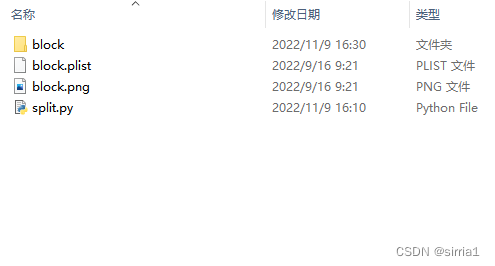
(4)将需要拆分的plist文件和图片跟脚本放在同一目录下

(5)运行拆分脚本:
python split.py block即可在当前目录下生成一个文件夹,里面包含了所有plist里的图片
-
相关阅读:
【微信小程序】解决分页this.setData数据量太大的限制问题
一键搞定发布自己Jar到Maven中央仓库
EdgeX Foundry优秀文章视频汇总
js从文件流获取minetype
在九天服务器平台上使用自己上传的数据集文件
网络原理的讲解
Windows 基于Visual Studio 开发Qt 6 注意事项
一篇解决JavaScript
2023年湖北省专利导航、知识产权软科学研究及服务政策(申报条件、材料、时间)
返回文件名问题
- 原文地址:https://blog.csdn.net/sirria1/article/details/127772251
