-
爱心html制作并部署github
手机也可以观看
效果预览地址1.网页效果

心形优化

可以改变不同的图片,作者已经改为全局变量
DOCTYPE html> <html> <head> <title>title> <script src="js/jquery-1.7.2.js">script> head> <style> * { padding: 0; margin: 0; box-sizing: border-box; } html, body { height: 100%; padding: 0; margin: 0; background: #000; } .tip { position: fixed; top: 10px; right: 10px; color: #fff; font-size: 20px; } .aa { position: fixed; left: 50%; bottom: 10px; color: #ccc; } .container { width: 100%; height: 100%; } /* .ranImg { position: fixed; display: none; width: 10%; } */ canvas { z-index: 99; position: absolute; width: 100%; height: 100%; } style> <body> <span class="tip">请点击一下span> <div id="jsi-cherry-container" class="container"> <audio autoplay="autopaly" loop> <source src="./Adagio.mp3" type="audio/mp3" /> 您的浏览器不支持播放声音 audio> <canvas id="pinkboard" class="container"> canvas> div> body> html> <script> let imgSrc1 = './caiwenji.jpg' let imgSrc2 = './lan.jpg' //音频 document.addEventListener('click', musicPlay); function musicPlay() { document.querySelector('audio').play(); document.removeEventListener('click', musicPlay); document.querySelector('.tip').style.display = 'none'; randomImg(); } //随机位置生成图片 function randomImg() { setInterval(function () { createRanImg(imgSrc1); createRanImg(imgSrc1); createRanImg(imgSrc1); }, 1000) setInterval(function () { createRanImg(imgSrc2); createRanImg(imgSrc2); createRanImg(imgSrc2); }, 1200) setInterval(function () { createRanImg(imgSrc1); createRanImg(imgSrc1); createRanImg(imgSrc1); }, 1400) setInterval(function () { createRanImg(imgSrc2); createRanImg(imgSrc2); createRanImg(imgSrc2); }, 1600) setInterval(function () { //删除图片 removeRanImg(); }, 1500) } function createRanImg(imgSrc) { setTimeout(function () { let top = Math.round(Math.random() * (document.body.clientHeight - 200) + 100); let left = Math.round(Math.random() * (document.body.clientWidth - 200) + 100); let img = document.createElement('img'); img.src = imgSrc; img.style.position = 'fixed'; img.style.width = '10%'; img.style.top = top + 'px'; img.style.left = left + 'px'; img.style.transition = 'all 0.5s'; img.style.opacity = 0.3; let container = document.querySelector('#jsi-cherry-container'); let pinkboard = document.querySelector('#pinkboard'); container.insertBefore(img, pinkboard); }, 200) } function removeRanImg() { let container = document.querySelector('#jsi-cherry-container'); let children = container.children; for (let i = 1; i < children.length - 1; i++) { container.removeChild(children[i]); } } /* * Settings */ var settings = { particles: { length: 700, // maximum amount of particles 【最大颗粒量】 duration: 2, // particle duration in sec 【力资持续时间(秒)】 velocity: 300, // particle velocity in pixels/sec 【粒子速度(像素/秒)】 effect: -0.75, // play with this for a nice effect 【效果】 size: 30, // particle size in pixels 【颗粒尺寸(像素)】 }, }; (function () { var b = 0; var c = ["ms", "moz", "webkit", "o"]; for (var a = 0; a < c.length && !window.requestAnimationFrame; ++a) { window.requestAnimationFrame = window[c[a] + "RequestAnimationFrame"]; window.cancelAnimationFrame = window[c[a] + "CancelAnimationFrame"] || window[c[a] + "CancelRequestAnimationFrame"]; } if (!window.requestAnimationFrame) { window.requestAnimationFrame = function (h, e) { var d = new Date().getTime(); var f = Math.max(0, 16 - (d - b)); var g = window.setTimeout(function () { h(d + f); }, f); b = d + f; return g; }; } if (!window.cancelAnimationFrame) { window.cancelAnimationFrame = function (d) { clearTimeout(d); }; } })(); /* 点 (心形) * Point class */ var Point = (function () { function Point(x, y) { this.x = typeof x !== "undefined" ? x : 0; this.y = typeof y !== "undefined" ? y : 0; } Point.prototype.clone = function () { return new Point(this.x, this.y); }; Point.prototype.length = function (length) { if (typeof length == "undefined") return Math.sqrt(this.x * this.x + this.y * this.y); this.normalize(); this.x *= length; this.y *= length; return this; }; Point.prototype.normalize = function () { var length = this.length(); this.x /= length; this.y /= length; return this; }; return Point; })(); /* * 微粒 * Particle class */ var Particle = (function () { function Particle() { this.position = new Point(); this.velocity = new Point(); this.acceleration = new Point(); this.age = 0; } Particle.prototype.initialize = function (x, y, dx, dy) { this.position.x = x; this.position.y = y; this.velocity.x = dx; this.velocity.y = dy; this.acceleration.x = dx * settings.particles.effect; this.acceleration.y = dy * settings.particles.effect; this.age = 0; }; Particle.prototype.update = function (deltaTime) { this.position.x += this.velocity.x * deltaTime; this.position.y += this.velocity.y * deltaTime; this.velocity.x += this.acceleration.x * deltaTime; this.velocity.y += this.acceleration.y * deltaTime; this.age += deltaTime; }; Particle.prototype.draw = function (context, image) { function ease(t) { return --t * t * t + 1; } var size = (image.width) * ease(this.age / settings.particles.duration); context.globalAlpha = 1 - this.age / settings.particles.duration; context.drawImage( image, this.position.x - size / 2, this.position.y - size / 2, size, size ); }; return Particle; })(); /* 微粒池 * ParticlePool class */ var ParticlePool = (function () { var particles, firstActive = 0, firstFree = 0, duration = settings.particles.duration; function ParticlePool(length) { // create and populate particle pool particles = new Array(length); for (var i = 0; i < particles.length; i++) particles[i] = new Particle(); } ParticlePool.prototype.add = function (x, y, dx, dy) { particles[firstFree].initialize(x, y, dx, dy); // handle circular queue firstFree++; if (firstFree == particles.length) firstFree = 0; if (firstActive == firstFree) firstActive++; if (firstActive == particles.length) firstActive = 0; }; ParticlePool.prototype.update = function (deltaTime) { var i; // update active particles if (firstActive < firstFree) { for (i = firstActive; i < firstFree; i++) particles[i].update(deltaTime); } if (firstFree < firstActive) { for (i = firstActive; i < particles.length; i++) particles[i].update(deltaTime); for (i = 0; i < firstFree; i++) particles[i].update(deltaTime); } // remove inactive particles while ( particles[firstActive].age >= duration && firstActive != firstFree ) { firstActive++; if (firstActive == particles.length) firstActive = 0; } }; ParticlePool.prototype.draw = function (context, image) { // draw active particles if (firstActive < firstFree) { for (i = firstActive; i < firstFree; i++) particles[i].draw(context, image); } if (firstFree < firstActive) { for (i = firstActive; i < particles.length; i++) particles[i].draw(context, image); for (i = 0; i < firstFree; i++) particles[i].draw(context, image); } }; return ParticlePool; })(); /* 渲染canvas * Putting it all together */ (function (canvas) { //获取画布 var context = canvas.getContext("2d"), particles = new ParticlePool(settings.particles.length), particleRate = settings.particles.length / settings.particles.duration, // particles/sec time; // get point on heart with -PI <= t <= PI function pointOnHeart(t) { //通过三角函数画出心形 return new Point( (160 * Math.pow(Math.sin(t), 3)) / 1.4, (130 * Math.cos(t) - 50 * Math.cos(2 * t) - 20 * Math.cos(3 * t) - 10 * Math.cos(4 * t) + 25) / 1.4 ); } // creating the particle image using a dummy canvas var image = (function () { var canvas = document.createElement("canvas"), context = canvas.getContext("2d"); canvas.width = settings.particles.size; canvas.height = settings.particles.size; // helper function to create the path function to(t) { var point = pointOnHeart(t); //小心 point.x = settings.particles.size / 2 + (point.x * settings.particles.size) / 350; point.y = settings.particles.size / 2 - (point.y * settings.particles.size) / 350; return point; } // create the path context.beginPath(); var t = -Math.PI; var point = to(t); context.moveTo(point.x, point.y); while (t < Math.PI) { t += 0.01; // baby steps! point = to(t); context.lineTo(point.x, point.y); } context.closePath(); // create the fill context.fillStyle = "#ea80b0"; context.fill(); // create the image var image = new Image(); image.src = canvas.toDataURL(); return image; })(); // render that thing! function render() { // next animation frame requestAnimationFrame(render); // update time var newTime = new Date().getTime() / 1000, deltaTime = newTime - (time || newTime); time = newTime; // clear canvas context.clearRect(0, 0, canvas.width, canvas.height); // create new particles var amount = particleRate * deltaTime; for (var i = 0; i < amount; i++) { var pos = pointOnHeart(Math.PI - 2 * Math.PI * Math.random()); var dir = pos.clone().length(settings.particles.velocity); particles.add( canvas.width / 2 + pos.x, canvas.height / 2 - pos.y, dir.x, -dir.y ); } // update and draw particles particles.update(deltaTime); particles.draw(context, image); } // handle (re-)sizing of the canvas function onResize() { canvas.width = canvas.clientWidth; canvas.height = canvas.clientHeight; } window.onresize = onResize; // delay rendering bootstrap setTimeout(function () { onResize(); render(); }, 10); })(document.getElementById("pinkboard")); script>- 1
- 2
- 3
- 4
- 5
- 6
- 7
- 8
- 9
- 10
- 11
- 12
- 13
- 14
- 15
- 16
- 17
- 18
- 19
- 20
- 21
- 22
- 23
- 24
- 25
- 26
- 27
- 28
- 29
- 30
- 31
- 32
- 33
- 34
- 35
- 36
- 37
- 38
- 39
- 40
- 41
- 42
- 43
- 44
- 45
- 46
- 47
- 48
- 49
- 50
- 51
- 52
- 53
- 54
- 55
- 56
- 57
- 58
- 59
- 60
- 61
- 62
- 63
- 64
- 65
- 66
- 67
- 68
- 69
- 70
- 71
- 72
- 73
- 74
- 75
- 76
- 77
- 78
- 79
- 80
- 81
- 82
- 83
- 84
- 85
- 86
- 87
- 88
- 89
- 90
- 91
- 92
- 93
- 94
- 95
- 96
- 97
- 98
- 99
- 100
- 101
- 102
- 103
- 104
- 105
- 106
- 107
- 108
- 109
- 110
- 111
- 112
- 113
- 114
- 115
- 116
- 117
- 118
- 119
- 120
- 121
- 122
- 123
- 124
- 125
- 126
- 127
- 128
- 129
- 130
- 131
- 132
- 133
- 134
- 135
- 136
- 137
- 138
- 139
- 140
- 141
- 142
- 143
- 144
- 145
- 146
- 147
- 148
- 149
- 150
- 151
- 152
- 153
- 154
- 155
- 156
- 157
- 158
- 159
- 160
- 161
- 162
- 163
- 164
- 165
- 166
- 167
- 168
- 169
- 170
- 171
- 172
- 173
- 174
- 175
- 176
- 177
- 178
- 179
- 180
- 181
- 182
- 183
- 184
- 185
- 186
- 187
- 188
- 189
- 190
- 191
- 192
- 193
- 194
- 195
- 196
- 197
- 198
- 199
- 200
- 201
- 202
- 203
- 204
- 205
- 206
- 207
- 208
- 209
- 210
- 211
- 212
- 213
- 214
- 215
- 216
- 217
- 218
- 219
- 220
- 221
- 222
- 223
- 224
- 225
- 226
- 227
- 228
- 229
- 230
- 231
- 232
- 233
- 234
- 235
- 236
- 237
- 238
- 239
- 240
- 241
- 242
- 243
- 244
- 245
- 246
- 247
- 248
- 249
- 250
- 251
- 252
- 253
- 254
- 255
- 256
- 257
- 258
- 259
- 260
- 261
- 262
- 263
- 264
- 265
- 266
- 267
- 268
- 269
- 270
- 271
- 272
- 273
- 274
- 275
- 276
- 277
- 278
- 279
- 280
- 281
- 282
- 283
- 284
- 285
- 286
- 287
- 288
- 289
- 290
- 291
- 292
- 293
- 294
- 295
- 296
- 297
- 298
- 299
- 300
- 301
- 302
- 303
- 304
- 305
- 306
- 307
- 308
- 309
- 310
- 311
- 312
- 313
- 314
- 315
- 316
- 317
- 318
- 319
- 320
- 321
- 322
- 323
- 324
- 325
- 326
- 327
- 328
- 329
- 330
- 331
- 332
- 333
- 334
- 335
- 336
- 337
- 338
- 339
- 340
- 341
- 342
- 343
- 344
- 345
- 346
- 347
- 348
- 349
- 350
- 351
- 352
- 353
- 354
- 355
- 356
- 357
- 358
- 359
- 360
- 361
- 362
- 363
- 364
- 365
- 366
- 367
- 368
- 369
- 370
- 371
- 372
- 373
- 374
- 375
- 376
- 377
- 378
- 379
- 380
- 381
- 382
- 383
- 384
- 385
- 386
- 387
- 388
- 389
- 390
- 391
- 392
- 393
- 394
- 395
- 396
- 397
- 398
- 399
- 400
- 401
- 402
- 403
- 404
- 405
- 406
- 407
- 408
- 409
- 410
- 411
- 412
- 413
- 414
- 415
- 416
- 417
- 418
- 419
- 420
- 421
- 422
- 423
- 424
- 425
- 426
3.上线github
(1)新建远程代码仓库

填写仓库名称

(2)推送代码到远程仓库
echo "# heart1" >> README.md git init git add README.md git commit -m "first commit" git branch -M main git remote add origin https://github.com/zhudunfeng/heart1.git git push -u origin main- 1
- 2
- 3
- 4
- 5
- 6
- 7
源文件命名要求:
必须index.html

(3)部署github pages
选择setting
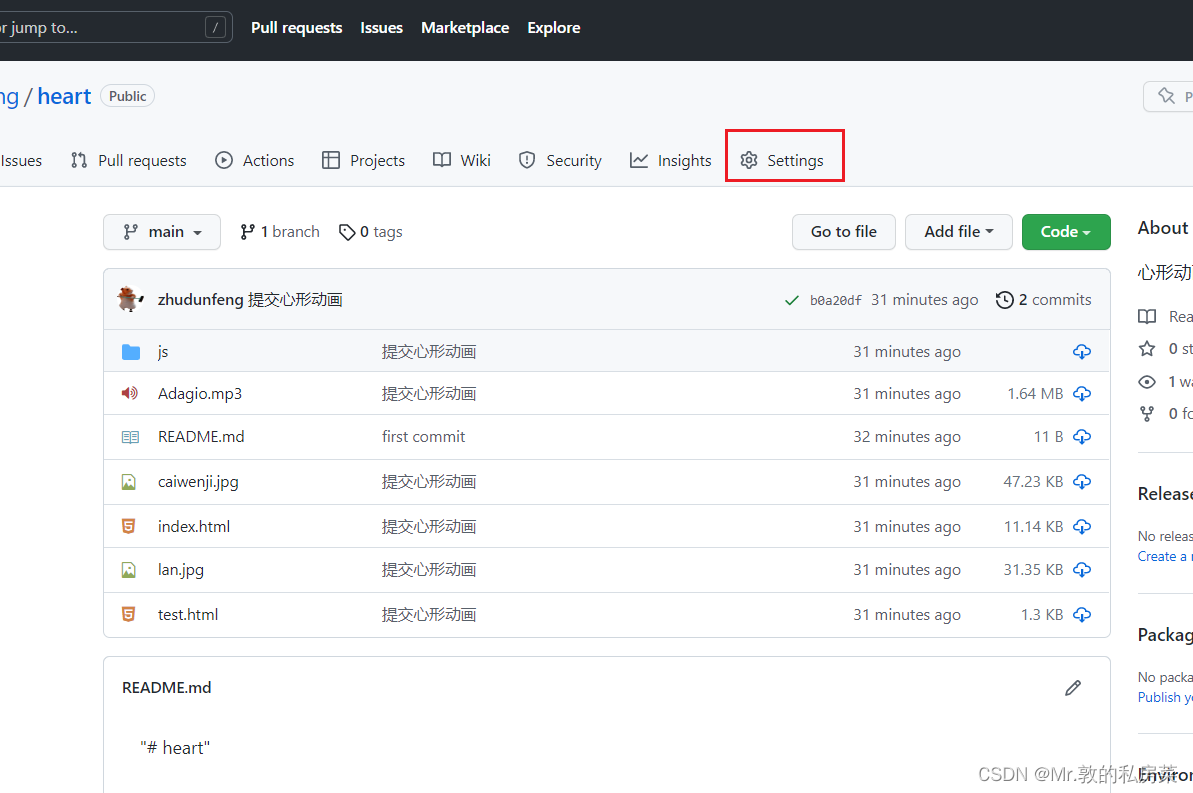
选择pages
 选择/root点击save即可

心形代码参考:https://blog.csdn.net/Su_mer/article/details/127154474
-
相关阅读:
MySQL 导出一条数据的插入语句
iEnglish马铁鹰:智能教育塑造未来学习新范式
中国石油大学(北京)-《 完井工程》第一阶段在线作业
低代码,助力中小企业快速实现信息化
《HTML5移动网站与App开发实战》简介
Elasticsearch高级检索之使用单个字母数字进行分词N-gram tokenizer(不区分大小写)【实战篇】
sqlmap --os-shell(写入木马获取getshell)
解题报告 之 SOJ3353 Total Flow
linux manual
超聚变服务器关闭超线程CPU的步骤(完整版)
- 原文地址:https://blog.csdn.net/qq_41816702/article/details/127766868
