-
Java读取Excel并生成Word&PDF
- 最近需要用Java处理Excel中的数据,并生成word和pdf格式的文档(其中word和pdf需要带背景图),所以在这里做下总结。
- 使用技术:FreeMarker + easyexcel + jacob
- ①FreeMarker大家应该会比较熟悉,一个模板引擎。
- ②easyexcel 是阿里巴巴开源,用于快速、简单避免OOM的java处理Excel工具。
- ②JACOB是一个JAVA-COM Bridge,允许您从Java调用COM Automation组件。它使用JNI对COM和Win32库进行本机调用。
- 使用easyexcel处理excel
- import com.alibaba.excel.annotation.ExcelProperty;
- import com.alibaba.excel.metadata.BaseRowModel;
- import lombok.AllArgsConstructor;
- import lombok.Data;
- import lombok.NoArgsConstructor;
- /**
- * JavaBean与Excel之间的关系映射
- */
- @Data
- @NoArgsConstructor
- @AllArgsConstructor
- public class ERReport extends BaseRowModel {
- @ExcelProperty(value = "省", index = 0)
- private String province;
- @ExcelProperty(value = "市", index = 1)
- private String city;
- @ExcelProperty(value = "学校", index = 2)
- private String school;
- @ExcelProperty(value = "班级", index = 3)
- private String classs;
- @ExcelProperty(value = "老师", index = 4
- private String teacher;
- }
- import com.alibaba.excel.context.AnalysisContext;
- import com.alibaba.excel.event.AnalysisEventListener;
- import com.alibaba.excel.metadata.BaseRowModel;
- import com.google.common.collect.Lists;
- /**
- * 自定义Listener继承AnalysisEventListener,重写invoke方法,为了方便获取值,添加了一个getData的方法
- */
- public class ExcelListener
extends AnalysisEventListener { - private final List
data = Lists.newArrayList(); - @Override
- public void invoke(T t, AnalysisContext analysisContext) {
- data.add(t);
- }
- @Override
- public void doAfterAllAnalysed(AnalysisContext analysisContext) {
- }
- public List
getData(){ - return data;
- }
- public class ExcelUtils {
- /**
- * 读取excel的方法
- */
- public static
List readExcel(final InputStream inputStream, final Class clazz) { - if (null == inputStream) {
- throw new NullPointerException("the inputStream is null!");
- }
- AnalysisEventListener listener = new ExcelListener();
- ExcelReader reader = new ExcelReader(inputStream, null, listener);
- reader.read(new com.alibaba.excel.metadata.Sheet(1, 1, clazz));
- return ((ExcelListener) listener).getData();
- }
- public static void main(String[] args) throws Exception {
- String filePath = "C:\\Users\\Administrator\\Desktop\\test.xlsx";
- List
datas = ExcelUtils.readExcel(new FileInputStream(new File(filePath)), ERReport.class); - datas.forEach(System.out::println);
- }
新建一个word文件,把固定不变的地方写好,将要替换的值改用${xxx}占位符的方式,然后把后缀
名改为.ftl。(注:如果此条路行不通,可以先将word另存为xml文件,再将xml转为ftl格式),放到
项目的resource/templates目录下,便于读取。
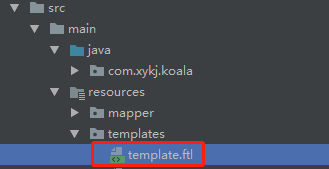
如果需要设置图片,打开ftl文件后,搜索
office word,可能并不一定是这个标签),这里正常显示的会是一长串base64编码后的字符串。因
为这里我需要替换图片,所以用了占位符。

- 转为word的代码如下:
- import freemarker.template.Configuration;
- import freemarker.template.Template;
- import freemarker.template.TemplateException;
- import sun.misc.BASE64Encoder;
- import java.io.*;
- import java.util.HashMap;
- import java.util.Map;
- public class WordUtils {
- public static void main(String[] args) throws Exception {
- String imgPath = "C:\\Users\\Administrator\\Desktop\\timg.jpg";
- BASE64Encoder encoder = new BASE64Encoder();
- String imgStr = encoder.encode(encode(imgPath));
- System.out.println(imgStr);
- // 这里只是一个示例,key=value的格式,这里的key对应的ftl文件占位符{}中的字符串。
- Map
- put("imgStr",imgStr);
- put("province","北京市");
- put("city","海淀区");
- put("school","");
- put("class","二三班");
- }};
- //处理excel,将其中的数据填充至模板中,最后生成word。
- List
datas = ExcelUtils.readExcel(new FileInputStream(new File(filePath)), ERReport.class); - datas.forEach((ERReport e) -> {
- try {
- processTemplate(e, “Your File Name”);
- System.out.println("转换成功");
- } catch (Exception ex) {
- LOGGER.error("Excel转换Word错误.", ex);
- }
- });
- }
- private static byte[] encode(String imagePath) throws IOException {
- InputStream in = null;
- byte[] data = null;
- try {
- in = new FileInputStream(imagePath);
- data = new byte[in.available()];
- in.read(data);
- in.close();
- } catch (Exception e) {
- e.printStackTrace();
- } finally {
- if (in != null) {
- in.close();
- }
- return data;
- }
- }
- public static void processTemplate(Object dataMap, String fileName) throws IOException, TemplateException {
- Configuration configuration = new Configuration();
- configuration.setDefaultEncoding("utf-8");
- configuration.setClassForTemplateLoading(WordUtils.class, "/templates");
- Template template = configuration.getTemplate("template.ftl");
- File file = new File("C:\\Users\\Administrator\\Desktop\\" + fileName + ".docx");
- BufferedWriter bufferedWriter = new BufferedWriter(new OutputStreamWriter(new FileOutputStream(file), "utf-8"));
- template.process(dataMap, bufferedWriter);
- }
- }
word转pdf(使用jacob)
- 所需依赖我放在百度云盘上了,如果有用到的朋友遇到问题,可以来微博或者github上面找我: https://pan.baidu.com/s/1uV54gViWt9x3eDYB0OAM0w 提取码: yy95
- 解压后会是下图所示,将两个dll文件放在jdk的bin目录下, 将jacob.jar导入项目中。

- word转pdf的代码如下:
- public class PDFUtils {
- public static void main(String[] args) {
- String wordFile = "C:\\Users\\Administrator\\Desktop\\二年级五班.docx";
- String pdfFile = "C:\\Users\\Administrator\\Desktop\\二年级五班.pdf";
- processWordToPdf(wordFile,pdfFile);
- }
- public static void processWordToPdf(String wordFile,String pdfFile){
- ActiveXComponent app = null;
- System.out.println("开始转换...");
- // 开始时间
- long start = System.currentTimeMillis();
- try {
- // 打开word
- app = new ActiveXComponent("Word.Application");
- // 获得word中所有打开的文档
- Dispatch documents = app.getProperty("Documents").toDispatch();
- System.out.println("打开文件: " + wordFile);
- // 打开文档
- Dispatch document = Dispatch.call(documents, "Open", wordFile, false, true).toDispatch();
- // 如果文件存在的话,不会覆盖,会直接报错,所以我们需要判断文件是否存在
- File target = new File(pdfFile);
- if (target.exists()) {
- target.delete();
- }
- System.out.println("另存为: " + pdfFile);
- // 另存为,将文档报错为pdf,其中word保存为pdf的格式宏的值是17
- Dispatch.call(document, "SaveAs", pdfFile, 17);
- // 关闭文档
- Dispatch.call(document, "Close", false);
- // 结束时间
- long end = System.currentTimeMillis();
- System.out.println("转换成功,用时:" + (end - start) + "ms");
- } catch (Exception e) {
- System.out.println("转换失败" + e.getMessage());
- } finally {
- // 关闭office
- app.invoke("Quit", 0);
- }
- }
- }
总结
总体思路:利用easyexcel读取excel里面的数据,然后利用事先定义好的freemarker模板,往里面
填充值,最后生成word,再利用jacob根据word生成pdf。(代码中用到了lombok和google
guava,所以可能直接复制以上代码并不能直接使用)
https://blog.csdn.net/Anthony_1223/article/details/88799100/
-
相关阅读:
什么是神经网络,它们是如何工作的?(神经网络架构基本指南)
功能超全的微信小程序制作源码 含15大主流功能小程序 源码开源可二开 持续更新升级
java计算机毕业设计vue基层社区管理服务网源码+mysql数据库+系统+lw文档+部署
一文搞懂MobileNet v1网络
Centos7的yum使用国内源阿里源163源等提高下载速度
C#__使用流读取和写入数据的简单用法
c/c++一个指针delete两次的后果
SWT/ANR问题-- OTA 升级 从Android P 到 Q 发生 watchdog
CSS中常见选择器的用法
java项目-第147期ssm社区生活超市管理系统_(spring+springmvc+mybatis+jsp)_java毕业设计_计算机毕业设计
- 原文地址:https://blog.csdn.net/ZHOU_VIP/article/details/127753624
