-
Vue 3 总结
title: Vue3 总结
date: 2022-11-06 23:57:57
tags:- Vue
categories: - Vue
cover: https://cover.png
feature: false
文章目录
Vue2 基础见:Vue2 总结(Basic)_凡 223 的博客Vue2 开发见:Vue2 总结(开发)_凡 223 的博客
1. 简介
-
性能的提升
- 打包大小减少41%
- 初次渲染快55%,更新渲染快133%
- 内存减少54%
…
-
源码的升级
- 使用Proxy代替defineProperty实现响应式
- 重写虚拟DOM的实现和Tree-Shaking
…
-
拥抱 TypeScript
Vue3 可以更好的支持 TypeScript -
新的特性
- Composition API(组合API)
- setup配置
- ref与reactive
- watch与watchEffect
- provide与inject
…
- 新的内置组件
- Fragment
- Teleport
- Suspense
- 其他改变
- 新的生命周期钩子
- data 选项应始终被声明为一个函数
- 移除 keyCode 支持作为 v-on 的修饰符
…
- Composition API(组合API)
2. 创建使用
2.1 使用 vue-cli 创建
官方文档:https://cli.vuejs.org/zh/guide/creating-a-project.html#vue-create
## 查看@vue/cli版本,确保@vue/cli版本在4.5.0以上 vue --version ## 安装或者升级你的@vue/cli npm install -g @vue/cli ## 创建 vue create vue_test ## 启动 cd vue_test npm run serve- 1
- 2
- 3
- 4
- 5
- 6
- 7
- 8
- 9
2.2 使用 vite 创建
官方文档:https://v3.cn.vuejs.org/guide/installation.html#vite
vite官网:https://vitejs.cn什么是 vite?—— 新一代前端构建工具。
- 开发环境中,无需打包操作,可快速的冷启动
- 轻量快速的热重载(HMR)
- 真正的按需编译,不再等待整个应用编译完成。
传统构建 与 vite 构建对比图


## 创建工程 npm init vue@latest 或 npm create vite@latest ## 进入工程目录 cd <project-name> ## 安装依赖 npm install ## 运行 npm run dev- 1
- 2
- 3
- 4
- 5
- 6
- 7
- 8
- 9
2.3 main.js 改动
// 引入的不再是Vue构造函数,引入的是一个名为 createApp 的工厂函数(不需要 new) import { createApp } from 'vue' import App from './App.vue' // createApp(App).mount('#app') // 创建应用实例对象——app(类似于之前Vue2中的vm,但app比vm更“轻”) const app = createApp(App) //挂载 app.mount('#app')- 1
- 2
- 3
- 4
- 5
- 6
- 7
- 8
- 9
- 10
2.4 App.vue 改动
Vue3 组件中的模板结构可以没有根标签
<template> <!-- Vue3组件中的模板结构可以没有根标签 --> <img alt="Vue logo" src="./assets/logo.png"> <HelloWorld msg="Welcome to Your Vue.js App"/> </template>- 1
- 2
- 3
- 4
- 5
2.5 Vue3 开发者工具

3. 常用 Composition API
3.1 setup 函数
- Vue3.0 中一个新的配置项,值为一个函数
- setup 是所有 Composition API(组合API)“ 表演的舞台 ”
- 组件中所用到的:数据、方法等等,均要配置在 setup 中
- setup 函数的两种返回值:
- 若返回一个对象,则对象中的属性、方法, 在模板中均可以直接使用
- 若返回一个渲染函数:则可以自定义渲染内容
<template> <h1>姓名:{{name}}h1> <h1>年龄:{{age}}h1> <button @click="info">个人信息button> template> <script> // import {h} from 'vue' export default { name: 'App', setup() { // 数据 let name = "张三" let age = 18 // 方法 function info() { alert(`我叫${name}, 年龄${age}岁`) } // 返回一个对象(常用) return { name, age, info } //返回一个函数(渲染函数),需要导入 h // return ()=> h('h1','渲染') } } script>- 1
- 2
- 3
- 4
- 5
- 6
- 7
- 8
- 9
- 10
- 11
- 12
- 13
- 14
- 15
- 16
- 17
- 18
- 19
- 20
- 21
- 22
- 23
- 24
- 25
- 26
- 27
- 28
- 29
- 30
- 31

1、尽量不要与 Vue2.x 配置混用
- Vue2.x 配置(data、methos、computed…)中可以访问到 setup 中的属性、方法
- 但在 setup 中不能访问到 Vue2.x 配置(data、methos、computed…)
- 如果有重名,setup 优先
2、setup 不能是一个 async 函数,因为 async 的返回值不再是 return 的对象,而是被 promise 包起来的,模板看不到 return 对象中的属性(也可以返回一个 Promise 实例,但需要 Suspense 和异步组件的配合)
3.2 ref 函数
如下,通过函数修改个人信息
<template> <h1>姓名:{{name}}h1> <h1>年龄:{{age}}h1> <button @click="changeInfo">改变个人信息button> template> <script> export default { name: 'App', setup() { // 数据 let name = "李四" let age = 18 // 方法 function changeInfo() { name = "张三" age = 20 console.log(name + age); } return { name, age, changeInfo } } } script>- 1
- 2
- 3
- 4
- 5
- 6
- 7
- 8
- 9
- 10
- 11
- 12
- 13
- 14
- 15
- 16
- 17
- 18
- 19
- 20
- 21
- 22
- 23
- 24
- 25
- 26
- 27
- 28
- 29
- 30
发现实际值已经修改了,但页面并没有响应改变

此时需要使用 ref 函数来定义响应的数据
- 作用:定义一个响应式的数据
- 语法:
const xxx = ref(initValue)- 创建一个包含响应式数据的引用对象(reference 对象,简称 ref 对象)
- JS 中操作数据:
xxx.value - 模板中读取数据: 不需要
.value,直接:
<script> import { ref } from 'vue'; export default { name: 'App', setup() { // 数据 let name = ref('李四') let age = ref(18) // 方法 function changeInfo() { name.value = "张三" age.value = 20 console.log(name, age); } return { name, age, changeInfo } } } </script>- 1
- 2
- 3
- 4
- 5
- 6
- 7
- 8
- 9
- 10
- 11
- 12
- 13
- 14
- 15
- 16
- 17
- 18
- 19
- 20
- 21
- 22
- 23
- 24
- 25
使用了 ref 函数的对象已经是一个 RefImpl 对象(Reference Implement)

假如是对象类型的数据,此时 RefImpl 对象的 value 是一个 Proxy 对象<template> <h1>姓名:{{name}}h1> <h1>年龄:{{age}}h1> <h2>职业:{{job.type}}h2> <h2>薪水:{{job.salary}}h2> <button @click="changeInfo">改变个人信息button> template> <script> import { ref } from 'vue'; export default { name: 'App', setup() { // 数据 let name = ref('李四') let age = ref(18) let job = ref({ type: '开发', salary: '20k' }) // 方法 function changeInfo() { job.value.type = '设计' job.value.salary = '25k' console.log(job); console.log(job.value); } return { name, age, job, changeInfo } } } script>- 1
- 2
- 3
- 4
- 5
- 6
- 7
- 8
- 9
- 10
- 11
- 12
- 13
- 14
- 15
- 16
- 17
- 18
- 19
- 20
- 21
- 22
- 23
- 24
- 25
- 26
- 27
- 28
- 29
- 30
- 31
- 32
- 33
- 34
- 35
- 36
- 37
- 38
- 39

注意:
- 接收的数据可以是:基本类型、也可以是对象类型
- 基本类型的数据:响应式依然是靠
Object.defineProperty()的 get 与 set 完成的 - 对象类型的数据:内部 “ 求助 ” 了 Vue3.0 中的一个新函数—— reactive 函数
3.3 reactive 函数
- 作用:定义一个对象类型的响应式数据(基本类型不要用它,要用 ref 函数)
- 语法:
const 代理对象 = reactive(源对象),接收一个对象(或数组),返回一个代理对象(Proxy 的实例对象,简称 Proxy 对象) - reactive 定义的响应式数据是“深层次的”
- 内部基于 ES6 的 Proxy 实现,通过代理对象操作源对象内部数据进行操作
将 3.2 的对象类型示例修改一下,使用 reactive 来定义对象类型数据,如下:
<template> <h1>姓名:{{name}}h1> <h1>姓名:{{age}}h1> <h2>职业:{{job.type}}h2> <h2>薪水:{{job.salary}}h2> <button @click="changeInfo">改变个人信息button> template> <script> import { reactive, ref } from 'vue'; export default { name: 'App', setup() { // 数据 let name = ref('李四') let age = ref(18) // let job = ref({ // type: '开发', // salary: '20k' // }) let job = reactive({ type: '开发', salary: '20k' }) // 方法 function changeInfo() { // job.value.type = '设计' // job.value.salary = '25k' job.type = '设计' job.salary = '25k' console.log(job); } return { name, age, job, changeInfo } } } script>- 1
- 2
- 3
- 4
- 5
- 6
- 7
- 8
- 9
- 10
- 11
- 12
- 13
- 14
- 15
- 16
- 17
- 18
- 19
- 20
- 21
- 22
- 23
- 24
- 25
- 26
- 27
- 28
- 29
- 30
- 31
- 32
- 33
- 34
- 35
- 36
- 37
- 38
- 39
- 40
- 41
- 42
- 43
- 44

同时还可以响应数组类型以及进行深层次的响应<template> <h1>姓名:{{person.name}}h1> <h1>年龄:{{person.age}}h1> <h2>职业:{{person.job.type}}h2> <h2>薪水:{{person.job.salary}}h2> <h1>爱好:{{person.hobby}}h1> <button @click="changeInfo">改变个人信息button> template> <script> import { reactive } from 'vue'; export default { name: 'App', setup() { // 数据 let person = reactive({ name: '李四', age: 18, job: { type: '开发', salary: '20k' }, hobby: ['看剧', '听歌'] }) // 方法 function changeInfo() { person.name = '张三' person.age = 20 person.job.type = '设计' person.job.salary = '25k' person.hobby[0] = '学习' } return { person, changeInfo } } } script>- 1
- 2
- 3
- 4
- 5
- 6
- 7
- 8
- 9
- 10
- 11
- 12
- 13
- 14
- 15
- 16
- 17
- 18
- 19
- 20
- 21
- 22
- 23
- 24
- 25
- 26
- 27
- 28
- 29
- 30
- 31
- 32
- 33
- 34
- 35
- 36
- 37
- 38
- 39
- 40
- 41
- 42

3.4 Vue3.0 中的响应式原理
3.4.1 Vue2.x 的响应式
实现原理:
- 对象类型:通过
Object.defineProperty()对属性的读取、修改进行拦截(数据劫持),但对新增和删除无法响应式的改变Object.defineProperty(data, 'count', { configurable: true, // 可配置,即可删除属性 get () { return ... }, set () { 响应... } })- 1
- 2
- 3
- 4
- 5
- 数组类型:通过重写更新数组的一系列方法来实现拦截(对数组的变更方法进行了包裹)
存在问题:
- 直接新增属性、删除属性,界面不会更新,需要调用对应的函数(set、delete)
methods: { addSex(){ this.person.sex = '女'; // 不生效 this.$set(this.person, 'sex', '女') Vue.set(this.person, 'sex', '女') }, deleteName(){ this.$delete(this.person, 'name', '张三') Vue.delete(this.person, 'name', '张三') } },- 1
- 2
- 3
- 4
- 5
- 6
- 7
- 8
- 9
- 10
- 11
- 直接通过下标修改数组,界面不会自动更新,同样可通过上面的方式修改,还可直接变更数组来修改
methods: { updateHobby(){ this.person.hobby[0] = '学习'; // 不生效 this.$set(this.person.hobby, 0, '学习') Vue.delete(this.person.hobby, 0, '学习') this.person.hobby.splice(0, 1, '学习') } },- 1
- 2
- 3
- 4
- 5
- 6
- 7
- 8
3.4.2 Vue3.0 的响应式
实现原理:
-
通过Proxy(代理):拦截对象中任意属性的变化,包括属性值的读写、属性的添加、属性的删除等
-
通过Reflect(反射):对源对象的属性进行操作
<body> <script type="text/javascript"> let person = { name: '张三', age: 18 } // 模拟 Vue3中实现响应式 const p = new Proxy(person, { // 读取时调用 get(target, prop) { console.log(target, prop); return target[prop] }, // 修改或新增时调用 set(target, prop, value) { console.log(target, prop, value); target[prop] = value; }, // 删除时调用 deleteProperty(target, prop) { console.log(target, prop); return delete target[prop]; } }) script> body>- 1
- 2
- 3
- 4
- 5
- 6
- 7
- 8
- 9
- 10
- 11
- 12
- 13
- 14
- 15
- 16
- 17
- 18
- 19
- 20
- 21
- 22
- 23
- 24
- 25
- 26
- 27
对原对象的代理对象进行操作,而代理对象操作原对象

可以把上述操作交给 Reflect 去执行new Proxy(data, { // 拦截读取属性值 get (target, prop) { return Reflect.get(target, prop) }, // 拦截设置属性值或添加新属性 set (target, prop, value) { return Reflect.set(target, prop, value) }, // 拦截删除属性 deleteProperty (target, prop) { return Reflect.deleteProperty(target, prop) } }) proxy.name = 'tom'- 1
- 2
- 3
- 4
- 5
- 6
- 7
- 8
- 9
- 10
- 11
- 12
- 13
- 14
- 15
- 16
-
MDN 文档中描述的 Proxy 与 Reflect:
<template> <h1>姓名:{{person.name}}h1> <h1>年龄:{{person.age}}h1> <h1 v-show="person.sex">性别:{{person.sex}}h1> <h2>职业:{{person.job.type}}h2> <h2>薪水:{{person.job.salary}}h2> <button @click="changeInfo">改变个人信息button> template> <script> import { reactive } from 'vue'; export default { name: 'App', setup() { // 数据 let person = reactive({ name: '李四', age: 18, job: { type: '开发', salary: '20k' }, hobby: ['看剧', '听歌'] }) // 方法 function changeInfo() { person.sex = '男' delete person.name person.hobby[0] = '学习' } return { person, changeInfo } } } script>- 1
- 2
- 3
- 4
- 5
- 6
- 7
- 8
- 9
- 10
- 11
- 12
- 13
- 14
- 15
- 16
- 17
- 18
- 19
- 20
- 21
- 22
- 23
- 24
- 25
- 26
- 27
- 28
- 29
- 30
- 31
- 32
- 33
- 34
- 35
- 36
- 37
- 38
- 39
- 40

3.5 reactive 对比 ref
1、 从定义数据角度对比
- ref 用来定义:基本类型数据
- reactive 用来定义:对象(或数组)类型数据
- 备注:ref 也可以用来定义对象(或数组)类型数据,它内部会自动通过 reactive 转为代理对象
2、从原理角度对比
- ref 通过
Object.defineProperty()的 get 与 set 来实现响应式(数据劫持) - reactive 通过使用 Proxy 来实现响应式(数据劫持),并通过 Reflect 操作源对象内部的数据
3、从使用角度对比
- ref 定义的数据:操作数据需要
.value,读取数据时模板中直接读取不需要.value - reactive 定义的数据:操作数据与读取数据:均不需要
.value
3.6 setup 的两个注意点
3.6.1 setup 执行的时机
在 beforeCreate 之前执行一次,this 是 undefined
3.6.2 setup 的参数
-
props:值为对象,包含:组件外部传递过来,且组件内部声明接收了的属性
App.vue 组件,传值进 Demo.vue<template> <Demo msg="你好" school="无" /> template> <script> import Demo from './components/Demo.vue'; export default { name: 'App', components: { Demo } } script>- 1
- 2
- 3
- 4
- 5
- 6
- 7
- 8
- 9
- 10
- 11
- 12
- 13
- 14
- 15
- 16
- 17
Demo.vue 组件,接收 App.vue 传进来的值
<template> <h1>个人信息h1> <h2>姓名:{{person.name}}h2> <h2>年龄:{{person.age}}h2> template> <script> import { reactive } from 'vue' export default { // eslint-disable-next-line vue/multi-word-component-names name: 'Demo', props: ['msg', 'school'], setup(props) { console.log(props); // 数据 let person = reactive({ name: '张三', age: 18 }) return { person } } } script> <style> style>- 1
- 2
- 3
- 4
- 5
- 6
- 7
- 8
- 9
- 10
- 11
- 12
- 13
- 14
- 15
- 16
- 17
- 18
- 19
- 20
- 21
- 22
- 23
- 24
- 25
- 26
- 27
- 28
- 29
- 30
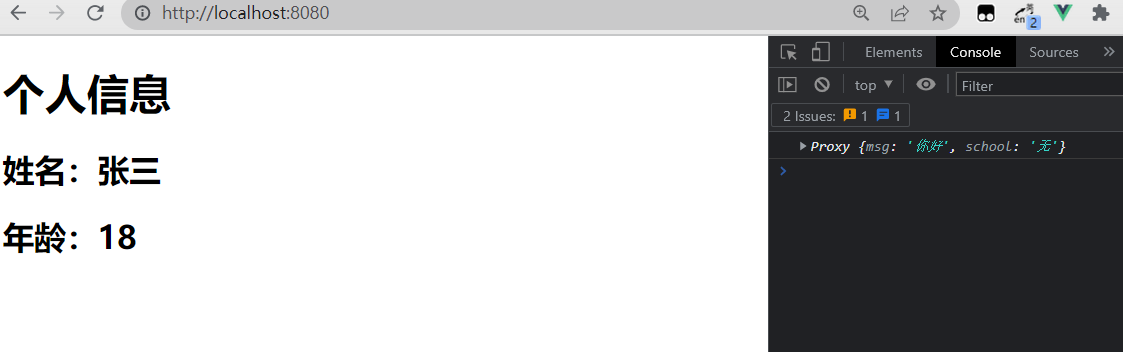
-
context:上下文对象
- attrs:值为对象,包含:组件外部传递过来,但没有在 props 配置中声明的属性, 相当于
this.$attrs - slots:收到的插槽内容, 相当于
this.$slots - emit:分发自定义事件的函数, 相当于
this.$emit
- attrs:值为对象,包含:组件外部传递过来,但没有在 props 配置中声明的属性, 相当于
App.vue,传值进 Demo.vue,同时传入自定义事件以及插槽
<template> <Demo msg="你好" school="无" @hello="showMsg" > <template v-slot:te> <span>测试span> template> Demo> template> <script> import Demo from './components/Demo.vue'; export default { name: 'App', setup() { function showMsg(value) { alert(`触发,参数是${value}`) } return { showMsg } }, components: { Demo } } script>- 1
- 2
- 3
- 4
- 5
- 6
- 7
- 8
- 9
- 10
- 11
- 12
- 13
- 14
- 15
- 16
- 17
- 18
- 19
- 20
- 21
- 22
- 23
- 24
- 25
- 26
- 27
- 28
- 29
- 30
- 31
Demo.vue 组件,props 接收 App.vue 传进来的值,未接收的值在 attrs 里,emits 接收自定义事件,假如未写接收会报警告,但不影响使用,emit 触发 App.vue 里的自定义事件。插槽直接使用
<template> <h1>个人信息h1> <h2>姓名:{{person.name}}h2> <h2>年龄:{{person.age}}h2> <button @click="hello">测试触发事件button> <slot name="te">slot> template> <script> import { reactive } from 'vue' export default { // eslint-disable-next-line vue/multi-word-component-names name: 'Demo', props: ['msg'], emits: ['hello'], setup(props, context) { console.log(props); console.log(context.attrs); console.log(context.emit); console.log(context.slots); // 数据 let person = reactive({ name: '张三', age: 18 }) // 方法 function hello() { context.emit('hello', 666); } return { person, hello } } } script> <style> style>- 1
- 2
- 3
- 4
- 5
- 6
- 7
- 8
- 9
- 10
- 11
- 12
- 13
- 14
- 15
- 16
- 17
- 18
- 19
- 20
- 21
- 22
- 23
- 24
- 25
- 26
- 27
- 28
- 29
- 30
- 31
- 32
- 33
- 34
- 35
- 36
- 37
- 38
- 39
- 40
- 41

3.7 计算属性与监视
3.7.1 computed 函数(计算属性)
第一种写法:与 Vue2.x 中 computed 配置功能一致
<script> import { reactive, computed } from 'vue' export default { // eslint-disable-next-line vue/multi-word-component-names name: 'Demo', computed: { fullName() { return this.person.firstName + '-' + this.person.lastName; } }, setup() { // 数据 let person = reactive({ firstName: '张', lastName: '三', }) return { person, } } } </script>- 1
- 2
- 3
- 4
- 5
- 6
- 7
- 8
- 9
- 10
- 11
- 12
- 13
- 14
- 15
- 16
- 17
- 18
- 19
- 20
- 21
- 22
- 23
- 24
第二种写法,如下:
<template> <h1>个人信息h1> 姓:<input type="text" v-model="person.firstName" /> <br> 名:<input type="text" v-model="person.lastName" /> <br> <span>全名: {{person.fullName}} span> <br> 全名:<input type="text" v-model="person.fullName" > template> <script> import { reactive, computed } from 'vue' export default { // eslint-disable-next-line vue/multi-word-component-names name: 'Demo', setup() { // 数据 let person = reactive({ firstName: '张', lastName: '三', }) // 计算属性-简写(只读,不考虑计算属性被修改的情况) person.fullName = computed(() => { return person.firstName + '-' + person.lastName; }) // 计算属性-完整写法(考虑读和写) person.fullName = computed({ get() { return person.firstName + '-' + person.lastName; }, set(value) { let nameArr = value.split('-'); person.firstName = nameArr[0] person.lastName = nameArr[1] } }) return { person, } } } script> <style> style>- 1
- 2
- 3
- 4
- 5
- 6
- 7
- 8
- 9
- 10
- 11
- 12
- 13
- 14
- 15
- 16
- 17
- 18
- 19
- 20
- 21
- 22
- 23
- 24
- 25
- 26
- 27
- 28
- 29
- 30
- 31
- 32
- 33
- 34
- 35
- 36
- 37
- 38
- 39
- 40
- 41
- 42
- 43
- 44
- 45
- 46
- 47
- 48
- 49
- 50
- 51
- 52
- 53
- 54
- 55

3.7.2 watch 函数(监视)
第一种写法:与 Vue2.x 中 computed 配置功能一致
<script> import { ref } from 'vue' export default { // eslint-disable-next-line vue/multi-word-component-names name: 'Demo', watch: { sum(newValue, oldValue) { console.log('sum 的值变化了', newValue, oldValue); } }, // watch: { // sum: { // immediate: true, // 立即监视,一进来就会监视一下 // deep: true, // handler(newValue, oldValue) { // console.log('sum 的值变化了', newValue, oldValue); // } // } // }, setup() { // 数据 let sum = ref(0) return { sum, } } } </script>- 1
- 2
- 3
- 4
- 5
- 6
- 7
- 8
- 9
- 10
- 11
- 12
- 13
- 14
- 15
- 16
- 17
- 18
- 19
- 20
- 21
- 22
- 23
- 24
- 25
- 26
- 27
- 28
- 29
- 30

第二种写法,如下:
1、监视 ref 定义的数据
<template> <h1>当前求和为:{{sum}} h1> <button @click="sum++">点击 + 1button> <hr> <h1>当前信息为:{{msg}} h1> <button @click="msg += '!'">修改信息button> template> <script> import { ref, watch } from 'vue' export default { // eslint-disable-next-line vue/multi-word-component-names name: 'Demo', setup() { // 数据 let sum = ref(0) let msg = ref('你好') // 情况一,监视 ref 所定义的一个响应式数据 // watch(sum, (newValue, oldValue) => { // console.log('sum 变了', newValue, oldValue); // }, {immediate: true, deep: true}) // 情况二,监视 ref 所定义的多个响应式数据 watch([sum, msg], (newValue, oldValue) => { console.log(newValue, oldValue); }, { immediate: true, deep: true }) return { sum, msg } } } script> <style> style>- 1
- 2
- 3
- 4
- 5
- 6
- 7
- 8
- 9
- 10
- 11
- 12
- 13
- 14
- 15
- 16
- 17
- 18
- 19
- 20
- 21
- 22
- 23
- 24
- 25
- 26
- 27
- 28
- 29
- 30
- 31
- 32
- 33
- 34
- 35
- 36
- 37
- 38
- 39
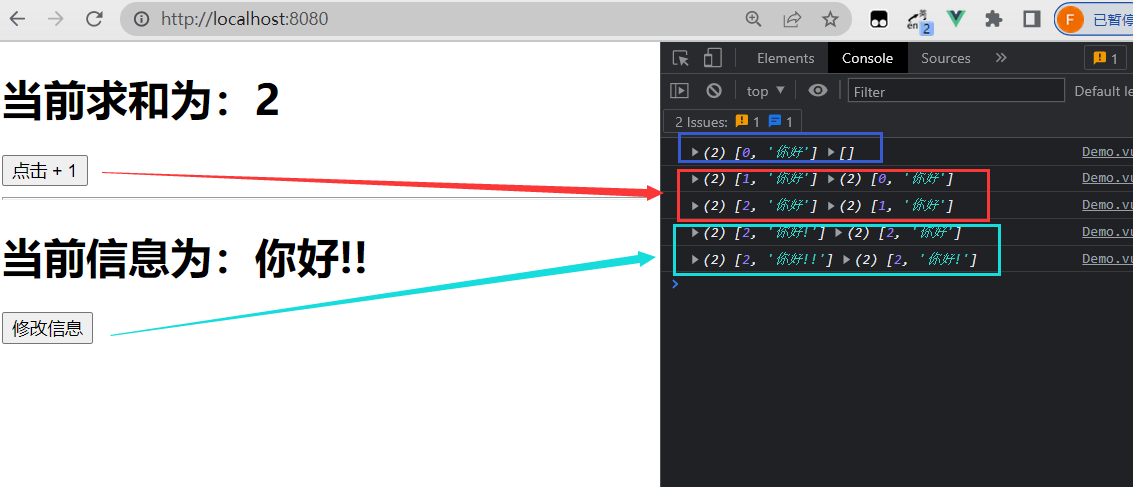
2、监视 reactive 定义的数据
<template> <h1>当前姓名为:{{person.name}} h1> <button @click="person.name += '~'">修改姓名button> <hr> <h1>当前年龄为:{{person.age}} h1> <button @click="person.age ++">修改年龄button> <hr> <h2>职业:{{person.job.type}} h2> <h2>薪酬:{{person.job.salary}} h2> <button @click="person.job.type += '!'">修改职业button> template> <script> import { reactive, watch } from 'vue' export default { // eslint-disable-next-line vue/multi-word-component-names name: 'Demo', setup() { // 数据 let person = reactive({ name: '张三', age: 18, job: { type: '开发', salary: '25k' } }) // 情况一,监视 reactive 所定义的一个响应式数据的全部属性 // watch 监视的是 reactive 定义的响应式数据,则无法正确获得 oldValue!! // 若watch 监视的是 reactive 定义的响应式数据,则强制开启了深度监视(deep 配置无效) // watch(person, (newValue, oldValue) => { // console.log('person变化', newValue, oldValue); // }, { deep: false }) // 情况二:监视 reactive 所定义的一个响应式数据的某个属性 // watch(() => person.age, (newValue, oldValue) => { // console.log('person 的age 变化了', newValue, oldValue); // }) // 情况三:监视 reactive 所定义的一个响应式数据的某些属性 watch([() => person.age, () => person.name], (newValue, oldValue) => { console.log('person 的age 变化了', newValue, oldValue); }) // 特殊情况:监视的是 reactive 定义的属性中的某个对象属性,所以 deep 配置有效 watch(() => person.job, (newValue, oldValue) => { console.log('person 的age 变化了', newValue, oldValue); }, { deep: true }) return { person } } } script> <style> style>- 1
- 2
- 3
- 4
- 5
- 6
- 7
- 8
- 9
- 10
- 11
- 12
- 13
- 14
- 15
- 16
- 17
- 18
- 19
- 20
- 21
- 22
- 23
- 24
- 25
- 26
- 27
- 28
- 29
- 30
- 31
- 32
- 33
- 34
- 35
- 36
- 37
- 38
- 39
- 40
- 41
- 42
- 43
- 44
- 45
- 46
- 47
- 48
- 49
- 50
- 51
- 52
- 53
- 54
- 55
- 56
- 57
- 58
- 59
- 60
- 61

3.7.2 watchEffect 函数
- watch 的套路是:既要指明监视的属性,也要指明监视的回调
- watchEffect 的套路是:不用指明监视哪个属性,监视的回调中用到哪个属性,那就监视哪个属性
- watchEffect 有点像 computed:
- 但 computed 注重的计算出来的值(回调函数的返回值),所以必须要写返回值
- 而 watchEffect 更注重的是过程(回调函数的函数体),所以不用写返回值
<script> import { reactive, watchEffect } from 'vue' export default { // eslint-disable-next-line vue/multi-word-component-names name: 'Demo', setup() { // 数据 let sum = ref(0) let person = reactive({ name: '张三', age: 18, job: { type: '开发', salary: '25k' } }) // watchEffect 所指定的回调中用到的数据只要发生变化,则直接重新执行回调 watchEffect(() => { const x1 = person.name const x2 = person.job.type console.log('watchEffect 配置的回调执行了'); }) return { person } } } </script>- 1
- 2
- 3
- 4
- 5
- 6
- 7
- 8
- 9
- 10
- 11
- 12
- 13
- 14
- 15
- 16
- 17
- 18
- 19
- 20
- 21
- 22
- 23
- 24
- 25
- 26
- 27
- 28
- 29
- 30
- 31
3.8 生命周期

Vue3.0 中可以继续使用 Vue2.x 中的生命周期钩子,但有两个被更名:- beforeDestroy 改名为 beforeUnmount
- destroyed 改名为 unmounted
App.vue
<template> <button @click="isShowDemo = !isShowDemo">显示/隐藏Demobutton> <Demo v-if="isShowDemo" /> template> <script> import Demo from './components/Demo.vue'; import { ref } from 'vue' export default { name: 'App', setup() { let isShowDemo = ref(true) return { isShowDemo } }, components: { Demo } } script>- 1
- 2
- 3
- 4
- 5
- 6
- 7
- 8
- 9
- 10
- 11
- 12
- 13
- 14
- 15
- 16
- 17
- 18
- 19
- 20
- 21
- 22
- 23
Demo.vue
<template> <h1>Demoh1> template> <script> export default { // eslint-disable-next-line vue/multi-word-component-names name: 'Demo', beforeCreate() { console.log('---beforeCreate---'); }, created() { console.log('---created---'); }, beforeMount() { console.log('---beforeMount---'); }, mounted() { console.log('---mounted---'); }, beforeUnmount() { console.log('---beforeUnmount---'); }, unmounted() { console.log('---unmounted--'); }, } script>- 1
- 2
- 3
- 4
- 5
- 6
- 7
- 8
- 9
- 10
- 11
- 12
- 13
- 14
- 15
- 16
- 17
- 18
- 19
- 20
- 21
- 22
- 23
- 24
- 25
- 26
- 27
- 28


Vue3.0 也提供了 Composition API 形式的生命周期钩子,与 Vue2.x 中钩子对应关系如下:
- beforeCreate ===>
setup() - created ===>
setup() - beforeMount ===> onBeforeMount
- mounted ===> onMounted
- beforeUpdate ===> onBeforeUpdate
- updated ===> onUpdated
- beforeUnmount ==> onBeforeUnmount
- unmounted ===> onUnmounted
<template> <h1>Demoh1> template> <script> import { onBeforeMount, onMounted, onBeforeUpdate, onUpdated, onBeforeUnmount, onUnmounted } from 'vue' export default { // eslint-disable-next-line vue/multi-word-component-names name: 'Demo', setup() { console.log('---setup()---'); onBeforeMount(() => { console.log('---onBeforeMount---') }) onMounted(() => { console.log('---onMounted---'); }) onBeforeUpdate(() => { console.log('---onBeforeUpdate---'); }) onUpdated(() => { console.log('---onUpdated---'); }) onBeforeUnmount(() => { console.log('---onBeforeUnmount---'); }) onUnmounted(() => { console.log('---onUnmounted---'); }) } } script>- 1
- 2
- 3
- 4
- 5
- 6
- 7
- 8
- 9
- 10
- 11
- 12
- 13
- 14
- 15
- 16
- 17
- 18
- 19
- 20
- 21
- 22
- 23
- 24
- 25
- 26
- 27
- 28
- 29
- 30
- 31
- 32
- 33
- 34
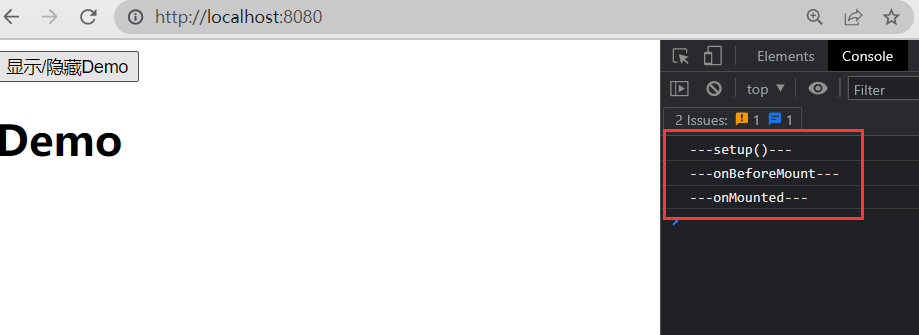

3.9 自定义 hook 函数
hook 本质是一个函数,把 setup 函数中使用的 Composition API 进行了封装。类似于 Vue2.x中的 mixin。可以复用代码,让 setup 中的逻辑更清楚易懂
如下,获取当前鼠标的位置
<template> <h1>当前点击时鼠标的坐标为:X:{{point.x}},y:{{point.y}} h1> template> <script> import { reactive, onMounted } from 'vue' export default { // eslint-disable-next-line vue/multi-word-component-names name: 'Demo', setup() { let point = reactive({ x: 0, y: 0 }) onMounted(() => { window.addEventListener('click', (event) => { point.x = event.pageX point.y = event.pageY }) }) return { point } } } script>- 1
- 2
- 3
- 4
- 5
- 6
- 7
- 8
- 9
- 10
- 11
- 12
- 13
- 14
- 15
- 16
- 17
- 18
- 19
- 20
- 21
- 22
- 23
- 24
- 25
- 26
- 27
- 28
- 29

此时给 window 加了一个点击事件,只要点击页面就会获取页面的鼠标位置给 point,假如该组件卸载了,也还是会触发

可以在组件卸载后,移除该点击事件。移除事件时需要传入移除的是哪个事件,所以将该点击事件单独写成一个函数<script> import { reactive, onMounted, onBeforeUnmount } from 'vue' export default { // eslint-disable-next-line vue/multi-word-component-names name: 'Demo', setup() { let point = reactive({ x: 0, y: 0 }) function savePoint(event) { point.x = event.pageX point.y = event.pageY console.log(point.x, point.y); } onMounted(() => { window.addEventListener('click', savePoint) }) onBeforeUnmount(() => { window.removeEventListener('click', savePoint) }) return { point } } } </script>- 1
- 2
- 3
- 4
- 5
- 6
- 7
- 8
- 9
- 10
- 11
- 12
- 13
- 14
- 15
- 16
- 17
- 18
- 19
- 20
- 21
- 22
- 23
- 24
- 25
- 26
- 27
- 28
- 29
- 30
- 31
- 32
假如有另一个组件也想用该功能,复用这块代码,就可以将该功能相关的数据和函数抽离出来,形成一个 hook 函数

import { reactive, onMounted, onBeforeUnmount} from 'vue'; export default function() { let point = reactive({ x: 0, y: 0 }) function savePoint(event) { point.x = event.pageX point.y = event.pageY console.log(point.x, point.y); } onMounted(() => { window.addEventListener('click', savePoint) }) onBeforeUnmount(() => { window.removeEventListener('click', savePoint) }) return point }- 1
- 2
- 3
- 4
- 5
- 6
- 7
- 8
- 9
- 10
- 11
- 12
- 13
- 14
- 15
- 16
- 17
- 18
- 19
- 20
- 21
- 22
- 23
- 24
使用时引入即可
<template> <h1>当前点击时鼠标的坐标为:X:{{point.x}},y:{{point.y}} h1> template> <script> import usePoint from '../hooks/usePoint' export default { // eslint-disable-next-line vue/multi-word-component-names name: 'Demo', setup() { let point = usePoint() return { point } } } script>- 1
- 2
- 3
- 4
- 5
- 6
- 7
- 8
- 9
- 10
- 11
- 12
- 13
- 14
- 15
- 16
- 17
- 18
- 19

3.10 toRef
创建一个 ref 对象,其 value 值指向另一个对象中的某个属性。
- 语法:
const name = toRef(person, 'name')
用于要将响应式对象中的某个属性单独提供给外部使用时,如下,将 person 对象里的name、age 等属性单独提供给外部使用
<template> <h1>姓名: {{name}} h1> <h1>年龄: {{age}} h1> <h1>薪资: {{salary}} h1> <button @click="name += '~'">修改姓名button> <button @click="age ++">修改年龄button> <button @click="salary ++">修改薪资button> template> <script> import { reactive, toRef } from '@vue/reactivity' export default { // eslint-disable-next-line vue/multi-word-component-names name: 'Demo', setup() { let person = reactive({ name: '张三', age: 18, job: { j1: { salary: 20 } } }) return { // name: ref(person, 'name') name: toRef(person, 'name'), age: toRef(person, 'age'), salary: toRef(person.job.j1, 'salary') } } } script>- 1
- 2
- 3
- 4
- 5
- 6
- 7
- 8
- 9
- 10
- 11
- 12
- 13
- 14
- 15
- 16
- 17
- 18
- 19
- 20
- 21
- 22
- 23
- 24
- 25
- 26
- 27
- 28
- 29
- 30
- 31
- 32
- 33
- 34
- 35
- 36

具有响应式效果,且此时 toRef 这里操纵的数据,就是原先的 person对象里的数据,修改即同步修改 person 对象里的对应的值
假如直接使用 ref 来转换,如:ref(person.name),操纵的是这个用 person 对象的 name 属性值新建的 ref 对象,而不再与原本的 person 对象的 name 有联系

toRefs 与 toRef 功能一致,但可以批量创建多个 ref 对象,即把整个对象都抛出去,语法:toRefs(person),但只能定位到第外层的属性<h1>姓名: {{name}} </h1> <h1>年龄: {{age}} </h1> <h1>薪资: {{job.j1.salary}} </h1> ...toRefs(person) // name: toRef(person, 'name'), // age: toRef(person, 'age'), // salary: toRef(person.job.j1, 'salary')- 1
- 2
- 3
- 4
- 5
- 6
- 7
- 8
4. 其它 Composition API
4.1 shallowReactive 与 shallowRef
- shallowReactive:只处理对象最外层属性的响应式(浅响应式)
- shallowRef:只处理基本数据类型的响应式,不进行对象的响应式处理
let person = shallowReactive ({ name: '张三', age: 18, job: { j1: { salary: 20 } } })- 1
- 2
- 3
- 4
- 5
- 6
- 7
- 8
- 9
什么时候使用?
- 如果有一个对象数据,结构比较深, 但变化时只是外层属性变化 ===> shallowReactive
- 如果有一个对象数据,后续功能不会修改该对象中的属性,而是生新的对象来替换 ===> shallowRef
4.2 readonly 与 shallowReadonly
- readonly:让一个响应式数据变为只读的(深只读)
- shallowReadonly:让一个响应式数据变为只读的(浅只读)
let person = reactive ({ name: '张三', age: 18, job: { j1: { salary: 20 } } }) person = readonly(person)- 1
- 2
- 3
- 4
- 5
- 6
- 7
- 8
- 9
- 10
- 11
应用于不希望数据被修改时
4.3 toRaw 与 markRaw
toRaw
- 作用:将一个由 reactive 生成的响应式对象转为普通对象
使用场景:用于读取响应式对象对应的普通对象,对这个普通对象的所有操作,不会引起页面更新
const p = toRaw(person)- 1
markRaw
- 作用:标记一个对象,使其永远不会再成为响应式对象
应用场景:
- 有些值不应被设置为响应式的,例如复杂的第三方类库等
- 当渲染具有不可变数据源的大列表时,跳过响应式转换可以提高性能
person.car = markRaw(person)- 1
4.4 customRef
创建一个自定义的 ref,并对其依赖项跟踪和更新触发进行显式控制
如下例,实现防抖效果<template> <input type="text" v-model="keyWord" /> <h1> {{keyWord}} h1> template> <script> import { customRef } from 'vue' export default { name: 'App', setup() { // 自定义一个 ref function myRef(value, delay) { let timer; return customRef((track, trigger) => { return { get() { // 通知 Vue 追踪数据变化(提前约定) track(); return value; }, set(newValue) { value = newValue; clearTimeout(timer); timer = setTimeout(() => { // 通知 Vue 去重新解析模板(调用一下 get() 方法) trigger(); }, delay); } } }) } // let keyWord = ref('hello') // 使用 Vue 提供的 ref let keyWord = myRef('hello', '500') // 使用自定义的 ref return { keyWord, myRef } }, } script>- 1
- 2
- 3
- 4
- 5
- 6
- 7
- 8
- 9
- 10
- 11
- 12
- 13
- 14
- 15
- 16
- 17
- 18
- 19
- 20
- 21
- 22
- 23
- 24
- 25
- 26
- 27
- 28
- 29
- 30
- 31
- 32
- 33
- 34
- 35
- 36
- 37
- 38
- 39
- 40
- 41
- 42
- 43
- 44
- 45
- 46
- 47
- 48

4.5 provide 与 inject

实现祖与后代组件间通信,父组件有一个 provide 选项来提供数据,后代组件有一个 inject 选项来开始使用这些数据
如下,祖组件 App.vue<template> <div class="app"> <h1> App 组件(祖),{{name}}---{{price}} h1> <Child /> div> template> <script> import { reactive, toRefs } from '@vue/reactivity' import Child from './components/Child.vue' import { provide } from '@vue/runtime-core' export default { name: 'App', setup() { let car = reactive({ name: '奔驰', price: '40w' }) provide('car', car) return { ...toRefs(car) } }, components: { Child } } script>- 1
- 2
- 3
- 4
- 5
- 6
- 7
- 8
- 9
- 10
- 11
- 12
- 13
- 14
- 15
- 16
- 17
- 18
- 19
- 20
- 21
- 22
- 23
- 24
- 25
- 26
- 27
- 28
- 29
- 30
- 31
子组件,Child.vue
<template> <div class="child"> <h1> Child组件(子)h1> <Son /> div> template> <script> import Son from './Son.vue' export default { // eslint-disable-next-line vue/multi-word-component-names name: 'Child', components: { Son } } script>- 1
- 2
- 3
- 4
- 5
- 6
- 7
- 8
- 9
- 10
- 11
- 12
- 13
- 14
- 15
- 16
- 17
- 18
孙组件,Son.vue
<template> <div class="son"> <h1> Son组件(孙),{{car.name}}---{{car.price}}h1> div> template> <script> import { inject } from '@vue/runtime-core' export default { // eslint-disable-next-line vue/multi-word-component-names name: 'Son', setup() { let car = inject('car') return { car } } } script>- 1
- 2
- 3
- 4
- 5
- 6
- 7
- 8
- 9
- 10
- 11
- 12
- 13
- 14
- 15
- 16
- 17
- 18
- 19
- 20

4.6 响应式数据的判断
- isRef:检查一个值是否为一个 ref 对象
- isReactive:检查一个对象是否是由 reactive 创建的响应式代理
- isReadonly:检查一个对象是否是由 readonly 创建的只读代理
- isProxy:检查一个对象是否是由 reactive 或者 readonly 方法创建的代理
let car = reactive({name: '奔驰', price: '40w'}) let sum = ref(0) let car2 = readonly(car) console.log(isReactive(car)) console.log(isRef(sum)) console.log(isReadonly(car2)) console.log(isReadonly(isProxy))- 1
- 2
- 3
- 4
- 5
- 6
- 7
- 8
5. Composition API 的优势
5.1 Options API 存在的问题
Vue2 使用的传统 Options API 中,新增或者修改一个需求,就需要分别在 data,methods,computed 里修改


5.2 Composition API 的优势
可以更加优雅的组织我们的代码,函数。让相关功能的代码更加有序的组织在一起


6. 新的组件
6.1 Fragment
在 Vue2 中:组件必须有一个根标签。在 Vue3 中:组件可以没有根标签,内部会将多个标签包含在一个 Fragment 虚拟元素中,可以减少标签层级, 减小内存占用
<template> <h1>111h1> <h1>222h1> template>- 1
- 2
- 3
- 4

6.2 Teleport
能够将组件 html 结构移动到指定位置
如下,直接打开弹窗会撑开组件及其父组件的高度

组件 Son.vue<template> <div class="son"> <h1> Son 组件(孙)h1> <Dialog /> div> template> <script> import Dialog from './Dialog.vue' export default { // eslint-disable-next-line vue/multi-word-component-names name: 'Son', components: { Dialog } } script>- 1
- 2
- 3
- 4
- 5
- 6
- 7
- 8
- 9
- 10
- 11
- 12
- 13
- 14
- 15
- 16
- 17
- 18
组件 Dialog.vue
<template> <button @click="isShow = true"> 点击弹窗 button> <div v-if="isShow" class="dialog" > <h1>弹窗内容h1> <h1>弹窗内容h1> <h1>弹窗内容h1> <button @click="isShow = false">关闭弹窗button> div> template> <script> import { ref } from '@vue/reactivity'; export default { // eslint-disable-next-line vue/multi-word-component-names name: 'Dialog', setup() { let isShow = ref(false); return { isShow } } } script>- 1
- 2
- 3
- 4
- 5
- 6
- 7
- 8
- 9
- 10
- 11
- 12
- 13
- 14
- 15
- 16
- 17
- 18
- 19
- 20
- 21
- 22
- 23
- 24
- 25
- 26
- 27
- 28
利用 Teleport 将弹窗移动到 body 上
<template> <button @click="isShow = true"> 点击弹窗 button> <teleport to='body'> <div v-if="isShow" class="mask" > <div class="dialog"> <h1>弹窗内容h1> <h1>弹窗内容h1> <h1>弹窗内容h1> <button @click="isShow = false">关闭弹窗button> div> div> teleport> template> <script> import { ref } from '@vue/reactivity'; export default { // eslint-disable-next-line vue/multi-word-component-names name: 'Dialog', setup() { let isShow = ref(false); return { isShow } } } script> <style> .mask { position: absolute; top: 0; bottom: 0; left: 0; right: 0; background-color: rgba(0, 0, 0, 0.5); } .dialog { position: absolute; top: 50%; left: 50%; transform: translate(-50%, -50%); text-align: center; background-color: green; width: 300px; height: 300px; } style>- 1
- 2
- 3
- 4
- 5
- 6
- 7
- 8
- 9
- 10
- 11
- 12
- 13
- 14
- 15
- 16
- 17
- 18
- 19
- 20
- 21
- 22
- 23
- 24
- 25
- 26
- 27
- 28
- 29
- 30
- 31
- 32
- 33
- 34
- 35
- 36
- 37
- 38
- 39
- 40
- 41
- 42
- 43
- 44
- 45
- 46
- 47
- 48
- 49
- 50
- 51
- 52
- 53

6.3 Suspense
等待异步组件时渲染一些额外内容,让应用有更好的用户体验
静态引入<template> <div class="app"> <h1> App 组件(祖)h1> <Child /> div> template> <script> import Child from './components/Child.vue' // 静态引入 export default { name: 'App', components: { Child } } script>- 1
- 2
- 3
- 4
- 5
- 6
- 7
- 8
- 9
- 10
- 11
- 12
- 13
- 14
- 15
- 16
- 17
将网速调慢,祖组件和后代组件是一起出来的

异步引入<template> <div class="app"> <h1> App 组件(祖)h1> <Child /> div> template> <script> // import Child from './components/Child.vue' //静态引入 import { defineAsyncComponent } from '@vue/runtime-core' // 静态引入 const Child = defineAsyncComponent(() => import('./components/Child.vue')) // 异步引入 export default { name: 'App', components: { Child } } script>- 1
- 2
- 3
- 4
- 5
- 6
- 7
- 8
- 9
- 10
- 11
- 12
- 13
- 14
- 15
- 16
- 17
- 18
- 19
网速慢的情况下,会先出现祖组件,再出现后代组件

此时有个问题,假如 Child 组件没有加载出来,其所在的位置是空的,并不知道到底有没有内容。使用 Suspense 解决如下:<template> <div class="app"> <h1> App 组件(祖)h1> <Suspense> <template v-slot:default> <Child /> template> <template v-slot:fallback> <h3>稍等,加载中...h3> template> Suspense> div> template> <script> // import Child from './components/Child.vue' //静态引入 import { defineAsyncComponent } from '@vue/runtime-core' // 静态引入 const Child = defineAsyncComponent(() => import('./components/Child.vue')) // 异步引入 export default { name: 'App', components: { Child } } script>- 1
- 2
- 3
- 4
- 5
- 6
- 7
- 8
- 9
- 10
- 11
- 12
- 13
- 14
- 15
- 16
- 17
- 18
- 19
- 20
- 21
- 22
- 23
- 24
- 25
- 26

使用了异步引入后,该组件是一个异步组件,则setup()可以用 async 修一个异步函数<script> import { ref } from 'vue'; export default { // eslint-disable-next-line vue/multi-word-component-names name: 'Child', async setup() { let sum = ref(0) let p = new Promise((resove, reject) => { setTimeout(() => { resove(sum) }, 3000); }) return await p; } } </script>- 1
- 2
- 3
- 4
- 5
- 6
- 7
- 8
- 9
- 10
- 11
- 12
- 13
- 14
- 15
- 16
- 17
- 18
- 19
之前是通过把网速调慢来实现等待 Child 组件出现的效果,使用异步函数之后,网速正常也能让 Child 组件等待后才出现

7. 其他变化
7.1 全局 API 的转移
Vue 2.x 有许多全局 API 和配置,例如:注册全局组件、注册全局指令等
//注册全局组件 Vue.component('MyButton', { data: () => ({ count: 0 }), template: '' }) //注册全局指令 Vue.directive('focus', { inserted: el => el.focus() }- 1
- 2
- 3
- 4
- 5
- 6
- 7
- 8
- 9
- 10
- 11
- 12
Vue3.0 中对这些 API 做出了调整,将全局的 API,即:Vue.xxx 调整到应用实例(app)上
2.x 全局 API(Vue) 3.x 实例 API (app) app.config.xxxx app.config.xxxx Vue.config.productionTip 移除 Vue.component app.component Vue.directive app.directive Vue.mixin app.mixin Vue.use app.use Vue.prototype app.config.globalProperties 7.2 其他改变
- data 选项应始终被声明为一个函数
// data { } data() { }- 1
- 2
- 过度类名的更改:
- Vue2.x 写法
.v-enter, .v-leave-to { opacity: 0; } .v-leave, .v-enter-to { opacity: 1; }- 1
- 2
- 3
- 4
- 5
- 6
- 7
- 8
- Vue3.x 写法
.v-enter-from, .v-leave-to { opacity: 0; } .v-leave-from, .v-enter-to { opacity: 1; }- 1
- 2
- 3
- 4
- 5
- 6
- 7
- 8
- 9
- Vue2.x 写法
- 移除 keyCode 作为 v-on 的修饰符,同时也不再支持 config.keyCodes
// @keyup.13 // Vue.config.keyCodes.enter = 13- 1
- 2
- 移除 v-on.native 修饰符,给组件传递事件时,Vue2 会将 click 事件也认为是自定义事件,需要加 native 来表示是原生事件。Vue3 则用 emit 来指定自定义事件,没有指定的就是原生事件
- 父组件中绑定事件
<my-component v-on:close="handleComponentEvent" v-on:click="handleNativeClickEvent" />- 1
- 2
- 3
- 4
- 子组件中声明自定义事件
<script> export default { emits: ['close'] } </script>- 1
- 2
- 3
- 4
- 5
- 父组件中绑定事件
- 移除过滤器(filter)
过滤器虽然看起来很方便,但它需要一个自定义语法,打破大括号内表达式是 “只是 JavaScript” 的假设,这不仅有学习成本,而且有实现成本!建议用方法调用或计算属性去替换过滤器 - …
- Vue
-
相关阅读:
一次Python爬虫实战,解决反爬问题!
webpack学习记录
掌机小霸王,开源俄罗斯方块小游戏
现货贵金属白银时间段
2023.10.18
部署ELK
【深入理解Kotlin协程】CoroutineScope.launch源码追踪扒皮
C++自增/减运算符的原理以及前后缀形式的本质区别
【数仓日常踩坑】记录一次特殊符号引发数据异常的排查思路
分布式通信框架
- 原文地址:https://blog.csdn.net/ACE_U_005A/article/details/127017186