-
【可视化工具】二维矩形装箱可视化 + JS-Canvas实现
一、说明
本代码文件为.vue文件,其中使用了Element-UI组件。可视化代码主要用了JS的Canvas画布。
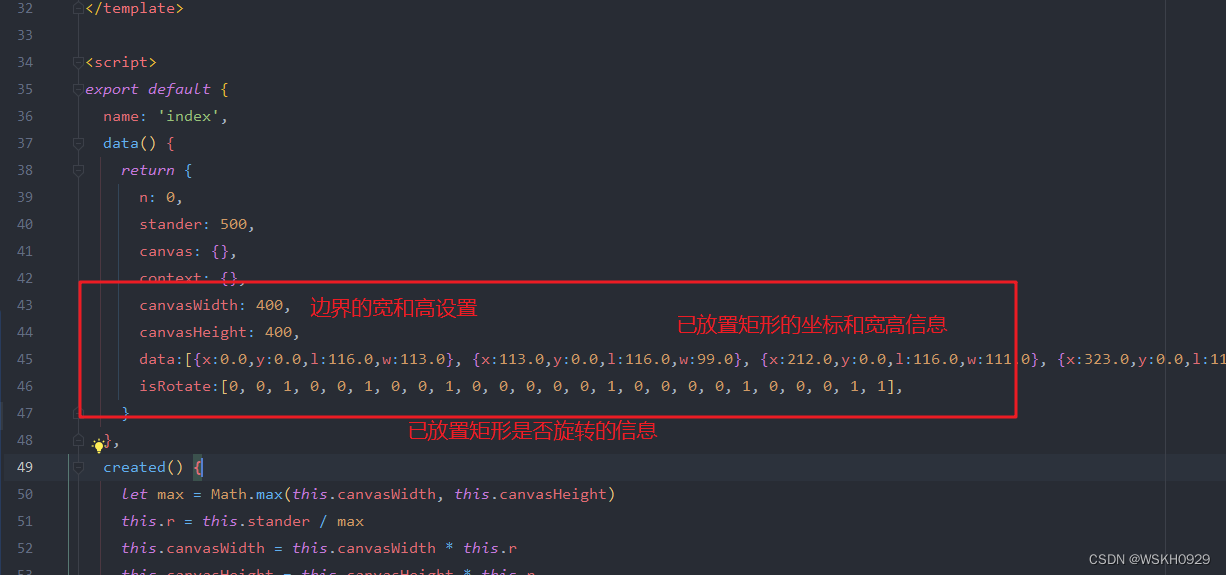
如果需要可视化,需要在程序中按照一定格式输出如下信息,data表示了每个矩形的坐标和长、宽(注意:这里的l是指矩形的高,w是指矩形的宽)。
data:[{x:0.0,y:0.0,l:116.0,w:113.0}, {x:113.0,y:0.0,l:116.0,w:99.0}, {x:212.0,y:0.0,l:116.0,w:111.0}, {x:323.0,y:0.0,l:116.0,w:20.0}, {x:343.0,y:0.0,l:89.0,w:57.0}, {x:343.0,y:89.0,l:95.0,w:57.0}, {x:0.0,y:116.0,l:100.0,w:113.0}, {x:113.0,y:116.0,l:88.0,w:99.0}, {x:212.0,y:116.0,l:79.0,w:111.0}, {x:323.0,y:116.0,l:58.0,w:20.0}, {x:332.0,y:184.0,l:42.0,w:68.0}, {x:230.0,y:195.0,l:31.0,w:102.0}, {x:113.0,y:204.0,l:71.0,w:117.0}, {x:0.0,y:216.0,l:88.0,w:113.0}, {x:230.0,y:226.0,l:81.0,w:102.0}, {x:332.0,y:226.0,l:97.0,w:68.0}, {x:113.0,y:275.0,l:29.0,w:117.0}, {x:0.0,y:304.0,l:96.0,w:98.0}, {x:98.0,y:304.0,l:96.0,w:84.0}, {x:182.0,y:304.0,l:50.0,w:48.0}, {x:230.0,y:307.0,l:53.0,w:102.0}, {x:332.0,y:323.0,l:37.0,w:68.0}, {x:182.0,y:354.0,l:46.0,w:30.0}, {x:212.0,y:360.0,l:40.0,w:106.0}, {x:318.0,y:360.0,l:40.0,w:82.0}], isRotate:[0, 0, 1, 0, 0, 1, 0, 0, 1, 0, 0, 0, 0, 0, 1, 0, 0, 0, 0, 1, 0, 0, 0, 1, 1],- 1
- 2
然后将上面的信息复制到前端代码对应位置即可进行可视化展示。
二、可视化效果展示
可以看到下面的矩形有两种颜色。其中蓝色代表没有旋转,粉色代表进行了90度旋转。

BACK按钮:往后一步

NEXT按钮:往前一步
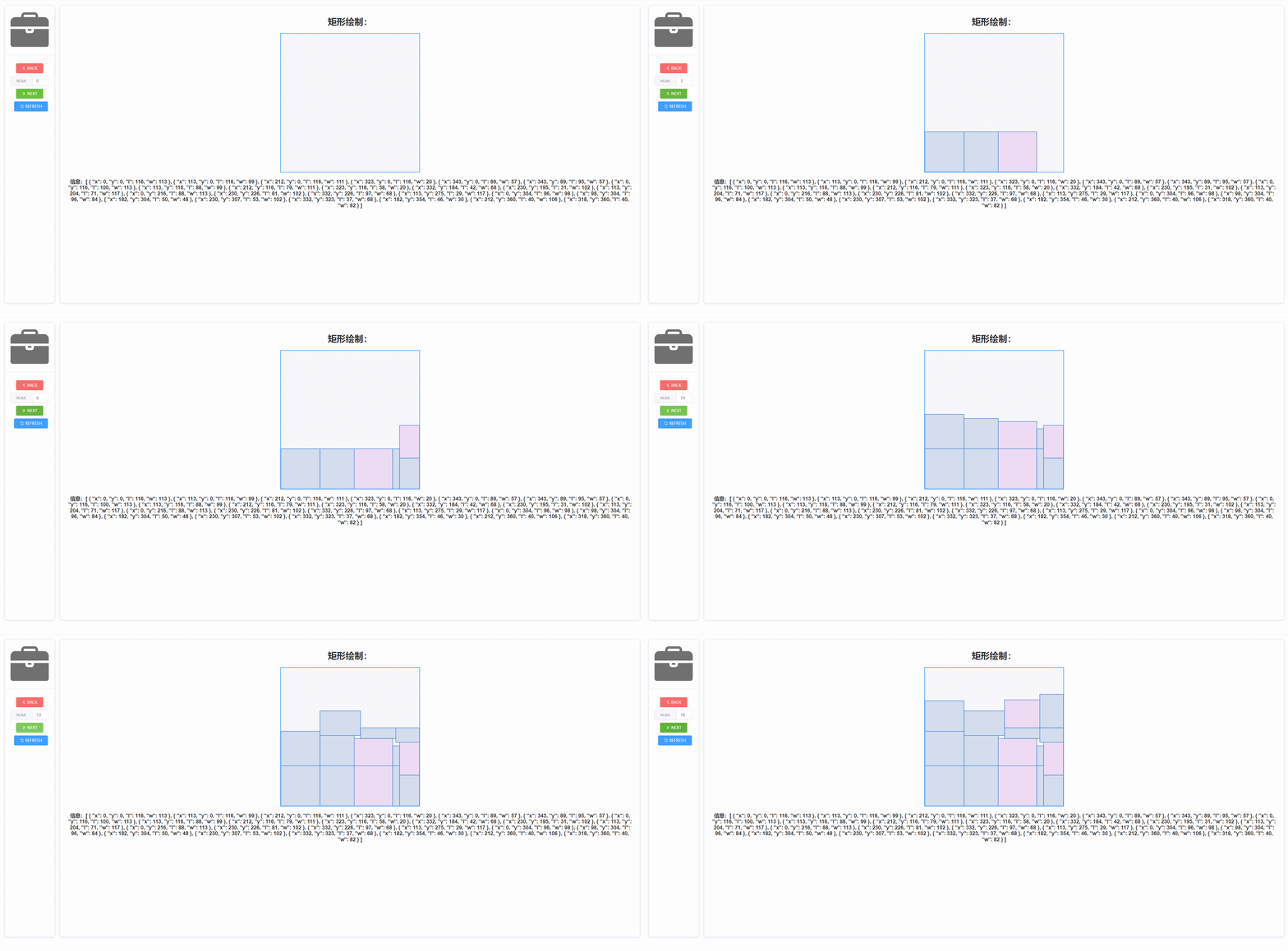
NUM输入框:展示前n个矩形

REFRESH按钮:刷新页面

三、代码
<template> <div style="margin: 20px;display: flex"> <div style="margin-right: 20px"> <el-card style="text-align: center;width: 180px;height: 83vh"> <div slot="header" class="clearfix"> <el-image src="https://picgo-wskh.oss-cn-guangzhou.aliyuncs.com/公文包,工具箱,手提包,行李包.svg">el-image> div> <div> <el-button icon="el-icon-d-arrow-left" type="danger" @click="diff()" style="margin-top: 10px">BACKel-button> <el-input v-model="n" style="margin-top: 10px;" @change="draw()"> <template slot="prepend">NUM<b>:b>template> el-input> <el-button icon="el-icon-d-arrow-right" type="success" @click="add()" style="margin-top: 10px">NEXT el-button> <el-button icon="el-icon-refresh" type="primary" @click="refresh()" style="margin-top: 10px">REFRESH el-button> div> el-card> div> <div style="width:100%"> <el-card style="text-align: center;height: 83vh;overflow: auto"> <h1>矩形绘制:h1> <div ref="cardCanvas" id="canvasDiv"> <canvas id="canvas" style="border: 2px solid #409EFF;background-color: #f6f6fd;" ref="canvas" :width="canvasWidth" :height="canvasHeight" >canvas> div> <h3>信息:{{ data }}h3> el-card> div> div> template> <script> export default { name: 'index', data() { return { n: 0, stander: 500, canvas: {}, context: {}, canvasWidth: 400, canvasHeight: 400, data:[{x:0.0,y:0.0,l:115.0,w:59.0}, {x:59.0,y:0.0,l:115.0,w:21.0}, {x:80.0,y:0.0,l:115.0,w:46.0}, {x:374.0,y:0.0,l:99.0,w:26.0}, {x:258.0,y:0.0,l:99.0,w:116.0}, {x:179.0,y:0.0,l:99.0,w:79.0}, {x:126.0,y:0.0,l:102.0,w:53.0}, {x:179.0,y:99.0,l:118.0,w:79.0}, {x:258.0,y:99.0,l:111.0,w:116.0}, {x:374.0,y:99.0,l:102.0,w:26.0}, {x:138.0,y:102.0,l:63.0,w:41.0}, {x:0.0,y:115.0,l:39.0,w:59.0}, {x:59.0,y:115.0,l:60.0,w:21.0}, {x:90.0,y:115.0,l:50.0,w:48.0}, {x:0.0,y:154.0,l:86.0,w:55.0}, {x:80.0,y:165.0,l:33.0,w:58.0}, {x:146.0,y:165.0,l:114.0,w:33.0}, {x:55.0,y:175.0,l:97.0,w:25.0}, {x:80.0,y:198.0,l:82.0,w:66.0}, {x:379.0,y:201.0,l:108.0,w:21.0}, {x:291.0,y:210.0,l:99.0,w:88.0}, {x:258.0,y:210.0,l:66.0,w:33.0}, {x:179.0,y:217.0,l:111.0,w:79.0}, {x:0.0,y:240.0,l:87.0,w:55.0}, {x:55.0,y:272.0,l:55.0,w:24.0}, {x:258.0,y:276.0,l:47.0,w:27.0}, {x:149.0,y:279.0,l:46.0,w:30.0}, {x:79.0,y:280.0,l:76.0,w:70.0}, {x:285.0,y:309.0,l:44.0,w:94.0}, {x:380.0,y:309.0,l:58.0,w:20.0}, {x:258.0,y:323.0,l:56.0,w:27.0}, {x:149.0,y:325.0,l:73.0,w:30.0}, {x:0.0,y:327.0,l:73.0,w:55.0}, {x:55.0,y:327.0,l:61.0,w:24.0}, {x:196.0,y:328.0,l:51.0,w:62.0}, {x:285.0,y:353.0,l:44.0,w:49.0}, {x:334.0,y:353.0,l:47.0,w:34.0}, {x:81.0,y:356.0,l:42.0,w:68.0}, {x:179.0,y:379.0,l:21.0,w:103.0}], isRotate:[0, 1, 1, 0, 1, 0, 1, 0, 0, 1, 0, 1, 0, 1, 1, 0, 0, 1, 1, 0, 1, 0, 0, 1, 0, 0, 0, 1, 0, 0, 1, 0, 0, 1, 1, 1, 1, 0, 0], } }, created() { let max = Math.max(this.canvasWidth, this.canvasHeight) this.r = this.stander / max this.canvasWidth = this.canvasWidth * this.r this.canvasHeight = this.canvasHeight * this.r }, mounted() { this.canvas = document.getElementById('canvas') // 坐标矫正 this.context = this.canvas.getContext('2d') this.context.translate(0, this.canvasHeight) this.context.rotate(this.getRad(180)) this.context.scale(-1, 1) this.n = this.data.length this.draw() }, methods: { refresh() { location.reload() }, clearCanvas() { this.context.clearRect(0, 0, this.canvasWidth, this.canvasHeight) }, diff() { this.n = -1 + parseInt(this.n) this.draw() }, add() { this.n = 1 + parseInt(this.n) this.draw() }, draw() { if (this.judgeN()) { this.clearCanvas() for (let i = 0; i < this.n; i++) { let tube = this.data[i] this.drawRect(tube.x, tube.y, tube.l, tube.w, this.isRotate[i]) } } }, judgeN() { if (this.n < 0) { this.n = 0 this.$message.warning('矩形数量已经为0了!') return false } else if (this.n > this.data.length) { this.n = this.data.length this.$message.warning('所有的矩形已经放置完毕!') return false } return true }, drawRect(x, y, l, w, isRotate) { let r = this.r w = w * r l = l * r x = x * r y = y * r this.context.strokeStyle = '#5190da' this.context.lineWidth = 2 this.context.beginPath() this.context.rect(x, y, w, l) this.context.stroke() // this.context.fillStyle = '#d1e4f9'; if(isRotate === 1){ this.context.fillStyle = 'rgba(212,152,218,0.29)' }else{ this.context.fillStyle = 'rgba(123,159,199,0.29)' } this.context.beginPath() this.context.rect(x, y, w, l) this.context.fill() }, getRad(degree) { return degree / 180 * Math.PI } } } script> <style scoped> style>- 1
- 2
- 3
- 4
- 5
- 6
- 7
- 8
- 9
- 10
- 11
- 12
- 13
- 14
- 15
- 16
- 17
- 18
- 19
- 20
- 21
- 22
- 23
- 24
- 25
- 26
- 27
- 28
- 29
- 30
- 31
- 32
- 33
- 34
- 35
- 36
- 37
- 38
- 39
- 40
- 41
- 42
- 43
- 44
- 45
- 46
- 47
- 48
- 49
- 50
- 51
- 52
- 53
- 54
- 55
- 56
- 57
- 58
- 59
- 60
- 61
- 62
- 63
- 64
- 65
- 66
- 67
- 68
- 69
- 70
- 71
- 72
- 73
- 74
- 75
- 76
- 77
- 78
- 79
- 80
- 81
- 82
- 83
- 84
- 85
- 86
- 87
- 88
- 89
- 90
- 91
- 92
- 93
- 94
- 95
- 96
- 97
- 98
- 99
- 100
- 101
- 102
- 103
- 104
- 105
- 106
- 107
- 108
- 109
- 110
- 111
- 112
- 113
- 114
- 115
- 116
- 117
- 118
- 119
- 120
- 121
- 122
- 123
- 124
- 125
- 126
- 127
- 128
- 129
- 130
- 131
- 132
- 133
- 134
- 135
- 136
- 137
-
相关阅读:
Linux_day12_LVM
【控制原理】使用C语言模拟simulink算法仿真
【数据结构】带头双向循环链表
认识前端包常用包管理工具(npm、cnpm、pnpm、nvm、yarn)
Bash脚本自学 - 输入输出重定向
小熊家务帮day13-day14 门户管理(ES搜索,Canal+MQ同步,索引同步)
不容错过!跨境卖家必须知道的十大海外社媒运营方法!
经典组件大更新,微软为Windows 11重新设计记事本
springboot单体项目部署
uni-app nvue vue3 setup中实现加载webview,解决nvue中获取不到webview实例的问题
- 原文地址:https://blog.csdn.net/weixin_51545953/article/details/127735503
