-
Vue中使用高德地图
一、安装依赖:
npm i @amap/amap-jsapi-loader --savetips:如果node版本过高,请使用
npm i @amap/amap-jsapi-loader --save --legacy-peer-deps参考链接:https://blog.csdn.net/lanmy_dl/article/details/126346812
二、使用(官网教程):
1、初始化地图:
a. 地图的数据获取:element-china-area-data
带全部的插件安装:
npm install element-china-area-data@5.0.2 -S
最新的插件安装:npm i element-china-area-datab. 对地图进行初始化:
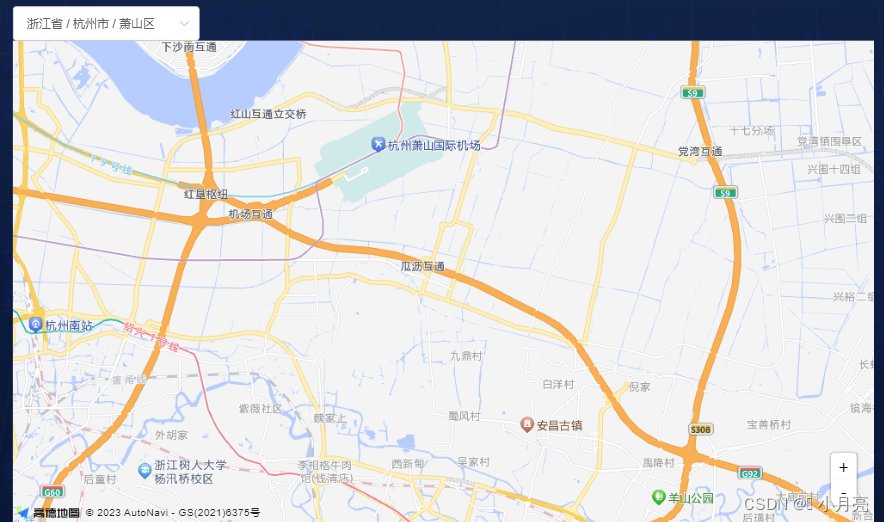
<template> <!-- 高德地图组件 --> <div class="map"> <div class="map-search"> <div class="map-search__area"> <span class="search-title">地区:</span> <el-cascader v-model="areaValue" :options="areaOptions" :props="areaProps" :teleported="false" separator="-" placeholder="请选择" popper-class="dropDownPanel" @change="handleAreaChange" /> </div> </div> <div v-loading="loading" element-loading-text="数据更新中" element-loading-spinner="el-icon-loading" element-loading-background="rgba(25,81,135,0.7)" id="qyContainer"> </div> </div> </template> <script> // 引入地图插件 import AMapLoader from '@amap/amap-jsapi-loader' // 引入 地址级联选择器和code码转换 import { regionDataPlus } from 'element-china-area-data' export default { name: "GapDeMap", data() { return { areaProps: { // 选择地区的属性 value: 'value', label: 'label', children: 'children' }, areaOptions: regionDataPlus, // 地区选择的所有的数据 areaValue: ['330000', '330100', '330109'], // 地区选择参数,['省区域码', '市区域码'] loading: false, // 地图是否处于加载中 map: null, // 当前显示的地图区域对象 AMap: null // 拿到的所有的地图的对象 } }, mounted() { // 设置安全密钥 window._AMapSecurityConfig = { // 必须配合秘钥使用,密钥需要生成,成为开发者之后创建应用即可。 securityJsCode: '1f324843f6c8ea5f532995xxxxxxxxxx' // 应用密钥概览:https://console.amap.com/dev/key/app } this.init() }, methods: { init() { this.$nextTick(() => { AMapLoader.load({ key: "acf13f4729d72d4ce267a2xxxxxxxxxx", // 申请好的Web端开发者Key,首次调用 load 时必填 version: "2.0", // 指定要加载的 JSAPI 的版本,缺省时默认为 1.4.15 plugins: ['AMap.ToolBar', 'AMap.Scale', 'AMap.LngLat'], // 需要使用的的插件列表 AMapUI: { version: '1.1', plugins: ['overlay/SimpleMarker'] } }).then((AMap) => { this.AMap = AMap // 初始化地图 this.map = new AMap.Map("qyContainer", { // 设置地图容器id viewMode: "2D", // 是否为3D地图模式 zoom: 12, // 初始化地图级别 center: [120.458373, 30.190322] // 初始化地图中心点位置 萧山区 }) // 添加toolbar--放大缩小 const toolbar = new AMap.ToolBar() this.map.addControl(toolbar) }).catch(e => { console.log(e) }) }) }, // 更改地图的地区 handleAreaChange() { // ... } } } </script> <style lang="scss" scoped> #qyContainer{ padding:0px; margin: 0px; width: 700px; height: 560px; } </style>- 1
- 2
- 3
- 4
- 5
- 6
- 7
- 8
- 9
- 10
- 11
- 12
- 13
- 14
- 15
- 16
- 17
- 18
- 19
- 20
- 21
- 22
- 23
- 24
- 25
- 26
- 27
- 28
- 29
- 30
- 31
- 32
- 33
- 34
- 35
- 36
- 37
- 38
- 39
- 40
- 41
- 42
- 43
- 44
- 45
- 46
- 47
- 48
- 49
- 50
- 51
- 52
- 53
- 54
- 55
- 56
- 57
- 58
- 59
- 60
- 61
- 62
- 63
- 64
- 65
- 66
- 67
- 68
- 69
- 70
- 71
- 72
- 73
- 74
- 75
- 76
- 77
- 78
- 79
- 80
- 81
- 82
- 83
- 84
- 85
- 86
- 87
- 88
- 89
- 90
- 91
- 92
- 93
- 94
- 95
- 96
- 97
- 98
- 99
- 100
- 101
- 102
2、地图查询轮廓绘制:

<template> <!-- 高德地图组件 --> <div class="map"> <div class="map-search"> <div class="map-search__area"> <span class="search-title">地区:</span> <el-cascader v-model="areaValue" :options="areaOptions" :props="areaProps" :teleported="false" separator="-" placeholder="请选择" popper-class="dropDownPanel" @change="handleAreaChange" /> </div> </div> <div v-loading="loading" element-loading-text="数据更新中" element-loading-spinner="el-icon-loading" element-loading-background="rgba(25,81,135,0.7)" id="qyContainer"> </div> </div> </template> <script> // 引入地图插件 import AMapLoader from '@amap/amap-jsapi-loader' // 引入 地址级联选择器和code码转换 import { regionDataPlus } from 'element-china-area-data' export default { name: "GapDeMap", data() { return { areaProps: { // 选择地区的属性 value: 'value', label: 'label', children: 'children' }, areaOptions: regionDataPlus, // 地区选择的所有的数据 areaValue: ['330000', '330100', '330109'], // 地区选择参数,['省区域码', '市区域码'] loading: false, // 地图是否处于加载中 map: null, // 当前显示的地图区域对象 AMap: null, // 拿到的所有的地图的对象 searchAreaText: '萧山区', // 默认查询萧山区 districtSearch: null, // 查询后的区域的对象 districtPositon: [120.458373, 30.190322], // 当前区域显示的中心点 polygons: [] // 绘制的轮廓的多边形 } }, mounted() { // 设置安全密钥 window._AMapSecurityConfig = { // 必须配合秘钥使用,密钥需要生成,成为开发者之后创建应用即可。 securityJsCode: '1f324843f6c8ea5f532995xxxxxxxxxx' // 应用密钥概览:https://console.amap.com/dev/key/app } this.init() }, methods: { init() { this.$nextTick(() => { AMapLoader.load({ key: "acf13f4729d72d4ce267a2xxxxxxxxxx", // 申请好的Web端开发者Key,首次调用 load 时必填 version: "2.0", // 指定要加载的 JSAPI 的版本,缺省时默认为 1.4.15 plugins: ['AMap.ToolBar', 'AMap.Scale', 'AMap.LngLat', 'AMap.DistrictSearch'], // 需要使用的的插件列表 AMapUI: { version: '1.1', plugins: ['overlay/SimpleMarker'] } }).then((AMap) => { this.AMap = AMap // 初始化地图 this.map = new AMap.Map("qyContainer", { // 设置地图容器id viewMode: "2D", // 是否为3D地图模式 zoom: 12, // 初始化地图级别 center: [120.458373, 30.190322] // 初始化地图中心点位置 萧山区 }) // 添加toolbar--放大缩小 const toolbar = new AMap.ToolBar() this.map.addControl(toolbar) // 添加行政区域信息--所选地区至省/市/区时,地图中显示该区域轮廓;选至镇街时则无轮廓 this.addDistrict() }).catch(e => { console.log(e) }) }) }, // 更改地图的地区 handleAreaChange() { // ... }, // 绘制行政区域 addDistrict() { // console.log('this.AMap', this.AMap) const AMap = this.AMap this.districtSearch = new AMap.DistrictSearch({ subdistrict: 0, // 获取边界不需要返回下级行政区 extensions: 'all', // 返回行政区边界坐标组等具体信息 base/all level: 'district' // country:国家 province:省/直辖市 city:市 district:区/县 }) // 行政区查询 this.districtSearch.search(this.searchAreaText, (status, result) => { // console.log('result',result) this.map.remove(this.polygons)// 清除上次绘制的轮廓结果 this.polygons = [] const bounds = result.districtList && result.districtList.length ? result.districtList[0].boundaries : [] if (bounds) { for (let i = 0, l = bounds.length; i < l; i++) { // 生成行政区划polygon const polygon = new AMap.Polygon({ strokeWeight: 1, path: bounds[i], fillOpacity: 0.6, fillColor: '#03c1ff', strokeColor: '#0490fd' }) this.polygons.push(polygon) } } this.map.add(this.polygons) this.map.setFitView(this.polygons)// 视口自适应 }) } } } </script> <style lang="scss" scoped> #qyContainer{ padding:0px; margin: 0px; width: 700px; height: 560px; } </style>- 1
- 2
- 3
- 4
- 5
- 6
- 7
- 8
- 9
- 10
- 11
- 12
- 13
- 14
- 15
- 16
- 17
- 18
- 19
- 20
- 21
- 22
- 23
- 24
- 25
- 26
- 27
- 28
- 29
- 30
- 31
- 32
- 33
- 34
- 35
- 36
- 37
- 38
- 39
- 40
- 41
- 42
- 43
- 44
- 45
- 46
- 47
- 48
- 49
- 50
- 51
- 52
- 53
- 54
- 55
- 56
- 57
- 58
- 59
- 60
- 61
- 62
- 63
- 64
- 65
- 66
- 67
- 68
- 69
- 70
- 71
- 72
- 73
- 74
- 75
- 76
- 77
- 78
- 79
- 80
- 81
- 82
- 83
- 84
- 85
- 86
- 87
- 88
- 89
- 90
- 91
- 92
- 93
- 94
- 95
- 96
- 97
- 98
- 99
- 100
- 101
- 102
- 103
- 104
- 105
- 106
- 107
- 108
- 109
- 110
- 111
- 112
- 113
- 114
- 115
- 116
- 117
- 118
- 119
- 120
- 121
- 122
- 123
- 124
- 125
- 126
- 127
- 128
- 129
- 130
- 131
- 132
- 133
- 134
- 135
- 136
- 137
- 138
- 139
- 140
- 141
- 142
- 143
3、按条件进行点的标记,并且绘制涟漪效果(为了看的清楚,加了地图样式darkblue):

<template> <!-- 高德地图组件 --> <div class="map"> <div class="map-search"> <div class="map-search__area"> <span class="search-title">地区:</span> <el-cascader v-model="areaValue" :options="areaOptions" :props="areaProps" :teleported="false" separator="-" placeholder="请选择" popper-class="dropDownPanel" @change="handleAreaChange" /> </div> </div> <div v-loading="loading" element-loading-text="数据更新中" element-loading-spinner="el-icon-loading" element-loading-background="rgba(25,81,135,0.7)" id="qyContainer"> </div> </div> </template> <script> // 引入地图插件 import AMapLoader from '@amap/amap-jsapi-loader' // 引入 地址级联选择器和code码转换 import { regionDataPlus } from 'element-china-area-data' export default { name: "GapDeMap", data() { return { areaProps: { // 选择地区的属性 value: 'value', label: 'label', children: 'children' }, areaOptions: regionDataPlus, // 地区选择的所有的数据 areaValue: ['330000', '330100', '330109'], // 地区选择参数,['省区域码', '市区域码'] loading: false, // 地图是否处于加载中 map: null, // 当前显示的地图区域对象 AMap: null, // 拿到的所有的地图的对象 colorMap: ['rgb(255, 0, 13)', 'rgb(255, 126, 36)', 'rgb(194, 187, 0)', 'rgb(26, 255, 0)', 'rgb(0, 84, 194)'], // 颜色 markers: [], // 标记 mapData: [], // 地图上的标记点 backList: [] // 后端给的所有的数据 } }, mounted() { // 设置安全密钥 window._AMapSecurityConfig = { // 必须配合秘钥使用,密钥需要生成,成为开发者之后创建应用即可。 securityJsCode: '1f324843f6c8ea5f532995xxxxxxxxxx' // 应用密钥概览:https://console.amap.com/dev/key/app } this.backList = [ { name: '地址1', // 地址名称 color: 0, // 点的颜色 lat: 30.221236, // 经度 lng: 120.264912 // 纬度 }, { name: '地址2', color: 1, lat: 30.194911, lng: 120.592917 }, { name: '地址3', color: 2, lat: 30.150751, lng: 120.593329 }, { name: '地址4', color: 3, lat: 30.221245, lng: 120.265387 }, { name: '地址5', color: 4, lat: 30.207206, lng: 120.285281 } ] // 假数据,初始化是空数组 this.mapData = [] this.markers = [] // 标记 this.init() this.handleMarker() }, methods: { init() { this.$nextTick(() => { AMapLoader.load({ key: "acf13f4729d72d4ce267a2xxxxxxxxxx", // 申请好的Web端开发者Key,首次调用 load 时必填 version: "2.0", // 指定要加载的 JSAPI 的版本,缺省时默认为 1.4.15 plugins: ['AMap.ToolBar', 'AMap.Scale', 'AMap.LngLat', 'AMap.Marker'], // 需要使用的的插件列表 AMapUI: { version: '1.1', plugins: ['overlay/SimpleMarker'] } }).then((AMap) => { this.AMap = AMap // 初始化地图 this.map = new AMap.Map("qyContainer", { // 设置地图容器id viewMode: "2D", // 是否为3D地图模式 zoom: 12, // 初始化地图级别 mapStyle: "amap://styles/darkblue", // 地图样式,可以自定义 center: [120.458373, 30.190322] // 初始化地图中心点位置 萧山区 }) // 添加toolbar--放大缩小 const toolbar = new AMap.ToolBar() this.map.addControl(toolbar) }).catch(e => { console.log(e) }) }) }, // 更改地图的地区 handleAreaChange() { // ... }, // 处理绘制的点 handleMarker() { this.mapData = this.backList.slice(0, 10) setTimeout(() => { this.mapData = this.backList // 删除之前的markers this.map && this.map.remove(this.markers) // 添加markers this.addMarkers() }, 1500) // 删除之前的markers // this.map && this.map.remove(this.markers) // 添加markers this.addMarkers() }, // 添加标记点 addMarkers() { const AMap = this.AMap if (AMap) { this.mapData.forEach(item => { const { color } = item if (item.lat && item.lng) { const obj = { position: new AMap.LngLat(item.lng, item.lat), zIndex: 99, content: `` } const marker = new AMap.Marker(obj) const marker2 = new AMap.Marker({ position: new AMap.LngLat(item.lng, item.lat), content: ``, zIndex: 99, offset: ['50%', '50%'], extData: { hasEffect: color === 2 // 是否需要涟漪效果 } }) // 绑定事件 marker.on('click', this.clickMarkerHandler.bind(this, item)) // 将创建的点标记添加到已有的地图实例: this.map.add([marker2, marker]) if (marker2._opts.extData.hasEffect) { marker2.dom.classList.add('rippleEffect') // 添加涟漪样式 } this.markers.push(marker2, marker) } }) } }, // 点击marker触发事件 clickMarkerHandler(item, event) { console.log('点击标记点', item, event) } } } </script> <style lang="scss"> #qyContainer{ padding:0px; margin: 0px; width: 100%; height: 560px; } .circleMark { display: inline-block; width: 12px; height: 12px; border-radius: 50%; } .rippleEffect { width: 12px; height: 12px; border-radius: 50%; animation: amapTransition 2s linear infinite; } @keyframes amapTransition { 0% { -webkit-transform: scale(1); -moz-transform: scale(1); -o-transform: scale(1); transform: scale(1); opacity: 1 } 100% { -webkit-transform: scale(3); -moz-transform: scale(3); -o-transform: scale(3); transform: scale(3); opacity: 0.5 } } </style>- 1
- 2
- 3
- 4
- 5
- 6
- 7
- 8
- 9
- 10
- 11
- 12
- 13
- 14
- 15
- 16
- 17
- 18
- 19
- 20
- 21
- 22
- 23
- 24
- 25
- 26
- 27
- 28
- 29
- 30
- 31
- 32
- 33
- 34
- 35
- 36
- 37
- 38
- 39
- 40
- 41
- 42
- 43
- 44
- 45
- 46
- 47
- 48
- 49
- 50
- 51
- 52
- 53
- 54
- 55
- 56
- 57
- 58
- 59
- 60
- 61
- 62
- 63
- 64
- 65
- 66
- 67
- 68
- 69
- 70
- 71
- 72
- 73
- 74
- 75
- 76
- 77
- 78
- 79
- 80
- 81
- 82
- 83
- 84
- 85
- 86
- 87
- 88
- 89
- 90
- 91
- 92
- 93
- 94
- 95
- 96
- 97
- 98
- 99
- 100
- 101
- 102
- 103
- 104
- 105
- 106
- 107
- 108
- 109
- 110
- 111
- 112
- 113
- 114
- 115
- 116
- 117
- 118
- 119
- 120
- 121
- 122
- 123
- 124
- 125
- 126
- 127
- 128
- 129
- 130
- 131
- 132
- 133
- 134
- 135
- 136
- 137
- 138
- 139
- 140
- 141
- 142
- 143
- 144
- 145
- 146
- 147
- 148
- 149
- 150
- 151
- 152
- 153
- 154
- 155
- 156
- 157
- 158
- 159
- 160
- 161
- 162
- 163
- 164
- 165
- 166
- 167
- 168
- 169
- 170
- 171
- 172
- 173
- 174
- 175
- 176
- 177
- 178
- 179
- 180
- 181
- 182
- 183
- 184
- 185
- 186
- 187
- 188
- 189
- 190
- 191
- 192
- 193
- 194
- 195
- 196
- 197
- 198
- 199
- 200
- 201
- 202
- 203
- 204
- 205
- 206
- 207
- 208
- 209
- 210
- 211
- 212
- 213
- 214
- 215
- 216
- 217
- 218
- 219
- 220
- 221
- 222
- 223
4、点聚合效果,并且给 聚合点 和 非聚合点 添加点击事件:
<template> <!-- 高德地图组件 --> <div class="map"> <div class="map-search"> <div class="map-search__area"> <span class="search-title">地区:</span> <el-cascader v-model="areaValue" :options="areaOptions" :props="areaProps" :teleported="false" separator="-" placeholder="请选择" popper-class="dropDownPanel" @change="handleAreaChange" /> </div> </div> <div v-loading="loading" element-loading-text="数据更新中" element-loading-spinner="el-icon-loading" element-loading-background="rgba(25,81,135,0.7)" id="qyContainer"> </div> </div> </template> <script> // 引入地图插件 import AMapLoader from '@amap/amap-jsapi-loader' // 引入 地址级联选择器和code码转换 import { regionDataPlus } from 'element-china-area-data' export default { name: 'GapDeMap', data () { return { areaProps: { // 选择地区的属性 value: 'value', label: 'label', children: 'children' }, areaOptions: regionDataPlus, // 地区选择的所有的数据 areaValue: ['330000', '330100', '330109'], // 地区选择参数,['省区域码', '市区域码'] loading: false, // 地图是否处于加载中 map: null, // 当前显示的地图区域对象 AMap: null, // 拿到的所有的地图的对象 colorMap: ['rgb(255, 0, 13)', 'rgb(255, 126, 36)', 'rgb(194, 187, 0)', 'rgb(26, 255, 0)', 'rgb(0, 84, 194)'], // 颜色 backList: [], // 后端给的所有的数据 points: [], // 聚合的数据 cluster: null // 点聚合对象 } }, mounted () { // 设置安全密钥 window._AMapSecurityConfig = { // 必须配合秘钥使用,密钥需要生成,成为开发者之后创建应用即可。 securityJsCode: '1f324843f6c8ea5f532995xxxxxxxxxx' // 应用密钥概览:https://console.amap.com/dev/key/app } this.backList = [ { name: '地址1', // 地址名称 color: 0, // 点的颜色 lat: 30.221236, // 经度 lng: 120.264912 // 纬度 }, { name: '地址2', color: 1, lat: 30.194911, lng: 120.592917 }, { name: '地址3', color: 2, lat: 30.150751, lng: 120.593329 }, { name: '地址4', color: 3, lat: 30.221245, lng: 120.265387 }, { name: '地址5', color: 4, lat: 30.207206, lng: 120.285281 }, { name: '地址6', // 地址名称 color: 0, // 点的颜色 lat: 30.221436, // 经度 lng: 120.264412 // 纬度 }, { name: '地址7', color: 1, lat: 30.192911, lng: 120.572917 }, { name: '地址8', color: 2, lat: 30.150851, lng: 120.591329 }, { name: '地址9', color: 3, lat: 30.226245, lng: 120.267387 }, { name: '地址10', color: 4, lat: 30.205206, lng: 120.285481 }, { name: '地址11', // 地址名称 color: 0, // 点的颜色 lat: 30.201236, // 经度 lng: 120.254912 // 纬度 }, { name: '地址12', color: 1, lat: 30.194901, lng: 120.502917 }, { name: '地址13', color: 2, lat: 30.159751, lng: 120.593129 }, { name: '地址14', color: 3, lat: 30.221345, lng: 120.264387 }, { name: '地址15', color: 4, lat: 30.207216, lng: 120.285291 } ] // 假数据,初始化是空数组 this.points = [] // 聚合的点 // 处理聚合的点的数据 this.backList.forEach(item => { const obj = { color: item.color, name: item.name, lnglat: [item.lng, item.lat] } this.points.push(obj) }) this.init() }, methods: { init () { AMapLoader.load({ key: 'acf13f4729d72d4ce267a2xxxxxxxxxxx', // 申请好的Web端开发者Key,首次调用 load 时必填 version: '2.0', // 指定要加载的 JSAPI 的版本,缺省时默认为 1.4.15 plugins: ['AMap.ToolBar', 'AMap.Scale', 'AMap.LngLat', 'AMap.Marker', 'AMap.MarkerClusterer'], // 需要使用的的插件列表 AMapUI: { version: '1.1', plugins: ['overlay/SimpleMarker'] } }).then((AMap) => { this.AMap = AMap // 初始化地图 this.map = new AMap.Map('qyContainer', { // 设置地图容器id viewMode: '3D', // 是否为3D地图模式 zoom: 12, // 初始化地图级别 mapStyle: 'amap://styles/darkblue' // 地图样式,可以自定义 }) // 添加toolbar--放大缩小 const toolbar = new AMap.ToolBar() this.map.addControl(toolbar) console.log('this.points', this.points) // 添加点聚合 this.cluster = new AMap.MarkerCluster(this.map, this.points, { gridSize: 60, // 设置网格像素大小 renderClusterMarker: this.renderClusterMarker, // 自定义聚合点样式 renderMarker: this.renderMarker // 自定义非聚合点样式 }) }).catch(e => { console.log(e) }) }, // 自定义聚合点样式 // https://lbs.amap.com/api/javascript-api-v2/documentation#markercluster renderClusterMarker (context) { const count = this.points.length const factor = Math.pow(context.count / count, 1 / 18) const div = document.createElement('div') const Hue = 180 - factor * 180 const bgColor = 'hsla(' + Hue + ',100%,40%,0.7)' const fontColor = 'hsla(' + Hue + ',100%,90%,1)' const borderColor = 'hsla(' + Hue + ',100%,40%,1)' const shadowColor = 'hsla(' + Hue + ',100%,90%,1)' div.style.backgroundColor = bgColor const size = Math.round(30 + Math.pow(context.count / count, 1 / 5) * 20) div.style.width = div.style.height = size + 'px' div.style.border = 'solid 1px ' + borderColor div.style.borderRadius = size / 2 + 'px' div.style.boxShadow = '0 0 5px ' + shadowColor div.innerHTML = context.count div.style.lineHeight = size + 'px' div.style.color = fontColor div.style.fontSize = '14px' div.style.textAlign = 'center' div.style.zIndex = 500 context.marker.setOffset(new this.AMap.Pixel(-size / 2, -size / 2)) context.marker.setContent(div) // 自定义点击事件,这边做的是点击聚合点,以聚合点中心,放大一级 context.marker.on('click', function (e) { console.log('点击聚合点') // let curZoom = that.map.getZoom(); // if(curZoom < 20){ // curZoom += 1; // } // that.map.setZoomAndCenter(curZoom, e.lnglat); }) }, // 自定义非聚合点样式 renderMarker (context) { const color = context.data[0].color const name = context.data[0].name const content = `` context.marker.setContent(content) // 绑定事件 context.marker.on('click', this.clickMarkerHandler.bind(this, name)) }, // 更改地图的地区 handleAreaChange () { // ... }, // 点击marker触发事件 clickMarkerHandler (item, event) { console.log('点击标记点', item, event) } } } </script> <style lang="scss"> #qyContainer{ position: absolute; left: 0; right: 0; z-index: 99999; padding:0px; margin: 0px; width: 100%; height: 100%; } .circleMark { display: inline-block; width: 12px; height: 12px; border-radius: 50%; } .rippleEffect { width: 12px; height: 12px; border-radius: 50%; animation: amapTransition 2s linear infinite; } @keyframes amapTransition { 0% { -webkit-transform: scale(1); -moz-transform: scale(1); -o-transform: scale(1); transform: scale(1); opacity: 1 } 100% { -webkit-transform: scale(3); -moz-transform: scale(3); -o-transform: scale(3); transform: scale(3); opacity: 0.5 } } </style>- 1
- 2
- 3
- 4
- 5
- 6
- 7
- 8
- 9
- 10
- 11
- 12
- 13
- 14
- 15
- 16
- 17
- 18
- 19
- 20
- 21
- 22
- 23
- 24
- 25
- 26
- 27
- 28
- 29
- 30
- 31
- 32
- 33
- 34
- 35
- 36
- 37
- 38
- 39
- 40
- 41
- 42
- 43
- 44
- 45
- 46
- 47
- 48
- 49
- 50
- 51
- 52
- 53
- 54
- 55
- 56
- 57
- 58
- 59
- 60
- 61
- 62
- 63
- 64
- 65
- 66
- 67
- 68
- 69
- 70
- 71
- 72
- 73
- 74
- 75
- 76
- 77
- 78
- 79
- 80
- 81
- 82
- 83
- 84
- 85
- 86
- 87
- 88
- 89
- 90
- 91
- 92
- 93
- 94
- 95
- 96
- 97
- 98
- 99
- 100
- 101
- 102
- 103
- 104
- 105
- 106
- 107
- 108
- 109
- 110
- 111
- 112
- 113
- 114
- 115
- 116
- 117
- 118
- 119
- 120
- 121
- 122
- 123
- 124
- 125
- 126
- 127
- 128
- 129
- 130
- 131
- 132
- 133
- 134
- 135
- 136
- 137
- 138
- 139
- 140
- 141
- 142
- 143
- 144
- 145
- 146
- 147
- 148
- 149
- 150
- 151
- 152
- 153
- 154
- 155
- 156
- 157
- 158
- 159
- 160
- 161
- 162
- 163
- 164
- 165
- 166
- 167
- 168
- 169
- 170
- 171
- 172
- 173
- 174
- 175
- 176
- 177
- 178
- 179
- 180
- 181
- 182
- 183
- 184
- 185
- 186
- 187
- 188
- 189
- 190
- 191
- 192
- 193
- 194
- 195
- 196
- 197
- 198
- 199
- 200
- 201
- 202
- 203
- 204
- 205
- 206
- 207
- 208
- 209
- 210
- 211
- 212
- 213
- 214
- 215
- 216
- 217
- 218
- 219
- 220
- 221
- 222
- 223
- 224
- 225
- 226
- 227
- 228
- 229
- 230
- 231
- 232
- 233
- 234
- 235
- 236
- 237
- 238
- 239
- 240
- 241
- 242
- 243
- 244
- 245
- 246
- 247
- 248
- 249
- 250
- 251
- 252
- 253
- 254
- 255
- 256
- 257
- 258
- 259
- 260
- 261
- 262
- 263
- 264
- 265
- 266
- 267
- 268
- 269
- 270
- 271
- 272
- 273
- 274
- 275
- 276
- 277
- 278
- 279
- 280
- 281
- 282
- 283
- 284
- 285
- 286
- 287
- 288
- 289
- 290
- 291
- 292
5、自定义弹窗的样式:
// 暂时没写,写了更新- 1
6、监听缩放并且获取当前缩放的大小:
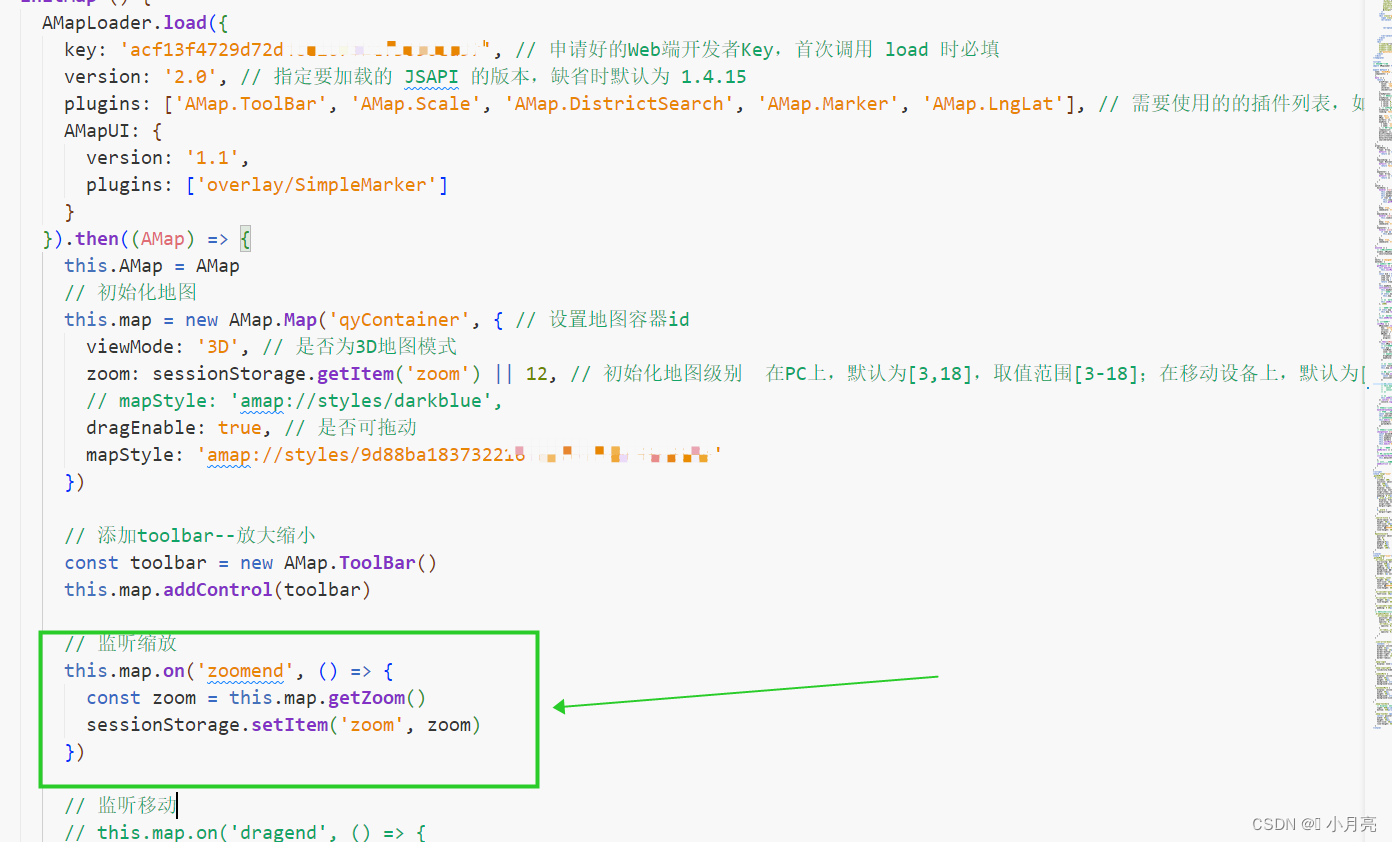
// 下面的代码写在地图初始化的函数中 // 监听缩放 this.map.on('zoomend', () => { const zoom = this.map.getZoom() sessionStorage.setItem('zoom', zoom) }) // 设置中心点和缩放 this.map.setZoom(sessionStorage.getItem('zoom') || 12)- 1
- 2
- 3
- 4
- 5
- 6
- 7
- 8
三、遇到的问题:
1、地图放大缩小的中心应以 鼠标当前所在位置 进行放大缩小,我的项目中以窗口左上角为原点:
原因:项目的缩放分辨率过大
解决:调整为 1920*1080 的就好了
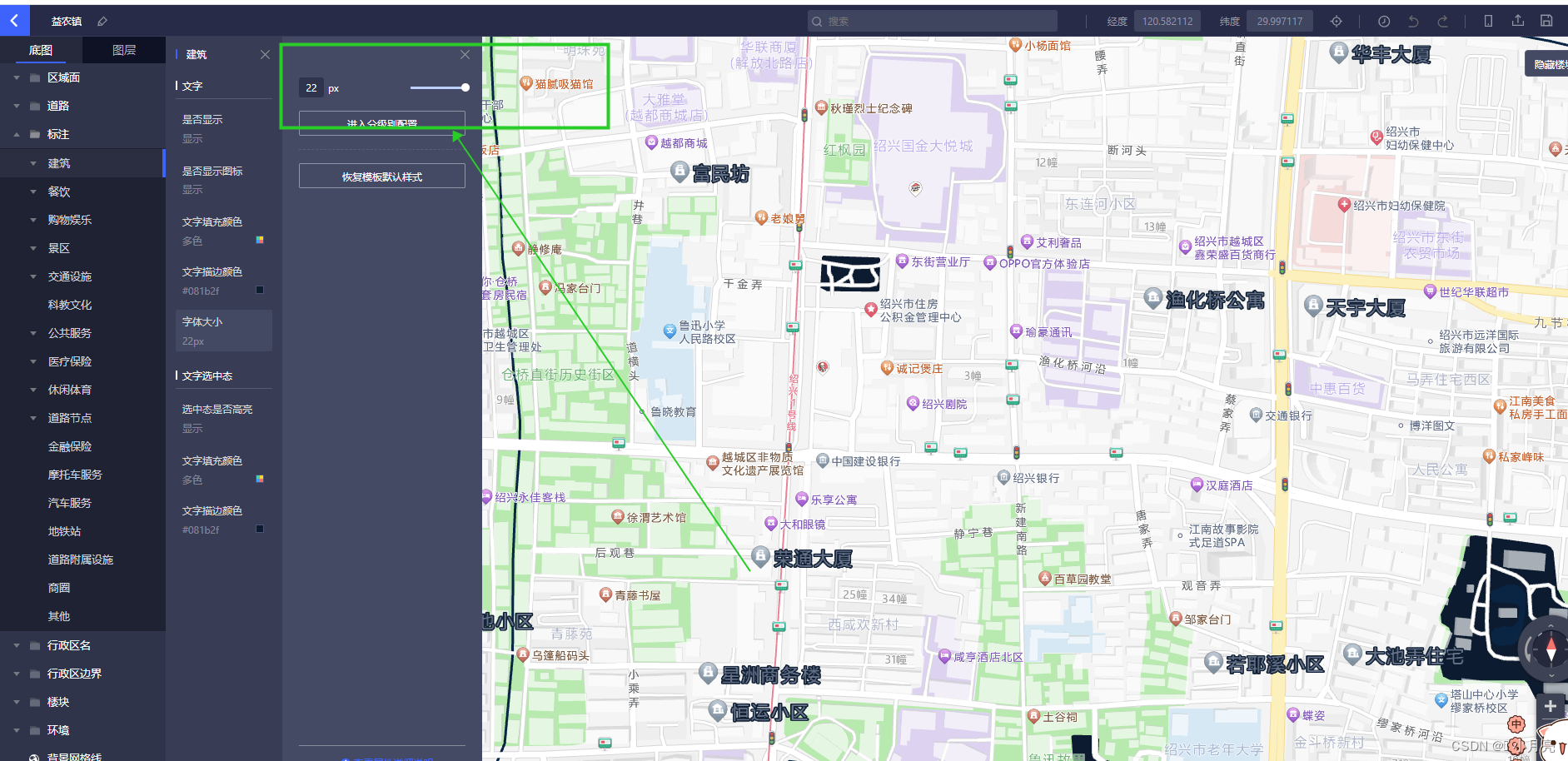
2、地图内部的标注文字大小调整:
代码中无法调整,需要自定义地图中进行更改。
3、地图获取当前鼠标移动的位置(未解决,官方文档中没有属性)
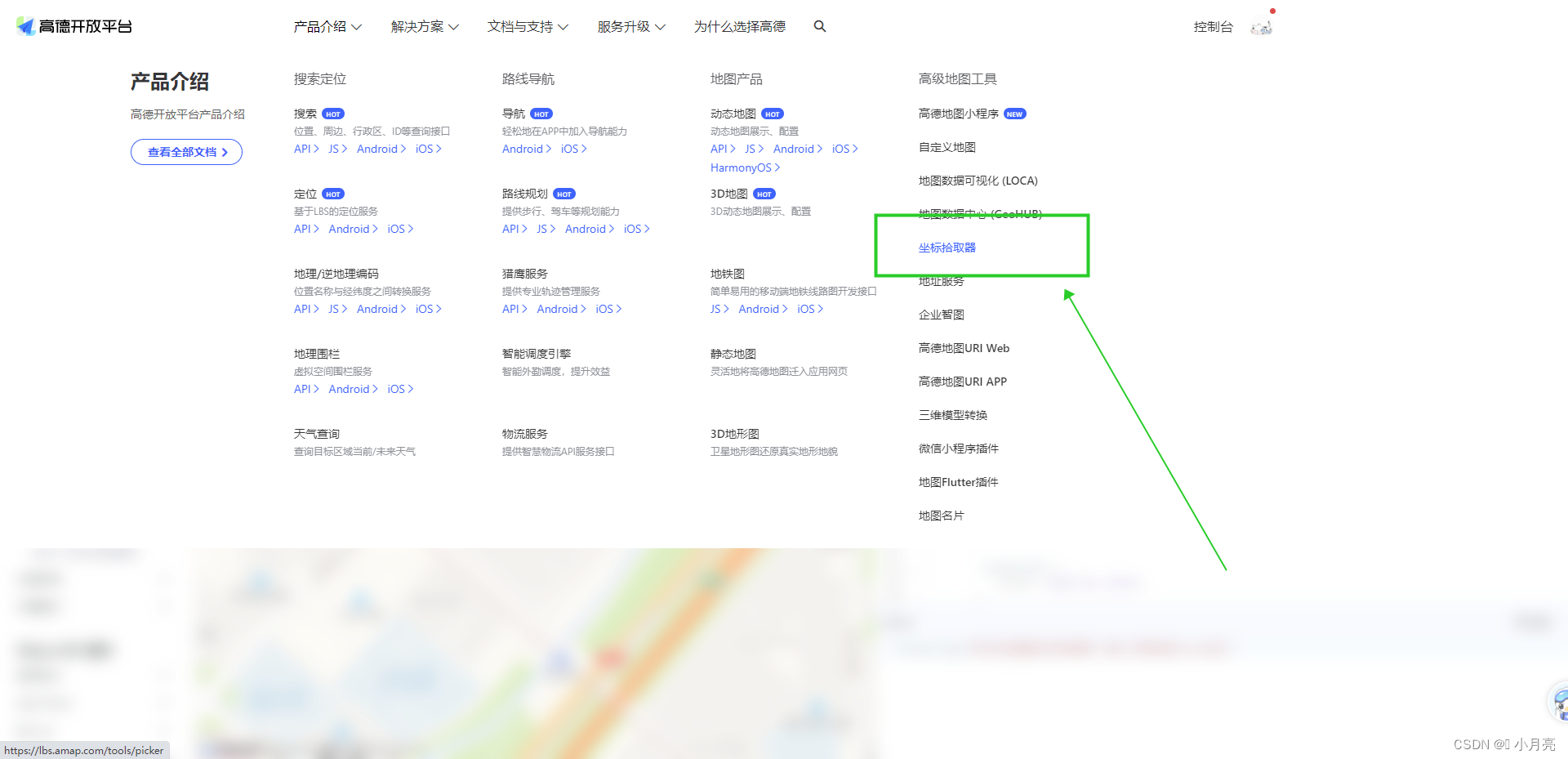
四、根据中文名称获取当前的经纬度(使用坐标拾取器):
-
相关阅读:
c语言动态内存分布
Speech | openSMILE语音特征提取工具
java观察者模式
SQL6 查找学校是北大的学生信息
PartImageNet物体部件分割(Semantic Part Segmentation)数据集介绍
索引失效的几种情况
JVM命令:jsp(找进程),jstack(线程栈),jmap(内存),jinfo(参数)
HashMap
【考研英语语法】口语语法
香港第一金:美元指数昨晚拉高,不确定性加深金价下跌
- 原文地址:https://blog.csdn.net/Y1914960928/article/details/127513173
