-
【AI作画】使用stable-diffusion-webui搭建AI作画平台
一、安装配置Anaconda
进入官网下载安装包https://www.anaconda.com/并安装,然后将Anaconda配置到环境变量中。

打开命令行,依次通过如下命令创建Python运行虚拟环境。
conda env create novelai python==3.10.6- 1
E:\workspace\02_Python\novalai>conda info --envs # conda environments: # base * D:\anaconda3 novelai D:\anaconda3\envs\novelai- 1
- 2
- 3
- 4
- 5
conda activate novelai- 1
二、安装CUDA
笔者的显卡为NVIDIA,需安装NVIDIA的开发者工具进入官网https://developer.nvidia.com/,根据自己计算机的系统情况,选择合适的安装包下载安装。

打开安装程序后,依照提示完成安装。


安装完成后,在命令窗口输入如下命令,输出CUDA版本即安装成功。
C:\Users\yefuf>nvcc -V nvcc: NVIDIA (R) Cuda compiler driver Copyright (c) 2005-2022 NVIDIA Corporation Built on Wed_Sep_21_10:41:10_Pacific_Daylight_Time_2022 Cuda compilation tools, release 11.8, V11.8.89 Build cuda_11.8.r11.8/compiler.31833905_0- 1
- 2
- 3
- 4
- 5
- 6
三、安装pytorch
进入官网https://pytorch.org/,根据计算机配置选择合适的版本进行安装。这里需要注意的是CUDA的平台选择,先打开NVIDIA控制面板-帮助-系统信息-组件查看CUDA版本,官网上选择的计算平台需要低于计算机的NVIDIA版本。

配置选择完成后,官网会生成相应的安装命令。

将安装命令复制出,命令窗口执行安装即可。conda install pytorch torchvision torchaudio pytorch-cuda=11.6 -c pytorch -c nvidia- 1
当查到Pytorch官网推荐的CUDA版本跟你的显卡版本不匹配时,就需要根据官网的CUDA版本找到对应的显卡驱动版本并升级显卡驱动,对应关系可通过https://docs.nvidia.com/cuda/cuda-toolkit-release-notes/index.html查看

四、安装git
进入git官网https://git-scm.com/,下载安装即可。
五、搭建stable-diffusion-webui
进入项目地址https://github.com/AUTOMATIC1111/stable-diffusion-webui,通过git将项目克隆下来。
git clone https://github.com/AUTOMATIC1111/stable-diffusion-webui.git Cloning into 'stable-diffusion-webui'... remote: Enumerating objects: 10475, done. remote: Counting objects: 100% (299/299), done. remote: Compressing objects: 100% (199/199), done. remote: Total 10475 (delta 178), reused 199 (delta 100), pack-reused 10176 Receiving objects: 100% (10475/10475), 23.48 MiB | 195.00 KiB/s, done. Resolving deltas: 100% (7312/7312), done.- 1
- 2
- 3
- 4
- 5
- 6
- 7
- 8
克隆下载扩展库。
git clone https://github.com/AUTOMATIC1111/stable-diffusion-webui-aesthetic-gradients “extensions/aesthetic-gradients” Cloning into 'extensions/aesthetic-gradients'... remote: Enumerating objects: 21, done. remote: Counting objects: 100% (21/21), done. remote: Compressing objects: 100% (12/12), done. remote: Total 21 (delta 3), reused 18 (delta 3), pack-reused 0 Receiving objects: 100% (21/21), 1.09 MiB | 1.34 MiB/s, done. Resolving deltas: 100% (3/3), done.- 1
- 2
- 3
- 4
- 5
- 6
- 7
- 8
git clone https://github.com/yfszzx/stable-diffusion-webui-images-browser “extensions/images-browser” Cloning into 'extensions/images-browser'... remote: Enumerating objects: 118, done. remote: Counting objects: 100% (118/118), done. remote: Compressing objects: 100% (70/70), done. remote: Total 118 (delta 42), reused 65 (delta 24), pack-reused 0 Receiving objects: 100% (118/118), 33.01 KiB | 476.00 KiB/s, done. Resolving deltas: 100% (42/42), done.- 1
- 2
- 3
- 4
- 5
- 6
- 7
- 8
克隆完成后,
extensions目录会多如下文件夹:

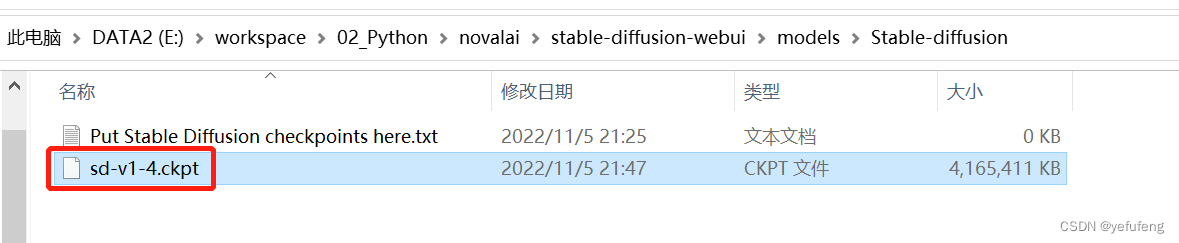
下载模型库https://github.com/AUTOMATIC1111/stable-diffusion-webui/wiki/Dependencies,并将下载的.ckpt放到
models/Stable-diffusion文件夹中。模型很大,推荐使用下载器。
安装项目所需的Python依赖库。pip install -r requirements.txt- 1

安装完成之后,运行如下命令,顺利的话,当程序加载完成模型之后,会自动打开http://127.0.0.1:7860/显示平台主页。python launch.py --autolaunch- 1
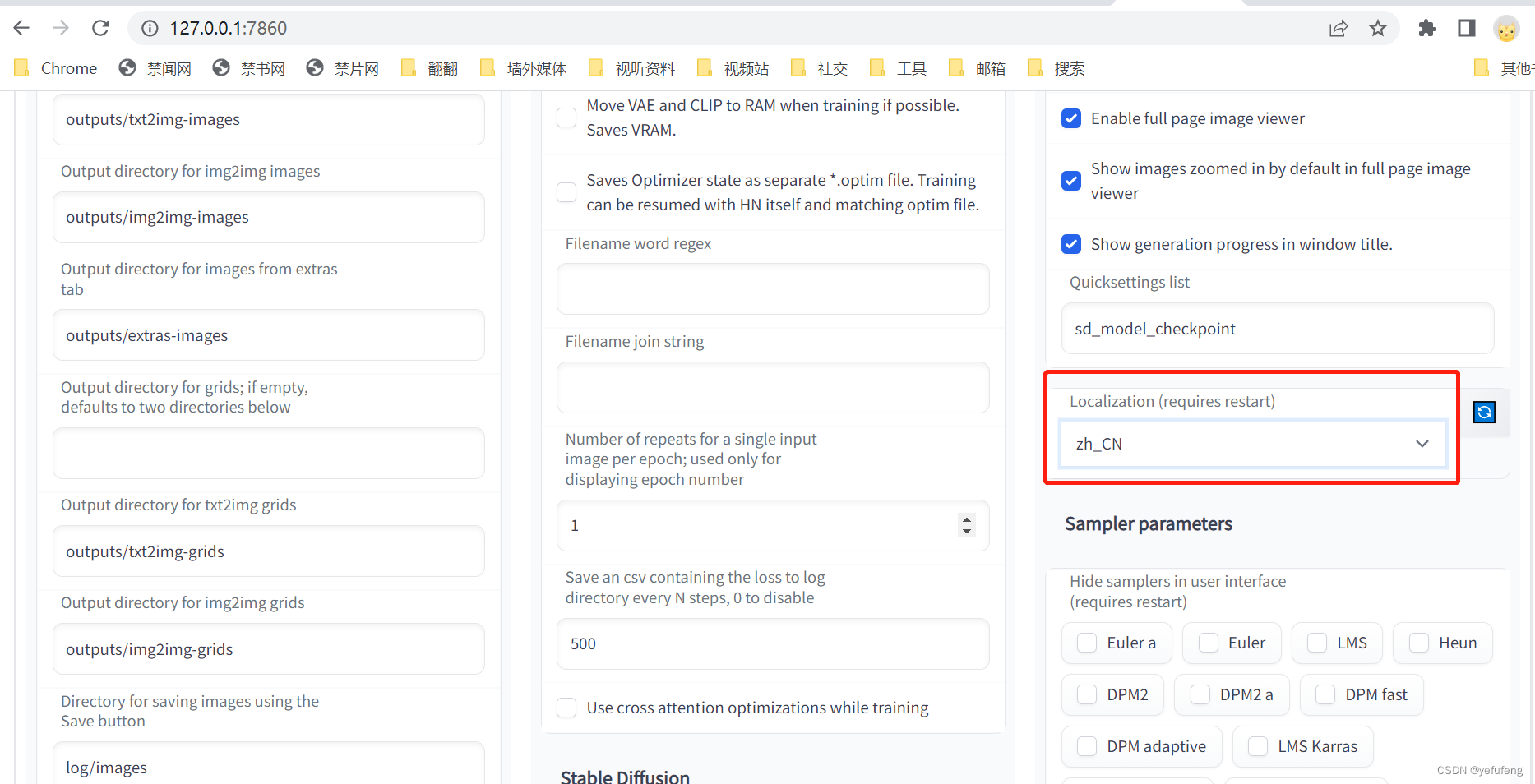
进入平台的设置页面,选择语言为中文,重启程序之后,即可看到页面显示为中文。
在界面中输入作画内容的正向提示词(画想要什么特征)和反向提示词(画不想要什么特征),点击生成即可开始自动作画。
如上述的提示词作出的画如图(由于随机种子不同,生成的画会有差异)。

六、如何设置提示词
这里建议使用元素法典https://docs.qq.com/doc/DWHl3am5Zb05QbGVs,上面有前人整理好的提示词及效果,以供参考。

七、可能遇到的问题
1、GitHub访问不了或访问慢
一般为DNS解析问题,需要修改本地host文件,增加配置内容,绕过域名解析,达到加速访问的目的。
访问https://www.ipaddress.com/,分别输入
github.com和github.global.ssl.fastly.net,获取域名对应的IP地址。


打开系统的Host文件,将IP和域名的对应关系配置到Host文件中。
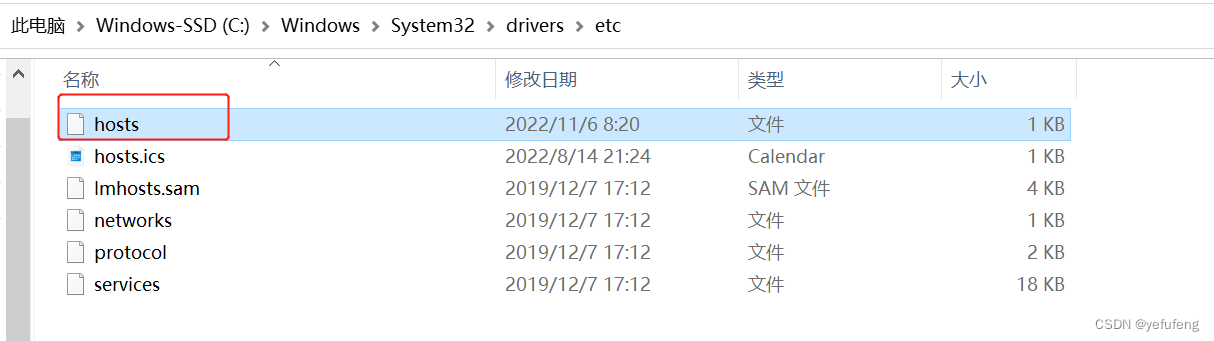
配置文件内容如下:140.82.114.4 github.com 199.232.5.194 github.global.ssl.fastly.net- 1
- 2
执行命令
ipconfig /flushdns刷新DNS即可。2、pip安装依赖库慢或常下载失败
pip安装依赖库时默认选择国外的源,安装速度会非常慢,可以考虑切换为国内源,常用的国内源如下:
阿里云 https://mirrors.aliyun.com/pypi/simple/ 中国科技大学 https://pypi.mirrors.ustc.edu.cn/simple/ 豆瓣(douban) https://pypi.douban.com/simple/ 清华大学 https://pypi.tuna.tsinghua.edu.cn/simple/ 中国科学技术大学 https://pypi.mirrors.ustc.edu.cn/simple/- 1
- 2
- 3
- 4
- 5
在安装依赖库时,可使用
pip install -i 源 空格 安装包名称进行源的选择,如pip install -i https://mirrors.aliyun.com/pypi/simple numpy。也可以通过增加配置文件,使安装依赖库时默认选择国内的源,在用户目录下增加
pip.ini文件。

在文件中写入如下内容。[global] timeout = 60000 index-url = https://pypi.tuna.tsinghua.edu.cn/simple [install] use-mirrors = true mirrors = https://pypi.tuna.tsinghua.edu.cn- 1
- 2
- 3
- 4
- 5
- 6
- 7
3、安装CLIP时提示Connection was aborted, errno 10053
出错时的错误打印如下:
(novelai) E:\workspace\02_Python\novalai\stable-diffusion-webui>python launch.py Python 3.10.6 | packaged by conda-forge | (main, Oct 24 2022, 16:02:16) [MSC v.1916 64 bit (AMD64)] Commit hash: b8f2dfed3c0085f1df359b9dc5b3841ddc2196f0 Installing clip Traceback (most recent call last): File "E:\workspace\02_Python\novalai\stable-diffusion-webui\launch.py", line 251, in <module> prepare_enviroment() File "E:\workspace\02_Python\novalai\stable-diffusion-webui\launch.py", line 178, in prepare_enviroment run_pip(f"install {clip_package}", "clip") File "E:\workspace\02_Python\novalai\stable-diffusion-webui\launch.py", line 63, in run_pip return run(f'"{python}" -m pip {args} --prefer-binary{index_url_line}', desc=f"Installing {desc}", errdesc=f"Couldn't install {desc}") File "E:\workspace\02_Python\novalai\stable-diffusion-webui\launch.py", line 34, in run raise RuntimeError(message) RuntimeError: Couldn't install clip. Command: "D:\anaconda3\envs\novelai\python.exe" -m pip install git+https://github.com/openai/CLIP.git@d50d76daa670286dd6cacf3bcd80b5e4823fc8e1 --prefer-binary Error code: 1 stdout: Looking in indexes: https://pypi.tuna.tsinghua.edu.cn/simple Collecting git+https://github.com/openai/CLIP.git@d50d76daa670286dd6cacf3bcd80b5e4823fc8e1 Cloning https://github.com/openai/CLIP.git (to revision d50d76daa670286dd6cacf3bcd80b5e4823fc8e1) to c:\users\yefuf\appdata\local\temp\pip-req-build-f8w7kbzg stderr: Running command git clone --filter=blob:none --quiet https://github.com/openai/CLIP.git 'C:\Users\yefuf\AppData\Local\Temp\pip-req-build-f8w7kbzg' fatal: unable to access 'https://github.com/openai/CLIP.git/': OpenSSL SSL_read: Connection was aborted, errno 10053 error: subprocess-exited-with-error git clone --filter=blob:none --quiet https://github.com/openai/CLIP.git 'C:\Users\yefuf\AppData\Local\Temp\pip-req-build-f8w7kbzg' did not run successfully. exit code: 128 See above for output. note: This error originates from a subprocess, and is likely not a problem with pip. error: subprocess-exited-with-error git clone --filter=blob:none --quiet https://github.com/openai/CLIP.git 'C:\Users\yefuf\AppData\Local\Temp\pip-req-build-f8w7kbzg' did not run successfully. exit code: 128 See above for output. note: This error originates from a subprocess, and is likely not a problem with pip.- 1
- 2
- 3
- 4
- 5
- 6
- 7
- 8
- 9
- 10
- 11
- 12
- 13
- 14
- 15
- 16
- 17
- 18
- 19
- 20
- 21
- 22
- 23
- 24
- 25
- 26
- 27
- 28
- 29
- 30
- 31
- 32
- 33
- 34
- 35
- 36
- 37
- 38
通过访
CLIP项目GitHub主页,发现该项目可以通过如下命令进行安装解决。pip install ftfy regex tqdm pip install git+https://github.com/openai/CLIP.git- 1
- 2
4、项目启动中提示Connection was reset in connection to github.com
出错时的错误打印如下:
(novelai) E:\workspace\02_Python\novalai\stable-diffusion-webui>python launch.py Python 3.10.6 | packaged by conda-forge | (main, Oct 24 2022, 16:02:16) [MSC v.1916 64 bit (AMD64)] Commit hash: b8f2dfed3c0085f1df359b9dc5b3841ddc2196f0 Cloning Stable Diffusion into repositories\stable-diffusion... Cloning Taming Transformers into repositories\taming-transformers... Traceback (most recent call last): File "E:\workspace\02_Python\novalai\stable-diffusion-webui\launch.py", line 251, in <module> prepare_enviroment() File "E:\workspace\02_Python\novalai\stable-diffusion-webui\launch.py", line 201, in prepare_enviroment git_clone(taming_transformers_repo, repo_dir('taming-transformers'), "Taming Transformers", taming_transformers_commit_hash) File "E:\workspace\02_Python\novalai\stable-diffusion-webui\launch.py", line 85, in git_clone run(f'"{git}" clone "{url}" "{dir}"', f"Cloning {name} into {dir}...", f"Couldn't clone {name}") File "E:\workspace\02_Python\novalai\stable-diffusion-webui\launch.py", line 34, in run raise RuntimeError(message) RuntimeError: Couldn't clone Taming Transformers. Command: "git" clone "https://github.com/CompVis/taming-transformers.git" "repositories\taming-transformers" Error code: 128 stdout:stderr: Cloning into ' repositories\taming-transformers'... fatal: unable to access 'https://github.com/CompVis/taming-transformers.git/': OpenSSL SSL_connect: Connection was reset in connection to github.com:443- 1
- 2
- 3
- 4
- 5
- 6
- 7
- 8
- 9
- 10
- 11
- 12
- 13
- 14
- 15
- 16
- 17
- 18
- 19
- 20
在命令窗口中输入如下命令,然后重新运行程序,但实际操作下来,仍有较大概率在克隆项目的过程中失败。
git config --global http.postBuffer 524288000 git config --global http.sslVerify "false"- 1
- 2
查看
lauch.py中的代码可以发现,程序在启动时有对依赖项目进行检查,如项目不存在,则克隆下来。def prepare_enviroment(): torch_command = os.environ.get('TORCH_COMMAND', "pip install torch==1.12.1+cu113 torchvision==0.13.1+cu113 --extra-index-url https://download.pytorch.org/whl/cu113") requirements_file = os.environ.get('REQS_FILE', "requirements_versions.txt") commandline_args = os.environ.get('COMMANDLINE_ARGS', "") gfpgan_package = os.environ.get('GFPGAN_PACKAGE', "git+https://github.com/TencentARC/GFPGAN.git@8d2447a2d918f8eba5a4a01463fd48e45126a379") clip_package = os.environ.get('CLIP_PACKAGE', "git+https://github.com/openai/CLIP.git@d50d76daa670286dd6cacf3bcd80b5e4823fc8e1") deepdanbooru_package = os.environ.get('DEEPDANBOORU_PACKAGE', "git+https://github.com/KichangKim/DeepDanbooru.git@d91a2963bf87c6a770d74894667e9ffa9f6de7ff") xformers_windows_package = os.environ.get('XFORMERS_WINDOWS_PACKAGE', 'https://github.com/C43H66N12O12S2/stable-diffusion-webui/releases/download/f/xformers-0.0.14.dev0-cp310-cp310-win_amd64.whl') stable_diffusion_repo = os.environ.get('STABLE_DIFFUSION_REPO', "https://github.com/CompVis/stable-diffusion.git") taming_transformers_repo = os.environ.get('TAMING_REANSFORMERS_REPO', "https://github.com/CompVis/taming-transformers.git") k_diffusion_repo = os.environ.get('K_DIFFUSION_REPO', 'https://github.com/crowsonkb/k-diffusion.git') codeformer_repo = os.environ.get('CODEFORMET_REPO', 'https://github.com/sczhou/CodeFormer.git') blip_repo = os.environ.get('BLIP_REPO', 'https://github.com/salesforce/BLIP.git') stable_diffusion_commit_hash = os.environ.get('STABLE_DIFFUSION_COMMIT_HASH', "69ae4b35e0a0f6ee1af8bb9a5d0016ccb27e36dc") taming_transformers_commit_hash = os.environ.get('TAMING_TRANSFORMERS_COMMIT_HASH', "24268930bf1dce879235a7fddd0b2355b84d7ea6") k_diffusion_commit_hash = os.environ.get('K_DIFFUSION_COMMIT_HASH', "f4e99857772fc3a126ba886aadf795a332774878") codeformer_commit_hash = os.environ.get('CODEFORMER_COMMIT_HASH', "c5b4593074ba6214284d6acd5f1719b6c5d739af") blip_commit_hash = os.environ.get('BLIP_COMMIT_HASH', "48211a1594f1321b00f14c9f7a5b4813144b2fb9")- 1
- 2
- 3
- 4
- 5
- 6
- 7
- 8
- 9
- 10
- 11
- 12
- 13
- 14
- 15
- 16
- 17
- 18
- 19
- 20
- 21
- 22
因此,我们打开
git bash重新执行上述两条git命令,预先将项目克隆下来。git clone https://github.com/CompVis/taming-transformers.git "repositories\taming-transformers" git clone https://github.com/crowsonkb/k-diffusion.git "repositories\k-diffusion" git clone https://github.com/sczhou/CodeFormer.git "repositories\CodeFormer" git clone https://github.com/salesforce/BLIP.git "repositories\BLIP"- 1
- 2
- 3
- 4
- 5
- 6
- 7
克隆完成之后如图:

5、项目启动中提示CUDA out of memory
出错时的错误打印如下:
(novelai) E:\workspace\02_Python\novalai\stable-diffusion-webui>python launch.py Python 3.10.6 | packaged by conda-forge | (main, Oct 24 2022, 16:02:16) [MSC v.1916 64 bit (AMD64)] Commit hash: b8f2dfed3c0085f1df359b9dc5b3841ddc2196f0 Fetching updates for BLIP... Checking out commit for BLIP with hash: 48211a1594f1321b00f14c9f7a5b4813144b2fb9... Installing requirements for CodeFormer Installing requirements for Web UI Launching Web UI with arguments: Moving sd-v1-4.ckpt from E:\workspace\02_Python\novalai\stable-diffusion-webui\models to E:\workspace\02_Python\novalai\stable-diffusion-webui\models\Stable-diffusion. LatentDiffusion: Running in eps-prediction mode DiffusionWrapper has 859.52 M params. making attention of type 'vanilla' with 512 in_channels Working with z of shape (1, 4, 32, 32) = 4096 dimensions. making attention of type 'vanilla' with 512 in_channels Downloading: 100%|██████████████████████████████████████████████████████████████████| 939k/939k [00:00<00:00, 1.26MB/s] Downloading: 100%|███████████████████████████████████████████████████████████████████| 512k/512k [00:01<00:00, 344kB/s] Downloading: 100%|████████████████████████████████████████████████████████████████████████████| 389/389 [00:00 start() File "E:\workspace\02_Python\novalai\stable-diffusion-webui\launch.py", line 247, in start webui.webui() File "E:\workspace\02_Python\novalai\stable-diffusion-webui\webui.py", line 148, in webui initialize() File "E:\workspace\02_Python\novalai\stable-diffusion-webui\webui.py", line 83, in initialize modules.sd_models.load_model() File "E:\workspace\02_Python\novalai\stable-diffusion-webui\modules\sd_models.py", line 252, in load_model sd_model.to(shared.device) File "D:\anaconda3\envs\novelai\lib\site-packages\pytorch_lightning\core\mixins\device_dtype_mixin.py", line 113, in to return super().to(*args, **kwargs) File "D:\anaconda3\envs\novelai\lib\site-packages\torch\nn\modules\module.py", line 987, in to return self._apply(convert) File "D:\anaconda3\envs\novelai\lib\site-packages\torch\nn\modules\module.py", line 639, in _apply module._apply(fn) File "D:\anaconda3\envs\novelai\lib\site-packages\torch\nn\modules\module.py", line 639, in _apply module._apply(fn) File "D:\anaconda3\envs\novelai\lib\site-packages\torch\nn\modules\module.py", line 639, in _apply module._apply(fn) [Previous line repeated 2 more times] File "D:\anaconda3\envs\novelai\lib\site-packages\torch\nn\modules\module.py", line 662, in _apply param_applied = fn(param) File "D:\anaconda3\envs\novelai\lib\site-packages\torch\nn\modules\module.py", line 985, in convert return t.to(device, dtype if t.is_floating_point() or t.is_complex() else None, non_blocking) torch.cuda.OutOfMemoryError: CUDA out of memory. Tried to allocate 20.00 MiB (GPU 0; 2.00 GiB total capacity; 1.68 GiB already allocated; 0 bytes free; 1.72 GiB reserved in total by PyTorch) If reserved memory is >> allocated memory try setting max_split_size_mb to avoid fragmentation. See documentation for Memory Management and PYTORCH_CUDA_ALLOC_CONF- 1
- 2
- 3
- 4
- 5
- 6
- 7
- 8
- 9
- 10
- 11
- 12
- 13
- 14
- 15
- 16
- 17
- 18
- 19
- 20
- 21
- 22
- 23
- 24
- 25
- 26
- 27
- 28
- 29
- 30
- 31
- 32
- 33
- 34
- 35
- 36
- 37
- 38
- 39
- 40
- 41
- 42
- 43
- 44
- 45
- 46
- 47
- 48
- 49
根据提示,先尝试用如下命令改变
pytorch配置,仍旧报错!set PYTORCH_CUDA_ALLOC_CONF=garbage_collection_threshold:0.6,max_split_size_mb:128- 1
尝试增加代码
with torch.no_grad(),使内存就不会分配参数梯度的空间,仍旧报错!

由于提示内存溢出,先通过控制面板->所有控制面板项->管理工具->系统信息,查看显卡内存大小。

官方推荐的显卡内存大小为4GB以上,而笔者的显卡内存只有2GB,显然GPU不符合要求。查看项目的命令选项,发现项目支持CPU计算--use-cpu。(novelai) E:\workspace\02_Python\novalai\stable-diffusion-webui>python launch.py -h Python 3.10.6 | packaged by conda-forge | (main, Oct 24 2022, 16:02:16) [MSC v.1916 64 bit (AMD64)] Commit hash: b8f2dfed3c0085f1df359b9dc5b3841ddc2196f0 Installing requirements for Web UI Launching Web UI with arguments: -h usage: launch.py [-h] [--config CONFIG] [--ckpt CKPT] [--ckpt-dir CKPT_DIR] [--gfpgan-dir GFPGAN_DIR] [--gfpgan-model GFPGAN_MODEL] [--no-half] [--no-half-vae] [--no-progressbar-hiding] [--max-batch-count MAX_BATCH_COUNT] [--embeddings-dir EMBEDDINGS_DIR] [--hypernetwork-dir HYPERNETWORK_DIR] [--localizations-dir LOCALIZATIONS_DIR] [--allow-code] [--medvram] [--lowvram] [--lowram] [--always-batch-cond-uncond] [--unload-gfpgan] [--precision {full,autocast}] [--share] [--ngrok NGROK] [--ngrok-region NGROK_REGION] [--enable-insecure-extension-access] [--codeformer-models-path CODEFORMER_MODELS_PATH] [--gfpgan-models-path GFPGAN_MODELS_PATH] [--esrgan-models-path ESRGAN_MODELS_PATH] [--bsrgan-models-path BSRGAN_MODELS_PATH] [--realesrgan-models-path REALESRGAN_MODELS_PATH] [--scunet-models-path SCUNET_MODELS_PATH] [--swinir-models-path SWINIR_MODELS_PATH] [--ldsr-models-path LDSR_MODELS_PATH] [--clip-models-path CLIP_MODELS_PATH] [--xformers] [--force-enable-xformers] [--deepdanbooru] [--opt-split-attention] [--opt-split-attention-invokeai] [--opt-split-attention-v1] [--disable-opt-split-attention] [--use-cpu {all,sd,interrogate,gfpgan,swinir,esrgan,scunet,codeformer} [{all,sd,interrogate,gfpgan,swinir,esrgan,scunet,codeformer} ...]] [--listen] [--port PORT] [--show-negative-prompt] [--ui-config-file UI_CONFIG_FILE] [--hide-ui-dir-config] [--freeze-settings] [--ui-settings-file UI_SETTINGS_FILE] [--gradio-debug] [--gradio-auth GRADIO_AUTH] [--gradio-img2img-tool {color-sketch,editor}] [--opt-channelslast] [--styles-file STYLES_FILE] [--autolaunch] [--theme THEME] [--use-textbox-seed] [--disable-console-progressbars] [--enable-console-prompts] [--vae-path VAE_PATH] [--disable-safe-unpickle] [--api] [--nowebui] [--ui-debug-mode] [--device-id DEVICE_ID] [--administrator] [--cors-allow-origins CORS_ALLOW_ORIGINS] [--tls-keyfile TLS_KEYFILE] [--tls-certfile TLS_CERTFILE] [--server-name SERVER_NAME] options: -h, --help show this help message and exit --config CONFIG path to config which constructs model --ckpt CKPT path to checkpoint of stable diffusion model; if specified, this checkpoint will be added to the list of checkpoints and loaded --ckpt-dir CKPT_DIR Path to directory with stable diffusion checkpoints --gfpgan-dir GFPGAN_DIR GFPGAN directory --gfpgan-model GFPGAN_MODEL GFPGAN model file name --no-half do not switch the model to 16-bit floats --no-half-vae do not switch the VAE model to 16-bit floats --no-progressbar-hiding do not hide progressbar in gradio UI (we hide it because it slows down ML if you have hardware acceleration in browser) --max-batch-count MAX_BATCH_COUNT maximum batch count value for the UI --embeddings-dir EMBEDDINGS_DIR embeddings directory for textual inversion (default: embeddings) --hypernetwork-dir HYPERNETWORK_DIR hypernetwork directory --localizations-dir LOCALIZATIONS_DIR localizations directory --allow-code allow custom script execution from webui --medvram enable stable diffusion model optimizations for sacrificing a little speed for low VRM usage --lowvram enable stable diffusion model optimizations for sacrificing a lot of speed for very low VRM usage --lowram load stable diffusion checkpoint weights to VRAM instead of RAM --always-batch-cond-uncond disables cond/uncond batching that is enabled to save memory with --medvram or --lowvram --unload-gfpgan does not do anything. --precision {full,autocast} evaluate at this precision --share use share=True for gradio and make the UI accessible through their site --ngrok NGROK ngrok authtoken, alternative to gradio --share --ngrok-region NGROK_REGION The region in which ngrok should start. --enable-insecure-extension-access enable extensions tab regardless of other options --codeformer-models-path CODEFORMER_MODELS_PATH Path to directory with codeformer model file(s). --gfpgan-models-path GFPGAN_MODELS_PATH Path to directory with GFPGAN model file(s). --esrgan-models-path ESRGAN_MODELS_PATH Path to directory with ESRGAN model file(s). --bsrgan-models-path BSRGAN_MODELS_PATH Path to directory with BSRGAN model file(s). --realesrgan-models-path REALESRGAN_MODELS_PATH Path to directory with RealESRGAN model file(s). --scunet-models-path SCUNET_MODELS_PATH Path to directory with ScuNET model file(s). --swinir-models-path SWINIR_MODELS_PATH Path to directory with SwinIR model file(s). --ldsr-models-path LDSR_MODELS_PATH Path to directory with LDSR model file(s). --clip-models-path CLIP_MODELS_PATH Path to directory with CLIP model file(s). --xformers enable xformers for cross attention layers --force-enable-xformers enable xformers for cross attention layers regardless of whether the checking code thinks you can run it; do not make bug reports if this fails to work --deepdanbooru enable deepdanbooru interrogator --opt-split-attention force-enables Doggettx's cross-attention layer optimization. By default, it's on for torch cuda. --opt-split-attention-invokeai force-enables InvokeAI's cross-attention layer optimization. By default, it's on when cuda is unavailable. --opt-split-attention-v1 enable older version of split attention optimization that does not consume all the VRAM it can find --disable-opt-split-attention force-disables cross-attention layer optimization --use-cpu {all,sd,interrogate,gfpgan,swinir,esrgan,scunet,codeformer} [{all,sd,interrogate,gfpgan,swinir,esrgan,scunet,codeformer} ...] use CPU as torch device for specified modules --listen launch gradio with 0.0.0.0 as server name, allowing to respond to network requests --port PORT launch gradio with given server port, you need root/admin rights for ports < 1024, defaults to 7860 if available --show-negative-prompt does not do anything --ui-config-file UI_CONFIG_FILE filename to use for ui configuration --hide-ui-dir-config hide directory configuration from webui --freeze-settings disable editing settings --ui-settings-file UI_SETTINGS_FILE filename to use for ui settings --gradio-debug launch gradio with --debug option --gradio-auth GRADIO_AUTH set gradio authentication like "username:password"; or comma-delimit multiple like "u1:p1,u2:p2,u3:p3" --gradio-img2img-tool {color-sketch,editor} gradio image uploader tool: can be either editor for ctopping, or color-sketch for drawing --opt-channelslast change memory type for stable diffusion to channels last --styles-file STYLES_FILE filename to use for styles --autolaunch open the webui URL in the system's default browser upon launch --theme THEME launches the UI with light or dark theme --use-textbox-seed use textbox for seeds in UI (no up/down, but possible to input long seeds) --disable-console-progressbars do not output progressbars to console --enable-console-prompts print prompts to console when generating with txt2img and img2img --vae-path VAE_PATH Path to Variational Autoencoders model --disable-safe-unpickle disable checking pytorch models for malicious code --api use api=True to launch the api with the webui --nowebui use api=True to launch the api instead of the webui --ui-debug-mode Don't load model to quickly launch UI --device-id DEVICE_ID Select the default CUDA device to use (export CUDA_VISIBLE_DEVICES=0,1,etc might be needed before) --administrator Administrator rights --cors-allow-origins CORS_ALLOW_ORIGINS Allowed CORS origins --tls-keyfile TLS_KEYFILE Partially enables TLS, requires --tls-certfile to fully function --tls-certfile TLS_CERTFILE Partially enables TLS, requires --tls-keyfile to fully function --server-name SERVER_NAME Sets hostname of server- 1
- 2
- 3
- 4
- 5
- 6
- 7
- 8
- 9
- 10
- 11
- 12
- 13
- 14
- 15
- 16
- 17
- 18
- 19
- 20
- 21
- 22
- 23
- 24
- 25
- 26
- 27
- 28
- 29
- 30
- 31
- 32
- 33
- 34
- 35
- 36
- 37
- 38
- 39
- 40
- 41
- 42
- 43
- 44
- 45
- 46
- 47
- 48
- 49
- 50
- 51
- 52
- 53
- 54
- 55
- 56
- 57
- 58
- 59
- 60
- 61
- 62
- 63
- 64
- 65
- 66
- 67
- 68
- 69
- 70
- 71
- 72
- 73
- 74
- 75
- 76
- 77
- 78
- 79
- 80
- 81
- 82
- 83
- 84
- 85
- 86
- 87
- 88
- 89
- 90
- 91
- 92
- 93
- 94
- 95
- 96
- 97
- 98
- 99
- 100
- 101
- 102
- 103
- 104
- 105
- 106
- 107
- 108
- 109
- 110
- 111
- 112
- 113
- 114
- 115
- 116
- 117
- 118
- 119
- 120
- 121
- 122
- 123
- 124
- 125
- 126
- 127
- 128
- 129
- 130
- 131
- 132
- 133
- 134
- 135
- 136
- 137
- 138
- 139
- 140
- 141
- 142
- 143
- 144
- 145
- 146
- 147
- 148
尝试构造如下运行参数,
--use-cpu all使所有模块均使用CPU计算,--lowram --always-batch-cond-uncond使用低内存配置选项,程序可以成功运行。(novelai) E:\workspace\02_Python\novalai\stable-diffusion-webui>python launch.py --lowram --always-batch-cond-uncond --use-cpu all Python 3.10.6 | packaged by conda-forge | (main, Oct 24 2022, 16:02:16) [MSC v.1916 64 bit (AMD64)] Commit hash: b8f2dfed3c0085f1df359b9dc5b3841ddc2196f0 Installing requirements for Web UI Launching Web UI with arguments: --lowram --always-batch-cond-uncond --use-cpu all Warning: caught exception 'Expected a cuda device, but got: cpu', memory monitor disabled LatentDiffusion: Running in eps-prediction mode DiffusionWrapper has 859.52 M params. making attention of type 'vanilla' with 512 in_channels Working with z of shape (1, 4, 32, 32) = 4096 dimensions. making attention of type 'vanilla' with 512 in_channels Loading weights [7460a6fa] from E:\workspace\02_Python\novalai\stable-diffusion-webui\models\Stable-diffusion\sd-v1-4.ckpt Global Step: 470000 Applying cross attention optimization (Doggettx). Model loaded. Loaded a total of 0 textual inversion embeddings. Embeddings: Running on local URL: http://127.0.0.1:7860 To create a public link, set `share=True` in `launch()`.- 1
- 2
- 3
- 4
- 5
- 6
- 7
- 8
- 9
- 10
- 11
- 12
- 13
- 14
- 15
- 16
- 17
- 18
- 19
- 20
然而,开始作画时提示
RuntimeError: "LayerNormKernelImpl" not implemented for 'Half'错误!如果安装网上的处理方法,将half函数在工程中替换为float函数,则会出现device不匹配问题。Traceback (most recent call last): File "E:\workspace\02_Python\novalai\stable-diffusion-webui\modules\ui.py", line 185, in f res = list(func(*args, **kwargs)) File "E:\workspace\02_Python\novalai\stable-diffusion-webui\webui.py", line 57, in f res = func(*args, **kwargs) File "E:\workspace\02_Python\novalai\stable-diffusion-webui\modules\txt2img.py", line 48, in txt2img processed = process_images(p) File "E:\workspace\02_Python\novalai\stable-diffusion-webui\modules\processing.py", line 423, in process_images res = process_images_inner(p) File "E:\workspace\02_Python\novalai\stable-diffusion-webui\modules\processing.py", line 508, in process_images_inner uc = prompt_parser.get_learned_conditioning(shared.sd_model, len(prompts) * [p.negative_prompt], p.steps) File "E:\workspace\02_Python\novalai\stable-diffusion-webui\modules\prompt_parser.py", line 138, in get_learned_conditioning conds = model.get_learned_conditioning(texts) File "E:\workspace\02_Python\novalai\stable-diffusion-webui\repositories\stable-diffusion\ldm\models\diffusion\ddpm.py", line 558, in get_learned_conditioning c = self.cond_stage_model(c) File "D:\anaconda3\envs\novelai\lib\site-packages\torch\nn\modules\module.py", line 1190, in _call_impl return forward_call(*input, **kwargs) File "E:\workspace\02_Python\novalai\stable-diffusion-webui\modules\sd_hijack.py", line 338, in forward z1 = self.process_tokens(tokens, multipliers) File "E:\workspace\02_Python\novalai\stable-diffusion-webui\extensions\aesthetic-gradients\aesthetic_clip.py", line 202, in __call__ z = self.process_tokens(remade_batch_tokens, multipliers) File "E:\workspace\02_Python\novalai\stable-diffusion-webui\modules\sd_hijack.py", line 353, in process_tokens outputs = self.wrapped.transformer(input_ids=tokens, output_hidden_states=-opts.CLIP_stop_at_last_layers) File "D:\anaconda3\envs\novelai\lib\site-packages\torch\nn\modules\module.py", line 1190, in _call_impl return forward_call(*input, **kwargs) File "D:\anaconda3\envs\novelai\lib\site-packages\transformers\models\clip\modeling_clip.py", line 722, in forward return self.text_model( File "D:\anaconda3\envs\novelai\lib\site-packages\torch\nn\modules\module.py", line 1190, in _call_impl return forward_call(*input, **kwargs) File "D:\anaconda3\envs\novelai\lib\site-packages\transformers\models\clip\modeling_clip.py", line 643, in forward encoder_outputs = self.encoder( File "D:\anaconda3\envs\novelai\lib\site-packages\torch\nn\modules\module.py", line 1190, in _call_impl return forward_call(*input, **kwargs) File "D:\anaconda3\envs\novelai\lib\site-packages\transformers\models\clip\modeling_clip.py", line 574, in forward layer_outputs = encoder_layer( File "D:\anaconda3\envs\novelai\lib\site-packages\torch\nn\modules\module.py", line 1190, in _call_impl return forward_call(*input, **kwargs) File "D:\anaconda3\envs\novelai\lib\site-packages\transformers\models\clip\modeling_clip.py", line 316, in forward hidden_states = self.layer_norm1(hidden_states) File "D:\anaconda3\envs\novelai\lib\site-packages\torch\nn\modules\module.py", line 1190, in _call_impl return forward_call(*input, **kwargs) File "D:\anaconda3\envs\novelai\lib\site-packages\torch\nn\modules\normalization.py", line 190, in forward return F.layer_norm( File "D:\anaconda3\envs\novelai\lib\site-packages\torch\nn\functional.py", line 2515, in layer_norm return torch.layer_norm(input, normalized_shape, weight, bias, eps, torch.backends.cudnn.enabled) RuntimeError: "LayerNormKernelImpl" not implemented for 'Half'- 1
- 2
- 3
- 4
- 5
- 6
- 7
- 8
- 9
- 10
- 11
- 12
- 13
- 14
- 15
- 16
- 17
- 18
- 19
- 20
- 21
- 22
- 23
- 24
- 25
- 26
- 27
- 28
- 29
- 30
- 31
- 32
- 33
- 34
- 35
- 36
- 37
- 38
- 39
- 40
- 41
- 42
- 43
- 44
- 45
- 46
考虑到
--use-cpu参数可以指定模块,则尝试使工程中的部分模块用CPU计算,其余在可用内存方位内用GPU计算,最终构造参数如下,项目可成功作画。然而,此方式作画效率非常低,一般每张图片约5-6分钟。当参数设置较大时,会达到数小时。因此如果有条件可以升级计算机的显卡配置,或租赁云服务器效果会更好。
(novelai) E:\workspace\02_Python\novalai\stable-diffusion-webui>python launch.py --lowram --always-batch-cond-uncond --precision full --no-half --opt-split-attention-v1 --use-cpu sd --autolaunch Python 3.10.6 | packaged by conda-forge | (main, Oct 24 2022, 16:02:16) [MSC v.1916 64 bit (AMD64)] Commit hash: b8f2dfed3c0085f1df359b9dc5b3841ddc2196f0 Installing requirements for Web UI Launching Web UI with arguments: --lowram --always-batch-cond-uncond --precision full --no-half --opt-split-attention-v1 --use-cpu sd Warning: caught exception 'Expected a cuda device, but got: cpu', memory monitor disabled LatentDiffusion: Running in eps-prediction mode DiffusionWrapper has 859.52 M params. making attention of type 'vanilla' with 512 in_channels Working with z of shape (1, 4, 32, 32) = 4096 dimensions. making attention of type 'vanilla' with 512 in_channels Loading weights [7460a6fa] from E:\workspace\02_Python\novalai\stable-diffusion-webui\models\Stable-diffusion\sd-v1-4.ckpt Global Step: 470000 Applying v1 cross attention optimization. Model loaded. Loaded a total of 0 textual inversion embeddings. Embeddings: Running on local URL: http://127.0.0.1:7860 To create a public link, set `share=True` in `launch()`. 100%|███████████████████████████████████████████████████████████████████████████████████████████████████████████████████████| 20/20 [06:30<00:00, 19.50s/it] Total progress: 100%|███████████████████████████████████████████████████████████████████████████████████████████████████████| 20/20 [06:10<00:00, 18.51s/it]- 1
- 2
- 3
- 4
- 5
- 6
- 7
- 8
- 9
- 10
- 11
- 12
- 13
- 14
- 15
- 16
- 17
- 18
- 19
- 20
- 21
- 22
- 23
参考文献:
【作者:墨叶扶风http://blog.csdn.net/yefufeng】
-
相关阅读:
JAVA- Acwing -求 1+2+...+n
Redhat安装oracle 11g
MySQL操作库
Element UI库 之 el-upload 图片上传组件多次上传或重新上传失效bug
1023 组个最小数
c语言每日一练(14)【加强版】
OOA/D 时统一过程(UP)中的 迭代、 进化 和 敏捷
PAT 1137 Final Grading
基于springboot实现的摄影跟拍预定管理系统
国标GB28181视频平台EasyGBS国标平台智能边缘计算网关关于小区电动车进电梯的应用方案设计
- 原文地址:https://blog.csdn.net/yefufeng/article/details/127719952