-
Java项目(三)-- SSM开发社交网站(3)--整合MyBatis-Plus及书评网数据库表设计
MyBatis-Plus
MyBatis-Plus(简称MP)是一个MyBatis的增强工具。
自动实现Mapper CRUD操作,极致提高数据库开发效率。
MP在MyBatis的基础上只做增强不做改变。MyBatis-Plus整合三部曲
pom引入mybatis-plus依赖
打开pom.xml文件引入依赖<dependency> <groupId>com.baomidougroupId> <artifactId>mybatis-plusartifactId> <version>3.3.2version> dependency>- 1
- 2
- 3
- 4
- 5
- 6
Spring XML更改配置SqlSessionFactory实现类
打开applicationContext.xml修改SqlSessionFactory实现类<bean id="sessionFactory" class="com.baomidou.mybatisplus.extension.spring.MybatisSqlSessionFactoryBean"> <property name="dataSource" ref="dataSource"/> <property name="mapperLocations" value="classpath:mappers/*.xml"/> <property name="configLocation" value="classpath:mybatis-config.xml"/> bean>- 1
- 2
- 3
- 4
- 5
- 6
- 7
- 8
- 9
mybatis-config.xml增加MP分页插件
打开mybatis-config.xml添加分页插件配置<plugins> <plugin interceptor="com.baomidou.mybatisplus.extension.plugins.PaginationInterceptor">plugin> plugins>- 1
- 2
- 3
- 4
MyBatis-Plus核心注解
@TableName - 将实体类与表名映射
@TableId - 说明对应属性是表的主键
@TableField - 设置属性与列名的对应关系
如果字段名与属性名相同或者符合驼峰命名转换规则,则TableField可省略BaseMapper接口核心API

MyBatis-Plus开发三部曲
创建实体类,@TableName/@Tableld/@TableField实现映射
在com.ql.reader.entity包下创建实体类Test.javapackage com.ql.reader.entity; import com.baomidou.mybatisplus.annotation.IdType; import com.baomidou.mybatisplus.annotation.TableField; import com.baomidou.mybatisplus.annotation.TableId; import com.baomidou.mybatisplus.annotation.TableName; @TableName("test")//说明实体对应哪一张表 public class Test { @TableId(type = IdType.AUTO) @TableField("id")//说明属性对应哪个字段 private Integer id; @TableField("content") private String content; public Integer getId() { return id; } public void setId(Integer id) { this.id = id; } public String getContent() { return content; } public void setContent(String content) { this.content = content; } }- 1
- 2
- 3
- 4
- 5
- 6
- 7
- 8
- 9
- 10
- 11
- 12
- 13
- 14
- 15
- 16
- 17
- 18
- 19
- 20
- 21
- 22
- 23
- 24
- 25
- 26
- 27
- 28
- 29
- 30
- 31
- 32
创建Mapper接口继承BaseMapper,创建Mapper XML
打开com.ql.reader.mapper包下的TestMapper.java修改内容为package com.ql.reader.mapper; import com.baomidou.mybatisplus.core.mapper.BaseMapper; import com.ql.reader.entity.Test; public interface TestMapper extends BaseMapper<Test> { public void insertSample(); }- 1
- 2
- 3
- 4
- 5
- 6
- 7
- 8
- 9
同时修改src/main/resources/mappers目录下的test.xml文件
DOCTYPE mapper PUBLIC "-//mybatis.org//DTD Mapper 3.0//EN" "http://mybatis.org/dtd/mybatis-3-mapper.dtd"> <mapper namespace="com.ql.reader.mapper.TestMapper"> <insert id="insertSample"> insert into test(content) values ('测试内容') insert> mapper>- 1
- 2
- 3
- 4
- 5
- 6
- 7
开发时注入Mapper对象,通过内置API实现CRUD操作
在src/test/java/com/ql/reader目录下创建测试类MyBatisPlusTest.javapackage com.ql.reader; import com.ql.reader.entity.Test; import com.ql.reader.mapper.TestMapper; import org.junit.runner.RunWith; import org.springframework.test.context.ContextConfiguration; import org.springframework.test.context.junit4.SpringJUnit4ClassRunner; import javax.annotation.Resource; @RunWith(SpringJUnit4ClassRunner.class) @ContextConfiguration(locations = {"classpath:applicationContext.xml"}) public class MyBatisPlusTest { @Resource private TestMapper testMapper; @org.junit.Test public void testInsert(){ Test test = new Test(); test.setContent("MyBatis Plus测试"); testMapper.insert(test); } @org.junit.Test public void testUpdate(){ Test test = testMapper.selectById(24); test.setContent("MyBatis Plus测试1"); testMapper.updateById(test); } @org.junit.Test public void testDelete(){ testMapper.deleteById(24); } @org.junit.Test public void testSelect(){ QueryWrapper<Test> queryWrapper = new QueryWrapper<>(); queryWrapper.eq("id", 23); queryWrapper.gt("id", 20); List<Test> list = testMapper.selectList(queryWrapper); System.out.println(list.get(0)); } }- 1
- 2
- 3
- 4
- 5
- 6
- 7
- 8
- 9
- 10
- 11
- 12
- 13
- 14
- 15
- 16
- 17
- 18
- 19
- 20
- 21
- 22
- 23
- 24
- 25
- 26
- 27
- 28
- 29
- 30
- 31
- 32
- 33
- 34
- 35
- 36
- 37
- 38
- 39
- 40
- 41
- 42
- 43
- 44
- 45
依次去运行测试方法,运行成功。


书评网数据库表设计
案例分析

数据库建表
打开Navicat连接数据库,创建数据表
图书表book

会员表member

评论表evaluation

分类表category

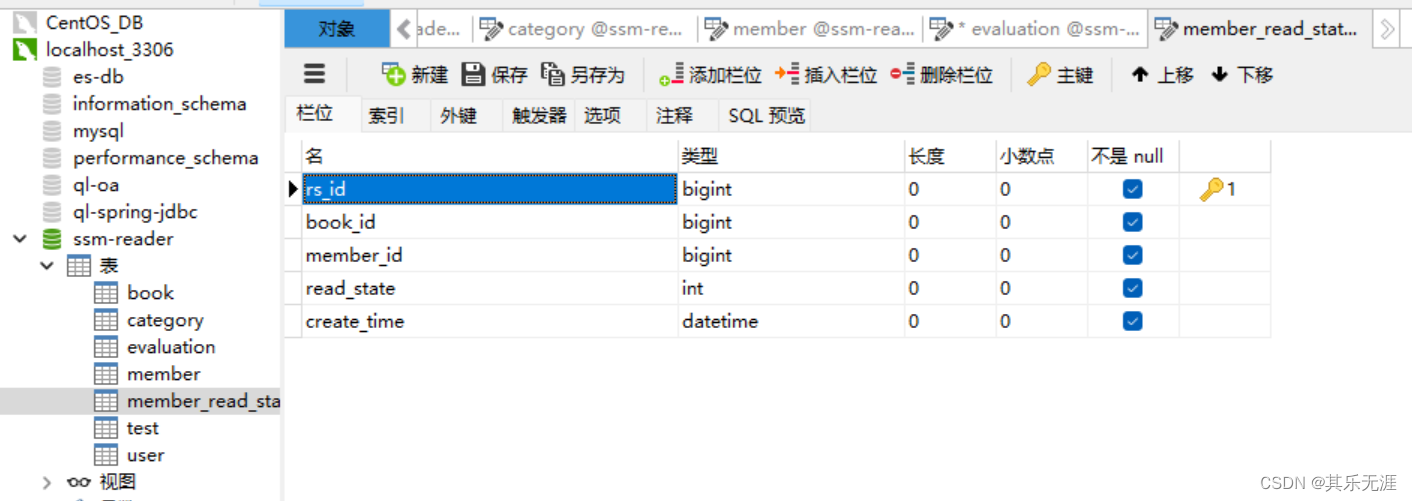
阅读状态表member_read_state
后台管理员用户表user

-
相关阅读:
JVM学习笔记(四)类加载与字节码技术
代码随想录训练营day46, 单词拆分和多重背包
Himall商城LinqHelper帮助类(1)
Centos Linux 7系统基础配置
FL Studio21.2破解版更新下载
模板模式+策略模式优化
英语作文写作步骤及模板例句(1)
金仓数据库兼容Oracle exp/imp的导出导入工具手册(3. exp/imp工具介绍)
【python】字典的使用
Java基础(二十五):JDBC
- 原文地址:https://blog.csdn.net/qq_32091929/article/details/127271959
