-
iptables防火墙
一、iptables 基本框架
iptables防火墙具有4表5链:
ptables 4表
- nat表(地址转换表)****
- filter表(数据过滤表)******
- raw表(状态跟踪表)(基本不用)
- mangle表(包标记表,流量跟踪)(基本不用)
iptables 5链(区分大小写):
- INPUT链(入站规则)******
- OUTPUT链(出站规则) ******
- FORWARD链(转发规则)****
- PREROUTING链(路由前规则)(用于数据跟踪用处不大)
- POSTROUTING链(路由后规则)(用于数据跟踪用处不大)
重点使用:
filter表下的:INPUT、OUTPUT、FORWARD ******
nat表下的:PREROUTING(包出去前,修改包的目的地址)、POSTROUTING(包进入前,修改包的源的地址)、OUTPUT(主要控制内部)执行顺序:
表的应用顺序:raw > mangle > nat > filter (层层过滤)
链的应用顺序:经过入栈、转发、出战
规则的应用顺序:从上匹配到下,逐条匹配,匹配到后停止不会继续匹配
注:正因为此特性,假如规则(192.168.1.1 × → 192.168.1.2 × →192.168.1.0 √),则192.168.1.2会被192.168.1.2匹配上,阻止。假如规则(192.168.1.0 √ → 192.168.1.2 × →192.168.1.1 × ),则192.168.1.下的所有网段,包括192.168.1.2全部放行,因为匹配到了192.168.1.0 √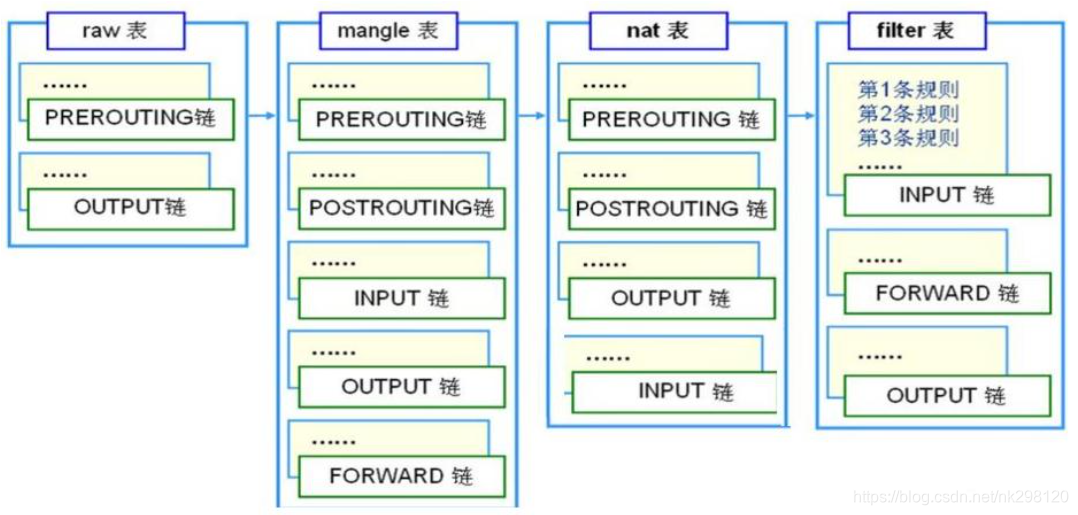
关闭firewalld,启动iptables服务
关闭firewalld服务器
[root@proxy ~]# systemctl stop firewalld.service
[root@proxy ~]# systemctl disable firewalld.service二、iptables基本语法
iptables命令的基本使用方法
iptabels语法格式 [root@proxy ~]# iptables [-t 表名] 选项 [链名] [条件] [-j 目标操作]
注意事项与规律:
可以不指定表,默认为filter表(不加-t)(iptables -t filter 等价于 iptables)
可以不指定链,默认为对应表的所有链 (-I)(iptables -I INPUT 等价于 iptables -I ALL)
按顺序匹配,匹配即停止,如果没有找到匹配条件,则执行防火墙默认规则
选项/链名/目标操作用大写字母,其余都小写插入修改选项:
-D 删除
-I 在链表开头插入这条规则,或者可以指定序号插入第几个位置
-A 在链表的末尾追加一条规则
iptables -nL -t nat 选项:
-t 指定查看那个链路,如果不指定,默认是filter链路
-L 列出-t 后链路的所有的规则
-n 以数字形式显示地址、端口等信息
-v 以更详细的方式显示规则
--line-number 打印序列号
-D 删除那条信息,可以指定序列号删除,也可以匹配规则上加-D
-F 清空所有规则(自创链条无法删除)
-X 清理自定义自创的链路,一般用不到自创
-Z 清零规则序号
-P 修改默认规则
-p 定义协议类型:
-p 后接协议,可以限制对协议的访问,一般有 -p icmp 禁止ping , -p tcp 禁用所有tcp的协议的。-p udp 禁用所有udp 的协议的。没有-p http ,因为http是基于tcp基础进行通信,所以禁用tcp就是禁用http的访问,注意使用-p tcp,会导致ssh等也断开,正确的做法是,先插入开放22端口 iptables -t filter -I INPUT -p tcp --dport=22 -j ACCEPT ,然后在-A 末尾添加 iptables -t filter -A INPUT -p tcp -j DROP
-p tcp --tcp-flags SYN,ACK,FIN,RST,URG,PSH SYN 对TCP的三次握手、四次会挥手的详细报文进行限制
INPUT -p icmp --icmp-type 0 -j DROP 实现自己不能 ping 通其他机器,其他机器能 ping 通我。
INPUT -p icmp --icmp-tpye 8 -j DROP 实现自己能 ping 通其他机器,其他机器不能 ping 通我。
-d 定义端口类型:
-p tcp --dport 搭配 -p tcp,限制那个端口
-p tcp --dport=21:26 可以写多个端口,注意是21~26
-p tcp -m multiport --dport=21,26 限制指定多端口21和26,multiport 限制端口的意思
限定IP地址:
-s 限制那个IP发过来的数据包,注设置后,本机 也无法访问此机器,虽然没有设置 OUTPUT能发出去,但是回包发不进来
-d 限制本机给谁发包
-s -p tcp --dport 限制这个IP,要访问我那个端口
-m iprange --src-range 限制来源地址的范围
-m iprange --dst-range 限制去哪的地址的范围MAC限制:
iptables -I INPUT -m mac --mac-source 00:0c:29:3e:34:34 -j ACCEPT
依据tcp状态限制(了解):
iptables -A INPUT -m state --state ESTABLISHED,RELATED -j ACCEPT 添加一条入站规则:对进来的包的状态进行检测。已经建立tcp连接的包以及该连接相关的包允许通过
iptables -A INPUT -j REJECT --reject-with icmp-host-prohibited 这条规则用在INPUT链默没有DROP的情况,作用与-P DROP相同,当前面所有的规则都没匹配时,自然落到这个 REJECT 上。 类似的FORWARD链也可以这么用:iptables -A FORWARD -j REJECT --reject-with icmp-host-prohibited。
对那个物理网卡限制:
-i 针对那个网卡进行限制,让此网卡不能接受流量或者什么流量,让此网卡出去限制
-i -p tcp -dport 限制其他设备通过那个网卡访问那个端口
-j 目标操作:
ACCEPT:允许通过/放行
DROP:直接丢弃,不给出任何回应
REJECT:拒绝通过,但会提示Unreachable不可达
LOG:记录日志,不任何阻止行为,想要有效果会在传给下一条规则查看规则
iptables -nL # 没有指定那个表,默认查看 filter 表
- [root@nginx01 ~]# iptables -nL
- Chain INPUT (policy ACCEPT) # 此位置代表是INPUT默认策略,默认策略匹配规则最低,如果在规则中都没匹配上,则执行默认策略
- target prot opt source destination
- Chain FORWARD (policy ACCEPT) # FORWARD默认策略 无任何阻拦
- target prot opt source destination
- Chain OUTPUT (policy ACCEPT) # OUTPUT默认策略 无任何阻拦
- target prot opt source destination
- [root@nginx01 ~]# [root@nginx01 ~]# iptables -nL
删除规则
iptables -nL --line-number # 通过iptables -nL打印 filter 表下规则,--line-number打印序列号
iptables -D INPUT 1 # 没有指定那个表,默认filter 表,删除filter 表下的INPUT链路下的第一条规则
或者
在规则的上加 -D,如iptables -t filter -I INPUT -p icmp -j REJECT,删除则是 iptables -t filter -D INPUT -p icmp -j REJECT- [root@nginx01 ~]# iptables -nL --line-number
- Chain INPUT (policy ACCEPT)
- num target prot opt source destination
- 1 REJECT icmp -- 0.0.0.0/0 0.0.0.0/0 reject-with icmp-port-unreachable
- Chain FORWARD (policy ACCEPT)
- num target prot opt source destination
- Chain OUTPUT (policy ACCEPT)
- num target prot opt source destination
- [root@nginx01 ~]# iptables -D INPUT 1
- [root@nginx01 ~]# iptables -nL --line-number
- Chain INPUT (policy ACCEPT)
- num target prot opt source destination
- Chain FORWARD (policy ACCEPT)
- num target prot opt source destination
- Chain OUTPUT (policy ACCEPT)
- num target prot opt source destination
DROP、REJECT 讲解
过滤 icmp 数据包直接拒绝
iptables -t filter -I INPUT -p icmp -j REJECT
- [root@nginx01 ~]# iptables -nL
- Chain INPUT (policy ACCEPT)
- target prot opt source destination
- REJECT icmp -- 0.0.0.0/0 0.0.0.0/0 reject-with icmp-port-unreachable
- Chain FORWARD (policy ACCEPT)
- target prot opt source destination
- Chain OUTPUT (policy ACCEPT)
- target prot opt source destination
- [root@nginx01 ~]# ping 192.168.206.4
- PING 192.168.206.4 (192.168.206.4) 56(84) bytes of data.
- From 192.168.206.4 icmp_seq=1 Destination Port Unreachable
- From 192.168.206.4 icmp_seq=2 Destination Port Unreachable
- From 192.168.206.4 icmp_seq=3 Destination Port Unreachable
- [root@nginx01 ~]# iptables -D INPUT 1
- [root@nginx01 ~]# iptables -t filter -I INPUT -p icmp -j DROP
- [root@nginx01 ~]# ping 192.168.206.4
- PING 192.168.206.4 (192.168.206.4) 56(84) bytes of data.
- ^C
- --- 192.168.206.4 ping statistics ---
- 158 packets transmitted, 0 received, 100% packet loss, time 157165ms
修改默认规则
格式:iptables -t 表 -P 链路 规则
慎重修改,若修改filter INPUT 为 DROP后,所有对外服务都会停止,包括ssh会掉
- [root@nginx01 ~]# iptables -nL
- Chain INPUT (policy ACCEPT)
- target prot opt source destination
- Chain FORWARD (policy ACCEPT)
- target prot opt source destination
- Chain OUTPUT (policy ACCEPT)
- target prot opt source destination
- [root@nginx01 ~]# iptables -t filter -P INPUT DROP # 将 filter 表的 input 链路,默认规则改成DROP,紧接着ssh会断开

注意:-F -X -Z 只能清理默认下的自定义的规则,无法还原默认规则,如果要修改,还是需要iptables -t 表 -P 链路 规则 (iptables -t filter -P INPUT ACCEPT)
三、filter 链路常用方法
根据协议、端口限制通信
- iptables -t filter -I INPUT -p icmp -j REJECT # 禁用ping的icmp
- iptables -t filter -I INPUT -p tcp-j REJECT # 禁用tcp得连接,包括http,包括ssh
- iptables -t filter -I INPUT -p udp-j REJECT # 禁用udp得连接,包括http
- iptables -t filter -I INPUT -p tcp --dport=22 -j ACCEPT # 开放22
限制多端口
- iptables -t filter -I INPUT -p tcp --dport=21:26 -j DROP # 禁用21~26
- iptables -t filter -I INPUT -p tcp -m multiport --dport 21,26 -j DROP # 禁用21和26
注意:在限制之前,建议先增加 iptables -I INPUT -i lo -j ACCEPT 和 iptables -I INPUT -i 本机网卡-j ACCEPT,本机访问自己的端口,也是需要进入网卡的
根据IP限制
-s 源IP
- iptables -t filter -I INPUT -s 192.168.206.4 -j DROP # 限制192.168.206.4的任何访问行为
- iptables -t filter -I INPUT -s 192.168.206.4 -p tcp --dport=22 -j DROP # 限制192.168.206.4机器ssh 22端口请求
-d 目的IP
- [root@nginx01 ~]# iptables -t filter -I OUTPUT -d 192.168.206.4 -j DROP
- [root@nginx01 ~]# ping 192.168.206.4
- PING 192.168.206.4 (192.168.206.4) 56(84) bytes of data.
- ping: sendmsg: 不允许的操作
- ping: sendmsg: 不允许的操作
- ping: sendmsg: 不允许的操作
- ping: sendmsg: 不允许的操作
限制多IP
-m iprange --src-range 限制来源地址的范围
-m iprange --dst-range 限制去哪的地址的范围iptables -A INPUT -p tcp -m iprange --src-range 192.168.206.5-192.168.206.10 -j DROP根据物理网卡限制
- iptables -I INPUT -i ens33 -j DROP # 限制所有访问ens33端口,注意ssh会断开
- iptables -I INPUT -i ens33 -p tcp --dport=80 -j DROP # 限制其他设备通过 ens33 网卡访问80端口
tcp-flags
针对tcp的三次握手和四次挥手的中详细的报文进行过滤,其中在报文的头部会有标识
三次握手
1. (B) --> [SYN] --> (A)
2. (B) <-- [SYN/ACK] <--(A)
3. (B) --> [ACK] --> (A)四次握手
1. (B) --> ACK/FIN --> (A)
2. (B) <-- ACK <-- (A)
3. (B) <-- ACK/FIN <-- (A)
4. (B) --> ACK --> (A)- iptables -A INPUT -p tcp --tcp-flags SYN,ACK,FIN,RST,URG,PSH SYN -j REJECT
- -p tcp --tcp-flags LIST1 LIST2
- 匹配指定的TCP标记,有两个参数列表,列表内部用逗号为分隔符,两个列表之间用空格分开,
- LIST1用作参数检查,LIST2用作参数匹配。可用标志有:
- SYN( 同步; 表示开始会话请求 ),
- ACK(应答),
- FIN(结束; 结束会话),
- RST(复位;中断一个连接) ,
- PSH(推送; 数据包立即发送),
- URG(紧急 ),
- ALL(指选定所有的标记),NONE(指未选定任何标记)
- ALL 代表的SYN,ACK,FIN,RST,URG,PSH
三个规则是等价的,随意设置一个就可以
- iptables -A INPUT -p tcp --syn -j REJECT
- iptables -A INPUT -p tcp --tcp-flags SYN,ACK,FIN,RST,URG,PSH SYN -j REJECT
- iptables -A INPUT -p tcp --tcp-flags ALL SYN -j REJECT
还有PSH (Push) 和URG(Urgent)标记
- URG(紧急位):急指针是一个正的偏移量,和序号字段中的值相加表示紧急数据最后一个字节的序号。TCP的
- 紧急方式是发送端向另一端发送紧急数据的一种方式。紧急指针指向包内数据段的某个字节(数据从第一字节到
- 指针所指字节就是紧急数据,不进入接收缓冲就直接交给上层进程,余下的数据要进入接收缓冲的)
- PSH(急迫位):在一个交互程序中,当客户发送一个命令给服务器时,它设置PU S H标志并停下来等待服务器
- 的响应。通过允许客户应用程序通知其T C P设置P U S H标志,客户进程通知T CP在向服务器发送一个报文段
- 时不要因等待额外数据而使已提交数据在缓存中滞留。类似地,当服务器的T C P接收到一个设置了P U SH标志
- 的报文段时,它需要立即将这些数据(包括以前存中滞留的数据)递交给服务器进程而不能等待判断是否还会
- 有额外的数据到达。PSH=1,只对接收方的接收缓冲区起作用,发送方通过使用PUSH位来通知接收方将所有收到
- 的数据立即提交给服务器进程,而不需要等待额外数据(将缓存填满)而让数据在缓存中停留!这里所说的数据
- 包括与此PUSH包一起传输的数据以及之前就为该进程传输过来的数据(滞留在缓存中的数据)。
--icmp-tpye
iptables -I INPUT -p icmp --j DROP # 自己不能 ping 通其他机器,其他机器不能 ping 通我。icmp 发出请求携带标签 8
icmp 应答携带标签 0实现自己不能 ping 通其他机器,其他机器能 ping 通我。
分析:自己发包,是发送标签 8 的 icmp,经过OUTPUT不限制,在对端给我回报,是带有标签 0的icmp,经过INPUT,被INPUT -p icmp --icmp-tpye 0 --j DROP阻拦iptables -I INPUT -p icmp --icmp-type 0 -j DROPINPUT -p icmp --icmp-tpye 8 --j DROP 实现自己能 ping 通其他机器,其他机器不能 ping 通我
分析:自己发包,是发送标签 8 的 icmp,经过OUTPUT不限制,在对端给我回报,是带有标签 0的icmp,经过INPUT也不被阻拦,故我可以 ping 通其他机器。其他机器 ping 我,发送标签 8 的 icmp,经过INPUT,被 INPUT -p icmp --icmp-tpye 0 --j DROP阻拦iptables -I INPUT -p icmp --icmp-type 8 -j DROPICMP类型字段(Type)以及代码字段(Code)含义汇总
类型TYPE 代码CODE 用途|描述 Description 查询类Query 差错类Error 0 0 Echo Reply——回显应答(Ping应答) x 3 0 Network Unreachable——网络不可达 x 3 1 Host Unreachable——主机不可达 x 3 2 Protocol Unreachable——协议不可达 x 3 3 Port Unreachable——端口不可达 x 3 4 Fragmentation needed but no frag. bit set——需要进行分片但设置不分片比特 x 3 5 Source routing failed——源站选路失败 x 3 6 Destination network unknown——目的网络未知 x 3 7 Destination host unknown——目的主机未知 x 3 8 Source host isolated (obsolete)——源主机被隔离(作废不用) x 3 9 Destination network administratively prohibited——目的网络被强制禁止 x 3 10 Destination host administratively prohibited——目的主机被强制禁止 x 3 11 Network unreachable for TOS——由于服务类型TOS,网络不可达 x 3 12 Host unreachable for TOS——由于服务类型TOS,主机不可达 x 3 13 Communication administratively prohibited by filtering——由于过滤,通信被强制禁止 x 3 14 Host precedence violation——主机越权 x 3 15 Precedence cutoff in effect——优先中止生效 x 4 0 Source quench——源端被关闭(基本流控制) 5 0 Redirect for network——对网络重定向 5 1 Redirect for host——对主机重定向 5 2 Redirect for TOS and network——对服务类型和网络重定向 5 3 Redirect for TOS and host——对服务类型和主机重定向 8 0 Echo request——回显请求(Ping请求) x 9 0 Router advertisement——路由器通告 10 0 Route solicitation——路由器请求 11 0 TTL equals 0 during transit——传输期间生存时间为0 x 11 1 TTL equals 0 during reassembly——在数据报组装期间生存时间为0 x 12 0 IP header bad (catchall error)——坏的IP首部(包括各种差错) x 12 1 Required options missing——缺少必需的选项 x 13 0 Timestamp request (obsolete)——时间戳请求(作废不用) x 14 Timestamp reply (obsolete)——时间戳应答(作废不用) x 15 0 Information request (obsolete)——信息请求(作废不用) x 16 0 Information reply (obsolete)——信息应答(作废不用) x 17 0 Address mask request——地址掩码请求 x 18 0 Address mask reply——地址掩码应答 适合Centos Web服务器的iptables规则
- 适合Centos Web服务器的iptables规则
- IPT="/sbin/iptables"
- $IPT --delete-chain
- $IPT --flush
- $IPT -P INPUT DROP
- $IPT -P FORWARD DROP
- $IPT -P OUTPUT DROP
- $IPT -A INPUT -m state --state RELATED,ESTABLISHED -j ACCEPT
- $IPT -A INPUT -p tcp -m tcp --dport 80 -j ACCEPT
- $IPT -A INPUT -p tcp -m tcp --dport 22 -j ACCEPT
- $IPT -A INPUT -p tcp -m tcp --dport 21 -j ACCEPT
- $IPT -A INPUT -p tcp -m tcp --dport 873 -j ACCEPT
- $IPT -A INPUT -i lo -j ACCEPT#4
- $IPT -A INPUT -p icmp -m icmp --icmp-type8 -j ACCEPT
- $IPT -A INPUT -p icmp -m icmp --icmp-type11 -j ACCEPT
- $IPT -A OUTPUT -m state --state RELATED,ESTABLISHED -j ACCEPT
- $IPT -A OUTPUT -p udp -m udp --dport 53 -j ACCEPT
- $IPT -A OUTPUT -o lo -j ACCEPT#4
- $IPT -A OUTPUT -p tcp -m tcp --dport 80 -j ACCEPT
- $IPT -A OUTPUT -p tcp -m tcp --dport 25 -j ACCEPT
- $IPT -A OUTPUT -p icmp -m icmp --icmp-type8 -j ACCEPT
- $IPT -A OUTPUT -p icmp -m icmp --icmp-type11 -j ACCEPT
- service iptables save
- service iptables restart
- 存为脚本iptables.sh,执行sh iptables.sh自动配置防火墙。
- 解释:
- #1、设置INPUT,FORWARD,OUTPUT链默认target为DROP,也就是外部与服务器不能通信。
- #2、设置当连接状态为RELATED和ESTABLISHED时,允许数据进入服务器。
- #3、设置外部客户端连接服务器端口80,22,21,873。
- #4、允许内部数据循回。
- #5、允许外部ping服务器 。
- #6、设置状态为RELATED和ESTABLISHED的数据可以从服务器发送到外部。
- #7、允许服务器使用外部dns解析域名。
- #8、设置服务器连接外部服务器端口80。
- #9、允许服务器发送邮件。
- #10、允许从服务器ping外部。
四、网络型NAT链路常用方法
两个网段的设备,想要互相通信需要路由器,iptable的nat可以充当路由器使用
借鉴 https://blog.csdn.net/boyemachao/article/details/1070593291、SNAT转发(代理内网机器上网)
 案例1
案例1内网机器B 通过网关A访问百度,设置如下:
网关A配置两个IP
公网ip IP:192.168.1.189/24 内网IP:1.1.1.1/24
开启路由写入配置文件永久生效
echo 'net.ipv4.ip_forward=1' > /etc/sysctl.confsysctl -p
防火墙设置(主要在POSTROUTING链上设置)
将流经网关的数据包的源地址改为192.168.1.189
iptables -t nat -A POSTROUTING -s 1.1.1.0/24 -j SNAT --to-source 192.168.1.189保存防火墙规则到配置文件,不然下次重启就失效了。
iptables-save > /etc/sysconfig/iptables内网机器配置 IP1.1.1.2/24
测试

补充:1,指定数据包流出的网卡,执行。(流出的网卡必需是配有公网IP的网卡)
iptables -t nat -A POSTROUTING -o ens33 -s 1.1.1.0/24 -j SNAT --to-source 192.168.1.1892,如果网关的IP是一个动态IP, 执行
iptables -t nat -A POSTROUTING -s 1.1.1.0/24 -j MASQUERADE3,若果要从指定的端口转发出去,执行
iptables -t nat -A POSTROUTING -s 1.1.1.0/24 -j MASQUERADE --to-ports 80-1000

iptables -t nat -A POSTROUTING -s 1.1.1.0/24 -p udp -j MASQUERADE --to-ports 80-1000这是不明智的选择,指定端口前必需指定使用的协议,所以最好别这样做。
但是使用随机端口是可以的,这也是默认的。
iptables -t nat -A POSTROUTING -s 1.1.1.0/24 -j MASQUERADE --random二、DNAT转发(将流入网关的数据包发给内网主机处理)

网关A配置两个IP
公网ip IP:192.168.1.189/24 内网IP:1.1.1.1/24
网关A开启路由
echo \'net.ipv4.ip_forward=1\' > /etc/sysctl.confsysctl -p网关防火墙设置(主要在PREROUTING链上设置)
利用iptables将目的地址为192.168.1.189的80端口的数据包更改目的地址为内网机器的IP1.1.1.2,目的端口为80.
iptables -t nat -A PREROUTING -d 192.168.1.189 -p tcp --dport 80 -j DNAT --to-destination 1.1.1.2:80也可以将网关的所有流量转发到内网主机(并不推荐这样做,除非特殊情况)
iptables -t nat -A PREROUTING -d 192.168.1.189 -j DNAT --to-destination 1.1.1.2iptables-save > /etc/sysconfig/iptables内网机器配置 IP1.1.1.2/24,并安装httpd服务

在客户端测试

总结:1,NAT功能主要是玩的iptables的NAT表。
2,代理内网机器上网,需要设置的是POSTROUTING链
3,转发外网端口流量则是设置PREROUTING链
-
相关阅读:
k8s集群使用Yaml部署Nacos集群
vuex详解
在Idea中使用Git后,类名各种颜色代表的含义
Synchronized关键字使用不合理,导致的多线程下线程阻塞问题排查
云原生Spark UI Service在腾讯云云原生数据湖产品DLC的实践
玩转云端 | 算力基础设施升级,看天翼云紫金DPU显身手!
计算机三级UML与数据库应用系统练习题(一)
UVMbasic
使用主成分分析进行模态分解(Matlab代码实现)
SQL 之 ROW_NUMBER() OVER函数用法
- 原文地址:https://blog.csdn.net/Jerry00713/article/details/127707793
