-
【愚公系列】2022年11月 微信小程序-优购电商项目-商品支付页面
前言
1. 商品⽀付页面设计规范
第一、支付流程一定要简单。现代人的生活节奏是非常快速的,而且情绪比较浮躁。当用户在浏览网站的时候,遇到复杂的操作自然就会产生烦躁的心理,就是关闭网站。一个电商网站想要持续发展,在设计支付流程的时候,一定要简化,这样才能提升转化率,还可以提升用户体验。
第二、网站支付的时候,提供的支付方式越多,转化率越高。因此,在设计的支付页面的时候,一定要支持多种支持方式,包括第三方支付,例如微信、支付宝、网上银行等等。
第三、积极引导用户。支付页面在设计时,简单的操作可以让支付流程产生良好的交互性,视觉设计也会显得更加清晰。用户在操作的时候,一定要清晰地引导用户下一步的操作是什么?同时在遇到问题的时候,要及时帮助用户解决问题,积极响应,减轻用户的焦虑。
第四、给用户提供更多的激励。例如用户在完成支付之后,可以参与抽奖活动,提升用户体验。也可以在完成支付之后,可以领取相应金额的优惠券,从而促进用户的消费以及分享的积极性。
第五、给用户推荐相关的产品。支付成功之后显示的页面,不仅要显示订单的信息,支付信息,还可以根据用户的浏览、购买记录等等,向用户推荐相关的产品,并且引导用户点击浏览。
一、商品支付页面
1.业务逻辑
- 获取微信收货地址
- 渲染购物⻋中要结算的商品
- 实现⽀付
- 获取微信的登录信息
- 获取⾃⼰后台返回的⽀付相关参数
- 调⽤微信接⼝实现 ⽀付
- ⽀付成功创建订单
- 跳转到订单⻚⾯

2.涉及的接口数据
- 获取预⽀付参数
- 创建订单
- 更新订单状态
3. 关键技术
⼩程序⽀付api
二、商品购物车页面相关代码
1.页面代码
/** * promise 形式 getSetting */ export const getSetting=()=>{ return new Promise((resolve,reject)=>{ wx.getSetting({ success: (result) => { resolve(result); }, fail: (err) => { reject(err); } }); }) } /** * promise 形式 chooseAddress */ export const chooseAddress=()=>{ return new Promise((resolve,reject)=>{ wx.chooseAddress({ success: (result) => { resolve(result); }, fail: (err) => { reject(err); } }); }) } /** * promise 形式 openSetting */ export const openSetting=()=>{ return new Promise((resolve,reject)=>{ wx.openSetting({ success: (result) => { resolve(result); }, fail: (err) => { reject(err); } }); }) } /** * promise 形式 showModal * @param {object} param0 参数 */ export const showModal=({content})=>{ return new Promise((resolve,reject)=>{ wx.showModal({ title: '提示', content: content, success :(res) =>{ resolve(res); }, fail:(err)=>{ reject(err); } }) }) } /** * promise 形式 showToast * @param {object} param0 参数 */ export const showToast=({title})=>{ return new Promise((resolve,reject)=>{ wx.showToast({ title: title, icon: 'none', success :(res) =>{ resolve(res); }, fail:(err)=>{ reject(err); } }) }) } /** * promise 形式 login */ export const login=()=>{ return new Promise((resolve,reject)=>{ wx.login({ timeout:10000, success: (result) => { resolve(result); }, fail: (err) => { reject(err); } }); }) } /** * promise 形式的 小程序的微信支付 * @param {object} pay 支付所必要的参数 */ export const requestPayment=(pay)=>{ return new Promise((resolve,reject)=>{ wx.requestPayment({ ...pay, success: (result) => { resolve(result) }, fail: (err) => { reject(err); } }); }) }- 1
- 2
- 3
- 4
- 5
- 6
- 7
- 8
- 9
- 10
- 11
- 12
- 13
- 14
- 15
- 16
- 17
- 18
- 19
- 20
- 21
- 22
- 23
- 24
- 25
- 26
- 27
- 28
- 29
- 30
- 31
- 32
- 33
- 34
- 35
- 36
- 37
- 38
- 39
- 40
- 41
- 42
- 43
- 44
- 45
- 46
- 47
- 48
- 49
- 50
- 51
- 52
- 53
- 54
- 55
- 56
- 57
- 58
- 59
- 60
- 61
- 62
- 63
- 64
- 65
- 66
- 67
- 68
- 69
- 70
- 71
- 72
- 73
- 74
- 75
- 76
- 77
- 78
- 79
- 80
- 81
- 82
- 83
- 84
- 85
- 86
- 87
- 88
- 89
- 90
- 91
- 92
- 93
- 94
- 95
- 96
- 97
- 98
- 99
- 100
- 101
- 102
- 103
- 104
- 105
- 106
- 107
- 108
- 109
- 110
- 111
- 112
- 113
- 114
- 115
- 116
- 117
- 118
- 119
- 120
- 121
- 122
- 123
import { getSetting, chooseAddress, openSetting, showModal, showToast, requestPayment } from "../../utils/asyncWx.js"; import regeneratorRuntime from '../../lib/runtime/runtime'; import { request } from "../../request/index.js"; Page({ data: { address: {}, cart: [], totalPrice: 0, totalNum: 0 }, onShow() { // 1 获取缓存中的收货地址信息 const address = wx.getStorageSync("address"); // 1 获取缓存中的购物车数据 let cart = wx.getStorageSync("cart") || []; // 过滤后的购物车数组 cart = cart.filter(v => v.checked); this.setData({ address }); // 1 总价格 总数量 let totalPrice = 0; let totalNum = 0; cart.forEach(v => { totalPrice += v.num * v.goods_price; totalNum += v.num; }) this.setData({ cart, totalPrice, totalNum, address }); }, // 点击 支付 async handleOrderPay() { try { // 1 判断缓存中有没有token const token = wx.getStorageSync("token"); // 2 判断 if (!token) { wx.navigateTo({ url: '/pages/auth/index' }); return; } // 3 创建订单 // 3.1 准备 请求头参数 // const header = { Authorization: token }; // 3.2 准备 请求体参数 const order_price = this.data.totalPrice; const consignee_addr = this.data.address.all; const cart = this.data.cart; let goods = []; cart.forEach(v => goods.push({ goods_id: v.goods_id, goods_number: v.num, goods_price: v.goods_price })) const orderParams = { order_price, consignee_addr, goods }; // 4 准备发送请求 创建订单 获取订单编号 const { order_number } = await request({ url: "/my/orders/create", method: "POST", data: orderParams }); // 5 发起 预支付接口 const { pay } = await request({ url: "/my/orders/req_unifiedorder", method: "POST", data: { order_number } }); // 6 发起微信支付 await requestPayment(pay); // 7 查询后台 订单状态 const res = await request({ url: "/my/orders/chkOrder", method: "POST", data: { order_number } }); await showToast({ title: "支付成功" }); // 8 手动删除缓存中 已经支付了的商品 let newCart=wx.getStorageSync("cart"); newCart=newCart.filter(v=>!v.checked); wx.setStorageSync("cart", newCart); // 8 支付成功了 跳转到订单页面 wx.navigateTo({ url: '/pages/order/index' }); } catch (error) { await showToast({ title: "支付失败" }) console.log(error); } } })- 1
- 2
- 3
- 4
- 5
- 6
- 7
- 8
- 9
- 10
- 11
- 12
- 13
- 14
- 15
- 16
- 17
- 18
- 19
- 20
- 21
- 22
- 23
- 24
- 25
- 26
- 27
- 28
- 29
- 30
- 31
- 32
- 33
- 34
- 35
- 36
- 37
- 38
- 39
- 40
- 41
- 42
- 43
- 44
- 45
- 46
- 47
- 48
- 49
- 50
- 51
- 52
- 53
- 54
- 55
- 56
- 57
- 58
- 59
- 60
- 61
- 62
- 63
- 64
- 65
- 66
- 67
- 68
- 69
- 70
- 71
- 72
- 73
- 74
- 75
- 76
- 77
- 78
- 79
- 80
- 81
- 82
- 83
- 84
- 85
- 86
<!-- 收货地址 --> <view class="revice_address_row"> <view class="user_info_row" > <view class="user_info"> <view>{{address.userName}}</view> <view>{{address.all}}</view> </view> <view class="user_phone">{{address.telNumber}}</view> </view> </view> <!-- 购物车内容 --> <view class="cart_content"> <view class="cart_title">购物车</view> <view class="cart_main"> <view class="cart_item" wx:for="{{cart}}" wx:key="goods_id" > <!-- 商品图片 --> <navigator class="cart_img_wrap"> <image mode="widthFix" src="{{item.goods_small_logo}}" ></image> </navigator> <!-- 商品信息 --> <view class="cart_info_wrap"> <view class="goods_name">{{item.goods_name}}</view> <view class="goods_price_wrap"> <view class="goods_price">¥{{item.goods_price}}</view> <view class="cart_num_tool"> <view class="goods_num">X {{item.num}}</view> </view> </view> </view> </view> </view> </view> <!-- 底部工具栏 --> <view class="footer_tool"> <!-- 总价格 --> <view class="total_price_wrap"> <view class="total_price"> 合计: <text class="total_price_text">¥{{totalPrice}}</text> </view> <view>包含运费</view> </view> <view class="order_pay_wrap" bindtap="handleOrderPay" > 支付({{totalNum}}) </view> </view>- 1
- 2
- 3
- 4
- 5
- 6
- 7
- 8
- 9
- 10
- 11
- 12
- 13
- 14
- 15
- 16
- 17
- 18
- 19
- 20
- 21
- 22
- 23
- 24
- 25
- 26
- 27
- 28
- 29
- 30
- 31
- 32
- 33
- 34
- 35
- 36
- 37
- 38
- 39
- 40
- 41
- 42
- 43
- 44
- 45
- 46
- 47
- 48
- 49
- 50
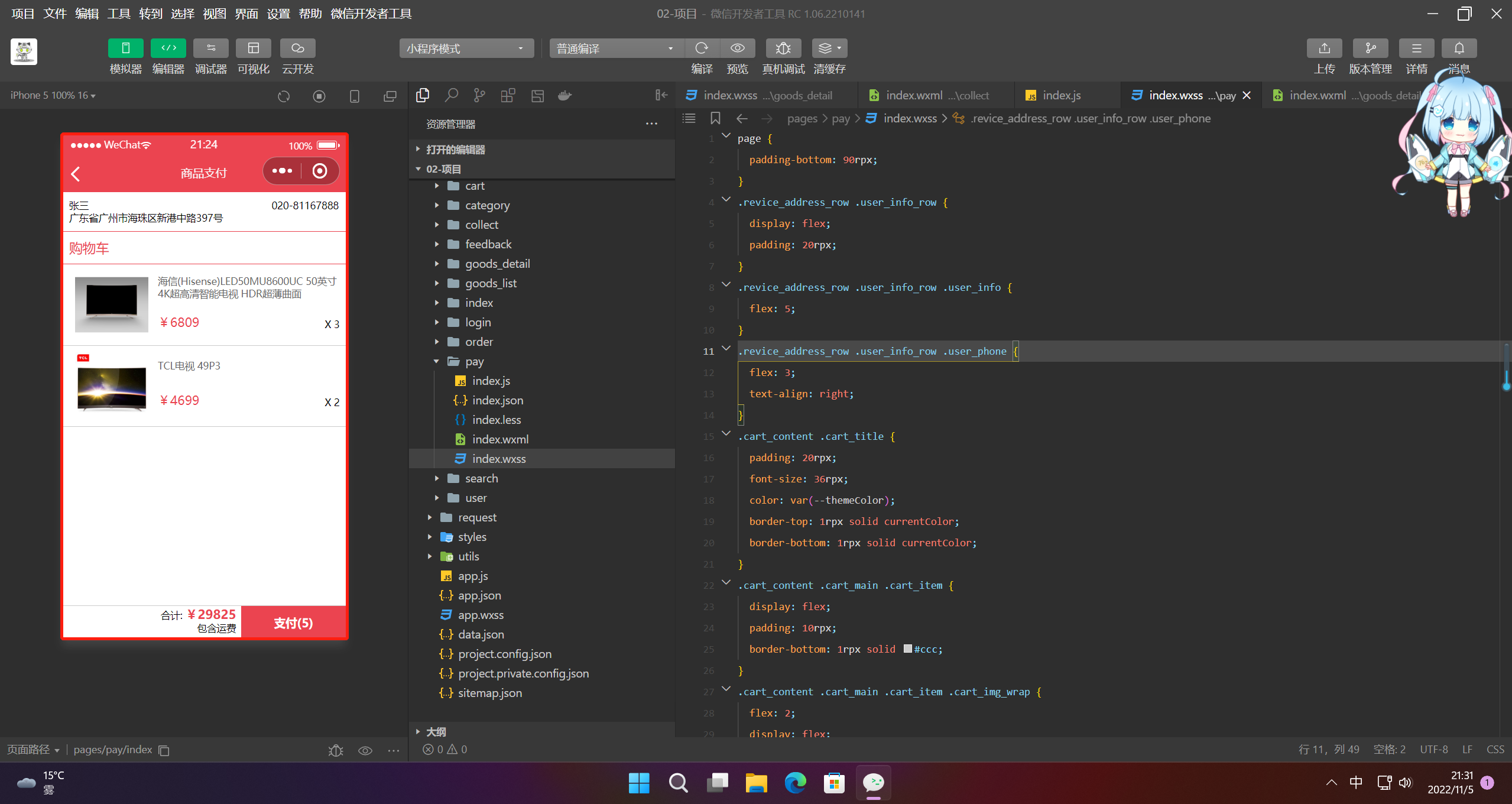
page { padding-bottom: 90rpx; } .revice_address_row .user_info_row { display: flex; padding: 20rpx; } .revice_address_row .user_info_row .user_info { flex: 5; } .revice_address_row .user_info_row .user_phone { flex: 3; text-align: right; } .cart_content .cart_title { padding: 20rpx; font-size: 36rpx; color: var(--themeColor); border-top: 1rpx solid currentColor; border-bottom: 1rpx solid currentColor; } .cart_content .cart_main .cart_item { display: flex; padding: 10rpx; border-bottom: 1rpx solid #ccc; } .cart_content .cart_main .cart_item .cart_img_wrap { flex: 2; display: flex; justify-content: center; align-items: center; } .cart_content .cart_main .cart_item .cart_img_wrap image { width: 80%; } .cart_content .cart_main .cart_item .cart_info_wrap { flex: 4; display: flex; flex-direction: column; justify-content: space-around; } .cart_content .cart_main .cart_item .cart_info_wrap .goods_name { display: -webkit-box; overflow: hidden; -webkit-box-orient: vertical; -webkit-line-clamp: 2; color: #666; } .cart_content .cart_main .cart_item .cart_info_wrap .goods_price_wrap { display: flex; justify-content: space-between; } .cart_content .cart_main .cart_item .cart_info_wrap .goods_price_wrap .goods_price { color: var(--themeColor); font-size: 34rpx; } .cart_content .cart_main .cart_item .cart_info_wrap .goods_price_wrap .cart_num_tool { display: flex; } .cart_content .cart_main .cart_item .cart_info_wrap .goods_price_wrap .cart_num_tool .goods_num { width: 55rpx; height: 55rpx; display: flex; justify-content: center; align-items: center; } .footer_tool { position: fixed; bottom: 0; left: 0; width: 100%; height: 90rpx; background-color: #fff; display: flex; border-top: 1rpx solid #ccc; } .footer_tool .total_price_wrap { flex: 5; padding-right: 15rpx; text-align: right; } .footer_tool .total_price_wrap .total_price .total_price_text { color: var(--themeColor); font-size: 34rpx; font-weight: 600; } .footer_tool .order_pay_wrap { flex: 3; background-color: var(--themeColor); color: #fff; font-size: 32rpx; font-weight: 600; display: flex; justify-content: center; align-items: center; }- 1
- 2
- 3
- 4
- 5
- 6
- 7
- 8
- 9
- 10
- 11
- 12
- 13
- 14
- 15
- 16
- 17
- 18
- 19
- 20
- 21
- 22
- 23
- 24
- 25
- 26
- 27
- 28
- 29
- 30
- 31
- 32
- 33
- 34
- 35
- 36
- 37
- 38
- 39
- 40
- 41
- 42
- 43
- 44
- 45
- 46
- 47
- 48
- 49
- 50
- 51
- 52
- 53
- 54
- 55
- 56
- 57
- 58
- 59
- 60
- 61
- 62
- 63
- 64
- 65
- 66
- 67
- 68
- 69
- 70
- 71
- 72
- 73
- 74
- 75
- 76
- 77
- 78
- 79
- 80
- 81
- 82
- 83
- 84
- 85
- 86
- 87
- 88
- 89
- 90
- 91
- 92
- 93
- 94
- 95
- 96
- 97
2.效果
-
相关阅读:
Python读取复杂电子表格(CSV)数据小技巧一则
数据挖掘项目(一)
【C++】哈希-bitset位图与模拟
css3 布局、flex布局、grid布局的常用属性(笔记)
ClickHouse—DML操作
初识C++(三)
visual studio 2017创建Cmake项目,并修改默认工作目录
一条来自水圈的鄙视链
预约挂号项目之预约挂号模块
JVM之Class文件分析详解
- 原文地址:https://blog.csdn.net/aa2528877987/article/details/127708961