-
【C#】xml解析对比XDocument和XmlDocument
XDocument比XmlDocument好用太多。
- XmlDocument 位于 using System.Xml; 下
- XmlDocument位于using System.Xml.Linq;下
XmlDocument
比如,我需要解soap格式的XML:
- string xml_str = @"
- xmlns:xsd=""http://www.w3.org/2001/XMLSchema""
- xmlns:soap=""http://schemas.xmlsoap.org/soap/envelope/"">
admin 0 - {""moid"":""WO09001"",""partID"":""3F258-A-MPWN"",""ppid"":""8789454645
- "",""testStation"":""T00001""}
888 GET_PROCESS_STATUS - ";
如果是XmlDocument,直接解析是不行的,这种标签带了空间名称(soap:),直接解析会导致报错,你得这么写(添加命名空间):
- XmlDocument xmlDoc = new XmlDocument();
- xmlDoc.LoadXml(xml_str);
- XmlNamespaceManager nsmgr = new XmlNamespaceManager(xmlDoc.NameTable);
- nsmgr.AddNamespace("soap", "http://schemas.xmlsoap.org/soap/envelope/");
- XmlNode rootNode = xmlDoc.SelectSingleNode("//soap:Envelope", nsmgr);
而且,找内层节点,你得一层层的剥开,没办法一次到位。
这太low了,适应性太差,结构稍有变化,就会嗝屁。于是我找到了XDocument
XDocument
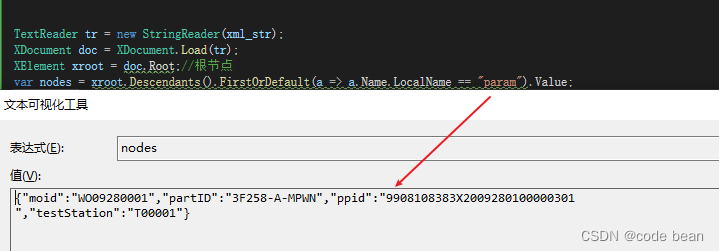
它无视空间名称(soap:)直接读就完了,而且能一次到位:
比如我想将上面字符串中的json取出来:
- TextReader tr = new StringReader(xml_str);
- XDocument doc = XDocument.Load(tr);
- XElement xroot = doc.Root;//根节点
- var nodes = xroot.Descendants().FirstOrDefault(a => a.Name.LocalName == "param").Value;
一次到位:
-
相关阅读:
iNFTnews | 虚拟人的出现,是新奇还是变革?
当 AI 邂逅绘画艺术,能迸发出怎样的火花?
LQ0150 回文日期【枚举】
SQL存储过程和函数
【服务器数据恢复】EXT3文件系统下raid数据恢复案例
Web3中文|马斯克也疯狂?网红AI “ChatGPT”有多火?
web课程设计使用html+css+javascript+jquery技术制作个人介绍6页
〖全域运营实战白宝书 - 高转化文案速成篇②〗- 快速找到产品卖点的N个小技巧
ARM驱动学习之基础小知识
哈工大李治军老师操作系统笔记【12】:CPU调度策略(Learning OS Concepts By Coding Them !)
- 原文地址:https://blog.csdn.net/songhuangong123/article/details/127687765
