-
iOS替换应用图标
Xcode 集成多套测试 App 图标
实现多套 App 图标,依赖** Xcode13及以上版本** 。
在Xcode13之前,如果要实现 iOS App 动态切换图标,需要在Info.plist中添加**CFBundleAlternatelcons**相关字段来声明对应的备用图标。如果要多套 App 图标,那么需要添加很多标签,不够直观和高效。
所以,在 Xcode 13 开始,可以通过项目的Assets.xcassets里创建 AppIcon 图标模板的形式,直观又方便管理图标。如何给App添加多套图标
添加多套icon,跟平时添加应用icon一样,由于笔者没有完整的一整套icon,这里有部分icon没有添加上,实际开发中,必须添加所有尺寸的icon (注意,需要将每套的icon图片名称保持一致!)

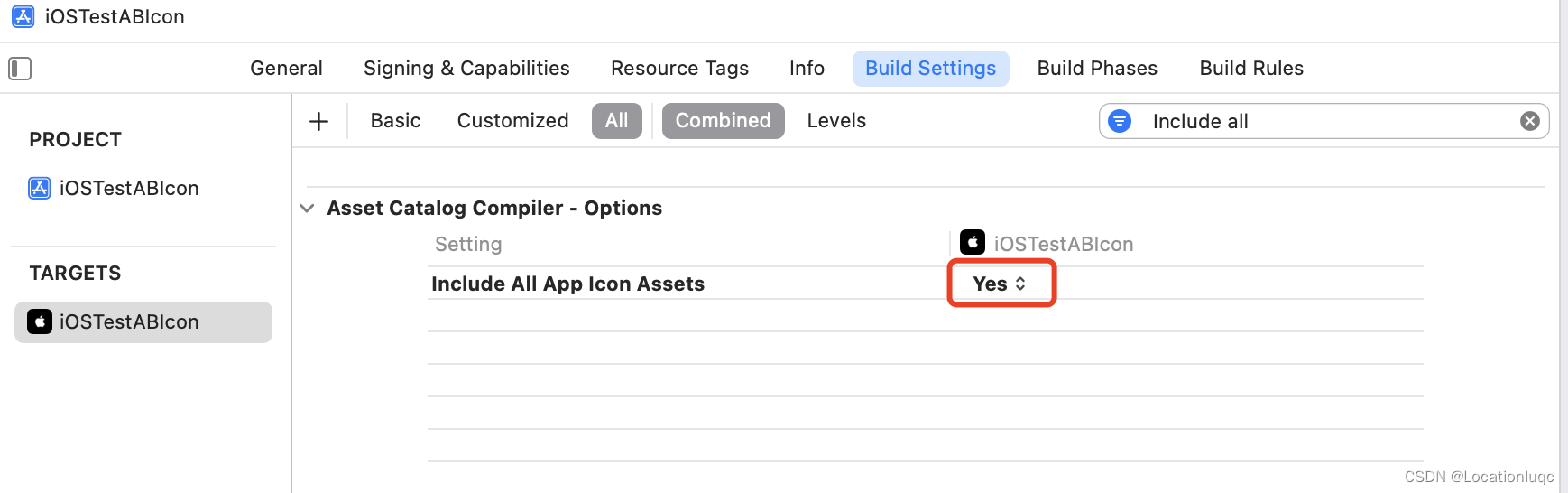
然后将工程Build Settings中 Include all app icon assets改为 YES。(注意,需要 Xcode 13 以上才有这个字段!)
如何验证是否配置多套图标成功了
编译后查看Product文件夹中的包体,或者Archive后查看包体中的 Info.plist文件下Icon files (iOS 5) 配置下是否有 CFBundleAlternateIcons 对应的多套图标的名字,如下图:

如何通过代码动态替换应用图标
Objective-C 代码动态替换应用图标如下:
注意:动态替换图标是在iOS 10.3以上才可以使用,所以要注意判断系统版本
setAlternateIconName: 如果参数传nil可以重置为应用原始图标
- (void)touchesBegan:(NSSet<UITouch *> *)touches withEvent:(UIEvent *)event { [self changeAppIconWithName:@"AppIcon1"]; } - (void)changeAppIconWithName:(NSString *)iconName { if (@available(iOS 10.3, *)) { if (![[UIApplication sharedApplication] supportsAlternateIcons]) { return; } if ([iconName isEqualToString:@""]) { //传nil可重置为原始icon iconName = nil; } [[UIApplication sharedApplication] setAlternateIconName:iconName completionHandler:^(NSError * _Nullable error) { if (error) { NSLog(@"更换app图标发生错误了 : %@",error); }else{ NSLog(@"更换成功"); } }]; } else { NSLog(@"版本太低了"); } }- 1
- 2
- 3
- 4
- 5
- 6
- 7
- 8
- 9
- 10
- 11
- 12
- 13
- 14
- 15
- 16
- 17
- 18
- 19
- 20
- 21
- 22
- 23
- 24
- 25
- 26
- 27
- 28
- 29
- 30
- 31
- 32
- 33
- 34
- 35
- 36
Swift代码操作如下:
override func touchesBegan(_ touches: Set<UITouch>, with event: UIEvent?) { self.changeAppIcon(iconName: "AppIcon1") } func changeAppIcon(iconName: String?) { if #available(iOS 10.3, *) { if UIApplication.shared.supportsAlternateIcons == false { return; } //iconName 如果传nil 可以重置为原始icon UIApplication.shared.setAlternateIconName(iconName) { error in if error != nil { print("更换app图标发生错误了" + "\(error.debugDescription)") } else { print("替换icon成功") } } } else { print("系统版本太低了") } }- 1
- 2
- 3
- 4
- 5
- 6
- 7
- 8
- 9
- 10
- 11
- 12
- 13
- 14
- 15
- 16
- 17
- 18
- 19
- 20
- 21
- 22
- 23
- 24
- 25
- 26
- 27
- 28
- 29
- 30
提示动态替换图标成功如下:

如何无感替换应用图标
在运行时runtime下用Method swizzling对弹框方法进行捕捉替换,可以在用户无感的情况下替换图标
建一个UIViewController的Category,结合+ (void)load 自动执行加载 Method swizzling 方法替换
Objective-C具体代码操作如下:
#import "UIViewController+Present.h" #import <objc/runtime.h> @implementation UIViewController (Present) + (void)load { static dispatch_once_t onceToken; dispatch_once(&onceToken, ^{ Method presentM = class_getInstanceMethod(self.class,@selector(presentViewController:animated:completion:)); Method presentSwizzlingM = class_getInstanceMethod(self.class,@selector(dy_presentViewController:animated:completion:)); method_exchangeImplementations(presentM, presentSwizzlingM); }); } - (void)dy_presentViewController:(UIViewController*)viewControllerToPresent animated:(BOOL)flag completion:(void(^)(void))completion { if ([viewControllerToPresent isKindOfClass:[UIAlertController class]]) { UIAlertController *alertController = (UIAlertController*)viewControllerToPresent; if (alertController.title == nil && alertController.message == nil) { NSLog(@"替换图标操作"); return; } else { [self dy_presentViewController:viewControllerToPresent animated:flag completion:completion]; return; } } [self dy_presentViewController:viewControllerToPresent animated:flag completion:completion]; } @end- 1
- 2
- 3
- 4
- 5
- 6
- 7
- 8
- 9
- 10
- 11
- 12
- 13
- 14
- 15
- 16
- 17
- 18
- 19
- 20
- 21
- 22
- 23
- 24
- 25
- 26
- 27
- 28
- 29
- 30
- 31
- 32
- 33
- 34
- 35
- 36
- 37
- 38
- 39
- 40
- 41
- 42
- 43
Swift代码操作如下:
写一个UIViewController扩展方法
extension UIViewController { public class func initializeMethod() { let presentSelector = #selector(UIViewController.present(_:animated:completion:)) let swizzledPresentSelector = #selector(UIViewController.customPresent(_:animated:completion:)) let presentMethod = class_getInstanceMethod(self, presentSelector) let swizzledPresentMethod = class_getInstanceMethod(self, swizzledPresentSelector) let didAddPresentMethod: Bool = class_addMethod(self, presentSelector, method_getImplementation(swizzledPresentMethod!), method_getTypeEncoding(presentMethod!)) if didAddPresentMethod { class_replaceMethod(self, swizzledPresentSelector, method_getImplementation(presentMethod!), method_getTypeEncoding(presentMethod!)) } else { method_exchangeImplementations(presentMethod!, swizzledPresentMethod!) } } @objc func customPresent(_ viewControllerToPresent: UIViewController, animated flag: Bool, completion: (() -> Void)? = nil) { if viewControllerToPresent is UIAlertController { if let alertController = viewControllerToPresent as? UIAlertController { if alertController.title == nil && alertController.message == nil { print("替换图标操作") return } else { self .customPresent(viewControllerToPresent, animated: flag, completion: completion) return } } } self .customPresent(viewControllerToPresent, animated: flag, completion: completion) } }- 1
- 2
- 3
- 4
- 5
- 6
- 7
- 8
- 9
- 10
- 11
- 12
- 13
- 14
- 15
- 16
- 17
- 18
- 19
- 20
- 21
- 22
- 23
- 24
- 25
- 26
- 27
- 28
- 29
- 30
- 31
- 32
- 33
- 34
- 35
- 36
- 37
- 38
- 39
- 40
- 41
- 42
- 43
- 44
- 45
在应用启动方法中执行 Method swizzling初始化方法
func application(_ application: UIApplication, didFinishLaunchingWithOptions launchOptions: [UIApplication.LaunchOptionsKey: Any]?) -> Bool { UIViewController.initializeMethod() return true }- 1
- 2
- 3
- 4
- 5
- 6
以上是笔者在工作中遇到的替换图标需求,实现后的简单总结,亲测有效!!!
-
相关阅读:
数据结构初阶--二叉树介绍(基本性质+堆实现顺序结构)
linux 挂载磁盘 普通用户读写 --chatGPT
Android学习笔记 81. RecyclerView
网络安全(黑客)自学
多线程锁-线程锁知识概述、乐观锁和悲观锁
javaweb汽车租赁系统
Flutter高仿微信-第45篇-群聊-文本
【物理应用】基于Matlab模拟RANS湍流
叮咚抢菜-派送时段监听及推送工具🔧
序列标注理解
- 原文地址:https://blog.csdn.net/Locationluqc/article/details/127680353
