-
day14 书城项目第六阶段
day14 书城项目第六阶段
1. 结账
1.1 创建订单模型
1.1.1 物理建模
① t_order表
CREATE TABLE t_order( order_id INT PRIMARY KEY AUTO_INCREMENT, order_sequence VARCHAR(200), create_time VARCHAR(100), total_count INT, total_amount DOUBLE, order_status INT, user_id INT );- 1
- 2
- 3
- 4
- 5
- 6
- 7
- 8
- 9
字段名 字段作用 order_id 主键 order_sequence 订单号 create_time 订单创建时间 total_count 订单的总数量 total_amount 订单的总金额 order_status 订单的状态 user_id 下单的用户的id - 虽然order_sequence也是一个不重复的数值,但是不使用它作为主键。数据库表的主键要使用没有业务功能的字段来担任。
- 订单的状态
- 待支付(书城项目中暂不考虑)
- 已支付,待发货:0
- 已发货:1
- 确认收货:2
- 发起退款或退货(书城项目中暂不考虑)
- 用户id
- 从逻辑和表结构的角度来说,这其实是一个外键。
- 但是开发过程中建议先不要加外键约束:因为开发过程中数据尚不完整,加了外键约束开发过程中使用测试数据非常不方便,建议项目预发布时添加外键约束测试。
② t_order_item表
CREATE TABLE t_order_item( item_id INT PRIMARY KEY AUTO_INCREMENT, book_name VARCHAR(20), price DOUBLE, img_path VARCHAR(50), item_count INT, item_amount DOUBLE, order_id VARCHAR(20) );- 1
- 2
- 3
- 4
- 5
- 6
- 7
- 8
- 9
字段名称 字段作用 item_id 主键 book_name 书名 price 单价 item_count 当前订单项的数量 item_amount 当前订单项的金额 order_id 当前订单项关联的订单表的主键 说明:book_name、author、price这三个字段其实属于t_book表,我们把它们加入到t_order_item表中,其实并不符合数据库设计三大范式。这里做不符合规范的操作的原因是:将这几个字段加入当前表就不必在显示数据时和t_book表做关联查询,提高查询的效率,这是一种变通的做法。
1.1.2 逻辑模型
① Order类
package com.atguigu.pojo; public class Order { private Integer orderid; private String ordersequence; private String createtime; private Integer totalcount; private Double totalamount; private Integer orderstatus; private Integer userid; public Order() { } public Order(Integer orderid, String ordersequence, String createtime, Integer totalcount, Double totalamount, Integer orderstatus, Integer userid) { this.orderid = orderid; this.ordersequence = ordersequence; this.createtime = createtime; this.totalcount = totalcount; this.totalamount = totalamount; this.orderstatus = orderstatus; this.userid = userid; } public Integer getOrderid() { return orderid; } public void setOrderid(Integer orderid) { this.orderid = orderid; } public String getOrdersequence() { return ordersequence; } public void setOrdersequence(String ordersequence) { this.ordersequence = ordersequence; } public String getCreatetime() { return createtime; } public void setCreatetime(String createtime) { this.createtime = createtime; } public Integer getTotalcount() { return totalcount; } public void setTotalcount(Integer totalcount) { this.totalcount = totalcount; } public Double getTotalamount() { return totalamount; } public void setTotalamount(Double totalamount) { this.totalamount = totalamount; } public Integer getOrderstatus() { return orderstatus; } public void setOrderstatus(Integer orderstatus) { this.orderstatus = orderstatus; } public Integer getUserid() { return userid; } public void setUserid(Integer userid) { this.userid = userid; } @Override public String toString() { return "Order{" + "orderid=" + orderid + ", ordersequence='" + ordersequence + '\'' + ", createtime='" + createtime + '\'' + ", totalcount=" + totalcount + ", totalamount=" + totalamount + ", orderstatus=" + orderstatus + ", userid=" + userid + '}'; } }- 1
- 2
- 3
- 4
- 5
- 6
- 7
- 8
- 9
- 10
- 11
- 12
- 13
- 14
- 15
- 16
- 17
- 18
- 19
- 20
- 21
- 22
- 23
- 24
- 25
- 26
- 27
- 28
- 29
- 30
- 31
- 32
- 33
- 34
- 35
- 36
- 37
- 38
- 39
- 40
- 41
- 42
- 43
- 44
- 45
- 46
- 47
- 48
- 49
- 50
- 51
- 52
- 53
- 54
- 55
- 56
- 57
- 58
- 59
- 60
- 61
- 62
- 63
- 64
- 65
- 66
- 67
- 68
- 69
- 70
- 71
- 72
- 73
- 74
- 75
- 76
- 77
- 78
- 79
- 80
- 81
- 82
- 83
- 84
- 85
- 86
- 87
- 88
- 89
- 90
- 91
- 92
- 93
- 94
- 95
② OrdrItem类
package com.atguigu.pojo; public class OrderItem { private Integer itemId; private String bookName; private Double price; private String imgPath; private Integer itemCount; private Double itemAmount; private Integer orderId; public OrderItem() { } public OrderItem(Integer itemId, String bookName, Double price, String imgPath, Integer itemCount, Double itemAmount, Integer orderId) { this.itemId = itemId; this.bookName = bookName; this.price = price; this.imgPath = imgPath; this.itemCount = itemCount; this.itemAmount = itemAmount; this.orderId = orderId; } public Integer getItemId() { return itemId; } public void setItemId(Integer itemId) { this.itemId = itemId; } public String getBookName() { return bookName; } public void setBookName(String bookName) { this.bookName = bookName; } public Double getPrice() { return price; } public void setPrice(Double price) { this.price = price; } public String getImgPath() { return imgPath; } public void setImgPath(String imgPath) { this.imgPath = imgPath; } public Integer getItemCount() { return itemCount; } public void setItemCount(Integer itemCount) { this.itemCount = itemCount; } public Double getItemAmount() { return itemAmount; } public void setItemAmount(Double itemAmount) { this.itemAmount = itemAmount; } public Integer getOrderId() { return orderId; } public void setOrderId(Integer orderId) { this.orderId = orderId; } @Override public String toString() { return "OrderItem{" + "itemId=" + itemId + ", bookName='" + bookName + '\'' + ", price=" + price + ", imgPath='" + imgPath + '\'' + ", itemCount=" + itemCount + ", itemAmount=" + itemAmount + ", orderId=" + orderId + '}'; } }- 1
- 2
- 3
- 4
- 5
- 6
- 7
- 8
- 9
- 10
- 11
- 12
- 13
- 14
- 15
- 16
- 17
- 18
- 19
- 20
- 21
- 22
- 23
- 24
- 25
- 26
- 27
- 28
- 29
- 30
- 31
- 32
- 33
- 34
- 35
- 36
- 37
- 38
- 39
- 40
- 41
- 42
- 43
- 44
- 45
- 46
- 47
- 48
- 49
- 50
- 51
- 52
- 53
- 54
- 55
- 56
- 57
- 58
- 59
- 60
- 61
- 62
- 63
- 64
- 65
- 66
- 67
- 68
- 69
- 70
- 71
- 72
- 73
- 74
- 75
- 76
- 77
- 78
- 79
- 80
- 81
- 82
- 83
- 84
- 85
- 86
- 87
- 88
- 89
- 90
- 91
- 92
- 93
- 94
- 95
- 96
1.2 创建组件
1.2.1 持久化层

1.2.2 业务逻辑层
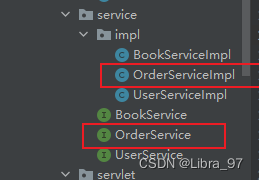
1.2.3 表述层

1.3 功能步骤
- 创建订单对象
- 给订单对象填充数据
- 生成订单号
- 生成订单的时间
- 从购物车迁移总数量和总金额
- 从已登录的User对象中获取userId并设置到订单对象中
- 将订单对象保存到数据库中
- 获取订单对象在数据库中自增主键的值
- 根据购物车中的CartItem集合逐个创建OrderItem对象
- 每个OrderItem对象对应的orderId属性都使用前面获取的订单数据的自增主键的值
- 把OrderItem对象的集合保存到数据库
- 每一个item对应的图书增加销量、减少库存
- 清空购物车
1.4 案例思路

1.5 代码实现
1.5.1 购物车页面结账超链接
cart.html
<a class="pay" href="protected/order?method=checkOut">去结账a>- 1
1.5.2 OrderServlet.checkout()
package com.atguigu.servlet.app; import com.atguigu.pojo.Cart; import com.atguigu.pojo.Constants; import com.atguigu.pojo.User; import com.atguigu.service.OrderService; import com.atguigu.service.impl.OrderServiceImpl; import com.atguigu.servlet.base.ModelBaseServlet; import javax.servlet.ServletException; import javax.servlet.annotation.WebServlet; import javax.servlet.http.HttpServletRequest; import javax.servlet.http.HttpServletResponse; import javax.servlet.http.HttpSession; import java.io.IOException; @WebServlet("/protected/order") public class OrderServlet extends ModelBaseServlet { // 结账操作 protected void checkOut(HttpServletRequest req, HttpServletResponse resp) throws ServletException, IOException { HttpSession session = req.getSession(); // 1.获取购物车 Cart cart = (Cart) session.getAttribute(Constants.SESSION_CART_KEY); // 2.获取用户 User user = (User) session.getAttribute(Constants.SESSION_LOGON_USER); // 3.进行结账的业务层操作 返回订单号 OrderService service = new OrderServiceImpl(); // 返回订单号 String sequence = service.checkOut(cart, user); // 4.清空购物车 session.removeAttribute(Constants.SESSION_CART_KEY); // 5.将订单号添加到请求域中 req.setAttribute("sequence", sequence); // 6.跳转到cart/checkout页面 processTemplate("cart/checkout", req, resp); } }- 1
- 2
- 3
- 4
- 5
- 6
- 7
- 8
- 9
- 10
- 11
- 12
- 13
- 14
- 15
- 16
- 17
- 18
- 19
- 20
- 21
- 22
- 23
- 24
- 25
- 26
- 27
- 28
- 29
- 30
- 31
- 32
- 33
- 34
- 35
- 36
- 37
- 38
- 39
- 40
1.5.3 BaseDao.batch()
// 通用的批量处理 public void batch(String sql, Object[][] params){ // 1.创建操作对象 QueryRunner runner = new QueryRunner(); try { // 2.获取连接 Connection connection = JDBCutils.getConnection(); // 3.执行操作 runner.batch(connection, sql, params); } catch (SQLException e) { e.printStackTrace(); throw new RuntimeException(e.getMessage()); } }- 1
- 2
- 3
- 4
- 5
- 6
- 7
- 8
- 9
- 10
- 11
- 12
- 13
- 14
1.5.4 OrderService.checkout()
package com.atguigu.bookstore.service.impl; import com.atguigu.bookstore.bean.Cart; import com.atguigu.bookstore.bean.CartItem; import com.atguigu.bookstore.constants.BookStoreConstants; import com.atguigu.bookstore.dao.BookDao; import com.atguigu.bookstore.dao.OrderDao; import com.atguigu.bookstore.dao.OrderItemDao; import com.atguigu.bookstore.dao.impl.BookDaoImpl; import com.atguigu.bookstore.dao.impl.OrderDaoImpl; import com.atguigu.bookstore.dao.impl.OrderItemDaoImpl; import com.atguigu.bookstore.entity.Order; import com.atguigu.bookstore.entity.User; import com.atguigu.bookstore.service.OrderService; import java.text.SimpleDateFormat; import java.util.Date; import java.util.List; import java.util.UUID; /** * 包名:com.atguigu.bookstore.service.impl * * * 日期2021-06-19 14:19 */ public class OrderServiceImpl implements OrderService { private OrderDao orderDao = new OrderDaoImpl(); private OrderItemDao orderItemDao = new OrderItemDaoImpl(); private BookDao bookDao = new BookDaoImpl(); @Override public String checkout(Cart cart, User user) throws Exception { //1. 往订单表插入一条数据 //1.1 生成一个唯一的订单号(使用UUID) String orderSequence = UUID.randomUUID().toString(); //1.2 生成当前时间createTime String createTime = new SimpleDateFormat("dd-MM-yy:HH:mm:ss").format(new Date()); //1.3 订单的totalCount就是cart的totalCount Integer totalCount = cart.getTotalCount(); //1.4 订单的totalAmount就是购物车的totalAmount Double totalAmount = cart.getTotalAmount(); //1.5 设置订单的状态为0 Integer status = BookStoreConstants.PAYED; //1.6 订单的userId就是user对象的id Integer userId = user.getUserId(); //将上述六个数据封装到一个Order对象中 Order order = new Order(null,orderSequence,createTime,totalCount,totalAmount,status,userId); //1.7 调用持久层OrderDao的insertOrder方法添加订单数据,并且获取自增长的主键值 Integer orderId = orderDao.insertOrder(order); //2. 往订单项表插入多条数据(采用批处理) //获取所有的购物项 List<CartItem> cartItemList = cart.getCartItemList(); //创建一个二维数组,用来做批量添加订单项的参数 Object[][] orderItemArrParam = new Object[cartItemList.size()][6]; //3. 更新t_book表中对应的书的sales和stock //创建一个二维数组,用来做批量修改图书信息的参数 Object[][] bookArrParam = new Object[cartItemList.size()][3]; //遍历出每一个购物项 for (int i=0;i<cartItemList.size();i++) { //封装批量添加订单项的二维数组参数 //每一个购物项就对应一个订单项 CartItem cartItem = cartItemList.get(i); //2.1 bookName就是CartItem的bookName //设置第i条SQL语句的第一个参数的值 orderItemArrParam[i][0] = cartItem.getBookName(); //2.2 price、imgPath、itemCount、itemAmount都是CartItem中对应的数据 //设置第i条SQL语句的第二个参数的值 orderItemArrParam[i][1] = cartItem.getPrice(); //设置第i条SQL语句的第三个参数的值 orderItemArrParam[i][2] = cartItem.getImgPath(); //设置第i条SQL语句的第四个参数的值 orderItemArrParam[i][3] = cartItem.getCount(); //设置第i条SQL语句的第五个参数的值 orderItemArrParam[i][4] = cartItem.getAmount(); //2.3 orderId就是第一步中保存的订单的id //设置第i条SQL语句的第六个参数的值 orderItemArrParam[i][5] = orderId; //封装批量更新图书库存和销量的二维数组参数 // 设置第i条SQL语句的第一个参数: 就是要增加的销量就是cartItem的count bookArrParam[i][0] = cartItem.getCount(); // 设置第i条SQL语句的第二个参数: 就是要减少的库存就是cartItem的count bookArrParam[i][1] = cartItem.getCount(); // 设置第i条SQL语句的第三个参数: 就是要修改的图书的bookId就是cartItem的bookId bookArrParam[i][2] = cartItem.getBookId(); } //2.4 调用持久层OrderItemDao的insertOrderItemArr方法进行批量添加 orderItemDao.insertOrderItemArr(orderItemArrParam); //3.1 调用持久层BookDao的updateBookArr方法进行批量更新 bookDao.updateBookArr(bookArrParam); //4. 返回订单号 return orderSequence; } }- 1
- 2
- 3
- 4
- 5
- 6
- 7
- 8
- 9
- 10
- 11
- 12
- 13
- 14
- 15
- 16
- 17
- 18
- 19
- 20
- 21
- 22
- 23
- 24
- 25
- 26
- 27
- 28
- 29
- 30
- 31
- 32
- 33
- 34
- 35
- 36
- 37
- 38
- 39
- 40
- 41
- 42
- 43
- 44
- 45
- 46
- 47
- 48
- 49
- 50
- 51
- 52
- 53
- 54
- 55
- 56
- 57
- 58
- 59
- 60
- 61
- 62
- 63
- 64
- 65
- 66
- 67
- 68
- 69
- 70
- 71
- 72
- 73
- 74
- 75
- 76
- 77
- 78
- 79
- 80
- 81
- 82
- 83
- 84
- 85
- 86
- 87
- 88
- 89
- 90
- 91
- 92
- 93
- 94
- 95
- 96
- 97
- 98
- 99
- 100
- 101
- 102
1.5.5 orderDao.createOrder(Order order)
package com.atguigu.dao.impl; import com.atguigu.dao.BaseDao; import com.atguigu.dao.OrderDao; import com.atguigu.pojo.Order; import com.atguigu.utils.JDBCutils; import java.sql.*; public class OrderDaoImpl extends BaseDao implements OrderDao { // 添加订单 返回自增的主键 @Override public int createOrder(Order order) { try { //因为使用DBUtils执行增删改的SQL语句没法获取自增长的id主键,所以我们只能使用原始的JDBC执行这个添加数据的SQL语句并且获取自增长的id // 1.获取连接 Connection connection = JDBCutils.getConnection(); // 2.准备sql String sql = "insert into t_order values(null,?,?,?,?,?,?)"; // 3.创建命令发送器 PreparedStatement pst = connection.prepareStatement(sql, Statement.RETURN_GENERATED_KEYS); // 4.填充数据 pst.setObject(1, order.getOrdersequence()); pst.setObject(2, order.getCreatetime()); pst.setObject(3, order.getTotalcount()); pst.setObject(4, order.getTotalamount()); pst.setObject(5, order.getOrderstatus()); pst.setObject(6, order.getUserid()); // 5.执行命令 pst.executeUpdate(); // 6.获取自增的主键 ResultSet rs = pst.getGeneratedKeys(); int anInt = 0; // 因为自增长的主键只有一个值 所以不需要while循环遍历 if (rs.next()){ // 因为自增长键值只有一个,所以这里直接getObject(1)即可 anInt = rs.getInt(1); } return anInt; } catch (Exception e) { e.printStackTrace(); throw new RuntimeException(e.getMessage()); } } }- 1
- 2
- 3
- 4
- 5
- 6
- 7
- 8
- 9
- 10
- 11
- 12
- 13
- 14
- 15
- 16
- 17
- 18
- 19
- 20
- 21
- 22
- 23
- 24
- 25
- 26
- 27
- 28
- 29
- 30
- 31
- 32
- 33
- 34
- 35
- 36
- 37
- 38
- 39
- 40
- 41
- 42
- 43
- 44
- 45
- 46
- 47
1.5.6 orderItemDao.insertItems(Object[][] itemParams)
package com.atguigu.bookstore.dao.impl; import com.atguigu.bookstore.dao.BaseDao; import com.atguigu.bookstore.dao.OrderItemDao; import com.atguigu.bookstore.entity.OrderItem; @Override public void insertItems(Object[][] itemParams) { // 批量新增订单明细 String sql = "insert into t_order_item values(null,?,?,?,?,?,?)"; batch(sql, itemParams); } }- 1
- 2
- 3
- 4
- 5
- 6
- 7
- 8
- 9
- 10
- 11
- 12
- 13
1.5.7 bookDao.batchUpdateBook(Object[][] bookParams)
@Override public void batchUpdateBook(Object[][] bookParams) { String sql = "update books set sales = sales + ?, stock = stock - ? where id = ?"; batch(sql, bookParams); }- 1
- 2
- 3
- 4
- 5
2. 结账过程中使用事务
2.1 事务回顾
2.1.1 ACID属性
-
A:原子性 事务中包含的数据库操作缺一不可,整个事务是不可再分的。
-
C:一致性 事务执行之前,数据库中的数据整体是正确的;事务执行之后,数据库中的数据整体仍然是正确的。
- 事务执行成功:提交(commit)
- 事务执行失败:回滚(rollback)
-
I:隔离性 数据库系统同时执行很多事务时,各个事务之间基于不同隔离级别能够在一定程度上做到互不干扰。简单说就是:事务在并发执行过程中彼此隔离。
-
D:持久性 事务一旦提交,就永久保存到数据库中,不可撤销。
2.1.2 隔离级别
① 并发问题
并发问题 问题描述 脏读 当前事务读取了其他事务尚未提交的修改
如果那个事务回滚,那么当前事务读取到的修改就是错误的数据不可重复读 当前事务中多次读取到的数据的内容不一致(数据行数一致,但是行中的具体内容不一致) 幻读 当前事务中多次读取到的数据行数不一致 ② 隔离级别
隔离级别 描述 能解决的并发问题 读未提交 允许当前事务读取其他事务尚未提交的修改 啥问题也解决不了 读已提交 允许当前事务读取其他事务已经提交的修改 脏读 可重复读 当前事务执行时锁定当前记录,不允许其他事务操作 脏读、不可重复读 串行化 当前事务执行时锁定当前表,不允许其他事务操作 脏读、不可重复读、幻读 2.2 JDBC事务控制
2.2.1 同一个数据库连接
只有当多次数据库操作是使用的同一个连接的时候,才能够保证这几次数据库操作在同一个事务中执行

2.2.2 关闭事务的自动提交
connection.setAutoCommit(false);- 1
2.2.3 提交事务
connection.commit();- 1
2.2.4 回滚事务
connection.rollBack();- 1
2.2.5 事务整体的代码块
try{ // 关闭事务的自动提交 connection.setAutoCommit(false); // 事务中包含的所有数据库操作 // 提交事务 connection.commit(); }catch(Excetion e){ // 回滚事务 connection.rollBack(); } finally { connection.setAutoCommit(true); //回收到连接池 connection.close(); }- 1
- 2
- 3
- 4
- 5
- 6
- 7
- 8
- 9
- 10
- 11
- 12
- 13
- 14
- 15
- 16
- 17
- 18
- 19
2.3 将事务对接到书城项目中
2.3.1 三层架构中事务要对接的位置
从逻辑上来说,一个事务对应一个业务方法(Service层的一个方法)。

2.3.2 假想
每一个Service方法内部,都套用了事务操作所需要的try…catch…finally块。
2.3.3 假想代码的缺陷
- 会出现大量的冗余代码:我们希望能够抽取出来,只写一次
- 对核心业务功能是一种干扰:我们希望能够在编写业务逻辑代码时专注于业务本身,而不必为辅助性质的套路代码分心
- 将持久化层对数据库的操作写入业务逻辑层,是对业务逻辑层的一种污染,导致持久化层和业务逻辑层耦合在一起
2.3.4 事务代码抽取
- 只要是Filter拦截到的请求都会从doFilter()方法经过
- chain.doFilter(req, resp);可以包裹住将来要执行的所有方法
- 事务操作的try…catch…finally块只要把chain.doFilter(req, resp)包住,就能够包住将来要执行的所有方法
2.3.5 编写一个TransactionFilter来统一处理事务
package com.atguigu.filter; import com.atguigu.utils.JDBCutils; import javax.servlet.*; import java.io.IOException; import java.sql.Connection; import java.sql.SQLException; // 事务处理的Filter public class TransactionFilter implements Filter { @Override public void init(FilterConfig filterConfig) throws ServletException { } @Override public void doFilter(ServletRequest servletRequest, ServletResponse servletResponse, FilterChain filterChain) throws IOException, ServletException { Connection connection = null; try { connection = JDBCutils.getConnection(); // 开启事务 connection.setAutoCommit(false); filterChain.doFilter(servletRequest, servletResponse); // 没有发生异常 提交事务 connection.commit(); } catch (Exception e) { e.printStackTrace(); try { // 出现异常 回滚事务 connection.rollback(); } catch (SQLException ex) { ex.printStackTrace(); } throw new RuntimeException(e.getMessage()); } } @Override public void destroy() { } }- 1
- 2
- 3
- 4
- 5
- 6
- 7
- 8
- 9
- 10
- 11
- 12
- 13
- 14
- 15
- 16
- 17
- 18
- 19
- 20
- 21
- 22
- 23
- 24
- 25
- 26
- 27
- 28
- 29
- 30
- 31
- 32
- 33
- 34
- 35
- 36
- 37
- 38
- 39
- 40
- 41
- 42
- 43
- 44
- 45
2.3.6 配置TransactionFilter指定其拦截要进行事务控制的请求
<filter> <filter-name>TransactionFilterfilter-name> <filter-class>com.atguigu.filter.TransactionFilterfilter-class> filter> <filter-mapping> <filter-name>TransactionFilterfilter-name> <url-pattern>/protected/orderurl-pattern> filter-mapping>- 1
- 2
- 3
- 4
- 5
- 6
- 7
- 8
- 9
- 10
2.3.7 创建CloseConnectionFilter用于统一关闭连接
<filter> <filter-name>CloseConnectionFilterfilter-name> <filter-class>com.atguigu.filter.CloseConnectionFilterfilter-class> filter> <filter-mapping> <filter-name>CloseConnectionFilterfilter-name> <url-pattern>/index.htmlurl-pattern> <url-pattern>/bookurl-pattern> <url-pattern>/userurl-pattern> <url-pattern>/protected/orderurl-pattern> filter-mapping>- 1
- 2
- 3
- 4
- 5
- 6
- 7
- 8
- 9
- 10
- 11
Java代码如下:
package com.atguigu.filter; import com.atguigu.utils.JDBCutils; import javax.servlet.*; import java.io.IOException; public class CloseConnectionFilter implements Filter { @Override public void init(FilterConfig filterConfig) throws ServletException { } @Override public void doFilter(ServletRequest servletRequest, ServletResponse servletResponse, FilterChain filterChain) throws IOException, ServletException { try { filterChain.doFilter(servletRequest, servletResponse); } catch (Exception e) { e.printStackTrace(); throw new RuntimeException(e.getMessage()); }finally { try { // 关闭连接实际是 放回池子 JDBCutils.closeConnection(); System.out.println("关闭连接执行了....."); } catch (Exception e) { e.printStackTrace(); throw new RuntimeException(e.getMessage()); } } } @Override public void destroy() { } }- 1
- 2
- 3
- 4
- 5
- 6
- 7
- 8
- 9
- 10
- 11
- 12
- 13
- 14
- 15
- 16
- 17
- 18
- 19
- 20
- 21
- 22
- 23
- 24
- 25
- 26
- 27
- 28
- 29
- 30
- 31
- 32
- 33
- 34
- 35
- 36
- 37
- 38
- 39
2.3.8 全局统一的异常处理
-
所有的Dao和Service的方法都抛最大的异常
-
在Servlet中对异常进行try…catch,在catch中做相应的处理(例如跳转到错误页面),然后在当前方法中throw new RuntimeException(e.getMessage());
-
在ModelBaseServlet的catch块里面throw new RuntimeException(e.getMessage())
-
在LoginFilter、TransactionFilter、CloseConnectionFilter中都需要对异常进行try…catch,然后在catch块中
throw new RuntimeException(e.getMessage());
-
创建一个ExceptionFilter,该Filter要配置在所有的Filter之前,用来统一处理异常
package com.atguigu.filter; import javax.servlet.*; import java.io.IOException; public class ExceptionFilter implements Filter { @Override public void init(FilterConfig filterConfig) throws ServletException { } @Override public void doFilter(ServletRequest servletRequest, ServletResponse servletResponse, FilterChain filterChain) throws IOException, ServletException { try { filterChain.doFilter(servletRequest, servletResponse); } catch (Exception e) { e.printStackTrace(); // 请求转发 servletRequest.getRequestDispatcher("/WEB-INF/pages/error.html").forward(servletRequest, servletResponse); } } @Override public void destroy() { } }- 1
- 2
- 3
- 4
- 5
- 6
- 7
- 8
- 9
- 10
- 11
- 12
- 13
- 14
- 15
- 16
- 17
- 18
- 19
- 20
- 21
- 22
- 23
- 24
- 25
- 26
- 27
- 28
<filter> <filter-name>ExceptionFilterfilter-name> <filter-class>com.atguigu.filter.ExceptionFilterfilter-class> filter> <filter-mapping> <filter-name>ExceptionFilterfilter-name> <url-pattern>/*url-pattern> filter-mapping>- 1
- 2
- 3
- 4
- 5
- 6
- 7
- 8
-
相关阅读:
day22_mysql
【关系推导】Codeforces Round #813 (Div. 2) E1. LCM Sum (easy version)
Eureka的使用场景
【单片机基础】C51语言基础
设计模式学习(十一):组合模式
Kotlin 使用@BindingAdapter编译出错
线性筛和埃氏筛
ArcGIS学习(十五)用地适宜性评价
C#8.0本质论第十一章--异常处理
SpringBoot+LayUI+MybatisPlus 前后端分离 实现排名统计功能
- 原文地址:https://blog.csdn.net/Libra_97/article/details/127659183
