-
SpringBoot
· 1. springBoot的基础
2. @SpringBootApplication初始化
3. @Configuration配置bean
4. @Import()导入组件
5. @ConditionalOnBean 按照条件装配
6. @ImportResource导入spring配置文件
7. @ConfigurationProperties配置绑定 快速获取值
8. lombok
9. yaml语法格式
10. 自定义文件,yaml提示
11. 静态资源访问
12. @PathVariable(“xx”):路径变量、@RequestHeader(“xx”):获取请求头信息
13. @RequestParam(“xx”) 获取请求体的参数
14. @CookieValue(“xx”) 获取指定的cookie
15. @RequestBody xx, 获取请求体post的全部数据
16. @RequestAttribute 获取请求域的数据
17. 矩阵变量,处理请求参数中,带;;;的
18. thymeleaf使用
19. 拦截器
20. 文件上传
21. 异常处理
22. 注入原生组件Servlet、Filter、Listenter
23. 定制化原理
24. 数据访问-引入jdbc
25. 整合druid数据源
26. 整合mybatis
27. 整合mybatis-plus
28. 分页
29. 跳转
30. 整合redis
31. 单元测试
32. 指标监控
33. 多环境切换SpringBoot的优点

导入的jar包<parent> <groupId>org.springframework.boot</groupId> <artifactId>spring-boot-starter-parent</artifactId> <version>2.3.4.RELEASE</version> </parent> <dependencies> <dependency> <groupId>org.springframework.boot</groupId> <artifactId>spring-boot-starter-web</artifactId> </dependency> </dependencies>- 1
- 2
- 3
- 4
- 5
- 6
- 7
- 8
- 9
- 10
- 11
- 12
- 13
- 14
主程序类
/** * 主程序类 */ @SpringBootApplication public class Helloword { // 启动主程序类 public static void main(String[] args) { SpringApplication.run(Helloword.class,args); } }- 1
- 2
- 3
- 4
- 5
- 6
- 7
- 8
- 9
- 10
修改系统配置

简化配置->把项目打包成jar包,直接在目标服务器
java -jar 包名


<build> <plugins> <plugin> <groupId>org.springframework.bootgroupId> <artifactId>spring-boot-maven-pluginartifactId> plugin> plugins> build>- 1
- 2
- 3
- 4
- 5
- 6
- 7
- 8
- 9
修改当前jar包的版本号

@SpringBootApplication
@SpringBootApplication
等同于
@SpringBootConfiguration
@EnableAutoConfiguration
@ComponentScan(“本包”)将本包内的文件,或本包内的子文件全部扫描出来
如果更改文件配置
@SpringBootApplication(scanBasePackages=“com.atguigu”)
或者@ComponentScan 指定扫描路径@Configuration 配置bean
import com.qwq.pojo.Pet; import com.qwq.pojo.User; import org.springframework.context.annotation.Bean; import org.springframework.context.annotation.Configuration; /** /** * 1.配置类也是组件 * 2.配置类里面使用@bean标注在容器上,注册组件,默认为单例 */ @Configuration(proxyBeanMethods = true) /** * 告诉springboot这是一个配置类 * true = 创建的对象都是单例的,Userbean中配置Pet的bean,那么user中的Pet和pet是同一个对象 * false= Userbean中配置Pet的bean,user中的Pet和pet不是同一个对象 * 组件不依赖于其他组件时,设置为false * 组件依赖于其他组件,设置为true */ public class myconfig { /** ** * 无论获取多次组件,都是容器中的这个对象 */ @Bean public User user(){ return new User("w", 21,Pet()); } @Bean public Pet Pet(){ return new Pet("Tomcat"); } }* * - 1
- 2
- 3
- 4
- 5
- 6
- 7
- 8
- 9
- 10
- 11
- 12
- 13
- 14
- 15
- 16
- 17
- 18
- 19
- 20
- 21
- 22
- 23
- 24
- 25
- 26
- 27
- 28
- 29
- 30
- 31
- 32
- 33
- 34
- 35
- 36
- 37
- 38
- 39
- 40
- 41

@Import() 导入组件
Import通过快速导入的方式实现把实例加入spring的IOC容器中
@Import({User.class, Pet.class}) //快速实例化对象 @Controller public class TestController { @Autowired User user; @Autowired Pet pet; @RequestMapping("/helloword") @ResponseBody public String test01(){ System.out.println(user + " "+ pet); return "bean"; } }- 1
- 2
- 3
- 4
- 5
- 6
- 7
- 8
- 9
- 10
- 11
- 12
- 13
- 14
- 15
- 16
- 17
- 18
- 19
@ConditionalOnBean 按照条件装配
加在方法上或类上 @ConditionalOnBean(name = "user") //当容器中有这个bean为tom时,才会执行注入bean的操作,没用这个bean,则该类不会注入组件 @ConditionalOnMissingBean(name = "tom") //当容器中没有这个bean为tom时,才会执行注入bean的操作,有这个bean,则该类不会注入组件- 1
- 2
- 3
@ImportResource导入spring配置文件
//1.声明配置类 2.告诉bean文件的地址 @Configuration(proxyBeanMethods = true) @ImportResource("classpath:SpirngConfig.xml") public class config { }- 1
- 2
- 3
- 4
- 5
- 6
@ConfigurationProperties配置绑定 快速获取值
第一种方式
@Component // 加入组件 @ConfigurationProperties(prefix = "mycar") //properties绑定数据的前缀 mycar.name=Byd public class Car { private String name; ........ }- 1
- 2
- 3
- 4
- 5
- 6
- 7
第二种方式
//1.声明配置类 2.告诉bean文件的地址 @Configuration(proxyBeanMethods = true) @ImportResource("classpath:SpirngConfig.xml") @EnableConfigurationProperties(Car.class) // 在配置类种声明 1.开启car的自动绑定功能 2.将car组件自动加入容器 public class config { }- 1
- 2
- 3
- 4
- 5
- 6
@ConfigurationProperties(prefix = "mycar") //properties绑定数据的前缀 mycar.name=Byd public class Car { private String name; }- 1
- 2
- 3
- 4
LOMBOK
<dependency> <groupId>org.projectlombokgroupId> <artifactId>lombokartifactId> dependency>- 1
- 2
- 3
- 4

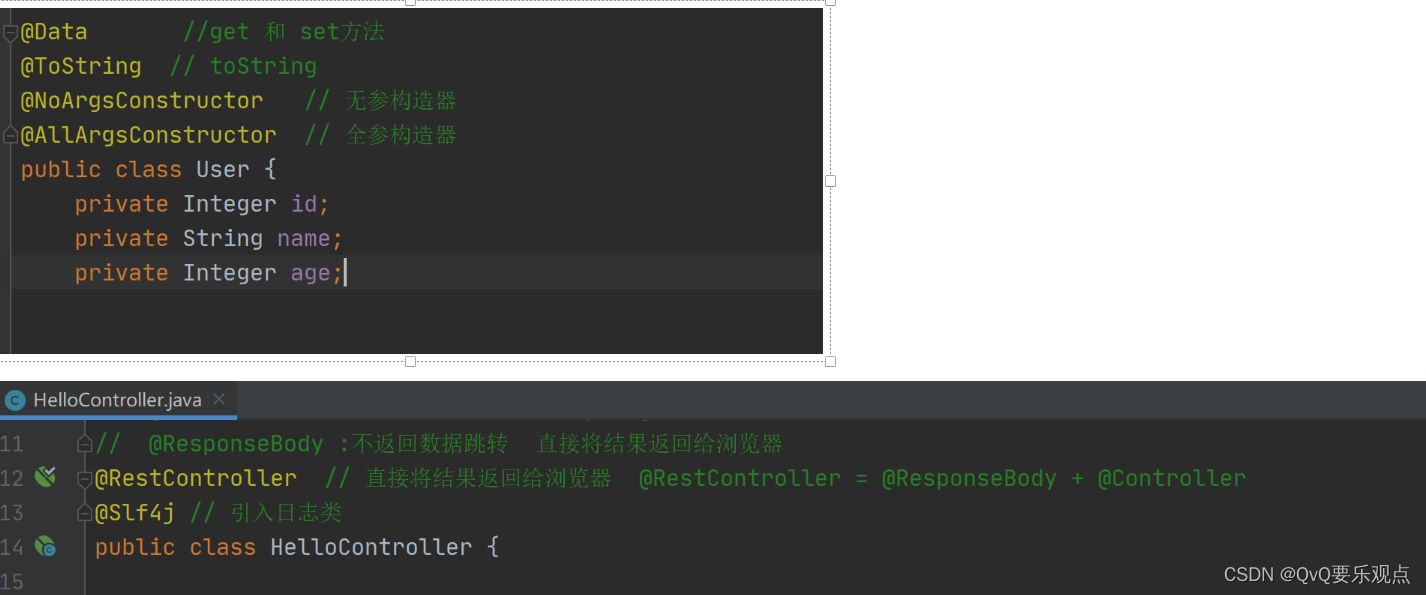
Yaml语法格式
person: userName: "zhangsan \n wang" # zhangsan \n wang json: "zhangsan \\n wang" 控制台:zhangsan \n wang # 'zhangsan \n wang' json: "zhangsan \\n wang" 控制台:zhangsan \n wang # "zhangsan \n wang" json: "zhangsan \n wang" 控制台:zhangsan 换行 wang # 单引号会将\n进行输出,会转义,双引号会对\n进行换行输出,不会转义 boss: true birth: 2019/12/9 age: 18 interests: [aa,bb,cc] #数组 animal: [aa,bb,cc] #集合 List score: {englist:80,math:100} # Map salarys: [111,222] #set pet: #对象 name: 123 weight: 123 allPets: # Map- 1
- 2
- 3
- 4
- 5
- 6
- 7
- 8
- 9
- 10
- 11
- 12
- 13
- 14
- 15
- 16
- 17
- 18
- 19
- 20
- 21
- 22
- 23
自定义文件,yaml提示
<dependency> <groupId>org.springframework.bootgroupId> <artifactId>spring-boot-configuration-processorartifactId> <optional>trueoptional> dependency> <build> <plugins> <plugin> <groupId>org.springframework.bootgroupId> <artifactId>spring-boot-maven-pluginartifactId> <configuration> <excludes> <exclude> <groupId>org.springframework.bootgroupId> <artifactId>spring-boot-configuration-processorartifactId> exclude> excludes> configuration> plugin> plugins> build>- 1
- 2
- 3
- 4
- 5
- 6
- 7
- 8
- 9
- 10
- 11
- 12
- 13
- 14
- 15
- 16
- 17
- 18
- 19
- 20
- 21
- 22
- 23
静态资源访问
请求进来,先去controller找请求裤裤能不能处理,不能处理的话再交给静态资源处理器,静态资源找不到页面404
静态资源目录

默认访问静态资源的路径
http://localhost:8080/c1.gif 直接输入静态资源的名称即可访问
修改默认资源访问路径
http://localhost:8080/res/c1.gif 修改默认访问路径spring: mvc: static-path-pattern: /res/**- 1
- 2
- 3
页面图标与index访问

@PathVariable(“xx”):路径变量 获取id、name "/car/{id}/owner/{name} @RequestHeader(“xx”):获取请求头信息
/** @PathVariable("xx"):路径变量 获取id、name "/car/{id}/owner/{name} * @RequestHeader("xx"):获取请求头信息 */ @RequestMapping("/car/{id}/owner/{name}") // car/10/owner/lisi public Map<String,Object> getCar(@PathVariable("id") Integer id, //获取路径变量中的ID值 @PathVariable("name")String name, //获取路径变量种的name值 @PathVariable Map<String,String> pv, @RequestHeader("Host") String Host, //获取请求头的Host信息 @RequestHeader Map<String,String> header, //将所有的请求头信息封装到header里面 @RequestParam("age") Integer age, @RequestParam("inters") List<String> inters, @RequestParam Map<String,String> params ){ //将所有的路径变量取出来 Map<String,Object> map =new HashMap<>(); map.put("age",age); map.put("inters",inters); map.put("params",params); map.put("id",id); map.put("name",name); // map.put("pv",pv); //获取所有的请求参数,封装到map集合 // map.put("Host",Host); // 获取请求头的Host信息 // map.put("hender",header); // 将所有的请求头信息封装到header里面 return map; }- 1
- 2
- 3
- 4
- 5
- 6
- 7
- 8
- 9
- 10
- 11
- 12
- 13
- 14
- 15
- 16
- 17
- 18
- 19
- 20
- 21
- 22
- 23
- 24
- 25
@RequestParam(“xx”) 获取请求体的参数
/** * /a/3/owner/lisi(路径变量)?age=10&inters=basketball&inters=game"(请求体参数) * @RequestParam("xx") 获取请求体的参数 */ @RequestMapping("/a/{id}/owner/{name}") public Map<String,Object> getCar2( @RequestParam("age") Integer age, // 获取请求体种的参数 age inters 将参数值封装为params @RequestParam("inters") List<String> inters, @RequestParam Map<String,String> params ){ // {"inters":["basketball","game"],"params":{"age":"10","inters":"basketball"},"age":10} Map<String,Object> map =new HashMap<>(); map.put("age",age); map.put("inters",inters); map.put("params",params); return map; }- 1
- 2
- 3
- 4
- 5
- 6
- 7
- 8
- 9
- 10
- 11
- 12
- 13
- 14
- 15
- 16
- 17
@CookieValue(“xx”) 获取指定的cookie
/** * * @CookieValue("xx") 获取指定的cookie */ @RequestMapping("/aaa/{id}") public Map<String,Object> Test01(HttpServletRequest request, @PathVariable Integer id, @CookieValue("cs") String cs, //根据键获取cookeie @CookieValue("JSESSIONID") String JSESSIONID, //根据键获取cookeie @CookieValue("cs") Cookie cookie //获取cookie对象 ) throws IOException { HttpSession session = request.getSession(); String id1 = session.getId(); // 获取cookie Map <String,Object> map = new HashMap<>(); map.put("id",id); map.put("cooke",id1); map.put("cs",cs); map.put("JSESSIONID",JSESSIONID); map.put("cookie对象",cookie); return map; }- 1
- 2
- 3
- 4
- 5
- 6
- 7
- 8
- 9
- 10
- 11
- 12
- 13
- 14
- 15
- 16
- 17
- 18
- 19
- 20
- 21
@RequestBody xx, 获取请求体post的全部数据
/** * @RequestBody xx, 获取请求体post的全部数据 */ @PostMapping("/post") // 获取post请求体 public Map postMeth(@RequestBody String body, @RequestParam("username") String username, @RequestParam("password") String password, @RequestParam Map<String,String> params){ Map <String,Object> map = new HashMap<>(); map.put("body",body); // "body":"username=12&password=12" map.put("user",username); // "user":"12" map.put("password",password); // "password":"12" map.put("params",params); // params":{"username":"12","password":"12"} return map; }- 1
- 2
- 3
- 4
- 5
- 6
- 7
- 8
- 9
- 10
- 11
- 12
- 13
- 14
- 15
- 16
@RequestAttribute 获取请求域的数据
@Controller public class Test01 { @RequestMapping("/go") public ModelAndView forwardrequest(){ ModelAndView mv = new ModelAndView(); mv.addObject("msg","成功"); mv.setViewName("forward:/success"); return mv; } /** * @RequestAttribute 获取请求域的数据 */ @ResponseBody @RequestMapping("success") public Map succer(@RequestAttribute("msg") String msg){ Map map = new HashMap(); map.put("msg",msg); //成功 return map; } }- 1
- 2
- 3
- 4
- 5
- 6
- 7
- 8
- 9
- 10
- 11
- 12
- 13
- 14
- 15
- 16
- 17
- 18
- 19
- 20
- 21
- 22
- 23
- 24
矩阵变量,处理请求中带有l的
1.需要重写一个方法,将方法修改为不排除
2.在配置类种,编写@Configuration(proxyBeanMethods = false) public class Myconfig { @Bean public WebMvcConfigurer webMvcConfigurer(){ return new WebMvcConfigurer(){ @Override public void configurePathMatch(PathMatchConfigurer configurer) { UrlPathHelper urlPathHelper = new UrlPathHelper(); // 不移除;后面的内容,矩阵变量功能可以正常生效 urlPathHelper.setRemoveSemicolonContent(false); configurer.setUrlPathHelper(urlPathHelper); } }; } }- 1
- 2
- 3
- 4
- 5
- 6
- 7
- 8
- 9
- 10
- 11
- 12
- 13
- 14
- 15
- 16
3.处理请求
@RestController public class Test01 { /** * 矩阵变量绑定路径变量 * /cars/sell;low=34;brand=byd;;brand=yd * /cars/sell;low=34;brand=byd;brand=yd */ @GetMapping("/cars/{path}") public Map carsSell(@MatrixVariable("low") Integer low, @MatrixVariable("brand") List<String> brand, @PathVariable("path") String path){ Map<String,Object> map = new HashMap<>(); map.put("low",low); map.put("brand",brand); map.put("path",path); return map; } /** * 绑定pathVar属于哪个路径变量 /poss/1;age=20/2;age=10 */ @GetMapping("/poss/{bossId}/{empId}") public Map boss(@MatrixVariable(value = "age",pathVar = "bossId") Integer bossAge, @MatrixVariable(value = "age",pathVar = "empId") Integer empAge){ Map<String,Object> map = new HashMap<>(); map.put("bossAge",bossAge); map.put("empAge",empAge); return map; } }- 1
- 2
- 3
- 4
- 5
- 6
- 7
- 8
- 9
- 10
- 11
- 12
- 13
- 14
- 15
- 16
- 17
- 18
- 19
- 20
- 21
- 22
- 23
- 24
- 25
- 26
- 27
- 28
- 29
- 30
- 31
- 32
- 33
- 34
thymeleaf使用
<dependency> <groupId>org.springframework.bootgroupId> <artifactId>spring-boot-starter-thymeleafartifactId> dependency>- 1
- 2
- 3
- 4
加入名称空间
<html lang="en" xmlns:th="http://www.thymeleaf.org">- 1
拦截器
第一步:配置拦截器,实现HandlerInterceptor接口
public class LoginInterceptor implements HandlerInterceptor { /** * 1.配置拦截器,实现HandlerInterceptor接口 * 2.将拦截器注入到容器中,实现WebMvcConfigurer接口,重写addInterceptors方法 * 3.放行静态资源 excludePathPattern() */ @Override //在方法目标方法执行前 执行 public boolean preHandle(HttpServletRequest request, HttpServletResponse response, Object handler) throws Exception { HttpSession session = request.getSession(); Object loginUser = session.getAttribute("loginUser"); if (loginUser != null){ // 登录信息不为空,放行 return true; } // 拦截住,跳转到登录页面 // session.setAttribute("msg","请先登录"); request.setAttribute("msg","请先登录账号"); // 重定向回到页面 getRequestDispatcher 是请求转发 request、response也转发过去 request.getRequestDispatcher("/").forward(request,response); return false; } }- 1
- 2
- 3
- 4
- 5
- 6
- 7
- 8
- 9
- 10
- 11
- 12
- 13
- 14
- 15
- 16
- 17
- 18
- 19
- 20
- 21
- 22
- 23
第二步:将拦截器注入到容器中,实现WebMvcConfigurer接口,重写addInterceptors方法
/** * 将拦截器注入到容器中,实现WebMvcConfigurer接口,重写addInterceptors方法 */ @Configuration // 告诉springboot这是一个配置类 public class AdminWebConfig implements WebMvcConfigurer { @Override public void addInterceptors(InterceptorRegistry registry) { // 1. 加入一个拦截器 InterceptorRegistration interceptorRegistration = registry.addInterceptor(new LoginInterceptor()); // 2.加入拦截器的请求路径 拦截所有请求 interceptorRegistration.addPathPatterns("/**") // 3. 加入放行的路径 .excludePathPatterns("/","/login","/css/**","/fonts/**","/images/**","/js/**"); } }- 1
- 2
- 3
- 4
- 5
- 6
- 7
- 8
- 9
- 10
- 11
- 12
- 13
- 14
- 15
- 16
- 17
文件上传@PostMapping("/upload") public String upload(@RequestParam("email") String email, @RequestParam("username") String username, // 请求体的参数 @RequestPart("headerImg") MultipartFile headerImg, //封装文件上传数据 @RequestPart("photos") MultipartFile[] photos) throws IOException { if (!headerImg.isEmpty()){ // headerImg判断是否为空 String name = headerImg.getOriginalFilename(); // 获取上传的文件名称 headerImg.transferTo( new File("D:\\Test\\"+name)); // 下载到文件目录 } if (photos.length > 0){ //判断当前数组不为空 for (MultipartFile j :photos){ if (!j.isEmpty()){ //判断当前文件不为空 String originalFilename = j.getOriginalFilename(); j.transferTo(new File(new File("D:\\Test\\")+originalFilename)); } } } return "form/form_layouts"; }- 1
- 2
- 3
- 4
- 5
- 6
- 7
- 8
- 9
- 10
- 11
- 12
- 13
- 14
- 15
- 16
- 17
- 18
- 19
appliction.properties需要设置一下上传文件的大小
#上传单个文件不超过10MB spring.servlet.multipart.max-file-size=10MB #上传多个文件不超过100MB spring.servlet.multipart.max-request-size=100MB- 1
- 2
- 3
- 4
异常页面
静态资源文件下放入error文件夹,放入4xx,5xx,出现异常会自动解析

异常的返回结果为ModelAndView();处理指定异常
@Slf4j @ControllerAdvice // 处理整个web的异常 public class GlobaExceptionHandler { // 异常处理器 处理数学运算异常、空指针异常 @ExceptionHandler({ArithmeticException.class,NullPointerException.class}) public String handException(Exception e, HttpServletRequest request, HttpServletResponse response) { System.out.println("异常原因是:"+e); log.error("异常是"+e); return "login"; } }- 1
- 2
- 3
- 4
- 5
- 6
- 7
- 8
- 9
- 10
- 11
- 12
- 13
自定义异常
// 返回状态码信息 @ResponseStatus(value = HttpStatus.FORBIDDEN , reason = "用户的数量给太多了") public class UserTooManyException extends RuntimeException { public UserTooManyException(){ } public UserTooManyException(String message){ super(message); } }- 1
- 2
- 3
- 4
- 5
- 6
- 7
- 8
- 9
- 10
- 11
- 12
- 13
- 14
 自定义全局异常
//自定义异常 @Order(value = Ordered.HIGHEST_PRECEDENCE) //定义优先级,数字越小,优先级越高 @Component // 将容器添加到spring容器中 public class customHandlerException implements HandlerExceptionResolver { @Override public ModelAndView resolveException(HttpServletRequest request, HttpServletResponse response, Object handler, Exception ex) { try { response.sendError(511,"我喜欢的错误"); } catch (IOException e) { e.printStackTrace(); } return new ModelAndView(); } }- 1
- 2
- 3
- 4
- 5
- 6
- 7
- 8
- 9
- 10
- 11
- 12
- 13
- 14
- 15
- 16
- 17
- 18
原生组件
原生servlet的请求不会被拦截
因为是两个servlet,自定义的servlet请求不会经过DispatcherServlet@Configuration public class MyRegistConfig { @Bean public ServletRegistrationBean myServlet(){ MyServlet myServlet = new MyServlet(); return new ServletRegistrationBean(myServlet,"/my","/my02"); } @Bean public FilterRegistrationBean myFilter(){ // 自定义拦截器 MyFILTER myFilter = new MyFILTER(); // return new FilterRegistrationBean(myFilter,myServlet()); FilterRegistrationBean filterRegistrationBean = new FilterRegistrationBean(myFilter); // 设置拦截路径 filterRegistrationBean.setUrlPatterns(Arrays.asList("/my","/css/*")); return filterRegistrationBean; } @Bean public ServletListenerRegistrationBean myListener(){ // 自定义的监听器 MyListenter mySwervletContextListener = new MyListenter(); return new ServletListenerRegistrationBean(mySwervletContextListener); } }- 1
- 2
- 3
- 4
- 5
- 6
- 7
- 8
- 9
- 10
- 11
- 12
- 13
- 14
- 15
- 16
- 17
- 18
- 19
- 20
- 21
- 22
- 23
- 24
- 25
- 26
- 27
- 28
- 29
定制化原理
自动配置:
导入场景的starter启动器,启动器会引入一系列的xxxxxAutoConfiguration自动配置,配置类中,会有一系列的@Bean导入一些组件,导入的一些组件会跟xxxxxproperties组件进行绑定,需要修改的时候,只需要修改配置文件JDBC数据访问
引入jar包 <dependency> <groupId>org.springframework.bootgroupId> <artifactId>spring-boot-starter-data-jdbcartifactId> dependency> 导入mysql版本 <dependency> <groupId>mysqlgroupId> <artifactId>mysql-connector-javaartifactId> dependency> 更换版本 <properties> <java.version>1.8java.version> <mysql.version>5.1.49mysql.version> properties>- 1
- 2
- 3
- 4
- 5
- 6
- 7
- 8
- 9
- 10
- 11
- 12
- 13
- 14
- 15
- 16
application.properties文件修改配置项目
spring: datasource: url: jdbc:mysql://localhost:3306/ssm username: root password: 12345 driver-class-name: com.mysql.jdbc.Driver- 1
- 2
- 3
- 4
- 5
- 6
测试是否可以连接
class SpringbootWebDemoApplicationTests { @Autowired JdbcTemplate jdbcTemplate; @Test void contextLoads() { Long aLong = jdbcTemplate.queryForObject("Select count(*) from account_tbl", Long.class); log.info("长度为"+aLong); } }- 1
- 2
- 3
- 4
- 5
- 6
- 7
- 8
- 9
- 10
- 11
- 12
整合Druid
<dependency> <groupId>com.alibabagroupId> <artifactId>druidartifactId> <version>1.1.17version> dependency>- 1
- 2
- 3
- 4
- 5
@Configuration public class MyDataSource { @Bean // 默认自动配置是判断容器种,没用,才会配置数据源 @ConfigurationProperties("spring.datasource") public DataSource dataSource() throws SQLException { DruidDataSource druidDataSource = new DruidDataSource(); // 加入监控功能 druidDataSource.setFilters("stat"); return druidDataSource; } /** * 配置 druid的监控页功能 * @return */ @Bean public ServletRegistrationBean statViewServlet(){ StatViewServlet statViewServlet = new StatViewServlet(); ServletRegistrationBean<StatViewServlet> registrationBean = new ServletRegistrationBean<>(statViewServlet, "/druid/*"); //登录页面 registrationBean.addInitParameter("loginUsername","admin"); registrationBean.addInitParameter("loginPassword","123456"); return registrationBean; } /** * WebStatFilter 用于采集web-jdbc关联监控的数据。 */ // @Bean public FilterRegistrationBean webStatFilter(){ WebStatFilter webStatFilter = new WebStatFilter(); FilterRegistrationBean<WebStatFilter> filterRegistrationBean = new FilterRegistrationBean<>(webStatFilter); filterRegistrationBean.setUrlPatterns(Arrays.asList("/*")); filterRegistrationBean.addInitParameter("exclusions","*.js,*.gif,*.jpg,*.png,*.css,*.ico,/druid/*"); return filterRegistrationBean; } http://localhost:8080/druid/index.html }- 1
- 2
- 3
- 4
- 5
- 6
- 7
- 8
- 9
- 10
- 11
- 12
- 13
- 14
- 15
- 16
- 17
- 18
- 19
- 20
- 21
- 22
- 23
- 24
- 25
- 26
- 27
- 28
- 29
- 30
- 31
- 32
- 33
- 34
- 35
- 36
- 37
- 38
- 39
- 40
- 41
- 42
- 43
- 44
第二种方法
<dependency> <groupId>com.alibabagroupId> <artifactId>druid-spring-boot-starterartifactId> <version>1.1.17version> dependency>- 1
- 2
- 3
- 4
- 5
application.properties
druid: aop-patterns: com.atguigu.admin.* #springbean监控 filters: stat,wall,slf4j #所有开启的功能 stat-view-servlet: #监控页配置 enabled: true login-username: admin login-password: admin resetEnable: false web-stat-filter: #web监控 enabled: true urlPattern: /* exclusions: '*.js,*.gif,*.jpg,*.png,*.css,*.ico,/druid/*' filter: stat: #sql监控 slow-sql-millis: 1000 logSlowSql: true enabled: true wall: #防火墙 enabled: true config: drop-table-allow: false- 1
- 2
- 3
- 4
- 5
- 6
- 7
- 8
- 9
- 10
- 11
- 12
- 13
- 14
- 15
- 16
- 17
- 18
- 19
- 20
- 21
- 22
- 23
- 24
- 25
整合mybatis
1.引入satater
<dependency> <groupId>org.mybatis.spring.bootgroupId> <artifactId>mybatis-spring-boot-starterartifactId> <version>2.1.4version> dependency>- 1
- 2
- 3
- 4
- 5
配置版
2.设置mybatis的路径

混合版
 可以使用 xml
<insert id="InsertEmo" useGeneratedKeys="true" keyProperty="id"> insert into emp (username) values (#{username}) insert>- 1
- 2
- 3
- 4
可以使用mapper.xml 可以使用注解
// @Select("select * from emp where id = #{id}") public emp selectEmpId(int id); @Insert("insert into emp (username) values (#{username})") @Options(useGeneratedKeys = true , keyProperty = "id") public int InsertEmo(emp emp);- 1
- 2
- 3
- 4
- 5
- 6
- 7
mybatis-plus
<dependency> <groupId>com.baomidougroupId> <artifactId>mybatis-plus-boot-starterartifactId> <version>3.4.1version> dependency>- 1
- 2
- 3
- 4
- 5
1.引入依赖
2.设置数据源
3.classpath*:/mapper/**/*.xml mapper文件的映射路径
4.启动类 @MapperScan(“com.qwq.controller.mapper”) // 就不用在mapper文件中加注解了@TableField(exist = false) // 这个字段在数据表中不存在 private String userName; @TableField(exist = false) // 这个字段在数据表中不存在 private String password;- 1
- 2
- 3
- 4
mapper
@TableName("user") // 指定user表 public interface UserMapper extends BaseMapper<User> { }- 1
- 2
- 3
- 4
service
public interface Userservice extends IService<User> { }- 1
- 2
serviceImpl
public class UserServiceImpl extends ServiceImpl<UserMapper, User> implements Userservice { }- 1
- 2
- 3
- 4
不用写方法便可以调用其方法

mybatis分页
步骤实现
@GetMapping("/dynamic_table") // 查询是否传递pn值(页码),不传递默认为1 public ModelAndView dynamicTable(@RequestParam(value = "pn",defaultValue = "1") Integer pn ,ModelAndView mv){ // Listlist = userservice.list(); //分页查询数据 Page<User> userPage = new Page<>(pn,3); //分页查询结果 Page<User> page = userservice.page(userPage); //分页的数据 mv.addObject("users",page); System.out.println(page); mv.setViewName("table/dynamic_table"); return mv; }- 1
- 2
- 3
- 4
- 5
- 6
- 7
- 8
- 9
- 10
- 11
- 12
- 13
- 14
分页插件
@Configuration() public class mybatisconfig { @Bean public MybatisPlusInterceptor mybatisPlusInterceptor() { MybatisPlusInterceptor interceptor = new MybatisPlusInterceptor(); //添加分页插件 PaginationInnerInterceptor paginationInnerInterceptor = new PaginationInnerInterceptor(DbType.MYSQL); paginationInnerInterceptor.setOverflow(true); interceptor.addInnerInterceptor(paginationInnerInterceptor); return interceptor; } }- 1
- 2
- 3
- 4
- 5
- 6
- 7
- 8
- 9
- 10
- 11
- 12
删除分页跳转
删除数据,跳转到第一页
@GetMapping("/user/delete/{id}") public String deleteTable(@PathVariable("id") Integer id){ userservice.removeById(id); return "redirect:/dynamic_table"; }- 1
- 2
- 3
- 4
- 5
删除数据,跳转到当前页面
@GetMapping("/user/delete/{id}") public String deleteTable(@PathVariable("id") Integer id, @RequestParam(value = "pn",defaultValue = "1") Integer pn, //查询是否传递pn值(页码),不传递默认为1 RedirectAttributes ra) { //RedirectAttributes ra 重定向页面携带的参数 ra.addAttribute("pn",pn); userservice.removeById(id); return "redirect:/dynamic_table"; }- 1
- 2
- 3
- 4
- 5
- 6
- 7
- 8
整合 redis

<dependency> <groupId>org.springframework.boot</groupId> <artifactId>spring-boot-starter-data-redis</artifactId> </dependency> <dependency> <groupId>redis.clients</groupId> <artifactId>jedis</artifactId> </dependency>- 1
- 2
- 3
- 4
- 5
- 6
- 7
- 8
编写拦截器
@Component public class RedisUrlCountInterceptor implements HandlerInterceptor { @Autowired StringRedisTemplate redisTemplate; @Override public boolean preHandle(HttpServletRequest request, HttpServletResponse response, Object handler) throws Exception { // 获取路径的URL String requestURI = request.getRequestURI(); // 默认访问路径会+1 redisTemplate.opsForValue().increment(requestURI); return true; } }- 1
- 2
- 3
- 4
- 5
- 6
- 7
- 8
- 9
- 10
- 11
- 12
- 13
- 14
- 15
加入拦截器
@Configuration // 告诉springboot这是一个配置类 public class AdminWebConfig implements WebMvcConfigurer { @Autowired RedisUrlCountInterceptor redisUrlCountInterceptor; @Override public void addInterceptors(InterceptorRegistry registry) { // 1.将redis的拦截器加入 registry.addInterceptor(redisUrlCountInterceptor) .addPathPatterns("/**") .excludePathPatterns("/", "/login", "/css/**", "/fonts/**", "/images/**", "/js/**"); } }- 1
- 2
- 3
- 4
- 5
- 6
- 7
- 8
- 9
- 10
- 11
- 12
- 13
- 14
- 15
- 16
- 17
- 18
@Autowired StringRedisTemplate stringRedisTemplate; @RequestMapping("/main.html") public String redirect(HttpSession session,Model model) { // 获取所有的路径 ValueOperations<String, String> operations = stringRedisTemplate.opsForValue(); // 获取个别路径 String s = operations.get("/sql"); String s1 = operations.get("/main"); // 将路径信息保存 model.addAttribute("mainCount",s); model.addAttribute("sqlCount",s1); return "main"; }- 1
- 2
- 3
- 4
- 5
- 6
- 7
- 8
- 9
- 10
- 11
- 12
- 13
- 14
- 15
- 16
单元测试
注解
@Disabled 禁用测试方法
@RepeatedTest(5) // 该方法执行5次,输出5个1public void test04(){ System.out.println("1"); }- 1
- 2
- 3
@Timeout(value = 500,unit = TimeUnit.MICROSECONDS) // 方法超过500毫秒发生异常
@DisplayName(“xx”) 可以添加到类上、可以添加到方法上,代表方法或类的别名


断言->不满足断言的方法,测试失败,出现在测试报告中。
前面断言失败,后面的代码不会执行.
简单断言 对象断言
 数组断言
数组断言
 组合断言
组合断言
 异常断言
异常断言
 超出时间断言

快速失败

前置条件->不满足前置条件的测试,只会终止执行
正常执行
@DisplayName("测试前置条件") @Test // @Disabled public void test01(){ Assumptions.assumeFalse(false,"结果是false"); }- 1
- 2
- 3
- 4
- 5
- 6
- 7

参数化测试
@DisplayName("参数化测试") @ParameterizedTest //参数化测试 @ValueSource(ints = {1,2,3,4,5}) public void test02(int i){ System.out.println(i); }- 1
- 2
- 3
- 4
- 5
- 6
指标监控
<dependency> <groupId>org.springframework.boot</groupId> <artifactId>spring-boot-starter-actuator</artifactId> </dependency>- 1
- 2
- 3
- 4
开启
management: endpoints: enabled-by-default: true # 默认开启全部端点 web: exposure: include: '*'- 1
- 2
- 3
- 4
- 5
- 6
- 7
监控指标:
以http://localhost:8080/actuator/xx路径进行监控
http://localhost:8080/actuator/beans 监控bean


Profile多环境切换
配置多个perperties文件 生产环境 测试环境
默认配置文件:什么时候都会加载,指定配置文件也会加载,同时生效,遇到相同的名称,以主配置文件为主
指定从哪一个配置文件取值
spring.profiles.active=prod // 获取的是prod文件中 person.name的值 // ${person.name: 获取配置文件的name @Value("${person.name:李四}") private String name; @GetMapping("/01hello") public String Hello(){ return "hello"+name; }- 1
- 2
- 3
- 4
- 5
- 6
- 7
- 8
- 9
- 10
 可以修改指定文件配置 修改指定配置文件
java -jar springboot1-0.0.1-SNAPSHOT.jar --person.name=xx
指定配置文件仍然可以修改
java -jar springboot1-0.0.1-SNAPSHOT.jar spring.profiles.active=prod --person.name=haha

切换
@Profile(value = {“指定的配置文件名称”})
@ConfigurationProperties(“person”) //指定配置文件的属性
可以获取maven地址、当前系统等@Value("${MAVEN_HOME}") private String msg; // D:\java_maven\apache-maven-3.6.3 @RequestMapping("a") public String mc(){ return msg; } @Value("${os.name}") private String name; @RequestMapping("/") //Windows 10 public String mc1(){ return name; }- 1
- 2
- 3
- 4
- 5
- 6
- 7
- 8
- 9
- 10
- 11
- 12
- 13
- 14
- 15
- 16
配置文件优先级

-
相关阅读:
7.Xaml Image控件
git merge rebase 分别什么时候用?
加速博客体验:静态资源优化技巧大揭秘!
CPU、内存、磁盘性能监控
普通用户能执行docker命令
大学生个人网页模板 简单网页制作作业成品 极简风格个人介绍HTML网页设计代码下载
Mysql 单行处理函数打字练习—— 让你熟悉必要的函数,提高查询效率
【LIUNX】配置缓存DNS服务
Terminator终端
三个点语法和DOM观察者
- 原文地址:https://blog.csdn.net/qq_48690030/article/details/127576761
