-
【Linux】文件操作和文件系统(详解)
让我们来认识一下linux下的文件接口吧!
演示所用系统:CentOS7.6
本文所有代码都可以在我的gitee仓库查看【链接】
1.什么是文件?
文件=文件内容+文件属性,文件属性也是数据,即便我们创建一个空文件,也是会占用磁盘空间的文件操作=文件内容的操作+文件属性的操作,在之前linux权限的博客里面就提到过,文件操作有可能即改变内容,又改变属性文件打开操作其实是把文件的属性和内容加载到内存中,没有被打开的文件依旧处于磁盘当中当前路径为当前进程所处的工作路径
我们的打开文件操作需要和磁盘这个硬件打交道,只有操作系统才能直接操作硬件。所以我们的文件操作其实都是调用的系统接口。
实际上,所有编程语言都对操作系统接口进行了封装,这样才能保证他们的跨平台性。因为不同操作系统的各种接口各不相同,如果不进行封装,直接调用系统接口,则该代码只能在指定系统上跑!
1.2 C语言文件操作
在学习Linux下文件相关内容之前,我们先来复习一下C语言的文件接口
void writetest() { char*file="test.txt"; FILE* f=fopen(file,"w"); for(int i =0;i<10;i++) { fprintf(f,"hello linux! %d\n",i); } fclose(f); f=NULL; } void readtest() { char*file="test.txt"; FILE* f=fopen(file,"r"); char buff[128];//将读取到的数据写入buff数组里面 for(int i =0;i<10;i++) { fgets(buff,20,f); printf("%s",buff); } fclose(f); f=NULL; }- 1
- 2
- 3
- 4
- 5
- 6
- 7
- 8
- 9
- 10
- 11
- 12
- 13
- 14
- 15
- 16
- 17
- 18
- 19
- 20
- 21
- 22
- 23
- 24
- 25
- 26
- 27
- 28
这里用循环先往
test.txt内输入10行数据,再读取并打印到屏幕上[muxue@bt-7274:~/git/linux/code/22-10-18_files]$ ./test1 hello linux! 0 hello linux! 1 hello linux! 2 hello linux! 3 hello linux! 4 hello linux! 5 hello linux! 6 hello linux! 7 hello linux! 8 hello linux! 9 [muxue@bt-7274:~/git/linux/code/22-10-18_files]$- 1
- 2
- 3
- 4
- 5
- 6
- 7
- 8
- 9
- 10
- 11
- 12

除了w和r方法外,C语言还提供了
w+ r+ a以及带b的二进制读写这部分内容可以去看看我之前的C语言文件操作博客!
C语言默认打开了三个输入输出流,都是一个
FILE*的指针,分别为stdin/stdout/stderr,记住这个点,后面会用到哦
2.初识Linux系统的文件接口
Linux下的文件操作用的接口为
open/write/read,都需要先用open打开文件并指定打开方式后,再用write/read操作进行读写注:man查询的时候需要指定
man 2 open,否则查询到的是命令不是函数接口
这里open一共有两个函数接口,没错,就是函数重载!这是因为linux下的C语言标准和我们之前在win下学习所用的标准是不一样的!
- 第一个参数为
pathname,文件路径 - 第二个参数为
flags,打开文件的方式
打开文件的方式并不像C语言用
w/r等等代替,而是需要我们传入多个flag进行按位与,这一点和C++中的文件类一样!这里的flag其实是一种位图结构。每一个
flag只需要在一个比特位上为1(十进制2的倍数)其余位为0,保证互不影响。这样在按位与的时候,才能正确凑到一起,并通过按位或进行flag的取出flag的参数中,下面这三个值,必须指定一个且只能指定一个
- O_RDONLY: 只读打开
- O_WRONLY: 只写打开
- O_RDWR: 读,写打开
剩余的参数是用作额外操作的
- O_CREAT: 若文件不存在,则创建;需要传入
mode参数,来指明新文件的访问权限 - O_APPEND: 追加写
- O_TRUNC: 清空文件
- ……
常用的参数就上面这些,更多参数可以使用
man 2 open查看完整flag列表这种大写+下划线的命名方式告诉我们,它其实就是系统中预先定义好的宏!
需要注意的是,open函数的返回值是一个
int类型,它被称为文件描述符,后面会有详解
2.1 读文件

读文件的操作和
fgets类似,需要指定文件描述符,以及用于保存文件内容的buf,和数据长度count#define SIZE 256 void test1() { char buf[SIZE]; int fd1 = open("test.txt", O_RDONLY); read(fd1,buf,strlen(buf)-1); ssize_t s = read(fd1, buf, sizeof(buf)-1); if(s > 0) { buf[s] = '\0'; printf("%s", buf); } close(fd1); }- 1
- 2
- 3
- 4
- 5
- 6
- 7
- 8
- 9
- 10
- 11
- 12
- 13
- 14
- 15
- 16
ssize_t是有符号整型,其实就是inttypedef int ssize_t- 1
这里我们打开了刚刚测试C语言用的
test.txt文件,成功读出了里面的内容[muxue@bt-7274:~/git/linux/code/22-10-18_files]$ ./test hello linux! 0 hello linux! 1 hello linux! 2 hello linux! 3 hello linux! 4 hello linux! 5 hello linux! 6 hello linux! 7 hello linux! 8 hello linux! 9 [muxue@bt-7274:~/git/linux/code/22-10-18_files]$- 1
- 2
- 3
- 4
- 5
- 6
- 7
- 8
- 9
- 10
- 11
- 12
2.2 写文件

注意的是,默认情况下,如果我们不在
open的时候指定第三个参数,其创建的新文件,权限是乱掉的。而单给第三个参数传入0666还不够,我们需要先把系统的umask在当前进程中设置为0,以避免系统umask的默认值对我们创建文件的权限造成影响void test2() { umask(0);//先把umask设置为0,保证权限值设置正确,不受系统umask影响 int fd = open("test.txt", O_WRONLY | O_CREAT | O_TRUNC, 0666); //这里我们指定了0_CREAT,所以需要指定0666作为权限值 const char *str = "bbbbbb\n"; write(fd, str, strlen(str)); close(fd); }- 1
- 2
- 3
- 4
- 5
- 6
- 7
- 8
- 9
- 10
执行上述代码后,可以看到数据被成功写入

这里我们还指定了
O_TRUNC,所以每一次执行的时候,文件内部的内容都会被清空。修改str后重新进行测试,可以看到原有的内容不见了
如果不指定,其不会清空已有内容。而是会从开头进行写入,覆盖开头已有的内容(左边为写入后,右边为写入前)

实际上,C语言的文件操作,调用的就是
linux的文件接口fopen("test.txt", "w"); //底层调用open,O_WRONLY | O_CREAT | O_TRUNC fopen("test.txt", "a"); //底层调用open,O_WRONLY | O_CREAT | O_APPEND- 1
- 2
写方式覆盖?
在测试的时候,我发现了一个神奇的情况
void test2() { umask(0);//先把umask设置为0,保证权限值设置正确,不受系统umask影响 int fd1 = open("test.txt", O_WRONLY | O_CREAT, 0666); int fd2 = open("test.txt", O_WRONLY | O_CREAT | O_TRUNC, 0666); printf("fd1: %d fd2: %d\n",fd1,fd2); const char *str = "bbadsfasdfasdfa23123bbbb"; write(fd1, str, strlen(str)); close(fd1); }- 1
- 2
- 3
- 4
- 5
- 6
- 7
- 8
- 9
- 10
- 11
- 12
- 13
这里我分别用
fd1/fd2打开了test.txt文件,打印它们的文件描述符可以看到,结果不一样[muxue@bt-7274:~/git/linux/code/22-10-18_files]$ ./test fd1: 3 fd2: 4 [muxue@bt-7274:~/git/linux/code/22-10-18_files]$- 1
- 2
- 3
但是,执行的写入,却是
O_TRUNC的覆盖方法!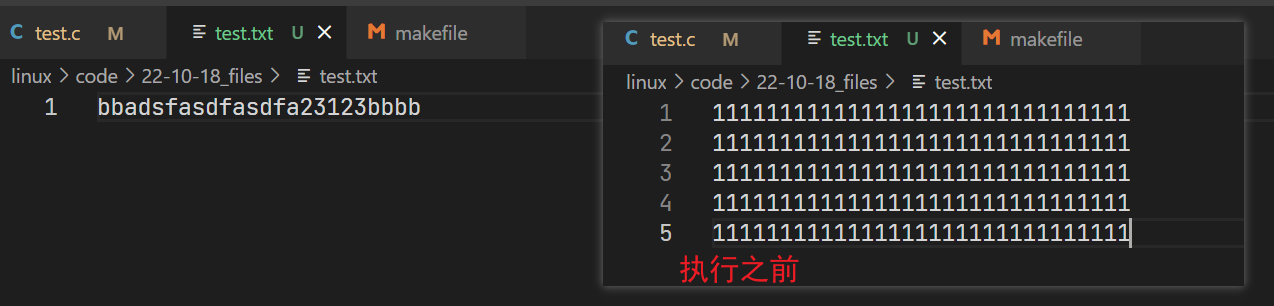
实际上,并不是
fd2的写入方法覆盖了fd1的,而是当我们使用O_TRUNC方法打开文件的时候,文件里面的内容就已经被清空了!

可以看到,刚刚才
begin fd2的时候,test.txt的文件大小就已经变成0了为了避免这种情况,建议不要在同一个进程里面多次打开一个之前已经打开过的文件!
3.文件描述符
3.1 为什么是从3开始?
这里我们一次性打开多个文件,打印他们的文件描述符
void test3() { int fda = open("loga.txt", O_WRONLY | O_CREAT | O_TRUNC, 0666); int fdb = open("logb.txt", O_WRONLY | O_CREAT | O_TRUNC, 0666); int fdc = open("logc.txt", O_WRONLY | O_CREAT | O_TRUNC, 0666); int fdd = open("logd.txt", O_WRONLY | O_CREAT | O_TRUNC, 0666); int fde = open("loge.txt", O_WRONLY | O_CREAT | O_TRUNC, 0666); printf("fda: %d\n", fda); printf("fdb: %d\n", fdb); printf("fdc: %d\n", fdc); printf("fdd: %d\n", fdd); printf("fde: %d\n", fde); }- 1
- 2
- 3
- 4
- 5
- 6
- 7
- 8
- 9
- 10
- 11
- 12
- 13
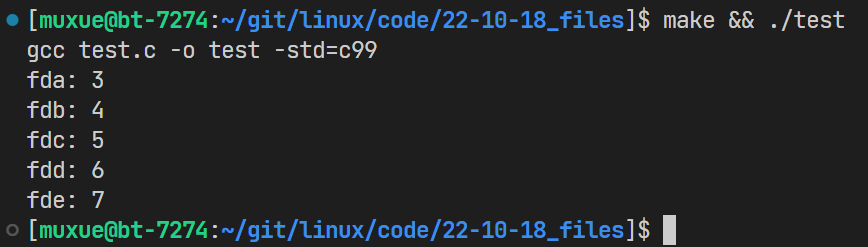
会发现打印的文件是从3开始的。这和我们之前是否有打开过文件没关系,任何进程open的自己的文件都是从3开始的!
还记得前面C语言部分提到的
stdin/stdout/stderr吗?linux系统下一切皆文件,这三个家伙也不例外!既然C语言的文件操作封装了系统的接口,那么其内部肯定是有文件描述符的存在的,我们只需要找到它就行了。
这一点,代码补全就可以帮忙了

void test4() { //c语言中的FILE是一个结构体,里面管理了linux系统的文件描述符 printf("stdin %d\n",stdin->_fileno);// 0 printf("stdout %d\n",stdout->_fileno);// 1 printf("stderr %d\n",stderr->_fileno);// 2 FILE* f1 = fopen("test.txt","w"); printf("f1 %d\n",f1->_fileno);//3 }- 1
- 2
- 3
- 4
- 5
- 6
- 7
- 8
- 9
- 10
[muxue@bt-7274:~/git/linux/code/22-10-18_files]$ ./test stdin 0 stdout 1 stderr 2 f1 3 [muxue@bt-7274:~/git/linux/code/22-10-18_files]$- 1
- 2
- 3
- 4
- 5
- 6
打印之后我们发现,其
0 1 2就是被C语言的这三个默认打开的文件流占用了,而我们用C语言fopen打开的文件,其文件描述符也是从3开始的!
用文件描述符调用stdin/out
既然
stdout对应的文件描述符是1,那我们可不可以直接调用系统的接口往屏幕上输出东西呢?void test5() { char buf[SIZE]="12345678910\n"; write(1,buf,strlen(buf)); }- 1
- 2
- 3
- 4
- 5
当然是可以的!
[muxue@bt-7274:~/git/linux/code/22-10-18_files]$ ./test 12345678910 [muxue@bt-7274:~/git/linux/code/22-10-18_files]$- 1
- 2
- 3
同理,我们还可以这样来接收用户输入
void test6() { char buf[SIZE]; ssize_t s = read(0,buf,sizeof(buf)); if(s>0) { buf[s]='\0'; printf("stdin: %s\n",buf); } }- 1
- 2
- 3
- 4
- 5
- 6
- 7
- 8
- 9
- 10
- 11

运行的时候,程序会挂起等待用户输入,由此可以打印获取输入的结果👇
[muxue@bt-7274:~/git/linux/code/22-10-18_files]$ make gcc test.c -o test -std=c99 [muxue@bt-7274:~/git/linux/code/22-10-18_files]$ ./test asdfasdfadfadf stdin: asdfasdfadfadf [muxue@bt-7274:~/git/linux/code/22-10-18_files]$- 1
- 2
- 3
- 4
- 5
- 6
- 7
3.2 从0开始?数组下标!
既然
stdin/stdout/stderr分别对应的是0/1/2,而我们打开的自己的文件对应的是3开始,有没有可能,这些数字是一个数组的下标呢?一个进程打开的文件,其数据是在内存中的。操作系统内核肯定需要管理一个进程已经打开的文件!万一有“大聪明"忘记
close文件了,而操作系统又没去管理已有文件,其不就会造成内存泄漏吗?在操作系统中,有一个
struct file,其管理的就是已经打开了的文件struct file { //包含了文件的内容+属性 }- 1
- 2
- 3
- 4
同时,这个文件内核还会被插入到进程的
task_struct中,因为一个进程是可以同时打开多个文件的。操作系统在对已打开文件进行管理的同时,还需要对一个进程打开的文件进行管理(知道某个文件是谁打开的)下载的linux源码中,task_strcut的位置如下
linux-2.6.32.12/include/linux/sched.h- 1

而我们文件描述符,其实就是进程中管理文件的一个数组的下标。

struct files_struct { /* * read mostly part */ atomic_t count; struct fdtable *fdt; struct fdtable fdtab; /* * written part on a separate cache line in SMP */ spinlock_t file_lock ____cacheline_aligned_in_smp; int next_fd; struct embedded_fd_set close_on_exec_init; struct embedded_fd_set open_fds_init; struct file * fd_array[NR_OPEN_DEFAULT];//文件数组 };- 1
- 2
- 3
- 4
- 5
- 6
- 7
- 8
- 9
- 10
- 11
- 12
- 13
- 14
- 15
- 16
这样对进程打开的文件的管理,就被转化为了对这个数组的增删查改
3.3 Linux下一切皆文件
最初学习Linux的时候,就提到了Linux下一切皆文件
现在我们知道了内核中是用
file结构体来管理文件的,那么,它是怎么用文件来管理键盘、鼠标、显示器、磁盘、网卡的呢?这时候就可以来“浅浅”的看一下源码了!不求看懂代码实现,只求理解理念
struct file位于include/linux/fs.h中struct file { /* * fu_list becomes invalid after file_free is called and queued via * fu_rcuhead for RCU freeing */ union { struct list_head fu_list; struct rcu_head fu_rcuhead; } f_u; struct path f_path; #define f_dentry f_path.dentry #define f_vfsmnt f_path.mnt const struct file_operations *f_op; spinlock_t f_lock; /* f_ep_links, f_flags, no IRQ */ atomic_long_t f_count; unsigned int f_flags; fmode_t f_mode; loff_t f_pos; struct fown_struct f_owner; const struct cred *f_cred; struct file_ra_state f_ra; u64 f_version; #ifdef CONFIG_SECURITY void *f_security; #endif /* needed for tty driver, and maybe others */ void *private_data; #ifdef CONFIG_EPOLL /* Used by fs/eventpoll.c to link all the hooks to this file */ struct list_head f_ep_links; #endif /* #ifdef CONFIG_EPOLL */ struct address_space *f_mapping; #ifdef CONFIG_DEBUG_WRITECOUNT unsigned long f_mnt_write_state; #endif };- 1
- 2
- 3
- 4
- 5
- 6
- 7
- 8
- 9
- 10
- 11
- 12
- 13
- 14
- 15
- 16
- 17
- 18
- 19
- 20
- 21
- 22
- 23
- 24
- 25
- 26
- 27
- 28
- 29
- 30
- 31
- 32
- 33
- 34
- 35
- 36
- 37
- 38
其余内容用来干哈子的咱暂且不管,目光聚焦于这一个结构体
const struct file_operations *f_op;- 1
翻译过来,这个成员的名字为文件操作。再来复习一下
const修饰指针的知识点const修饰指针有下面两种形式
- 在
*之前修饰,代表该指针指向对象的内容不能被修改(地址里的内容不能改) - 在
*之后修饰,代表该指针指向的对象不能被修改(指向的地址不能改)
在这个结构体中,就有
read/write方法,它们是两个函数指针struct file_operations { struct module *owner; loff_t (*llseek) (struct file *, loff_t, int); ssize_t (*read) (struct file *, char __user *, size_t, loff_t *); ssize_t (*write) (struct file *, const char __user *, size_t, loff_t *); ssize_t (*aio_read) (struct kiocb *, const struct iovec *, unsigned long, loff_t); ssize_t (*aio_write) (struct kiocb *, const struct iovec *, unsigned long, loff_t); int (*readdir) (struct file *, void *, filldir_t); unsigned int (*poll) (struct file *, struct poll_table_struct *); int (*ioctl) (struct inode *, struct file *, unsigned int, unsigned long); long (*unlocked_ioctl) (struct file *, unsigned int, unsigned long); long (*compat_ioctl) (struct file *, unsigned int, unsigned long); int (*mmap) (struct file *, struct vm_area_struct *); int (*open) (struct inode *, struct file *); int (*flush) (struct file *, fl_owner_t id); int (*release) (struct inode *, struct file *); int (*fsync) (struct file *, struct dentry *, int datasync); int (*aio_fsync) (struct kiocb *, int datasync); int (*fasync) (int, struct file *, int); int (*lock) (struct file *, int, struct file_lock *); ssize_t (*sendpage) (struct file *, struct page *, int, size_t, loff_t *, int); unsigned long (*get_unmapped_area)(struct file *, unsigned long, unsigned long, unsigned long, unsigned long); int (*check_flags)(int); int (*flock) (struct file *, int, struct file_lock *); ssize_t (*splice_write)(struct pipe_inode_info *, struct file *, loff_t *, size_t, unsigned int); ssize_t (*splice_read)(struct file *, loff_t *, struct pipe_inode_info *, size_t, unsigned int); int (*setlease)(struct file *, long, struct file_lock **); };- 1
- 2
- 3
- 4
- 5
- 6
- 7
- 8
- 9
- 10
- 11
- 12
- 13
- 14
- 15
- 16
- 17
- 18
- 19
- 20
- 21
- 22
- 23
- 24
- 25
- 26
- 27
- 28
linux操作系统内的文件系统以统一的方式看待所有的设备。
特定的设备的
read/write方法是不一样的,只需要在这些硬件的驱动程序中给操作系统提供读写这个设备的函数实现,操作系统则将函数指针指向对应的函数,便能实现对某一个硬件设备的操作!比如调用显示器驱动的write刷新显示器的画面,调用网卡的
read/write来下载/上传数据等等!
3.4 分配规则
分配文件描述符的时候,会从头开始遍历
fd_array[],找到第一个没有被使用的下标,分配给新的文件!void test7() { int fda = open("loga.txt", O_WRONLY | O_CREAT | O_TRUNC, 0666); int fdb = open("logb.txt", O_WRONLY | O_CREAT | O_TRUNC, 0666); printf("fda: %d\n", fda); printf("fdb: %d\n", fdb); close(fda); printf("\n"); int fdc = open("logc.txt", O_WRONLY | O_CREAT | O_TRUNC, 0666); printf("fdc: %d\n", fdc); }- 1
- 2
- 3
- 4
- 5
- 6
- 7
- 8
- 9
- 10
- 11
- 12
上述代码中,我们先打开了两个文件,打印可以看到其文件描述符为
3/4;关掉第一个文件后,再打开一个新的文件,会发现文件描述符还是3(第一个为空的文件描述符)[muxue@bt-7274:~/git/linux/code/22-10-18_files]$ ./test fda: 3 fdb: 4 fdc: 3 [muxue@bt-7274:~/git/linux/code/22-10-18_files]$- 1
- 2
- 3
- 4
- 5
- 6
输出重定向
同理,如果我们在打开文件之前,就关闭掉C语言打开的
stdout,那么此时打开文件的fd就为1,我们的printf则会把数据打印到该文件当中!void test8() { //文件描述符分配的时候,会在数组里面找第一个为空的描述符 printf("start test!\n");//打印到屏幕上 close(1);//关闭stdout int fd = open("log.txt", O_WRONLY | O_CREAT | O_TRUNC, 0666); printf("fd: %d\n",fd);//打印到文件中 close(fd); }- 1
- 2
- 3
- 4
- 5
- 6
- 7
- 8
- 9
可以看到,运行
./test之前,文件里面没有内容。执行之后,就把我们printf的数据输出到文件当中了![muxue@bt-7274:~/git/linux/code/22-10-18_files]$ cat log.txt [muxue@bt-7274:~/git/linux/code/22-10-18_files]$ ./test start test! [muxue@bt-7274:~/git/linux/code/22-10-18_files]$ cat log.txt fd: 1 [muxue@bt-7274:~/git/linux/code/22-10-18_files]$- 1
- 2
- 3
- 4
- 5
- 6
这种操作就叫做输出重定向!
另外一种情况下,如果我们在关闭
stdout之前不进行printf,则不会立马刷新到log.txt而是需要我们刷新了缓冲区之后,才会写入到文件中close(1);//关闭stdout int fd = open("log.txt", O_WRONLY | O_CREAT | O_TRUNC, 0666); printf("fd: %d\n",fd); fflush(stdout); close(fd);- 1
- 2
- 3
- 4
- 5
这里有个小技巧
>log.txt可以用来清空文件的内容[muxue@bt-7274:~/git/linux/code/22-10-18_files]$ >log.txt [muxue@bt-7274:~/git/linux/code/22-10-18_files]$ ./test [muxue@bt-7274:~/git/linux/code/22-10-18_files]$ cat log.txt [muxue@bt-7274:~/git/linux/code/22-10-18_files]$- 1
- 2
- 3
- 4
3.5 dup2
上面是我们手动进行的输出重定向操作。操作系统提供了一个接口,可以让我们很方便地进行输出重定向
int dup2(int oldfd, int newfd);- 1

这里我们要用的是
dup2函数,它的作用如下dup2() makes newfd be the copy of oldfd, closing newfd first if necessary, but note the following: * If oldfd is not a valid file descriptor, then the call fails, and newfd is not closed. * If oldfd is a valid file descriptor, and newfd has the same value as oldfd, then dup2() does nothing, and returns newfd.- 1
- 2
- 3
- 4
一定要看清楚,是将
newfd变成oldfd的一个拷贝,在执行完毕之后,就只剩oldfd了!如果
newfd原本已经打开了一个文件,该操作会先将newfd给关掉RETURN VALUE On success, these system calls return the new descriptor. On error, -1 is returned, and errno is set appropriately.- 1
- 2
该函数成功的时候会返回
newfd,否则返回-1
下面为一个示例代码,假设我们想将输出的内容重定向到一个文件中,则可以使用
dup2将1替换为我们自己的fd,此时oldfd=fd,newfd=1void test9() { int fd = open("log.txt", O_WRONLY | O_CREAT | O_TRUNC, 0666); dup2(fd, 1); int ret = dup2(fd, 1); if(ret > 0) close(fd); printf("ret: %d\n", ret);//ret为newfd //本来往显示器打印,最终变成向指定文件打印 -> 重定向 fprintf(stdout, "打开文件成功,fd: %d\n", fd); fflush(stdout);//刷新缓冲区 close(fd); }- 1
- 2
- 3
- 4
- 5
- 6
- 7
- 8
- 9
- 10
- 11
- 12
- 13
- 14
结果如下,我们成功的将内容
printf到了指定文件中[muxue@bt-7274:~/git/linux/code/22-10-18_files]$ >log.txt [muxue@bt-7274:~/git/linux/code/22-10-18_files]$ ./test [muxue@bt-7274:~/git/linux/code/22-10-18_files]$ cat log.txt ret: 1 打开文件成功,fd: 3 [muxue@bt-7274:~/git/linux/code/22-10-18_files]$- 1
- 2
- 3
- 4
- 5
- 6
- 为什么这里可以用
stdout来输出到文件中呢?
因为当我们使用
dup2的时候,stdout所指向的文件描述符1已经被替换成了log.txt,此时对stdout的操作就是对我们自己的文件操作- 为什么这里我们已经把
fd关掉了,但是替换掉的文件描述符1不受影响呢?
同一个文件是可以被打开多次的!执行
dup2的时候,可以理解为操作系统又一次打开了fd指向的文件,在文件底层,则有一个计数来判断该文件被打开了几次。当我们close(fd)的时候,只是让该文件底层struct file的打开计数-1,并非完全关闭了该文件!此时1还能正确指向log.txt呢追加重定向
这里只需要我们改变
fd打开的方式,加上O_APPEND即可!void test9() { int fd = open("log.txt", O_WRONLY | O_CREAT | O_APPEND, 0666); dup2(fd, 1); int ret = dup2(fd, 1);// if(ret > 0) close(fd); printf("ret: %d\n", ret);//ret为newfd //本来往显示器打印,最终变成向指定文件打印 -> 重定向 fprintf(stdout, "打开文件成功,fd: %d\n", fd); fflush(stdout);//刷新缓冲区 close(fd); }- 1
- 2
- 3
- 4
- 5
- 6
- 7
- 8
- 9
- 10
- 11
- 12
- 13
- 14
运行可以看到,成功在后面追加
[muxue@bt-7274:~/git/linux/code/22-10-18_files]$ cat log.txt ret: 1 打开文件成功,fd: 3 [muxue@bt-7274:~/git/linux/code/22-10-18_files]$ ./test [muxue@bt-7274:~/git/linux/code/22-10-18_files]$ cat log.txt ret: 1 打开文件成功,fd: 3 ret: 1 打开文件成功,fd: 3 [muxue@bt-7274:~/git/linux/code/22-10-18_files]$- 1
- 2
- 3
- 4
- 5
- 6
- 7
- 8
- 9
- 10
输入重定向
//输入重定向 void test11() { int fd = open("log.txt",O_RDONLY); if(fd<0) { perror("open"); return ; } int ret = dup2(fd,0);//重定向stdin if(ret > 0) close(fd); char buf[128]; while(fgets(buf,sizeof(buf),stdin)!=NULL) { printf("%s",buf); } }- 1
- 2
- 3
- 4
- 5
- 6
- 7
- 8
- 9
- 10
- 11
- 12
- 13
- 14
- 15
- 16
- 17
- 18
- 19
- 20
此时我们的
stdin被dup2替换成了log.txt,其获取输入的操作转为了读取文件[muxue@bt-7274:~/git/linux/code/22-10-18_files]$ cat log.txt ret: 1 打开文件成功,fd: 3 ret: 1 打开文件成功,fd: 3 [muxue@bt-7274:~/git/linux/code/22-10-18_files]$ ./test ret: 1 打开文件成功,fd: 3 ret: 1 打开文件成功,fd: 3 [muxue@bt-7274:~/git/linux/code/22-10-18_files]$- 1
- 2
- 3
- 4
- 5
- 6
- 7
- 8
- 9
- 10
- 11
3.6 标准输出/标准错误
之前写代码的时候,我们常常直接使用了printf来打印一些错误信息,而没有怎么用过
perror/cerr这两个库函数那么它们和
printf/cout又有什么区别呢?int main() { // stdout printf("hello printf\n"); fprintf(stdout, "hello fprintf to stdout\n"); fputs("hello fputs to stdout\n", stdout); cout << "hello cout" << endl; // stderr perror("hello perror"); fprintf(stderr, "hello fprintf to stderr\n"); fputs("hello fputs to stderr\n", stderr); cerr << "hello cerr" << endl; return 0; }- 1
- 2
- 3
- 4
- 5
- 6
- 7
- 8
- 9
- 10
- 11
- 12
- 13
- 14
- 15
- 16
测试发现,似乎没有啥区别啊,不都打印到屏幕上了吗?
[muxue@bt-7274:~/git/linux/code/22-10-31_stdout_err]$ ./test hello printf hello fprintf to stdout hello fputs to stdout hello cout hello perror: Success hello fprintf to stderr hello fputs to stderr hello cerr [muxue@bt-7274:~/git/linux/code/22-10-31_stdout_err]$- 1
- 2
- 3
- 4
- 5
- 6
- 7
- 8
- 9
- 10
非也!当我们使用重定向的时候,就出现问题了
[muxue@bt-7274:~/git/linux/code/22-10-31_stdout_err]$ ./test >log.txt hello perror: Success hello fprintf to stderr hello fputs to stderr hello cerr [muxue@bt-7274:~/git/linux/code/22-10-31_stdout_err]$ cat log.txt hello printf hello fprintf to stdout hello fputs to stdout hello cout [muxue@bt-7274:~/git/linux/code/22-10-31_stdout_err]$- 1
- 2
- 3
- 4
- 5
- 6
- 7
- 8
- 9
- 10
- 11
欸?不是使用了重定向吗,为什么还在屏幕上输出了内容呢?
仔细一看,输出的都是
stderr的内容,而没有stdout。cat文件一看,stdout的内容都在文件里面嘞!还记得吗?
stdout/stderr对应的文件描述符是1/2,而在默认情况下,它们都指向的是显示器。注意:虽然它们两个指向都是显示器,但它们是通过两个不同的文件描述符,独立地往显示器上打印内容的!
我们重定向的时候,其实省略了一个1,默认情况下,重定向只对1号描述符,也就是stdout有效!
./test >log.txt ./test 1>log.txt- 1
- 2
如果我们把这里的1换成2,结果就不一样了
[muxue@bt-7274:~/git/linux/code/22-10-31_stdout_err]$ ./test 2>log.txt hello printf hello fprintf to stdout hello fputs to stdout hello cout [muxue@bt-7274:~/git/linux/code/22-10-31_stdout_err]$ cat log.txt hello perror: Success hello fprintf to stderr hello fputs to stderr hello cerr [muxue@bt-7274:~/git/linux/code/22-10-31_stdout_err]$- 1
- 2
- 3
- 4
- 5
- 6
- 7
- 8
- 9
- 10
- 11
可以看到,stderr的内容进了文件,而stdout的内容输出到了屏幕上
区分错误和正常输出
这么设计的意义,就是为了方便我们定位问题。将错误和正常的打印输出写道不同的文件中。如果我们像只关注错误,就只需要去查找记录了错误信息的文件即可
混合输出2>&1
如果我们就是不听不听,非要把他俩打一个文件里面,应该怎么弄呢?
./test >log.txt 2>&1- 1
这个
2>&1的操作需要我们理解:./test运行可执行程序>log.txt代表重定向,默认只重定向了1- 现在指向
log.txt的是1号文件描述符,代表stdout 2>&1代表将2重定向到1,可以理解为dup2(1,2);- 执行结束后,2就成了1的一份拷贝,现在只剩下了1
- 因为1指向的是
log.txt,所以2也指向的是相同文件
而这个语句必须写在
>log.txt的后面, 否则意义就错误了👇./test 2>&1 >log.txt #错误写法- 1
2>&1代表将2重定向到1,此时1指向的是屏幕,所以2也指向了屏幕>log.txt代表将1指向文件,此时1指向了文件,但是2还是指向屏幕- 白写!
执行了正确的命令后,来看看结果吧!
[muxue@bt-7274:~/git/linux/code/22-10-31_stdout_err]$ ./test >log.txt 2>&1 [muxue@bt-7274:~/git/linux/code/22-10-31_stdout_err]$ cat log.txt hello printf hello fprintf to stdout hello fputs to stdout hello cout hello perror: Success hello fprintf to stderr hello fputs to stderr hello cerr [muxue@bt-7274:~/git/linux/code/22-10-31_stdout_err]$- 1
- 2
- 3
- 4
- 5
- 6
- 7
- 8
- 9
- 10
- 11
标准错误和标准输出的内容都被写入到文件中了!
上面的整法实在有点太长了,而且还有可能记不住写反了。所以有一种简写的方式
#简写方式 &>log.txt #上面的写法等同于 >log.txt 2>&1- 1
- 2
- 3
- 4
测试一下,没问题!
[muxue@bt-7274:~/git/linux/code/22-10-31_stdout_err]$ >log.txt [muxue@bt-7274:~/git/linux/code/22-10-31_stdout_err]$ ./test &>log.txt [muxue@bt-7274:~/git/linux/code/22-10-31_stdout_err]$ cat log.txt hello printf hello fprintf to stdout hello fputs to stdout hello cout hello perror: Success hello fprintf to stderr hello fputs to stderr hello cerr [muxue@bt-7274:~/git/linux/code/22-10-31_stdout_err]$- 1
- 2
- 3
- 4
- 5
- 6
- 7
- 8
- 9
- 10
- 11
- 12
关于
2>&1的详解参考👉 传送门
4.C语言缓冲区
4.1 观察现象
先来看看下面的代码,分别调用C语言的
printf和操作系统的write接口,往屏幕上打印内容。结束后sleep(3)void test1() { printf("test printf "); const char*msg = "test write "; write(stdout->_fileno,msg,strlen(msg)); sleep(3); }- 1
- 2
- 3
- 4
- 5
- 6
- 7
- 8

我们惊奇的发现,第一个打印出来的竟然是
write,而不是在它之前的printf接口!void test1() { printf("test printf "); fflush(stdout); const char*msg = "test write "; write(stdout->_fileno,msg,strlen(msg)); sleep(3); }- 1
- 2
- 3
- 4
- 5
- 6
- 7
- 8
- 9
只有在
printf后立马调用fflush刷新缓冲区,才能按正确的“顺序”打印出内容来[muxue@bt-7274:~/git/linux/code/22-10-27_buffer]$ ./test test printf test write [muxue@bt-7274:~/git/linux/code/22-10-27_buffer]$- 1
- 2
在调用其他C语言的函数,往屏幕上输出信息。我们会发现结果相同!都是先打印出来
write结果,才一次性打印出所有C语言函数的结果void test2() { printf("test printf "); fprintf(stdout,"test fprintf "); fputs("test fputs ",stdout); const char*msg = "test write "; write(stdout->_fileno,msg,strlen(msg)); sleep(3); }- 1
- 2
- 3
- 4
- 5
- 6
- 7
- 8
- 9
- 10
- 11
[muxue@bt-7274:~/git/linux/code/22-10-27_buffer]$ ./test test write test printf test fprintf test fputs [muxue@bt-7274:~/git/linux/code/22-10-27_buffer]$- 1
- 2
由此可见,之前我们一直提到的缓冲区,其实是C语言提供的!
注意:缓冲区不止C语言内部有,操作系统内也有。本文只讨论C语言提供的缓冲区
4.2 缓冲区在哪?
printf("test printf "); fprintf(stdout,"test fprintf "); fputs("test fputs ",stdout);- 1
- 2
- 3
上面这几个函数都有一个共同的特点:它们都往
stdout里面打印了内容!printf虽然没有显示指定stdout,但是底层是有的我们知道,C语言的文件是一个
FILE类型的结构体。该结构体内封装了很多属性,其中stdout的_fileno文件描述符,就是该FILE对应的语言级别的缓冲区!关闭文件描述符
如果我们在数据刷新之前,关闭了
stdout对应的文件描述符,会发生什么?printf("test printf "); fprintf(stdout,"test fprintf "); fputs("test fputs ",stdout); const char*msg = "test write "; write(stdout->_fileno,msg,strlen(msg)); sleep(3); close(stdout->_fileno);- 1
- 2
- 3
- 4
- 5
- 6
- 7
- 8
- 9
结果就是,啥都没有刷新!
缓冲区都被关闭了,其内部的数据都无了,肯定不会刷新啦~
[muxue@bt-7274:~/git/linux/code/22-10-27_buffer]$ ./test test write [muxue@bt-7274:~/git/linux/code/22-10-27_buffer]$- 1
- 2
而在输出重定向中,打印的内容没有直接被显示的,也是因为我们没有在关闭
fd之前刷新stdout(此时指向的是fd)中的缓冲区close(1);//关闭stdout int fd = open("log.txt", O_WRONLY | O_CREAT | O_TRUNC, 0666); printf("fd: %d\n",fd); fflush(stdout); close(fd);- 1
- 2
- 3
- 4
- 5
FILE
既然stdout的缓冲区在FILE内部,推而广之,所有用C语言打开的文件,
FILE中都会有一个文件描述符和它自己的语言级别缓冲区typedef struct _IO_FILE FILE;- 1
库函数中的
FILE是一个struct _IO_FILE类型的结构体,其定义如下struct _IO_FILE { int _flags; /* High-order word is _IO_MAGIC; rest is flags. */ #define _IO_file_flags _flags //下面这些就是它的缓冲区 /* The following pointers correspond to the C++ streambuf protocol. */ /* Note: Tk uses the _IO_read_ptr and _IO_read_end fields directly. */ char* _IO_read_ptr; /* Current read pointer */ char* _IO_read_end; /* End of get area. */ char* _IO_read_base; /* Start of putback+get area. */ char* _IO_write_base; /* Start of put area. */ char* _IO_write_ptr; /* Current put pointer. */ char* _IO_write_end; /* End of put area. */ char* _IO_buf_base; /* Start of reserve area. */ char* _IO_buf_end; /* End of reserve area. */ /* The following fields are used to support backing up and undo. */ char *_IO_save_base; /* Pointer to start of non-current get area. */ char *_IO_backup_base; /* Pointer to first valid character of backup area */ char *_IO_save_end; /* Pointer to end of non-current get area. */ struct _IO_marker *_markers; struct _IO_FILE *_chain; int _fileno;//文件描述符 #if 0 int _blksize; #else int _flags2; #endif _IO_off_t _old_offset; /* This used to be _offset but it's too small. */ #define __HAVE_COLUMN /* temporary */ /* 1+column number of pbase(); 0 is unknown. */ unsigned short _cur_column; signed char _vtable_offset; char _shortbuf[1]; /* char* _save_gptr; char* _save_egptr; */ _IO_lock_t *_lock; #ifdef _IO_USE_OLD_IO_FILE };- 1
- 2
- 3
- 4
- 5
- 6
- 7
- 8
- 9
- 10
- 11
- 12
- 13
- 14
- 15
- 16
- 17
- 18
- 19
- 20
- 21
- 22
- 23
- 24
- 25
- 26
- 27
- 28
- 29
- 30
- 31
- 32
- 33
- 34
- 35
- 36
- 37
- 38
- 39
- 40
- 41
- 42
- 43
我们可以看到有多个变量用于维护该文件的缓冲区,也证实了缓冲区是由C语言提供的这一结论。
4.3 缓冲区的作用
C语言提供缓冲区的理由很简单,相对于内存而言,其余硬件都是满设备。
- 为代码提供缓冲区,可以提高该程序/进程输出的效率
- 缓冲区可以集中处理数据刷新,减少IO的次数,提高了整机运行效率
4.4 什么时候刷新缓冲区?
什么时候刷新缓冲区,对应的是
刷新策略问题常规的刷新策略
- 无缓冲(立即刷新)
- 行缓冲(逐行刷新)
- 全缓冲(缓存区满,刷新)
特殊情况
- 进程退出(刷新)
- 用户调用函数,强制刷新
刷新与子进程
void test3() { const char*str1="test printf\n"; const char*str2="test fprintf\n"; const char*str3="test fputs\n"; const char*str4="test write\n"; //C语言 printf(str1);//这样写也是ok的 fprintf(stdout,str2); fputs(str3,stdout); //系统接口 write(stdout->_fileno,str4,strlen(str4)); //子进程创建 fork(); }- 1
- 2
- 3
- 4
- 5
- 6
- 7
- 8
- 9
- 10
- 11
- 12
- 13
- 14
- 15
- 16
- 17
上面的代码,会出现两种运行情况
- 如果直接打印到屏幕上,打印的顺序和内容都是正确的
- 如果重定向到文件中,却发现C语言打印的内容都多打了一次!
[muxue@bt-7274:~/git/linux/code/22-10-27_buffer]$ ./test test printf test fprintf test fputs test write [muxue@bt-7274:~/git/linux/code/22-10-27_buffer]$ cat log.txt [muxue@bt-7274:~/git/linux/code/22-10-27_buffer]$ ./test > log.txt [muxue@bt-7274:~/git/linux/code/22-10-27_buffer]$ cat log.txt test write test printf test fprintf test fputs test printf test fprintf test fputs [muxue@bt-7274:~/git/linux/code/22-10-27_buffer]$- 1
- 2
- 3
- 4
- 5
- 6
- 7
- 8
- 9
- 10
- 11
- 12
- 13
- 14
- 15
- 16
刷新的本质,其实就是把缓冲区中数据,调用
write接口通过操作系统写入到文件中。而FILE内部的缓冲区,是属于父进程内部的数据。当我们在刷新之前
fork创建子进程的时候,会发生一次写时拷贝结果就是父进程、子进程各刷新一次。于是就出现了上面的C语言的内容多了一份的现象!
4.5 简单模拟实现
缓冲区,本质就是C语言在文件的结构体中维护的一个数组。同时维护了多种刷新策略,在不同的时刻将该数组的内容调用系统接口
write写入文件这里我们提供了一个简单的
MyFILE结构体,内部封装文件描述符、刷新策略、缓冲区#define NONE_FLUSH 0x0 //无刷 #define LINE_FLUSH 0x1 //行刷 #define FULL_FLUSH 0x2 //全缓存 typedef struct MyFILE{ int _fileno; char _buffer[NUM]; int _end;//缓冲区结尾 int _fflags; //刷新策略 }MyFILE;- 1
- 2
- 3
- 4
- 5
- 6
- 7
- 8
- 9
- 10
有了自己的文件结构体,对应的也需要分装一下系统的
open/read/write/close等接口,还有fflush用于强制刷新
封装接口
为了做到尽量简单,这里暂时只封装
r/w/a三种打开方法MyFILE *my_fopen(const char *filename, const char *method) { assert(filename); assert(method); int flags = O_RDONLY; if(strcmp(method, "r") == 0) { flags = O_RDONLY; } else if(strcmp(method, "w") == 0) { flags = O_WRONLY | O_CREAT | O_TRUNC; } else if(strcmp(method, "a") == 0) { flags = O_WRONLY | O_CREAT | O_APPEND; } int fileno = open(filename, flags, 0666); if(fileno < 0) { return NULL; } MyFILE *fp = (MyFILE *)malloc(sizeof(MyFILE)); if(fp == NULL) return fp; memset(fp, 0, sizeof(MyFILE)); fp->_fileno = fileno; fp->_fflags |= LINE_FLUSH;//默认行缓冲 fp->_end = 0; return fp; }- 1
- 2
- 3
- 4
- 5
- 6
- 7
- 8
- 9
- 10
- 11
- 12
- 13
- 14
- 15
- 16
- 17
- 18
- 19
- 20
- 21
- 22
- 23
- 24
- 25
- 26
- 27
- 28
- 29
- 30
- 31
- 32
- 33
- 34
这里暂时只用行缓冲和全缓冲来体验一下缓冲区的作用。同时只对字符串结尾的
\n进行了判断,情况不够全面。这里其实我很好奇,C库里面是怎么处理
\n的捏;总不能用遍历吧?那样效率也太低了。个人猜测是和预先设置的特殊字符有关系。void my_fwrite(MyFILE *fp, const char *start, int len) { assert(fp); assert(start); assert(len > 0); //先写入到缓冲区里面 strncpy(fp->_buffer+fp->_end, start, len); //将数据写入到缓冲区了 fp->_end += len; if(fp->_fflags & NONE_FLUSH) {} else if(fp->_fflags & LINE_FLUSH) { //这里的判断只是测试,实际上还需要判断中间有无\n if(fp->_end > 0 && fp->_buffer[fp->_end-1] == '\n') { //写入到内核中 write(fp->_fileno, fp->_buffer, fp->_end); fp->_end = 0; syncfs(fp->_fileno); } } else if(fp->_fflags & FULL_FLUSH) {//满了刷新 if(fp->_end > 0 && fp->_end==NUM) { //写入到内核中 write(fp->_fileno, fp->_buffer, fp->_end); fp->_end = 0; syncfs(fp->_fileno); } } }- 1
- 2
- 3
- 4
- 5
- 6
- 7
- 8
- 9
- 10
- 11
- 12
- 13
- 14
- 15
- 16
- 17
- 18
- 19
- 20
- 21
- 22
- 23
- 24
- 25
- 26
- 27
- 28
- 29
- 30
- 31
- 32
- 33
- 34
这里有一个新接触的函数
syncfsint syncfs(int fd);- 1
该函数是一个系统调用接口,用于将文件内核缓冲区内的数据写入到指定文件中。
前面我们提到的缓冲区,一直说的都是C语言内部维护的。从这个接口也能看出,操作系统同样对文件进行了缓冲区的维护。

void my_fflush(MyFILE *fp) { assert(fp); if(fp->_end > 0) { write(fp->_fileno, fp->_buffer, fp->_end); fp->_end = 0; syncfs(fp->_fileno); } } void my_fclose(MyFILE *fp) { my_fflush(fp); close(fp->_fileno); free(fp); }- 1
- 2
- 3
- 4
- 5
- 6
- 7
- 8
- 9
- 10
- 11
- 12
- 13
- 14
- 15
- 16
运行测试
int main() { MyFILE *fp = my_fopen("log.txt", "w"); if(fp == NULL) { printf("my_fopen error\n"); return 1; } const char *a = "hello my 111\n"; my_fwrite(fp, a, strlen(a)); printf("消息立即刷新\n"); sleep(3); const char *b = "hello my 222 "; my_fwrite(fp, b, strlen(b)); printf("写入了一个不满足刷新条件的字符串\n"); sleep(3); const char *c = "hello my 333 "; my_fwrite(fp, c, strlen(c)); printf("写入了一个不满足刷新条件的字符串\n"); sleep(3); const char *d = "end\n"; my_fwrite(fp, d, strlen(d)); printf("写入了一个满足刷新条件的字符串\n"); sleep(3); my_fclose(fp); printf("程序结束\n"); }- 1
- 2
- 3
- 4
- 5
- 6
- 7
- 8
- 9
- 10
- 11
- 12
- 13
- 14
- 15
- 16
- 17
- 18
- 19
- 20
- 21
- 22
- 23
- 24
- 25
- 26
- 27
- 28
- 29
- 30
- 31
- 32
- 33
刚开始的时候,我们写入了一个
\n结尾的字符串,其立马写入到了文件中
随后写入了两个不满足刷新条件的字符串,文件中没有出现结果


而当我们写入一个满足刷新条件的字符串后,缓冲区的内容就同时被写入到文件中了!

子进程测试
除此之外,我们还可以测试一下子进程是否会出现刷新两次的情况
void test2(MyFILE * fp) { const char *s = "-test "; my_fwrite(fp, s, strlen(s)); printf("写入了一个不满足刷新条件的字符串\n"); fork(); } int main() { MyFILE *fp = my_fopen("log.txt", "w"); if(fp == NULL) { printf("my_fopen error\n"); return 1; } //test1(fp); test2(fp); //模拟进程退出 my_fclose(fp); printf("程序结束\n"); }- 1
- 2
- 3
- 4
- 5
- 6
- 7
- 8
- 9
- 10
- 11
- 12
- 13
- 14
- 15
- 16
- 17
- 18
- 19
- 20
- 21
- 22
- 23
- 24
- 25
结果如我们所料,文件中出现了两个
-test,原因在4.4中已做解释[muxue@bt-7274:~/git/linux/code/22-10-27_buffer]$ cat log.txt [muxue@bt-7274:~/git/linux/code/22-10-27_buffer]$ ./test1 写入了一个不满足刷新条件的字符串 程序结束 程序结束 [muxue@bt-7274:~/git/linux/code/22-10-27_buffer]$ cat log.txt -test -test [muxue@bt-7274:~/git/linux/code/22-10-27_buffer]$- 1
- 2
- 3
- 4
- 5
- 6
- 7
5.文件系统
之前我们提到的这些数据,都是存放在内存中的。接下来我们便要来了解一下操作系统是如何管理磁盘上的文件。
5.1 磁盘的物理结构
以机械硬盘为例,其内部主要由盘片和磁头组成。

当我们改变磁盘上某一个位置的NS极,就好比更改了此处保存的数据
0/1
在机械硬盘中,一个盘片对应一个磁头
- 每个盘片被分为诺干个同心圆,每一个同心圆就是一个
磁道 - 每个磁道被划分为诺干
段(扇区) - 每个扇区的存储容量为
512字节
由此可见,当我们读写机械硬盘的时候,需要去找某一个盘面、某一个磁道的某一片扇区,就能找到该扇区的数据!
- 盘面(磁面)有自己对应的磁头
- 磁道是由距离圆心的半径决定的
- 扇区是由盘面旋转决定的
而操作系统的文件系统所作的工作,便是将文件和其对应的扇区联系起来。用上面提到的办法,便可以查找到每一个扇区!
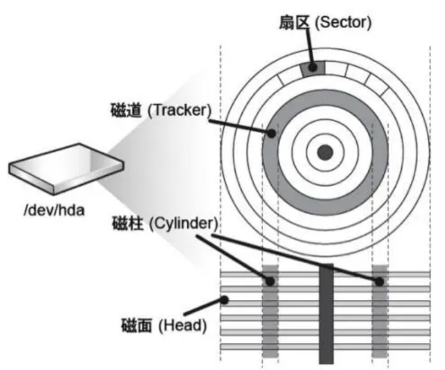
这种查找数据位置的操作,被称为
CHS寻址,CHS分别对应磁柱、磁面、扇区5.2 CHS和LBA
更详细的解析参考:https://blog.csdn.net/jadeshu/article/details/89072512
假设我们把一个磁道的数据“拉直”,其就变成了一条直线。依此类推,可以把每一个盘面上的每一条磁道都“拉直”

最终,其不就变成了和上图类似的“长条状”了吗?我们学过的什么数据结构也是线性长条的捏?
没错!就是数组!
此时,对磁盘文件的修改,就可以抽象成对内核中一个数组的增删查改操作!
这种抽象之后的磁盘,被称为
LBA逻辑块地址,他们之中有一个转换关系👇用C表示当前柱面号,H表示当前磁头号,S表示当前扇区号,CS表示起始柱面号,HS表示起始磁头号,SS表示起始扇区号,PS表示每磁道有多少个扇区,PH表示每柱面有多少个磁道,计算公式如下:
L B A = ( C – C S ) ∗ P H ∗ P S + ( H – H S ) ∗ P S + ( S – S S ) LBA = ( C – CS ) * PH * PS + ( H – HS ) * PS + ( S – SS ) LBA=(C–CS)∗PH∗PS+(H–HS)∗PS+(S–SS)
通过这个公式,我们就能将磁盘中的一个区块的数据,转为数组中的一个下标,来方便操作系统访问
C = L B A / ( P H ∗ P S ) + C S C = LBA / ( PH * PS ) + CS C=LBA/(PH∗PS)+CSH = ( L B A / P S ) % P H + H S H = ( LBA / PS ) \% PH + HS H=(LBA/PS)%PH+HS
S = L B A / P S + S S S = LBA / PS + SS S=LBA/PS+SS
修改了数组中的数据之后,操作系统将LBA对应的CHS地址算出来交给磁盘,让磁盘来修改指定扇区的数据,便实现了保存数据到磁盘中的操作
5.3 IO的基本单位
对于操作系统而言,一次IO的基本单位是4kb,也就是8个扇区
8*512字节- 磁盘的基本单位:扇区(一般为512字节)
- 文件系统访问磁盘的基本单位:
4kb
在操作系统中,会对前面提到的那个“数组”进一步抽象,8个扇区会被合并成一个
4KB的区块,用于单次IO。为了方便管理每一个区块,又将多个区块合并,作为一个分区进行管理这便是我们电脑上同一块物理硬盘可以对应不同分区的来源了!
为什么?
为什么操作系统要以4kb作为
IO的基本单位呢?https://www.51cto.com/article/617936.html
在上文中提到,Linux选择4KB作为“页操作”(即读取内存,以及从内存写入磁盘)的基本单位算是一个历史遗留问题了。
- 过小的页大小会带来较大的寻址开销
- 过大的页大小浪费内存空间,造成内存碎片
而当初这么选择,肯定是有其功用的!
- 能提高IO效率,不需要多次写入512字节的数据
- 不让文件系统的设计和磁盘有强相关性,解耦合
对于第二点进行说明,如果文件系统不在扇区外额外选择一个空间作为IO的基本单位,那么其设计必定会依赖于磁盘扇区大小。
如果某一天,所有磁盘的扇区大小都从512字节变成了1024字节,那就必须要修改操作系统的源码,才能正确访问新的硬盘。同时还需要对旧盘做优化,可谓事倍功半。
而提前设定好一个更大的IO基本单位,便是避免了磁盘变动而造成的无法访问。有了这个更大的IO基本单位,我们只需要把磁盘的扇区组成一个4kb大小的空间进行IO,不用管其磁盘扇区大小到底是多少了。
当然,如果哪天扇区大小大于4kb了,恐怕就得改源码了?
这部分我也不是很懂呢,以上只是个人浅显的理解
5.4 系统结构
下图向我们展示了一个磁盘是如何被文件系统“拆分”的
首先是分区,每一个分区都有一个
BootSector和文件系统。我们主要关注文件系统中,单个Block Group里面的内容
linux采用的是文件内容、文件属性分开存放的存储方式
- 文件的属性是稳定的
- 文件的内容在不断增多
data blocks:保存数据内容 inode table:保存文件的inode inode bitmap:位图结构,指示inode是否被使用 GDT:全称group descriptor table,保存了inode个数、起始inode编号、多少inode被使用、多少data blocks被使用…… Super Blocks:该Block Group文件系统的顶层数据结构- 1
- 2
- 3
- 4
- 5
inode
这里提到的
inode是linux下每一个文件的独立编号。linux并不以文件名来识别文件,而是用文件编号来识别唯一的文件的。inode保存了一个文件的基本信息
- 文件的属性
- rwx权限
- 所属用户、所属组
- 硬链接个数
- 文件访问、修改、创建的时间
- 指向
data blocks中文件的内容
struct inode的位置在/include/linux/fs.h
查看inode编号的方法为
ls -i,其中这串数字便是该文件的inode编号[muxue@bt-7274:~/git/linux/code/22-10-31_stdout_err]$ ls -i 1453833 makefile 1453832 test.cpp- 1
- 2
我们也可以看到,
.和..这两个文件夹也是有自己的inode编号的,印证了linux下一切皆文件,包括目录[muxue@bt-7274:~/git/linux/code/22-10-31_stdout_err]$ ls -ila total 16 1453831 drwxrwxr-x 2 muxue muxue 4096 Nov 2 09:58 . 1443736 drwxrwxr-x 16 muxue muxue 4096 Nov 2 09:20 .. 1453833 -rw-rw-r-- 1 muxue muxue 81 Nov 2 09:58 makefile 1453832 -rw-rw-r-- 1 muxue muxue 437 Nov 2 09:35 test.cpp- 1
- 2
- 3
- 4
- 5
- 6
stat命令
还可以用stat命令来查看单个文件的inode信息
[muxue@bt-7274:~/git/linux/code/22-10-31_stdout_err]$ stat test.cpp File: ‘test.cpp’ Size: 437 Blocks: 8 IO Block: 4096 regular file Device: fd01h/64769d Inode: 1453832 Links: 1 Access: (0664/-rw-rw-r--) Uid: ( 1001/ muxue) Gid: ( 1001/ muxue) Access: 2022-11-02 09:35:07.684160444 +0800 Modify: 2022-11-02 09:35:04.328161202 +0800 Change: 2022-11-02 09:35:04.328161202 +0800 Birth: -- 1
- 2
- 3
- 4
- 5
- 6
- 7
- 8
- 9
inode内部有一个结构,指向
data blocks。前面提到过,文件系统IO的基本单位是4KB,对应的,一个blocks的大小就是4KB每一个文件都对应一个inode,至少对应一个data blocks(inode中储存了blocks编号)
因为inode所能保存的编号有限,所以对data blocks的保存分为两种情况
- 部分data blocks直接保存了文件的内容。如果是小文件,inode中保存的block就足够存下所有文件内容了
- 如果是大文件,inode中一部分blocks会用来保存该文件剩余
data blocks的编号
在内核中,文件系统会对这两种情况进行区分
注意
- 因为每一个文件都肯定有一个inode与之对应,所以创建空文件也是占用磁盘空间的
- 可能会出现inode被用完了,磁盘空间却没有满的情况。但这时候也已经无法创建新文件了
😂你可以尝试写一个while1循环,不断往系统中创建新文件,看看能不能达到这个临界值(咳咳,虽然好玩,但并不推荐你这么做)
文件名存在哪儿?
前面提到过,inode保存了文件的属性,文件名是否为文件的属性呢?也算!
但inode中并不保存文件名字!
实际上,文件名是存在该文件所在目录的文件内容中的
目录也是文件,文件就有文件属性+文件内容
可以理解为,目录的内容保存的是一个键值对,其中key为文件名,value为inode编号
这便是为何一个目录中不能出现同名文件,这是一个不支持键值冗余的
map(cpp-stl)目录权限
既然目录也是文件,那么它就也有自己的文件权限
https://blog.csdn.net/muxuen/article/details/125776348
在我之前关于linux文件权限的讲解中,就提到了和目录有关的权限问题
- 进入目录需要x权限
- 创建文件需要w权限
- 查看文件名需要r权限
了解文件系统了之后,现在我们知道为什么目录的操作需要这些权限了。在目录下创建文件,本质就是在修改目录所对应的文件内容!

5.5 创建/删除文件
当我们创建一个文件的时候,文件系统做了什么捏?
- 创建一个新的文件结构体,和对应的inode编号
- 根据目录的inode,找到该目录的data blocks
- 将文件名和inode编号的对应关系写入到目录的数据块中
当我们删除一个文件的时候:
- 操作系统只需要删除当前目录下inode和文件名的对应关系
- 同时在inode bitmap中将对应的inode置为0(代表没有使用)
这样就算是删除该文件了!好比我们操作线性表进行尾删操作,只是对
size-1,并没有真的把该位置的数据删除- 这便能解释为什么复制粘贴一个文件的速度远慢于删除文件的速度
- 因为没有将文件的inode和data block清空,所以给我们
恢复数据带来了可能。只要该文件之前使用的inode/data block并没有被复写,我们就有可能还原出该文件的数据!

6.软硬链接
在最初学习linux命令行的时候,就已经学习过了
ln创建文件链接的操作这部分我没有写博客,因为网上的教程实在是太多啦
但是当时并不知道
软链接/硬链接到底有什么区别,学习了文件系统之后,回头再来看看
6.1 查看文件硬链接个数
ls -li- 1
当我们执行上面这个命令的时候,可以看到每一个文件的完整属性
[muxue@bt-7274:~/git/linux/code/22-10-31_stdout_err]$ ls -lia total 16 1453831 drwxrwxr-x 2 muxue muxue 4096 Nov 2 09:58 . 1443736 drwxrwxr-x 16 muxue muxue 4096 Nov 2 09:20 .. 1453833 -rw-rw-r-- 1 muxue muxue 81 Nov 2 09:58 makefile 1453832 -rw-rw-r-- 1 muxue muxue 437 Nov 2 09:35 test.cpp- 1
- 2
- 3
- 4
- 5
- 6
可之前一直没有去了解,这个第三列的
2 16 1 1到底是什么玩意呢?不卖关子,前面提到inode会保存文件的硬链接个数,第三列的数字,代表的便是该文件的硬链接个数!
这里我们创建一个新的文件夹,和一个新的文件
[muxue@bt-7274:~/git/linux/code/22-10-31_stdout_err]$ mkdir test_r [muxue@bt-7274:~/git/linux/code/22-10-31_stdout_err]$ touch test_f [muxue@bt-7274:~/git/linux/code/22-10-31_stdout_err]$ ls -li total 12 1453833 -rw-rw-r-- 1 muxue muxue 81 Nov 2 09:58 makefile 1453832 -rw-rw-r-- 1 muxue muxue 437 Nov 2 09:35 test.cpp 1453836 -rw-rw-r-- 1 muxue muxue 0 Nov 2 16:07 test_f 1449813 drwxrwxr-x 2 muxue muxue 4096 Nov 2 16:07 test_r [muxue@bt-7274:~/git/linux/code/22-10-31_stdout_err]$- 1
- 2
- 3
- 4
- 5
- 6
- 7
- 8
- 9
你会发现,文件夹默认的硬链接数是2,而文件默认的硬链接数是1
为什么?
当我们cd进入目录的时候,linux便会找到底层的inode,进入该inode所对应的文件中。
如果想知道一个目录的目录名,我们必须要去该目录的上级找。
为了方便查找当前目录以及其上级目录的inode,每一个目录下面,默认都会有
..和.这两个目录文件!进入刚刚我们新创的文件夹看看,你会发现,
.文件的inode就是该文件夹的inode!
从这里便引出了软连接和硬链接的区别
6.2 软硬链接区别
这里我创建了一个新文件夹,在里面创建了一个
test.c文件[muxue@bt-7274:~/git/linux/code/22-11-01_软硬链接]$ ls -li total 4 1453842 -rw-rw-r-- 1 muxue muxue 78 Nov 2 16:13 test.c [muxue@bt-7274:~/git/linux/code/22-11-01_软硬链接]$- 1
- 2
- 3
- 4
同时对该文件夹创建一个硬链接和软连接
ln -s 源 目标 #创建软连接 ln 源 目标 #创建硬链接- 1
- 2
康康结果👇
[muxue@bt-7274:~/git/linux/code/22-11-01_软硬链接]$ ln -s test.c testSoft.c [muxue@bt-7274:~/git/linux/code/22-11-01_软硬链接]$ ls -li total 4 1453842 -rw-rw-r-- 1 muxue muxue 78 Nov 2 16:13 test.c 1453843 lrwxrwxrwx 1 muxue muxue 6 Nov 2 16:14 testSoft.c -> test.c [muxue@bt-7274:~/git/linux/code/22-11-01_软硬链接]$ ln test.c testHard.c [muxue@bt-7274:~/git/linux/code/22-11-01_软硬链接]$ ls -li total 8 1453842 -rw-rw-r-- 2 muxue muxue 78 Nov 2 16:13 test.c 1453842 -rw-rw-r-- 2 muxue muxue 78 Nov 2 16:13 testHard.c 1453843 lrwxrwxrwx 1 muxue muxue 6 Nov 2 16:14 testSoft.c -> test.c [muxue@bt-7274:~/git/linux/code/22-11-01_软硬链接]$- 1
- 2
- 3
- 4
- 5
- 6
- 7
- 8
- 9
- 10
- 11
- 12
你能看出区别吗?
- 软链接的inode和源文件不相同,是一个全新的文件
- 硬链接的inode和源文件相同!同时它们的硬链接数+1
把这些文件都以指针理解,会更方便一些

- 软连接的文件内容是所指向文件的路径
- 硬链接只是在当前目录下新增文件名和inode编号的映射关系,并对inode中硬链接个数+1
如果我们删除了
test.c,软连接就会失效,但硬链接并不会,因为硬链接本身和test.c是一个东西!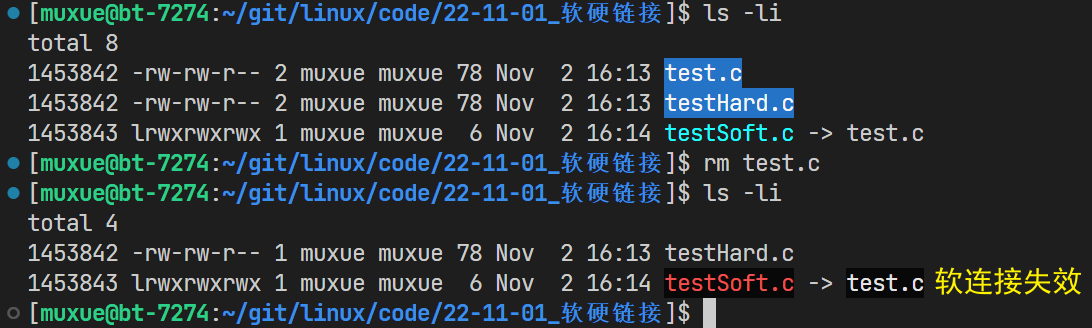
而inode中对硬链接的计数,就好比C++中智能指针的引用计数,如果该计数为0,就代表这个文件需要删除了!
解答!
知道了区别,我们也便知道为何一个新目录的默认硬链接个数是2了,其便是每一个目录都默认带的
.文件,用于标识当前目录的inode;另外一个是该文件本身- 每一个新创建的文件,默认都和自己映射,所以硬链接个数为1
同时,我们也可以通过
..文件的硬链接个数,快速知道上级目录中有多少个文件夹(除去默认的.和..)上级目录内的文件夹个数 = 当前目录..文件的硬链接个数 - 2 某一个目录内的文件夹个数 = 该目录..文件的硬链接个数 - 2- 1
- 2
6.3 unlink命令
我们可以通过unlink命令来取消链接
[muxue@bt-7274:~/git/linux/code/22-11-01_软硬链接]$ ls testHard.c testSoft.c [muxue@bt-7274:~/git/linux/code/22-11-01_软硬链接]$ unlink testSoft.c [muxue@bt-7274:~/git/linux/code/22-11-01_软硬链接]$ ls -lia total 12 1453838 drwxrwxr-x 2 muxue muxue 4096 Nov 2 16:39 . 1443736 drwxrwxr-x 17 muxue muxue 4096 Nov 2 16:12 .. 1453842 -rw-rw-r-- 1 muxue muxue 78 Nov 2 16:13 testHard.c [muxue@bt-7274:~/git/linux/code/22-11-01_软硬链接]$- 1
- 2
- 3
- 4
- 5
- 6
- 7
- 8
- 9
unlink也可以用来删除正常文件,但一般只用它来删除链接文件!
[muxue@bt-7274:~/git/linux/code/22-11-01_软硬链接]$ ls -lia total 12 1453838 drwxrwxr-x 2 muxue muxue 4096 Nov 2 16:39 . 1443736 drwxrwxr-x 17 muxue muxue 4096 Nov 2 16:12 .. 1453842 -rw-rw-r-- 1 muxue muxue 78 Nov 2 16:13 testHard.c [muxue@bt-7274:~/git/linux/code/22-11-01_软硬链接]$ unlink testHard.c [muxue@bt-7274:~/git/linux/code/22-11-01_软硬链接]$ ls -lia total 8 1453838 drwxrwxr-x 2 muxue muxue 4096 Nov 2 16:40 . 1443736 drwxrwxr-x 17 muxue muxue 4096 Nov 2 16:12 ..- 1
- 2
- 3
- 4
- 5
- 6
- 7
- 8
- 9
- 10
结语
linux文件系统的内容,到这里就over辣!后续如果有什么新增知识,会来这里添加!

感谢你看到最后,如果有什么问题,可以在评论区提出哦
-
相关阅读:
第四章运算符
Lightroom“夏日清凉”调色思路
【Vue】Pinia管理用户数据
使用git将本地文件上传到仓库+git常用指令
逍遥自在学C语言 | 位运算符^的高级用法
QT笔记——QMetaEnum类
欧科云链研究院:如何降低Web3风险,提升虚拟资产创新的安全合规
mysql添加字段和调整字段顺序(图文详解)
Vue-2.3v-model原理
room数据库的使用
- 原文地址:https://blog.csdn.net/muxuen/article/details/127654495
