-
JavaDemo——设置控制台输出字符颜色和格式
最近学习springboot的banner发现,可以设置控制台输出字体的颜色和格式,于是简单看了两眼;
springboot提供了3个枚举用于设置字体颜色,背景颜色,字体格式:AnsiColor.java、AnsiBackground.java、AnsiStyle.java;


在springboot默认banner里,最后那行的“:: Spring Boot ::”也是绿色的,去源码可以看到:

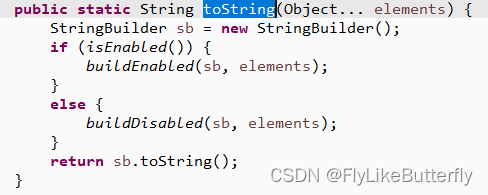
AnsiOutput.toString()方法里调用了buildEnabled()方法,该方法里设置了字体颜色格式:

主要的地方就是方法里使用的已经定义好的变量了:

所以设置字体颜色格式的字符串就是:\033[格式颜色代号;格式颜色代号;格式颜色代号;......m,后面再打印就是设置完的颜色格式了,多个代号中间用“;”隔开,设置对之后的打印一直生效,直到遇到新的设置才会新的生效,所以要恢复原状就要重新设置一下默认的颜色格式;
注:字体颜色和背景色只有最后设置的生效,字体格式可以叠加使用;从springboot源码看到恢复原状的字符串是“\033[0;39m”;“\033”也可用十六进制的“\u001b”代替,“[”也可用“\u005b”代替,其实就是ESC和[的ASCII码十六进制表示;
测试demo:
- public final static String start = "\033[";
- // public final static String start = "\u001b[";
- // public final static String start = "\u001b\u005b";
- public final static String end = "m";
- public final static String reset = "\033[0;39m";
- @Test
- void testColor() {
- for (int i = 0; i < 16; i++) {
- for (int j = 0; j < 16; j++) {
- int x = i * 16 + j;
- System.out.print(start + "" + x + end + x);
- System.out.print(reset + " ");
- }
- System.out.println("|");
- }
- }
执行结果:

可以看到执行结果跟springboot提供的枚举是对应的,甚至还有枚举里没有提到的格式,例如:7交换前景色背景色、8隐藏字符、9中横线、21双下划线、51边框;
另外AnsiElement接口除了那3个枚举,还有一个实现类Ansi8BitColor.java,可以用来实现256色颜色:


可以看到,通过拼接“38;5;”实现前景色,拼接“48;5;”实现背景色;
所以256色的字体颜色是:\033[38;5;颜色代号m,背景色是:\033[48;5;颜色代号m;
256色测试demo:
前景色:
- @Test
- void test8BitForeground() {
- for (int i = 0; i < 16; i++) {
- for (int j = 0; j < 16; j++) {
- int x = i * 16 + j;
- System.out.print(start + "38;5;" + x + end + x);
- System.out.print(reset + " ");
- }
- System.out.println("|");
- }
- }
结果:

背景色:
- @Test
- void test8BitBackground() {
- for (int i = 0; i < 16; i++) {
- for (int j = 0; j < 16; j++) {
- int x = i * 16 + j;
- System.out.print(start + "48;5;" + x + end + x);
- System.out.print(reset + " ");
- }
- System.out.println("|");
- }
- }
结果:
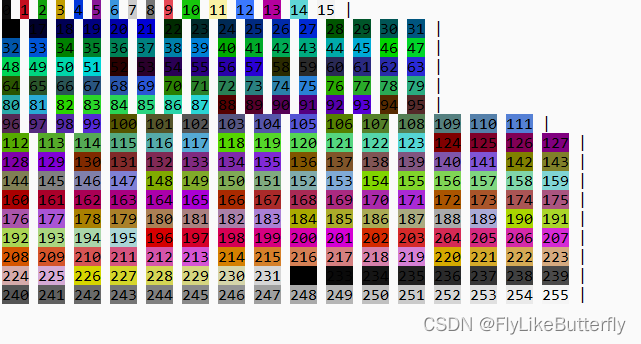
256色中,0-15是基本色,232-255是灰度,中间是色谱;
demo:
- @Test
- void test() {
- System.out.println(start + "4" + end + "HELLO");//下划线
- System.out.println(start + "32" + end + "HELLO");//绿色字(累加颜色)
- System.out.println(start + "106" + end + "HELLO");//青色背景(累加背景色)
- System.out.println(start + "41" + end + "HELLO");//覆盖背景色为红色
- System.out.println(reset + "reset");//重置
- System.out.println(start + "51;92;103" + end + "HELLO\n");//方框、浅绿字、浅黄背景
- System.out.println(reset + start + "1;3;4;9;91;44" + end + "HELLO\n");//加粗、倾斜、下划线、中横线、红字、蓝底
- System.out.println(start + "7" + end + "HELLO\n");//前景色背景色交换
- System.out.println("隐藏文字" + start + "8" + end + "8888888888");
- System.out.println(reset + "恢复正常");
- }
运行结果:

重新写了个格式化好看点的256色demo:
- @Test
- void format256() {
- //基本色
- for (int i = 0; i <= 15; i++) {
- if (i == 8) {//8开始黑色字
- System.out.print(start + "38;5;0" + end);
- }
- System.out.print(start + "48;5;" + i + end + a(i));
- }
- System.out.println();
- System.out.print(start + "38;5;15" + end);//白色字
- //色谱
- for (int i = 16; i <= 231; i++) {
- System.out.print(start + "48;5;" + i + end + a(i));
- if ((i - 15) % 36 == 0) {
- System.out.println();
- System.out.print(start + "38;5;15" + end);//新行开始左半白字
- }
- if ((i - 15) % 36 == 18) {
- System.out.print(start + "38;5;0" + end);//右半黑字
- }
- }
- //灰度
- for (int i = 232; i <= 255; i++) {
- if (i == 244) {//244开始黑色字
- System.out.print(start + "38;5;0" + end);
- }
- System.out.print(start + "48;5;" + i + end + a(i));
- }
- }
- String a(int i) {
- if (i < 10) {
- return " " + i + " ";
- } else if (i < 100) {
- return " " + i + " ";
- } else {
- return " " + i + " ";
- }
- }
打印:

-
相关阅读:
sql执行插入语句返回刚刚生成的自动编号
map的使用方法
mac版微信小程序反编译学习
8.2 矢量图层点要素单一符号使用一
Spark的内存管理机制
力扣第37题 解数独 c++ 难~ 回溯
异地远程访问内网BUG管理系统【Cpolar内网穿透】
MongoDB——写入耗时
Kafka之日志存储详解
灯带代码实现
- 原文地址:https://blog.csdn.net/FlyLikeButterfly/article/details/127654245
