-
什么是跨域
原文链接:什么是跨域 – 编程屋
目录
1 同源策略
跨域是指浏览器不能执行其他网站的脚本,是由浏览器的同源策略造成的,是浏览器加的安全限制。同源是指,域名,协议,端口均相同
2 什么是跨域
当请求的url和当前页面的url在域名、协议、端口三者之间有一个不相同就会产生跨域问题。
当前页面url 被请求url 是否跨域 跨域原因 http://www.baidu.com/ http://www.baidu.com/index.html 否 域名、协议、端口都相同 http://www.baidu.com/ https://www.baidu.com/index.html 是 协议不同(http/https) http://www.baidu.com/ http://www.test.com/ 是 主域名不同(baidu/test) http://www.baidu.com/ http://blog.baidu.com/ 是 子域名不同(baidu/test) http://www.baidu.com:8080/ http://www.baidu.com:7890/ 是 端口不同(8080/7890) 3 如何解决跨域
这里介绍平时最常用的两种跨域解决方式 1配置CROS 2配置nginx
没有进行配置之前的代码:
前端代码:
- <!DOCTYPE html>
- <html lang="en">
- <head>
- <meta charset="UTF-8">
- <title>cors</title>
- <script type="text/javascript" src="jquery-3.5.0.min.js"></script>
- <script type="text/javascript">
- $(function () {
- $("#cors-btn1").click(function () {
- $.ajax({
- url: "http://localhost:9999/test/cros", //此时9999是后端服务器端口号
- success: function (data) {
- console.log(JSON.stringify(data));
- }
- });
- });
- })
- </script>
- </head>
- <body>
- <button id="cors-btn1">跨域测试test1</button>
- </body>
- </html>
后端代码:
- @RestController
- public class LoginController {
- @GetMapping("/test/cros")
- public String testCros(){
- return "测试解决跨域问题";
- }
- }
直接在idea中打开浏览器访问:

结果:出现跨域问题如下

3.1 配置CROS
前端代码不变、后端代码配置CROS,设置一个过滤器。
配置过滤器:
- package com.liubujun.springbootinterceptor.filter;
- import org.springframework.http.HttpStatus;
- import org.springframework.web.bind.annotation.RequestMethod;
- import javax.servlet.*;
- import javax.servlet.annotation.WebFilter;
- import javax.servlet.http.HttpServletRequest;
- import javax.servlet.http.HttpServletResponse;
- import java.io.IOException;
- /**
- * @Author: liubujun
- * @Date: 2022/10/16 19:26
- */
- @WebFilter("/*")
- public class MyFilterOne implements Filter {
- /**
- * web应用启动时,web服务器将创建Filter的实例对象,并调用init方法,读取web.xml的配置,完成对象的初始化功能,
- * 从而为后续的用户请求做好拦截的准备工作(filter对象只会创建一次,init方法也只会执行一次,开发人员通过init的参数,
- * 可或得代表当前filter配置信息的FilterConfig对象)
- * @param filterConfig
- * @throws ServletException
- */
- @Override
- public void init(FilterConfig filterConfig) throws ServletException {
- }
- /**
- * 这个方法完成实际的过滤操作,当客户请求访问与过滤器相关联的URL的时候,Servlet过滤器将先执行doFilter方法,FilterChain参数用于访问后续过滤器
- * @param servletRequest
- * @param servletResponse
- * @param filterChain
- * @throws IOException
- * @throws ServletException
- */
- @Override
- public void doFilter(ServletRequest servletRequest, ServletResponse servletResponse, FilterChain filterChain) throws IOException, ServletException {
- System.out.println("我是过滤器,我进来了");
- HttpServletResponse httpResponse = (HttpServletResponse) servletResponse;
- HttpServletRequest request = (HttpServletRequest) servletRequest;
- httpResponse.addHeader("Access-Control-Allow-Origin", "*");
- httpResponse.addHeader("Access-Control-Allow-Methods", "POST, GET, OPTIONS, DELETE");
- httpResponse.addHeader("Access-Control-Max-Age", "3600");
- httpResponse.addHeader("Access-Control-Allow-Headers", request.getHeader("Access-Control-Request-Headers"));
- httpResponse.addHeader("Access-Control-Allow-Credentials", "true");
- if (request.getMethod().equals(RequestMethod.OPTIONS.name())) {
- httpResponse.setStatus(HttpStatus.OK.value());
- return;
- }
- filterChain.doFilter(servletRequest, servletResponse);
- }
- /**
- * filter创建后会保存在内存中,当web应用移除或者服务器停止时才销毁,该方法在Filter的生命周期中仅执行一次,在这个方法中,可以释放过滤器使用的资源
- */
- @Override
- public void destroy() {
- }
- }
启动类:
- @SpringBootApplication
- @ServletComponentScan
- public class SpringbootInterceptorApplication {
- public static void main(String[] args) {
- SpringApplication.run(SpringbootInterceptorApplication.class, args);
- }
- }
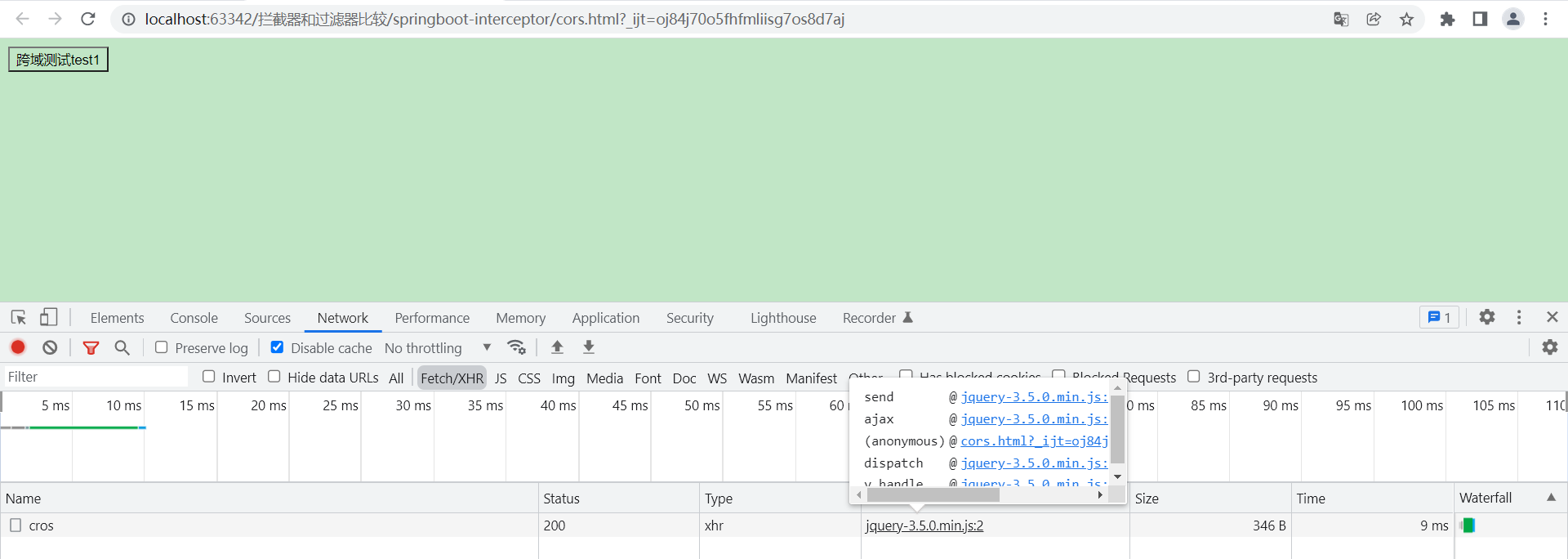
直接在浏览器打开:

结果没有出现跨域问题
3.2 Nginx解决跨域问题
打开自己nginx下的nginx.conf文件,向其中加入如下代码
- server {
- listen 8000;
- server_name localhost;
- # / 表示匹配路径为/的url
- location / {
- proxy_pass http://localhost:9999;
- }
- # /user 表示访问以/test 开头 的地址 如/testname,/test/find等
- location /test {
- proxy_pass http://localhost:9999;
- }
- }
以上只是部分内容,为了维护方便,本文已迁移到新地址:什么是跨域 – 编程屋
-
相关阅读:
mysql 自定义函数create function
【Express】登录鉴权 JWT
qt中toLocal8Bit和toUtf8()有什么区别
2022年深圳技能大赛—大数据技术应用职业技能竞赛圆满闭幕
vue中v-model应用于表单元素
C++广搜例题+代码+讲解(2)
Bootstrap的徽章样式设计,徽章常用作作为显示未读内容或动态计数内容
Codeforces Round #818 (Div. 2) E. Madoka and The Best University(gcd性质+莫比乌斯反演φ)
【AI视野·今日NLP 自然语言处理论文速览 第三十五期】Mon, 18 Sep 2023
民安智库(第三方市场调研公司)哪家残疾人服务满意度调研公司比较专业
- 原文地址:https://blog.csdn.net/qq_50652600/article/details/123539278
