-
H3C S7000/S7500E/10500系列交换机Console密码忘记处理方法
V7交换机Console密码忘记处理方法
1 配置需求或说明
1.1 适用产品系列
1.2 配置需求及实现的效果
2 组网图
3 配置步骤
3.1 进入bootroom菜单清除Consle密码
3.2 如果不需要之前的配置信息的话
3.3 如果需要之前的配置信息的话
1 配置需求或说明
1.1 适用产品系列
本案例适用于如 本案例适用于如S7006、S7503E、S7506E、S7606、S10510、S10508等S7000、S7500E、S10508等S7000、S7500E、S10500系列,且软件版本是V7的交等的V7交换机,V5、V7交换机具体分类及型号可以参考“1.1 Comware V5、V7平台交换机分类说明”。1.2 配置需求及实现的效果
清除Consle密码,恢复出厂2 组网图
无3 配置步骤
3.1 进入bootroom菜单清除Consle密码
通过conlse线和crt软件连接并登陆设备,然后把设备断电重启。控制台上会打印如下信息,当出现“press Ctrl+B”的时候快速按住“Ctrl+B” 进入botroom菜单System is starting…
Press Ctrl+D to access BASIC-BOOTWARE MENU
Booting Normal Extend BootWare
The Extend BootWare is self-decompressing…Done!
BootWare Validating…
Press Ctrl+B to enter extended boot menu…BotWare password: Not required. Please press Enter to continue.
Password recovery capability is enabled.
Note: The current operating device is flash
Enter < Storage Device Operation > to select device.
按住“Ctrl+B”进入如下菜单。选择“<6> Skip Current System Configuration”跳过当前配置启动,不同设备可能不是数字6,- 1
==
|<1> Boot System |
|<2> Enter Serial SubMenu |
|<3> Enter Ethernet SubMenu |
|<4> File Control |
|<5> Restore to Factory Default Configuration |
|<6> Skip Current System Configuration |
|<7> BootWare Operation Menu |
|<8> Clear Super Password |
|<9> Storage Device Operation |
|<0> Reboot |
============================================================================
Ctrl+Z: Access EXTEND-ASSISTANT MENU
Ctrl+F: Format File System
Enter your choice(0-9): 6
Flag Set Success.
然后输入0重启设备
==
|<1> Boot System |
|<2> Enter Serial SubMenu |
|<3> Enter Ethernet SubMenu |
|<4> File Control |
|<5> Restore to Factory Default Configuration |
|<6> Skip Current System Configuration |
|<7> BootWare Operation Menu |
|<8> Clear Super Password |
|<9> Storage Device Operation |
|<0> Reboot |
============================================================================
Ctrl+Z: Access EXTEND-ASSISTANT MENU
Ctrl+F: Format File System
Enter your choice(0-9): 0
System is starting…
Press ENTER to get started.
3.2 如果不需要之前的配置信息的话
操作步骤:跳过启动文件后直接保存当前配置,再重启。save
The current configuration will be written to the device. Are you sure? [Y/N]:y
Please input the file name(*.cfg)[flash:/startup.cfg]
(To leave the existing filename unchanged, press the enter key):(输入回车)
flash:/startup.cfg exists, overwrite? [Y/N]:y
Validating file. Please wait…
Configuration is saved to device successfully.
reboot
Start to check configuration with next startup configuration file, please wait…DONE!
Current configuration may be lost after the reboot, save current configuration? [Y/N]:y
This command will reboot the device. Continue? [Y/N]:y
3.3 如果需要之前的配置信息的话
#Apr 26 12:02:07:166 2000 H3C SHELL/4/LOGIN:
Trap 1.3.6.1.4.1.25506.2.2.1.1.3.0.1: login from Console
%Apr 26 12:02:07:306 2000 H3C SHELL/5/SHELL_LOGIN: Console logged in from aux0.
dir %查看设备配置文件
Directory of flash:/
1 drw- - Apr 26 2000 12:00:20 logfile
2 -rw- 1666 Apr 26 2000 12:05:39 startup.cfg
3 -rw- 1556 Apr 26 2000 12:05:33 _startup_bak.cfg
4 -rw- 151 Apr 26 2000 12:05:30 system.xml
29106 KB total (16876 KB free)
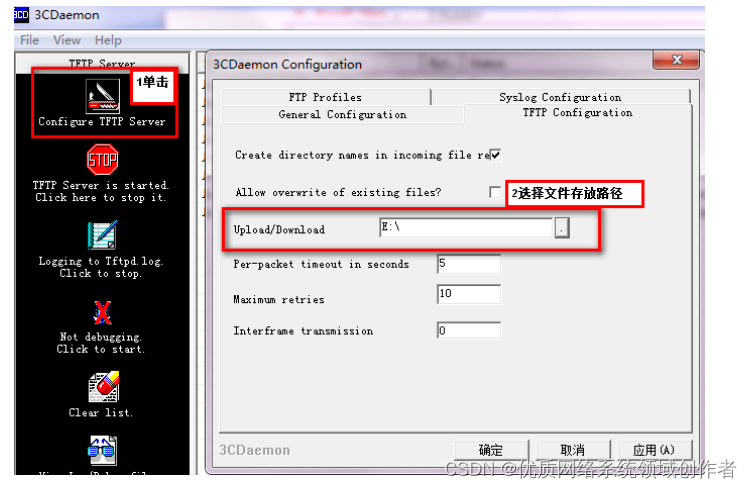
给设备和电脑配置成同网段IP地址(举例:WAC配置成192.168.100.1,电脑配置成192.168.100.2),在电脑上通过3CD软件搭建tftp服务器。
sys
System View: return to User View with Ctrl+Z.
[H3C]interface Vlan-interface 1
[H3C-Vlan-interface1]ip address 192.168.100.1 24
[H3C-Vlan-interface1]quit
[H3C]ping 192.168.100.2
PING 192.168.100.2: 56 data bytes, press CTRL_C to break
Reply from 192.168.100.2: bytes=56 Sequence=1 ttl=128 time=7 ms Reply from 192.168.100.2: bytes=56 Sequence=2 ttl=128 time=2 ms- 1
- 2
- 3
tftp 192.168.100.2 put startup.cfg
File will be transferred in binary mode
Sending file to remote TFTP server. Please wait… |
TFTP: 1666 bytes sent in 0 second(s).
File uploaded successfully.下载成功:
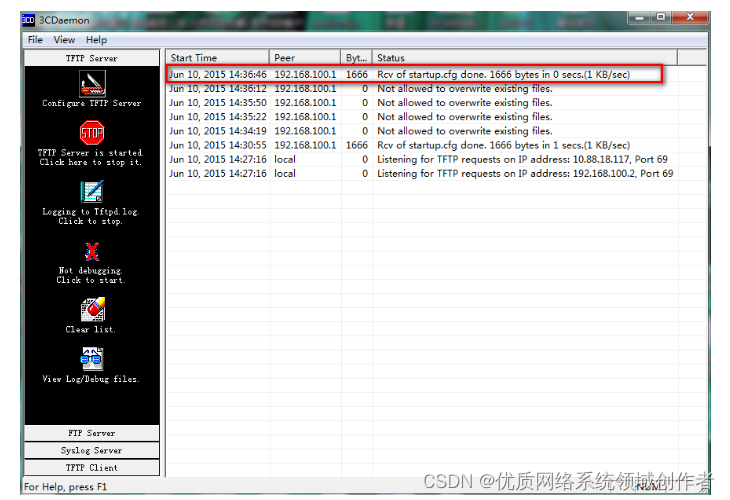
可以到本地相关路径(此例子中是E盘)查看到相关文件。
需要恢复之前配置
解决方法:删除密码恢复之前配置文件
使用记事本打开startup.cfg文件
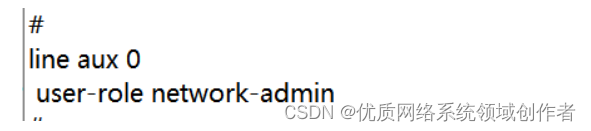
删除aux0口下的认证方式和密码并保存文件
覆盖当前配置文件
tftp 192.168.100.20 get startup.cfg
The file startup.cfg exists. Overwrite it? [Y/N]:y
Verifying server file…
Deleting the old file, please wait…
…
File will be transferred in binary mode
Downloading file from remote TFTP server, please wait…
TFTP: 1166 bytes received in 0 second(s)
File downloaded successfully.
reboot
Start to check configuration with next startup configuration file, please wait…DONE!
Current configuration may be lost after the reboot, save current configuration? [Y/N]:n 不保存配置
This command will reboot the device. Continue? [Y/N]:y 确定继续重启
-
相关阅读:
微服务项目的登录流程
2.2 机器学习流程
登录中获取验证码的节流
面试官:介绍一下 Redis 三种集群模式
文本格式清理工具 TextSoap mac中文版软件特色
【高级语言程序设计】python函数式编程(二)
【FPGA开发/IC开发之时序约束最全面的归纳总结】时序路径基本概念及时序约束分析方法
算法竞赛进阶指南 基本算法 0x07 贪心
npm本地发包过程
公共数据这座金矿,授权运营为何是赋能的关键路径?
- 原文地址:https://blog.csdn.net/qq_23930765/article/details/127627842