-
MyBatis 多对一映射和一对多映射的处理
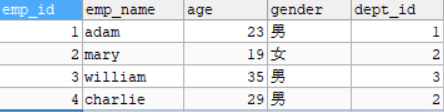
- 员工表
t_emp
- 部门表
t_dept
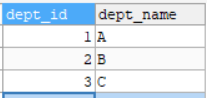
员工和部门之间是多对一的关系,而部门和员工是一对多的关系
- Emp和Dept类的属性
//Emp private Integer empId; private String empName; private Integer age; private String gender; private Dept dept; //Dept private Integer deptId; private String deptName; private List<Emp> emps;- 1
- 2
- 3
- 4
- 5
- 6
- 7
- 8
- 9
- 10
- 11
下面分别演示mybatis中这两种情况的映射的处理
多对一映射关系
- 根据员工号查询员工和对应部门的信息
法1. 使用级联处理
接口抽象方法:
Emp getEmpAndDeptByEmpId(@Param("empId") Integer empId);<resultMap id="empAndDeptResultMap" type="Emp"> <id column="emp_id" property="empId">id> <result column="emp_name" property="empName">result> <result column="age" property="age">result> <result column="gender" property="gender">result> <result column="dept_id" property="dept.deptId">result> <result column="dept_name" property="dept.deptName">result> resultMap> <select id="getEmpAndDeptByEmpId" resultMap="empAndDeptResultMap"> SELECT * FROM t_emp LEFT JOIN t_dept ON t_emp.dept_id = t_dept.dept_id WHERE emp_id = #{empId}; select>- 1
- 2
- 3
- 4
- 5
- 6
- 7
- 8
- 9
- 10
- 11
- 12
- 13
- 14
- 15
法2. 使用association处理
<resultMap id="empAndDeptResultMap" type="Emp"> <id column="emp_id" property="empId">id> <result column="emp_name" property="empName">result> <result column="age" property="age">result> <result column="gender" property="gender">result> <association property="dept" javaType="Dept"> <id column="dept_id" property="deptId">id> <result column="dept_name" property="deptName">result> association> resultMap> <select id="getEmpAndDeptByEmpId" resultMap="empAndDeptResultMap"> SELECT * FROM t_emp LEFT JOIN t_dept ON t_emp.dept_id = t_dept.dept_id WHERE emp_id = #{empId}; select>- 1
- 2
- 3
- 4
- 5
- 6
- 7
- 8
- 9
- 10
- 11
- 12
- 13
- 14
- 15
- 16
- 17
法3. 分步查询
EmpMapper接口抽象方法:
Emp getEmpAndDeptByStepOne(@Param("empId") Integer empId);<resultMap id="empAndDeptByStepResultMap" type="Emp"> <id column="emp_id" property="empId">id> <result column="emp_name" property="empName">result> <result column="age" property="age">result> <result column="gender" property="gender">result> <association property="dept" select="lrc.mapper.DeptMapper.getEmpAndDeptByStepTwo" column="dept_id">association> resultMap> <select id="getEmpAndDeptByStepOne" resultMap="empAndDeptByStepResultMap"> SELECT * FROM t_emp WHERE emp_id = #{empId}; select>- 1
- 2
- 3
- 4
- 5
- 6
- 7
- 8
- 9
- 10
- 11
- 12
- 13
DeptMapper接口抽象方法:
Dept getEmpAndDeptByStepTwo(@Param("deptId") Integer deptId);<select id="getEmpAndDeptByStepTwo" resultType="Dept"> SELECT * FROM t_dept WHERE dept_id = #{deptId}; select>- 1
- 2
- 3
- 4
一对多映射关系
- 根据部门id查询部门以及部门中的员工信息
法1. 使用collection处理
接口抽象方法:
Dept getDeptAndEmpByDeptId(@Param("deptId") Integer deptId);<resultMap id="deptAndEmpResultMap" type="Dept"> <id column="dept_id" property="deptId">id> <result column="dept_name" property="deptName">result> <collection property="emps" ofType="Emp"> <id column="emp_id" property="empId">id> <result column="emp_name" property="empName">result> <result column="age" property="age">result> <result column="gender" property="gender">result> collection> resultMap> <select id="getDeptAndEmpByDeptId" resultMap="deptAndEmpResultMap"> SELECT * FROM t_dept LEFT JOIN t_emp ON t_dept.dept_id = t_emp.dept_id WHERE t_dept.dept_id = 2; select>- 1
- 2
- 3
- 4
- 5
- 6
- 7
- 8
- 9
- 10
- 11
- 12
- 13
- 14
- 15
- 16
- 17
法2. 分步查询
DeptMapper接口抽象方法:
Dept getDeptAndEmpByStepOne(@Param("deptId") Integer deptId);<resultMap id="empAndDeptResultMap" type="Dept"> <id column="dept_id" property="deptId">id> <result column="dept_name" property="deptName">result> <association property="emps" select="lrc.mapper.EmpMapper.getDeptAndEmpByStepTwo" column="dept_id">association> resultMap> <select id="getDeptAndEmpByStepOne" resultMap="empAndDeptResultMap"> SELECT * FROM t_dept WHERE dept_id = #{deptId}; select>- 1
- 2
- 3
- 4
- 5
- 6
- 7
- 8
- 9
- 10
- 11
EmpMapper接口抽象方法:
ListgetDeptAndEmpByStepTwo(@Param("deptId") Integer deptId); <select id="getDeptAndEmpByStepTwo" resultType="Emp"> SELECT * FROM t_emp WHERE dept_id = #{deptId}; select>- 1
- 2
- 3
- 4
分步查询
分步查询的优点:可以实现延迟加载,但是必须在核心配置文件中设置全局配置信息:
lazyLoadingEnabled:延迟加载的全局开关。当开启时,所有关联对象都会延迟加载
aggressiveLazyLoading:当开启时,任何方法的调用都会加载该对象的所有属性。否则,每个属性会按需加载
此时就可以实现按需加载,获取的数据是什么,就只会执行相应的sql。可通过association和collection中的
fetchType属性设置当前的分步查询是否使用延迟加载,
fetchType="lazy(延迟加载)|eager(立即加载)" - 员工表
-
相关阅读:
macOS Sonoma 14.1正式版(23B74)发布(可下载黑白苹果镜像)
[附源码]计算机毕业设计JAVAssm酒店综合管理平台
FPGA设计FIR滤波器低通滤波器,代码及视频
【智慧公寓】东胜物联嵌入式硬件解决方案,为智慧公寓解决方案商降本增效,更快实现产品规模化生产
Flink SQL 常用作业sql
十个关于商业智能商业智能BI的观点,你认同几个?
CSS函数-BFC介绍-原理详解
Java Remote Method Invocation (RMI)
Golang应用 ━━ 安装与配置hugo博客系统
猫头虎博主赠书三期:《Go编程进阶实战: 开发命令行应用、HTTP应用和gRPC应用》
- 原文地址:https://blog.csdn.net/weixin_47869348/article/details/127615218
