-
C++ Mysql对接实现登录注册
C++ Mysql对接、简单实现登录注册
明镜止水
环境:Ubuntu20.04、C++、Mysql8.0
表结构:

由于打算集成到自己开发Cat服务器程序中去,为提高性能,后续打算引入Mysql连接池的概念,故使用类来封装。Cat_Mysql类的设计
//Mysql相关类放这 #ifndef _CAT_MYSQL__H_ #define _CAT_MYSQL__H_ #include#include #include #include class Cat_Mysql { private: const char* m_host; // 主机地址 const char* m_username; // 用户名 const char* m_password; // 密码 const char* m_database; // 连接的数据库名称database unsigned int m_port; // Mysql端口号,默认3306 const char* m_unix_socket; // unix连接标识,一般默认为NULL unsigned long m_clientflag; // 客户端连接标志,一般默认为0 private: MYSQL m_Mysql; // Mysql连接句柄 MYSQL_RES* m_SelectResult = NULL; // 用于存储Mysql查询结果集合 public: //构造函数 Cat_Mysql(); //析构函数 ~Cat_Mysql(); public: //初始化数据库 bool my_Init(); //释放数据库资源 void my_FreeConnect(); //sql语句执行 bool my_RunSql(const char* sql); //sql语句查询 bool my_SelectData(const char* sql); //打印结果 void my_PrintData(); //具体功能函数放这 public: //注册验证 bool my_Register(std::string& un, std::string& pw); //登录验证 bool my_Login(std::string& un, std::string& pw); }; #endif - 1
- 2
- 3
- 4
- 5
- 6
- 7
- 8
- 9
- 10
- 11
- 12
- 13
- 14
- 15
- 16
- 17
- 18
- 19
- 20
- 21
- 22
- 23
- 24
- 25
- 26
- 27
- 28
- 29
- 30
- 31
- 32
- 33
- 34
- 35
- 36
- 37
- 38
- 39
- 40
- 41
- 42
- 43
- 44
- 45
- 46
- 47
- 48
- 49
- 50
- 51
- 52
Cat_Mysql类成员函数的实现
- 这里暂时先在构造函数中直接写数据库信息,后面迁移到服务器程序的时候,可以把数据库相关信息写到配置文件中去,再调个文件读写对象的成员函数来读取就行;
- 为了防止Mysql连接资源忘记释放,干脆把释放函数写到析构函数中去,对象销毁时,会自动释放;对于每一步操作可能会失败的情况,尽量打印出来,方便排错,后续再把日志系统整合进去;
- 几个功能函数暂时留着,等后面开发需求都清楚后,一些可能重复用的功能可以单独写进去,比如sql查询、sql执行等,尽量简洁会好点。
//Mysql相关功能实现函数放这 #include#include #include #include #include "cat_mysql.h" using namespace std; //构造函数 Cat_Mysql::Cat_Mysql() { m_host = "localhost"; m_username = "root"; m_password = "123456"; m_database = "qiye"; m_port = 3306; m_unix_socket = NULL; m_clientflag = 0; my_Init(); } //析构函数 Cat_Mysql::~Cat_Mysql() { //释放Mysql资源 my_FreeConnect(); } //初始化数据库 bool Cat_Mysql::my_Init() { // Mysql初始化函数,返回Mysql句柄 if (!mysql_init(&m_Mysql)) { printf("Mysql初始化失败!\n"); return false; } // 连接Mysql数据库,检测是否连接成功,成功返回连接句柄,失败返回 NULL if (!mysql_real_connect(&m_Mysql, m_host, m_username, m_password, m_database, m_port, m_unix_socket, m_clientflag)) { printf("数据库连接失败!\n"); return false; } // 连接成功 return true; } //提交注册信息 bool Cat_Mysql::my_Register(std::string& un, std::string& pw) { string sql = "SELECT * FROM user"; //查询,判断是否已有该用户名 if (mysql_query(&m_Mysql, sql.c_str())) { printf("查询失败!\n"); return false; } m_SelectResult = mysql_store_result(&m_Mysql); //获取行,row[1]表示第二个字段username,拿它判断就行 MYSQL_ROW row; while (row = mysql_fetch_row(m_SelectResult)) { //要依据表的结构字段来使用,不然查询很麻烦,简单写的话,账号和密码是同一行就是正常登录 if (row[1] == un) { cout << "该用户被注册!" << endl; return false; } } //正式注册 sql = "INSERT INTO user(username, password) VALUES(\""+ un + "\", \"" + pw + "\")"; cout << "执行sql语句:" << sql << endl; // mysql_query数据库操作函数,传入SQL语句执行。成功返回0 if (mysql_query(&m_Mysql, sql.c_str())) { printf("sql语句执行失败!\n"); return false; } printf("sql语句执行成功!\n"); return true; } //提交登录信息 bool Cat_Mysql::my_Login(std::string& un, std::string& pw) { string sql = "SELECT * FROM user"; cout << "执行sql语句:" << sql << endl; //查询 if (mysql_query(&m_Mysql, sql.c_str())) { printf("查询失败!\n"); return false; } //获取结果集 m_SelectResult = mysql_store_result(&m_Mysql); if (!m_SelectResult) { printf("没有该用户\n"); return false; } //获取行 MYSQL_ROW row; while (row = mysql_fetch_row(m_SelectResult)) { //要依据表的结构字段来使用,不然查询很麻烦,简单写的话,账号和密码是同一行就是正常登录 cout << "row[1]: " << row[1] << " " << "row[2]: " << row[2] <<endl; if (row[1] == un && row[2] == pw) return true; } cout << "账号或是密码错误!" << endl; return false; } //释放 void Cat_Mysql::my_FreeConnect() { cout << "====================================" << endl; printf("开始回收Mysql连接!\n"); // 释放存储的查询结果集合 mysql_free_result(m_SelectResult); // 释放Mysql连接资源 mysql_close(&m_Mysql); return ; } //================================================================== //以下后面根据具体功能再来实现 //执行sql语句 bool Cat_Mysql::my_RunSql(const char* sql){} //查询sql数据 bool Cat_Mysql::my_SelectData(const char* sql){} //打印信息 void Cat_Mysql::my_PrintData(){} - 1
- 2
- 3
- 4
- 5
- 6
- 7
- 8
- 9
- 10
- 11
- 12
- 13
- 14
- 15
- 16
- 17
- 18
- 19
- 20
- 21
- 22
- 23
- 24
- 25
- 26
- 27
- 28
- 29
- 30
- 31
- 32
- 33
- 34
- 35
- 36
- 37
- 38
- 39
- 40
- 41
- 42
- 43
- 44
- 45
- 46
- 47
- 48
- 49
- 50
- 51
- 52
- 53
- 54
- 55
- 56
- 57
- 58
- 59
- 60
- 61
- 62
- 63
- 64
- 65
- 66
- 67
- 68
- 69
- 70
- 71
- 72
- 73
- 74
- 75
- 76
- 77
- 78
- 79
- 80
- 81
- 82
- 83
- 84
- 85
- 86
- 87
- 88
- 89
- 90
- 91
- 92
- 93
- 94
- 95
- 96
- 97
- 98
- 99
- 100
- 101
- 102
- 103
- 104
- 105
- 106
- 107
- 108
- 109
- 110
- 111
- 112
- 113
- 114
- 115
- 116
- 117
- 118
- 119
- 120
- 121
- 122
- 123
- 124
- 125
- 126
- 127
- 128
- 129
- 130
- 131
- 132
- 133
- 134
- 135
- 136
- 137
- 138
- 139
- 140
- 141
- 142
- 143
- 144
主函数main
主函数先这样写,后续打算用QT写界面,就不用这么麻烦了,先写两个函数去调Cat_Mysql的成员函数
//程序入口 #include#include #include #include #include "cat_mysql.h" using namespace std; Cat_Mysql my; int main() { cout << "====================================" << endl; //islogin=true代表登录,flag=0代表退出 int flag = 1; bool islogin = false; while (flag) { int index; cout << "1. 注册\n2. 登录\n其余为退出\n请输入要执行的操作:"; cin >> index; switch (index) { case 1: cat_Register(); break; case 2: if (cat_Login()) { islogin = true; flag = 0; } break; default: flag = 0; break; } } if (islogin) cout << "已登陆!!!" << endl; else cout << "啥也没发生!" << endl; return 0; } //注册 bool cat_Register() { string username, password; cout << "注册时,请不要有空格和特殊符号!" << endl; cout << "select a username: " ; cin >> username; cout << "select a password: " ; cin >> password; if (my.my_Register(username, password)) { printf("注册成功!\n"); } else { printf("注册失败!\n"); return false; } return true; } //登录 bool cat_Login() { string username, password, un, pw; //正常流程的登录 cout << "登陆时,请不要有空格和特殊符号!" << endl; cout << "Enter username: "; cin >> username; cout << "Enter password: "; cin >> password; if(my.my_Login(username, password)) { printf("登录成功!\n"); return true; } return false; } - 1
- 2
- 3
- 4
- 5
- 6
- 7
- 8
- 9
- 10
- 11
- 12
- 13
- 14
- 15
- 16
- 17
- 18
- 19
- 20
- 21
- 22
- 23
- 24
- 25
- 26
- 27
- 28
- 29
- 30
- 31
- 32
- 33
- 34
- 35
- 36
- 37
- 38
- 39
- 40
- 41
- 42
- 43
- 44
- 45
- 46
- 47
- 48
- 49
- 50
- 51
- 52
- 53
- 54
- 55
- 56
- 57
- 58
- 59
- 60
- 61
- 62
- 63
- 64
- 65
- 66
- 67
- 68
- 69
- 70
- 71
- 72
- 73
- 74
- 75
- 76
- 77
- 78
- 79
- 80
- 81
- 82
- 83
- 84
- 85
- 86
- 87
- 88
- 89
- 90
- 91
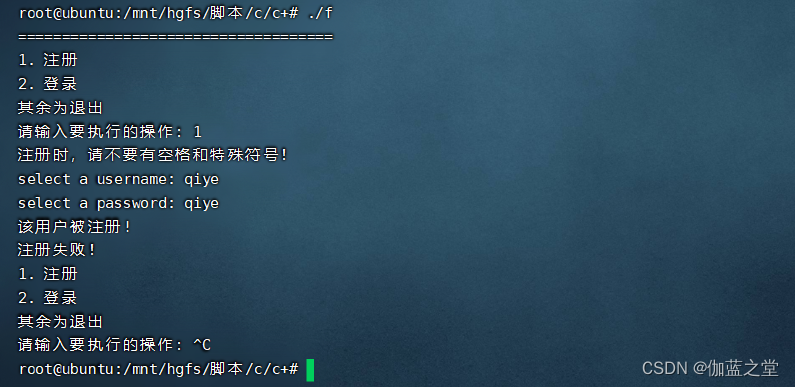
编译运行和效果
g++ app/cat_mysql.cpp app/main.cpp -I/usr/include/mysql -lmysqlclient -I include -o f ./f- 1
- 2
- 3
登录

注册
-
相关阅读:
【代码随想录】算法训练营 第十四天 第六章 二叉树 Part 1
Python Urllib:网络库(stdlib)的强大功能与灵活运用
1、HTML初识_排版、图片、音频、视频、超链接标签和绝对、相对路径学习
高级架构师_Docker_第1章_ 第2节_Docker镜像
计算机毕业设计JavaiMeli在线彩妆店铺(源码+系统+mysql数据库+lw文档)
腾讯云4核8G服务器选CVM还是轻量比较好?价格对比
2.链表--链表环相关问题
基于JavaWeb+SSM+微信小程序基金优选系统的设计和实现
Fedora Linux 38下安装音频与视频的解码器和播放器
驱动开发:内核监控进程与线程回调
- 原文地址:https://blog.csdn.net/m0_46684679/article/details/127623820
