-
树莓派4B安装ROS的方法总结
准备
硬件:树莓派4B 4G内存。
软件:VNC Viewer,FileZilla Client。
首先确定下载的版本(Ubuntu和ROS1版本对应关系):

推荐安装最新的。Raspberry Pi 安装ROS
树莓派原生的Raspbian系统,这个系统是基于Debian的,尽管都说它对ROS的支持不如Ubuntu好,但它内存占用小。
参考:http://wiki.ros.org/ROSberryPi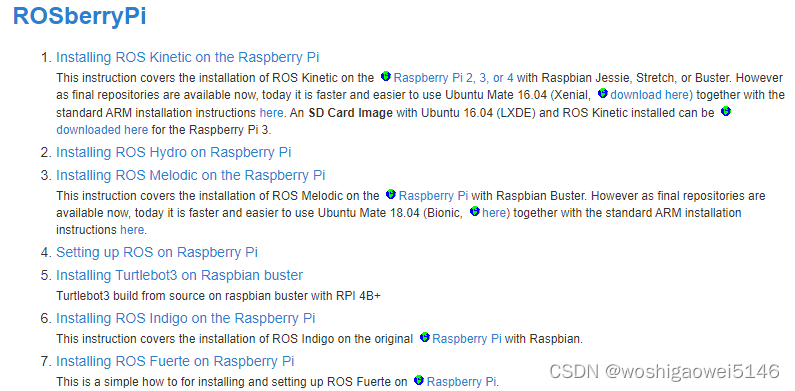
我选择了Installing ROS Melodic on the Raspberry Pi.
设置ROS仓库
$ sudo sh -c 'echo "deb http://packages.ros.org/ros/ubuntu $(lsb_release -sc) main" > /etc/apt/sources.list.d/ros-latest.list'- 1
设置密钥
sudo apt-key adv --keyserver hkp://ha.pool.sks-keyservers.net:80 --recv-key C1CF6E31E6BADE8868B172B4F42ED6FBAB17C654 Now, make sure your Debian package index is up-to-date:- 1
- 2
按官方教程可能会接收失败,此处需更改。
sudo apt-key adv --keyserver 'hkp://keyserver.ubuntu.com:80' --recv-key C1CF6E31E6BADE8868B172B4F42ED6FBAB17C654- 1

更新
$ sudo apt-get update $ sudo apt-get upgrade- 1
- 2
安装引导依赖
$ sudo apt install -y python-rosdep python-rosinstall-generator python-wstool python-rosinstall build-essential cmake- 1
初始化rosdep
$ sudo rosdep init $ rosdep update- 1
- 2
安装ROS系统
创建catkin工作空间(建文件夹并切换)$ mkdir -p ~/ros_catkin_ws $ cd ~/ros_catkin_ws- 1
- 2
安装Desktop版,包含ROS,rqt,rviz,以及robot-generic库
(官方教程,建议安装ROS-Comm版本,不要安装Desktop版本)$ rosinstall_generator desktop --rosdistro melodic --deps --wet-only --tar > melodic-desktop-wet.rosinstall $ wstool init src melodic-desktop-wet.rosinstall- 1
- 2
wstool init会下载所有ROS包到/ros_catkin_ws/src/文件夹下。这一步要好久。
如果此时卡顿太久可以Ctrl+C打断,输入以下其中一条wstool update指令继续,-j4并行下载4个包,-j8并行下载8个包。结束后总是有报错ERROR ,多执行几遍wstool update也没用。
考虑到只能另行处理了。但是之前用的pand是64位的,无法安装在32位的raspberry上。
用了Nor update还是不行,搞了好久。最后用expre可以,但是总是掉线。
(先暂时放弃这种方案,工具是生产力的前提)$ wstool update -j4 -t src $ wstool update -j8 -t src- 1
- 2
解决依赖项
将查看src目录中的所有包,并找到它们拥有的所有依赖项。然后它将递归地安装依赖项。$ cd ~/ros_catkin_ws $ rosdep install -y --from-paths src --ignore-src --rosdistro melodic -r --os=debian:buster- 1
- 2
构建catkin工作空间
一旦完成了包的下载并解析了依赖项,就可以构建catkin包了。$ sudo ./src/catkin/bin/catkin_make_isolated --install -DCMAKE_BUILD_TYPE=Release --install-space /opt/ros/melodic- 1
现在应该安装ROS了!请记住获取新安装的源代码:
$ source /opt/ros/melodic/setup.bash- 1
ROS环境变量到bash:
$ echo "source /opt/ros/melodic/setup.bash" >> ~/.bashrc- 1
运行ROS
启动bash终端输入指令
$ roscore- 1
Ctrl+Alt+T再启一个bash终端输入指令
$ rosrun turtlesim turtlesim_node- 1
Ctrl+Alt+T再启第三个bash终端输入指令
$ rosrun turtlesim turtle_teleop_key- 1
操作方向键如果发现小乌龟能移动,说明ROS已经安装好了!
最后没成功,前人的坑非要跳一下才死心,我这臭毛病。
参考:
https://www.bilibili.com/read/cv13756256
Ubuntu Mate安装ROS
下载Ubuntu Mate
下载地址:https://ubuntu-mate.org/raspberry-pi/download/

直接下载ARM64.

这个大小1.8G。远程桌面
先解决远程桌面的问题,也是一堆BUG。https://blog.csdn.net/woshigaowei5146/article/details/127565757
https://bbs.huaweicloud.com/blogs/208176安装ROS Noetic Ninjemys
参考官方教程:http://wiki.ros.org/cn/noetic/Installation/Ubuntu
设置sources.listsudo sh -c 'echo "deb http://packages.ros.org/ros/ubuntu $(lsb_release -sc) main" > /etc/apt/sources.list.d/ros-latest.list'- 1
发现这样报错,修改为:update /etc/apt/sources.list.d/ros-latest.list as follows (substitute Ubuntu Xenial for the appropriate distribution):
deb http://packages.ros.org/ros/ubuntu xenial main deb-src http://packages.ros.org/ros/ubuntu xenial main- 1
- 2
设置密钥
sudo apt-key adv --keyserver 'hkp://keyserver.ubuntu.com:80' --recv-key C1CF6E31E6BADE8868B172B4F42ED6FBAB17C654- 1
若无法连接到密钥服务器,可以尝试替换上面命令中的 hkp://keyserver.ubuntu.com:80 为 hkp://pgp.mit.edu:80 。
安装sudo apt update- 1
我选择了桌面版(Desktop):包括了ROS-Base的全部组件,还有一些工具,比如rqt和rviz。
sudo apt install ros-noetic-desktop- 1
设置环境
source /opt/ros/noetic/setup.bash- 1
操作方向键如果发现小乌龟能移动,说明ROS已经安装好了!
$ rosrun turtlesim turtle_teleop_key- 1
可以用小鱼的方法:
wget http://fishros.com/install -O fishros && . fishros- 1
但还是报错
https://fishros.org.cn/forum/topic/20/%E5%B0%8F%E9%B1%BC%E7%9A%84%E4%B8%80%E9%94%AE%E5%AE%89%E8%A3%85%E7%B3%BB%E5%88%97?lang=zh-CN
参考:
https://mp.weixin.qq.com/s/UWgDs0UA_SegAoWl4X5eRg
https://www.guyuehome.com/5831上述方法失败,最后用古月居的方法Ubuntu Mate20.04+humble成功:
https://book.guyuehome.com/ROS2/1.%E7%B3%BB%E7%BB%9F%E6%9E%B6%E6%9E%84/1.3_ROS2%E5%AE%89%E8%A3%85%E6%96%B9%E6%B3%95/
Ubuntu Server安装ROS
Ubuntu18.04+ROS,发现我的树莓派是2022年1月产的,装不了旧的Ubuntu系统,查了一下方法又很麻烦。
https://blog.csdn.net/m0_49579642/article/details/122294251
Ubuntu Desktop安装ROS
Ubuntu Desktop的下载地址:https://ubuntu.com/download/raspberry-pi。
也可以选择之前的版本:https://ubuntu.com/download/alternative-downloads安装教程:https://ubuntu.com/tutorials/how-to-install-ubuntu-desktop-on-raspberry-pi-4#1-overview
我装好系统后直接用一键安装成功ROS2 humble,更新用了挺久的时间:
wget http://fishros.com/install -O fishros && . fishros- 1
https://blog.csdn.net/weixin_59239853/article/details/125797037
也可参考古月居:
https://book.guyuehome.com/ROS2/1.%E7%B3%BB%E7%BB%9F%E6%9E%B6%E6%9E%84/1.3_ROS2%E5%AE%89%E8%A3%85%E6%96%B9%E6%B3%95/
总结
- 新版的树莓派只能装新版的ubuntu系统,不然开不了机,不过似乎有解决方法,没有尝试。
- 原装树莓派系统raspberry不容易实现,网上成功的不多。
- 小鱼的一键安装很方便,但我在mate系统下还是失败了。
- 不同版本的ubuntu系统对应不同的ROS,一定要对应。
- 我在Ubuntu Mate和Ubuntu Desktop安装成功了,其他两种因为各种原因安装失败。
故障问题解决
sudo rosdep init / rosdep update报错

下载链接:https://gitcode.net/mirrors/ros/rosdistro?utm_source=csdn_github_accelerator下载完成后用FileZilla Client将其解压移动到 /home/pi/ 目录下
# os-specific listings first
yaml file://home/pi/rosdistro/rosdep/osx-homebrew.yaml osx# generic
yaml file://home/pi/rosdistro/rosdep/base.yaml
yaml file://home/pi/rosdistro/rosdep/python.yaml
yaml file://home/pi/rosdistro/rosdep/ruby.yaml
gbpdistro file://home/pi/rosdistro/releases/fuerte.yaml fuerte
# newer distributions (Groovy, Hydro, …) must not be listed anymore, they are being fetched from the rosdistro index.yaml instead修改 /usr/lib/python2.7/dist-packages/rosdep2 文件夹下的 sources_list.py 文件中的默认的url地址:
> # default file to download with ‘init’ command in order to bootstrap
> # rosdep DEFAULT_SOURCES_LIST_URL = ‘file:///home/pi/rosdistro/rosdep/sources.list.d/20-default.list’
> # seconds to wait before aborting download of rosdep data需要更改权限:
sudo chmod a+w sources_list.py
修改以下两个文件里面的代码:
/usr/lib/python2.7/dist-packages/rosdep2/rep3.py文件:> # location of targets file for processing gbpdistro files REP3_TARGETS_URL = ‘file:///home/pi/rosdistro/releases/targets.yaml’
> # seconds to wait before aborting download of gbpdistro data/usr/lib/python2.7/dist-packages/rosdistro/init.py的文件:
*# index information
DEFAULT_INDEX_URL = ‘file:///home/pi/rosdistro/index-v4.yaml’
def get_index_url():注意修改时,file后面三个斜杠,吃亏。
修改后,成功。


参考:
https://blog.csdn.net/sinat_39110395/article/details/123534397
无法定位软件包 ros-noetic-desktop
应该是ubuntu和ros的版本不对应。22.04对应ROS2了。
https://javaforall.cn/148877.html
参考
https://mp.weixin.qq.com/s/UWgDs0UA_SegAoWl4X5eRg
-
相关阅读:
Linux 命令(188)—— runlevel 命令
Java基础——初始Java(2)数据类型+运算符
java: 错误: 无效的源发行版:17 【解决】
thinkPHP基于php的衡水游泳馆管理系统-计算机毕业设计
(二十二)Flask之上下文管理第三篇【收尾—讲一讲g】
自然语言处理(NLP)-spacy简介以及安装指南(语言库zh_core_web_sm)
量化投资 日周月报 2024-06-28
【luogu P4218】珠宝商(SAM)(点分治)(根号分治)
《模拟电子技术》半导体原理部分笔记
什么软件可以图片转文字?这几个软件值得收藏
- 原文地址:https://blog.csdn.net/woshigaowei5146/article/details/127472989