-
图像分类MMClassification
一、前提环境
-
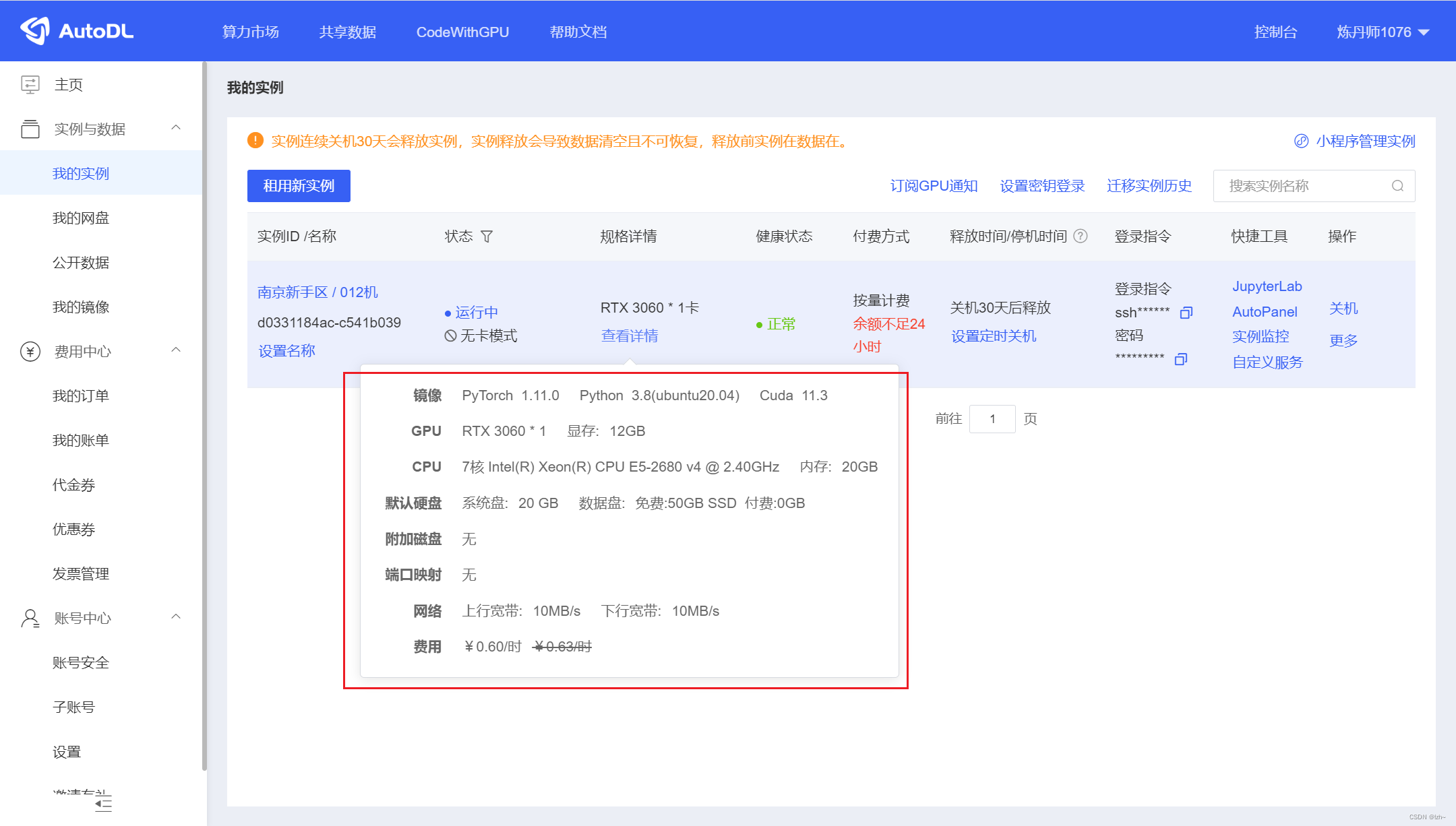
我连接的GPU环境,下面几个环境是需要先下载whl然后进行安装
GPU选择的AtuoDL,够个人学习使用,价格亲民,不用配置cuda环境,已经配置好
-
CPU环境的话直接用
pip install 环境包==版本号安装即可
1.1、安装版本
库 版本号 pytorch 1.11.0+cu113 torchvision 0.12.0+cu113 mmcv-full 1.5.0 其余包直接
pip install安装即可1.2、安装库
二、安装下载项目
2.1、github项目 mmclassification

2.2、mmclassification 安装文档

三、项目解析
3.1、项目结构

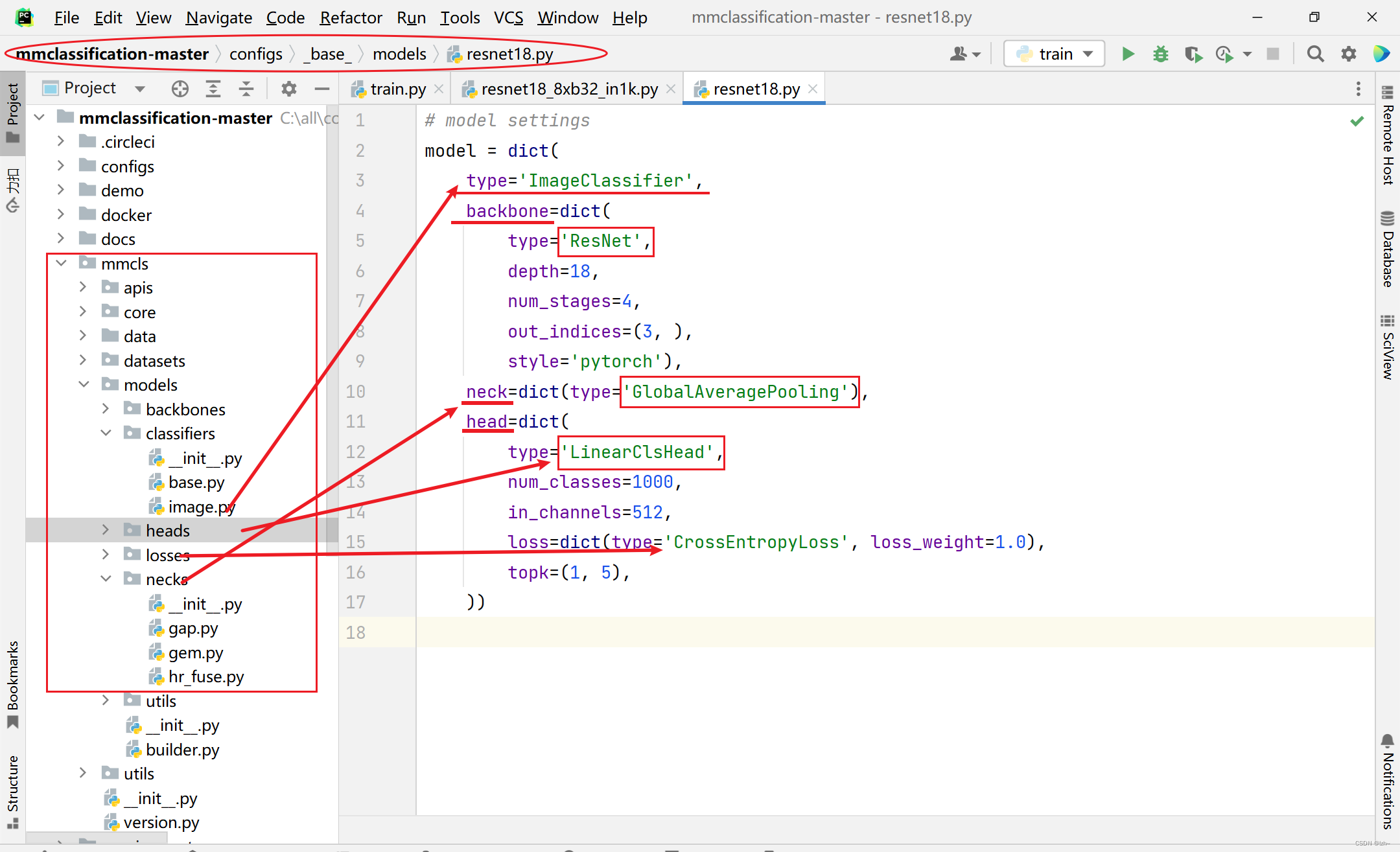
3.2、分类模型构成
1000种

3.3、分类模型构建
说明

代码目录
对应代码(以
resnet18_8xb32_in1k模型为例)configs->resne->resnet18_8xb32_in1k.py中可以看到restnet18.py文件目录

- 找到
restnet18.py目录可以看到对应代码

- 对应的模型可以在
mmcls->models里面相应的目录里面找到相应的类
举例

- 对应的模型可以在
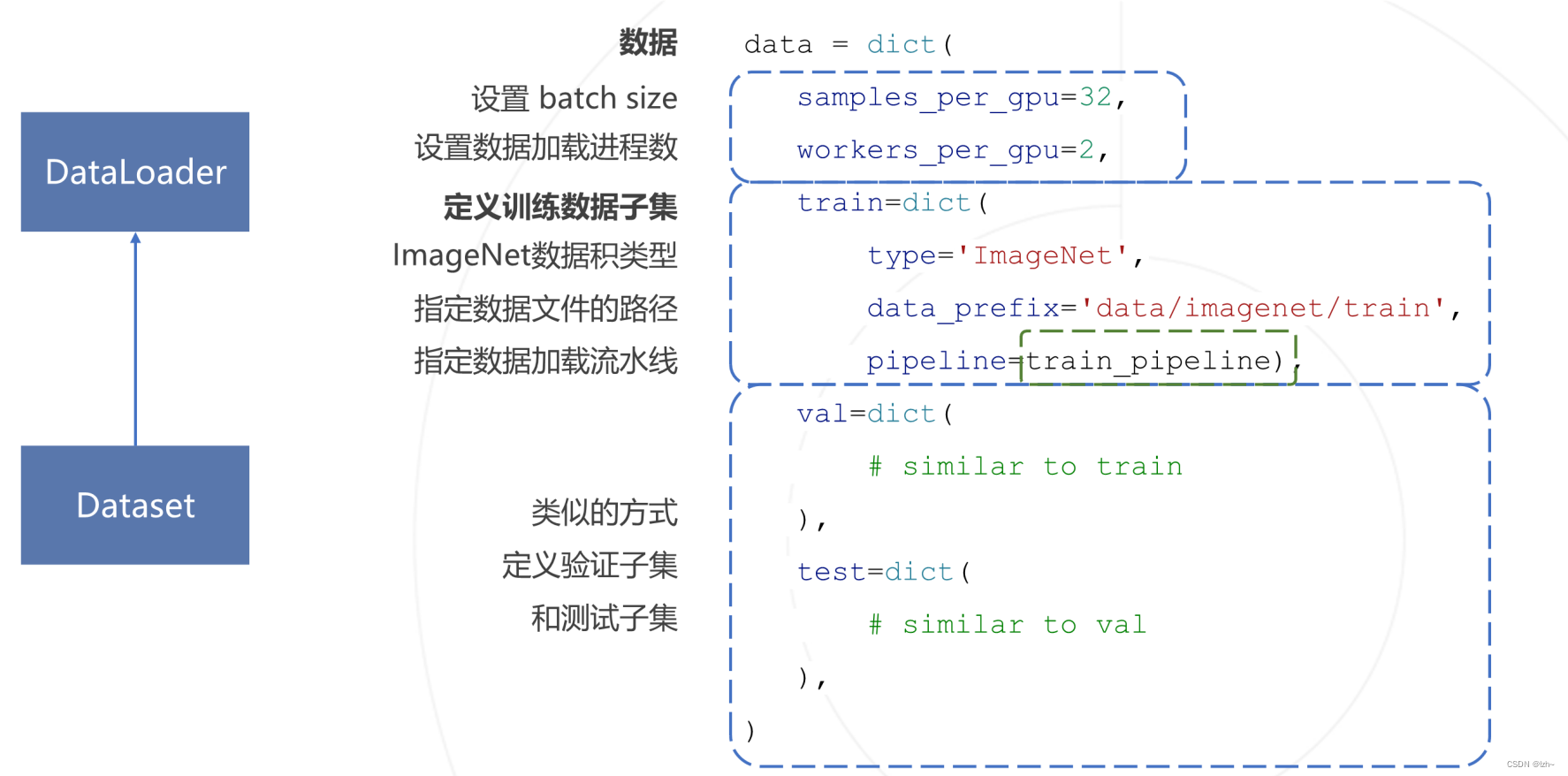
3.4、数据集构建
说明
代码目录
对应代码(以
resnet18_8xb32_in1k模型为例)configs->resne->resnet18_8xb32_in1k.py中可以看到restnet18.py文件目录

- 找到
imagenet_bs32.py目录可以看到对应代码

- 对应的模型可以在
mmcls->datasets里面相应的目录里面找到相应的类
图中蓝紫色:data中存放数据,之后自己定义的数据集也放到这里
图中红色代表模型的位置

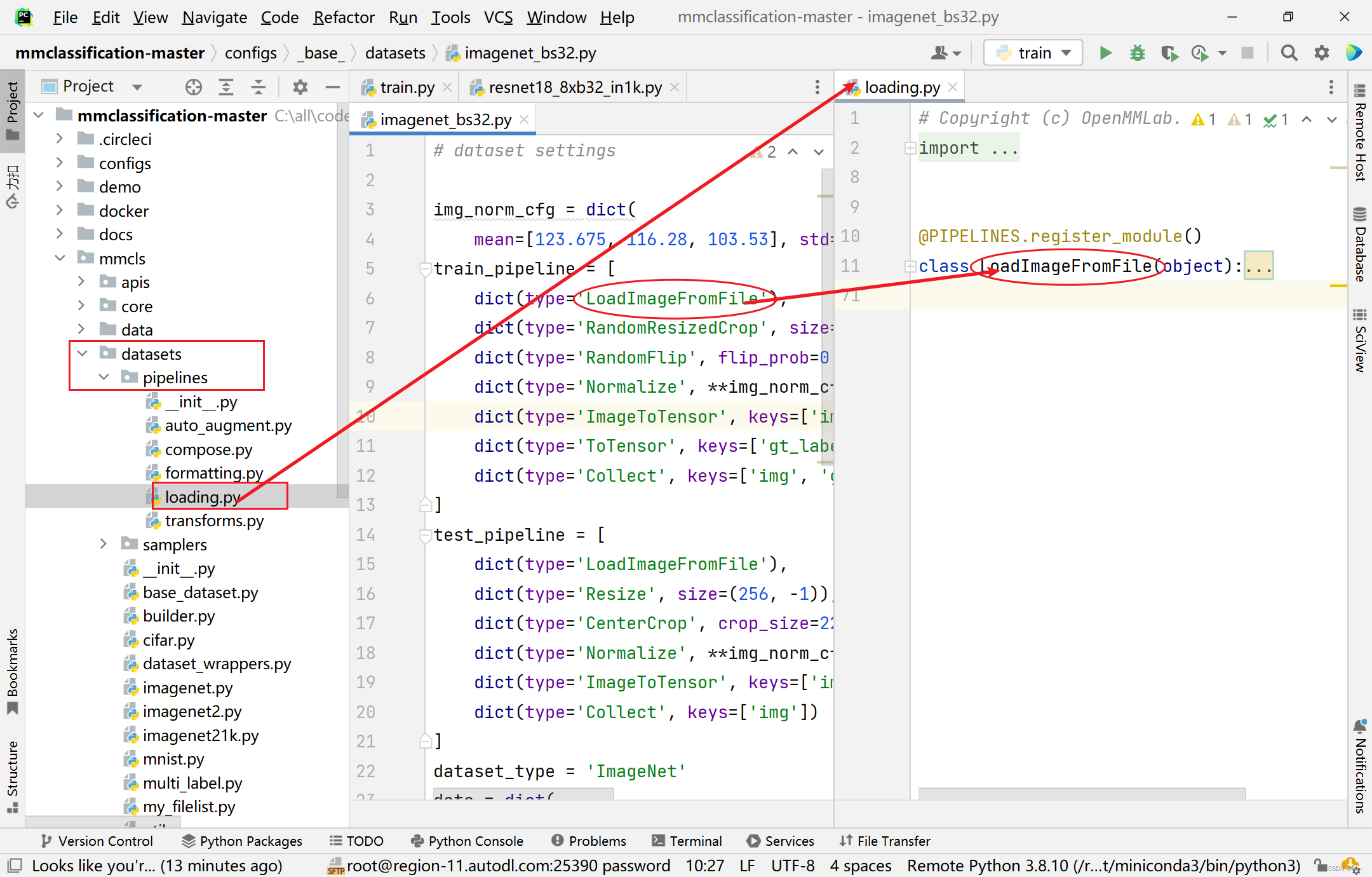
3.5、数据加载流水线
说明

代码目录
对应代码(以
resnet18_8xb32_in1k模型为例)- 和上面的数据集构建在同一个文件
imagenet_bs32.py中

- 对应的模型可以在
mmcls->datasets->pipelines里面相应的目录里面找到相应的类
3.6、配置学习策略
说明

代码目录
对应代码(以
resnet18_8xb32_in1k模型为例)configs->resne->resnet18_8xb32_in1k.py中可以看到imagenet_bs256.py文件目录

- 找到
imagenet_bs256.py目录可以看到对应代码

- 对应的模型可以在
mmcls->core里面相应的目录里面找到相应的类

四、训练自己的数据集模型
4.1、执行train.py
执行
tools->train.py-
配置执行环境
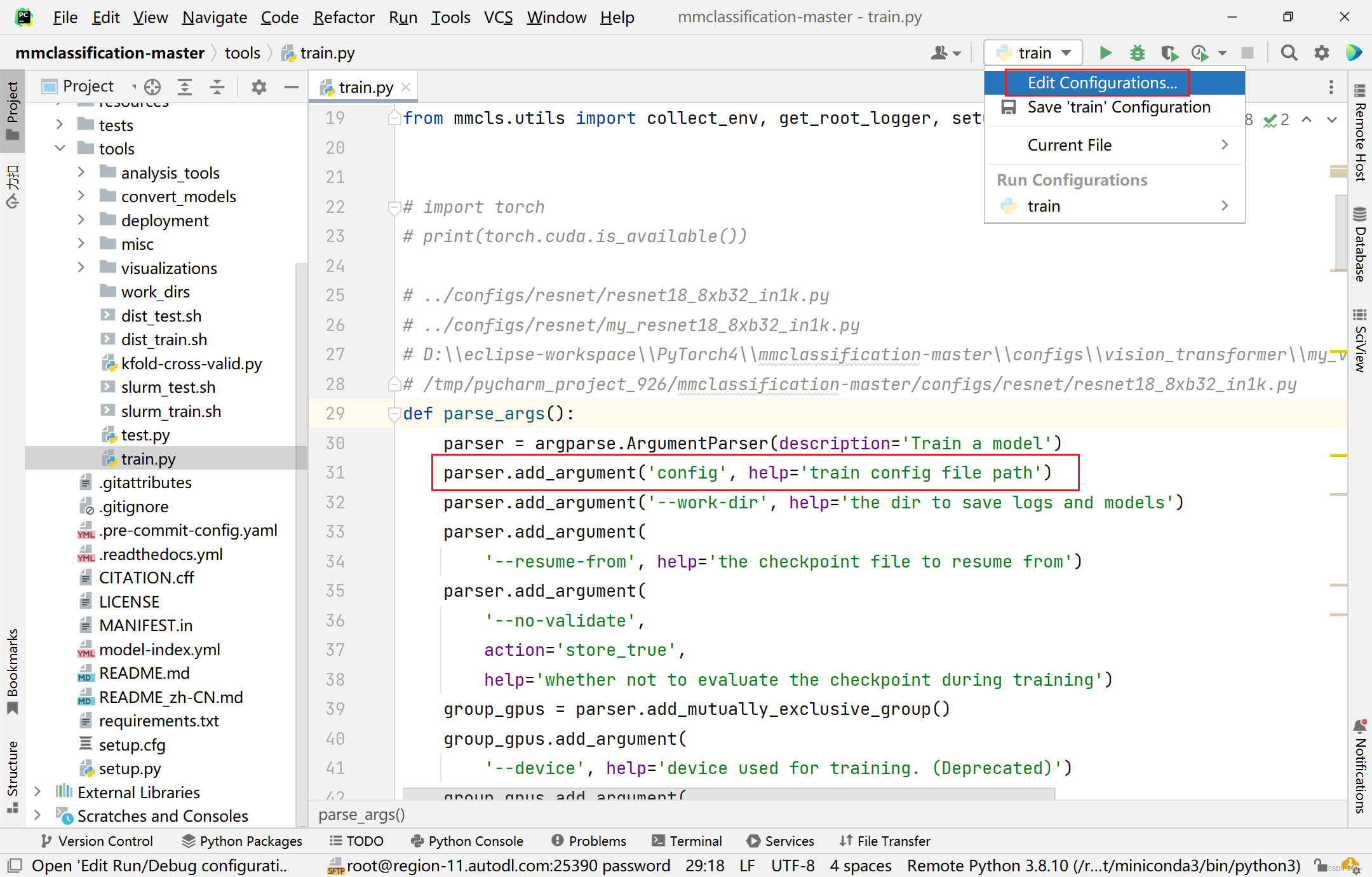
Parameters中可以直接写路径,也可以--config 路径
(以resnet18_8xb32_in1k.py模型为例)

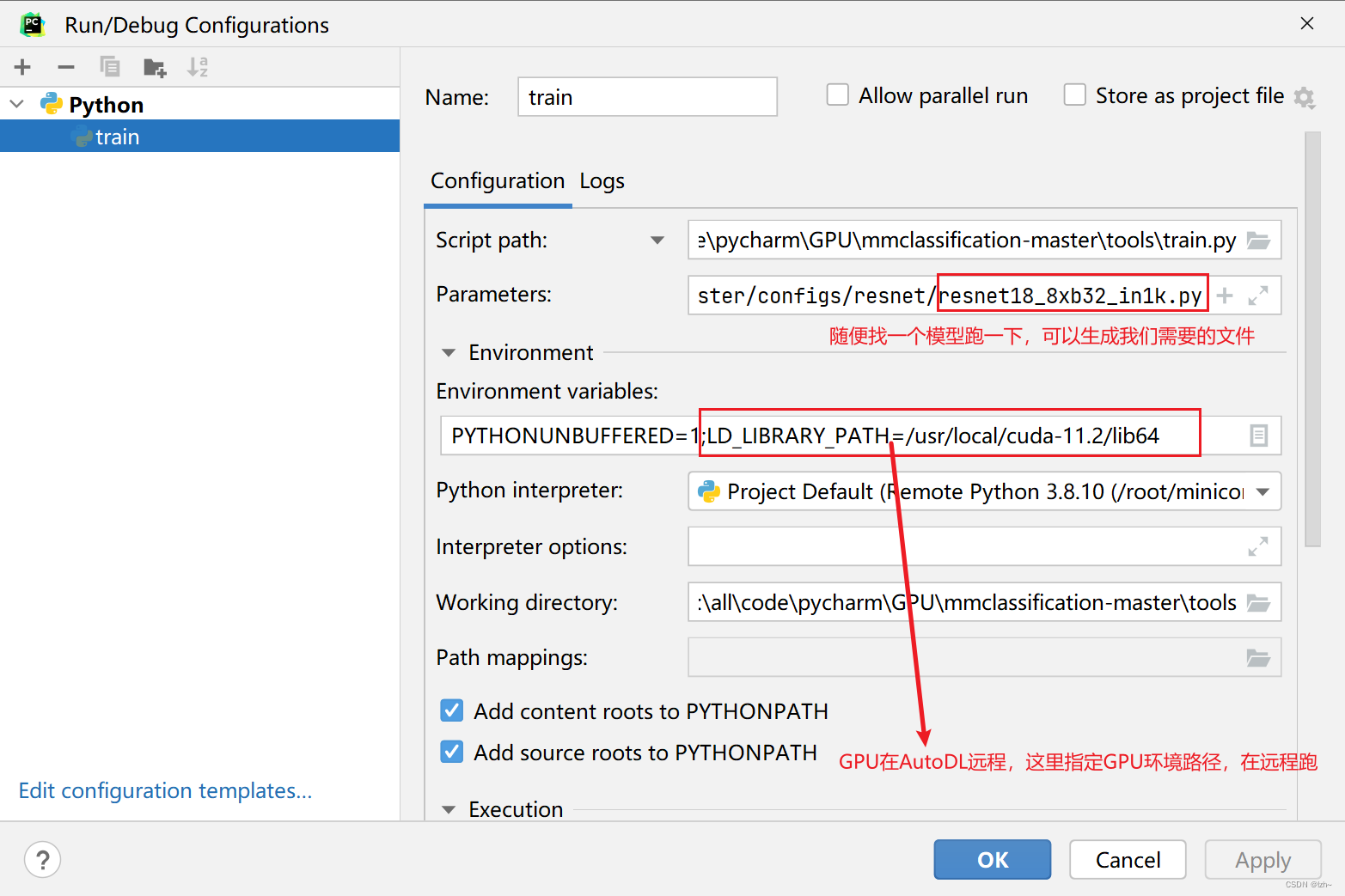
-
执行结果报错不用管(相应的目录文件找不到)

4.2、修改生成文件
4.2.1、找到生成文件
在
tools->work_dirs中会生成一个文件夹,点开会看到生成的resnet18_8xb32_in1k.py文件
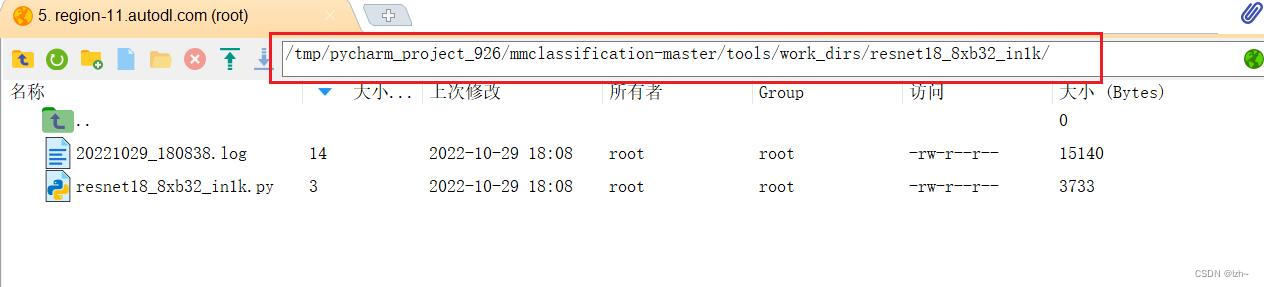
生成的代码将上面几个模型混到一个文件中,如果想分离可以按照上述目录分离,这里就不在分离# 模型 model = dict( type='ImageClassifier', backbone=dict( type='ResNet', depth=18, num_stages=4, out_indices=(3, ), style='pytorch'), neck=dict(type='GlobalAveragePooling'), head=dict( type='LinearClsHead', num_classes=1000, in_channels=512, loss=dict(type='CrossEntropyLoss', loss_weight=1.0), topk=(1, 5))) img_norm_cfg = dict( mean=[123.675, 116.28, 103.53], std=[58.395, 57.12, 57.375], to_rgb=True) # 数据加载流水线 train_pipeline = [ dict(type='LoadImageFromFile'), dict(type='RandomResizedCrop', size=224), dict(type='RandomFlip', flip_prob=0.5, direction='horizontal'), dict( type='Normalize', mean=[123.675, 116.28, 103.53], std=[58.395, 57.12, 57.375], to_rgb=True), dict(type='ImageToTensor', keys=['img']), dict(type='ToTensor', keys=['gt_label']), dict(type='Collect', keys=['img', 'gt_label']) ] test_pipeline = [ dict(type='LoadImageFromFile'), dict(type='Resize', size=(256, -1)), dict(type='CenterCrop', crop_size=224), dict( type='Normalize', mean=[123.675, 116.28, 103.53], std=[58.395, 57.12, 57.375], to_rgb=True), dict(type='ImageToTensor', keys=['img']), dict(type='Collect', keys=['img']) ] # 数据 dataset_type = 'ImageNet' data = dict( samples_per_gpu=32, workers_per_gpu=2, train=dict( type='ImageNet', data_prefix='data/imagenet/train', pipeline=[ dict(type='LoadImageFromFile'), dict(type='RandomResizedCrop', size=224), dict(type='RandomFlip', flip_prob=0.5, direction='horizontal'), dict( type='Normalize', mean=[123.675, 116.28, 103.53], std=[58.395, 57.12, 57.375], to_rgb=True), dict(type='ImageToTensor', keys=['img']), dict(type='ToTensor', keys=['gt_label']), dict(type='Collect', keys=['img', 'gt_label']) ]), val=dict( type='ImageNet', data_prefix='data/imagenet/val', ann_file='data/imagenet/meta/val.txt', pipeline=[ dict(type='LoadImageFromFile'), dict(type='Resize', size=(256, -1)), dict(type='CenterCrop', crop_size=224), dict( type='Normalize', mean=[123.675, 116.28, 103.53], std=[58.395, 57.12, 57.375], to_rgb=True), dict(type='ImageToTensor', keys=['img']), dict(type='Collect', keys=['img']) ]), test=dict( type='ImageNet', data_prefix='data/imagenet/val', ann_file='data/imagenet/meta/val.txt', pipeline=[ dict(type='LoadImageFromFile'), dict(type='Resize', size=(256, -1)), dict(type='CenterCrop', crop_size=224), dict( type='Normalize', mean=[123.675, 116.28, 103.53], std=[58.395, 57.12, 57.375], to_rgb=True), dict(type='ImageToTensor', keys=['img']), dict(type='Collect', keys=['img']) ])) # 策略 evaluation = dict(interval=1, metric='accuracy') optimizer = dict(type='SGD', lr=0.1, momentum=0.9, weight_decay=0.0001) optimizer_config = dict(grad_clip=None) lr_config = dict(policy='step', step=[30, 60, 90]) runner = dict(type='EpochBasedRunner', max_epochs=100) checkpoint_config = dict(interval=1) log_config = dict(interval=100, hooks=[dict(type='TextLoggerHook')]) dist_params = dict(backend='nccl') log_level = 'INFO' load_from = None resume_from = None workflow = [('train', 1)] work_dir = './work_dirs/resnet18_8xb32_in1k' gpu_ids = [0]- 1
- 2
- 3
- 4
- 5
- 6
- 7
- 8
- 9
- 10
- 11
- 12
- 13
- 14
- 15
- 16
- 17
- 18
- 19
- 20
- 21
- 22
- 23
- 24
- 25
- 26
- 27
- 28
- 29
- 30
- 31
- 32
- 33
- 34
- 35
- 36
- 37
- 38
- 39
- 40
- 41
- 42
- 43
- 44
- 45
- 46
- 47
- 48
- 49
- 50
- 51
- 52
- 53
- 54
- 55
- 56
- 57
- 58
- 59
- 60
- 61
- 62
- 63
- 64
- 65
- 66
- 67
- 68
- 69
- 70
- 71
- 72
- 73
- 74
- 75
- 76
- 77
- 78
- 79
- 80
- 81
- 82
- 83
- 84
- 85
- 86
- 87
- 88
- 89
- 90
- 91
- 92
- 93
- 94
- 95
- 96
- 97
- 98
- 99
- 100
- 101
- 102
- 103
- 104
- 105
- 106
- 107
- 108
- 109
- 110
- 111
- 112
- 113
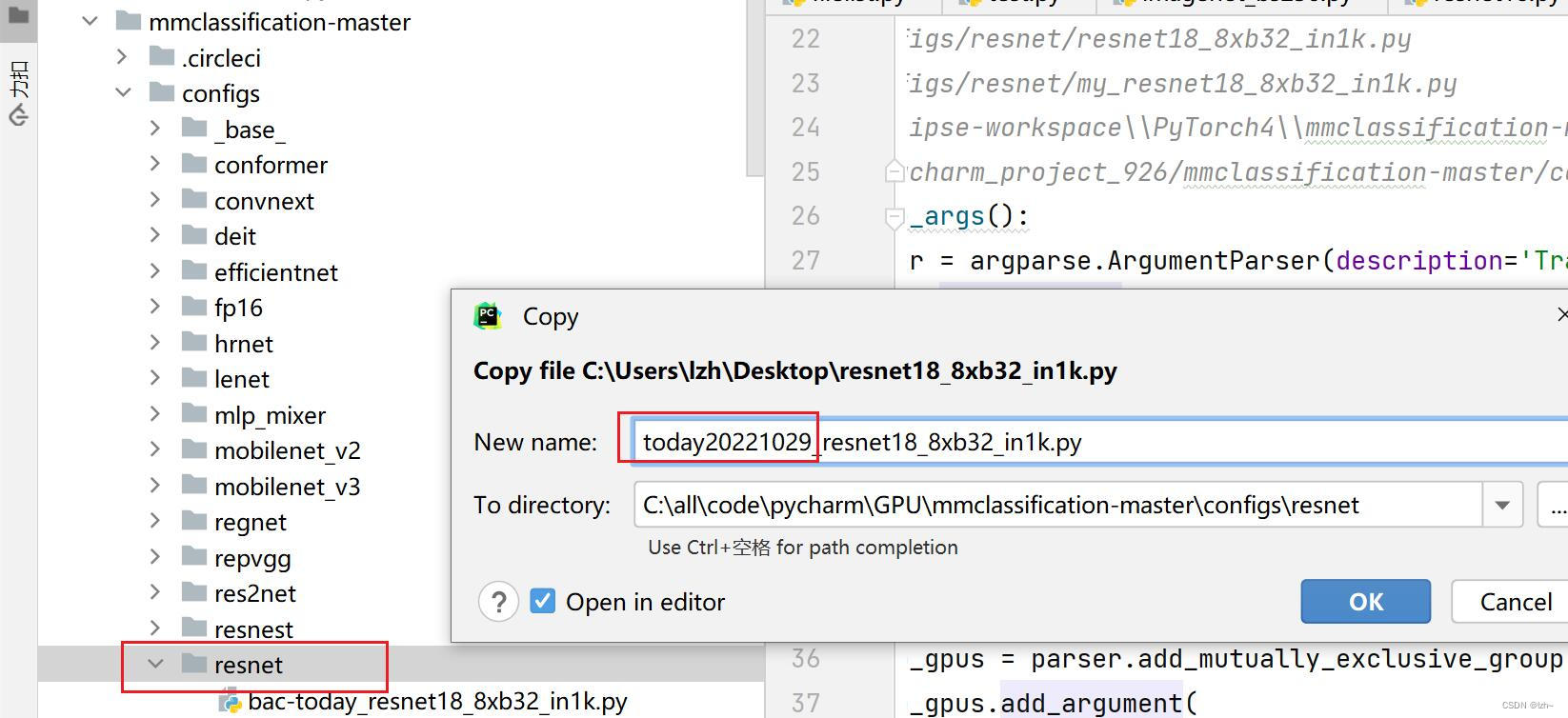
将生成文件
resnet18_8xb32_in1k.py放入configs->resnet中并修改名称(today20221029_resnet18_8xb32_in1k.py)
4.2.2、修改生成文件
-
在目录
mmcls->data中存放自己的数据集(flower_data数据集没有标签,以文件夹名称为标签)

- 修改文件
today20221029_resnet18_8xb32_in1k.py中的数据集路径

- 修改文件
-
修改标签总类别数目

-
修改模型
mmcls->datasets->imagenet为imagenet2,改变里面的总类别1000->102复制一份,然后修改文件名字和类的名字

修改里面的内容CLASSE列表为102类型

注册模型:在同目录下面的_init_.py文件中完成注册,具体操作如下

注意:将目录文件设置为根目录文件,否则会报错
KeyError: ‘ImageNet2 is not in the dataset registry’
4.2.3、数据集修改
将当前数据集flower_data修改成有标签的格式,这一步可以忽略
执行
filelist.py,生成相应的目录结构

将文件today20221029_resnet18_8xb32_in1k.py复制一份文件改名为today_resnet18_8xb32_in1k.py,数据集路径替换,并且添加数据集标签路径

filelist.py的代码import numpy as np import os import shutil train_path = './train' train_out = './train.txt' val_path = './valid' val_out = './val.txt' data_train_out = './train_filelist' data_val_out = './val_filelist' def get_filelist(input_path,output_path): with open(output_path,'w') as f: for dir_path,dir_names,file_names in os.walk(input_path): if dir_path != input_path: label = int(dir_path.split('/')[-1]) -1 #print(label) for filename in file_names: f.write(filename +' '+str(label)+"\n") def move_imgs(input_path,output_path): for dir_path, dir_names, file_names in os.walk(input_path): for filename in file_names: #print(os.path.join(dir_path,filename)) source_path = os.path.join(dir_path,filename) shutil.copyfile(source_path, os.path.join(output_path,filename)) get_filelist(train_path,train_out) get_filelist(val_path,val_out) move_imgs(train_path,data_train_out) move_imgs(val_path,data_val_out)- 1
- 2
- 3
- 4
- 5
- 6
- 7
- 8
- 9
- 10
- 11
- 12
- 13
- 14
- 15
- 16
- 17
- 18
- 19
- 20
- 21
- 22
- 23
- 24
- 25
- 26
- 27
- 28
- 29
- 30
- 31
- 32
- 33
4.3、再次执行train.py文件
-
将Parameters中的路径文件更改为上面更改的名字
today20221029_resnet18_8xb32_in1k.py
运行结果- 损失 loss 在下降
- 准确率 accuracy 在提升

-
将Parameters中的路径文件更改为上面更改的名字
today_resnet18_8xb32_in1k.py

运行结果(截图没有跑完)

在路径tools->work_dirs->resnet18_8xb32_in1k下回生成 epoch_50.pth,epoch_100.pth,latest.pth模型

五、训练结果测试与验证
5.1测试demo效果
- 找到demo下面的
image_demo.py文件

- 相关参数配置

- 运行结果
预测结果正确 1 分类 (下标从0开始的)

5.2 测试评估模型效果
- 找到
tools->test.py文件,并新建存放测试结果的目录val_result

- 相关参数配置

- 训练结果展示

六、训练模型参数替换及改进
预训练模型
-
下载
从github项目中选取对应的模型

找到自己训练的模型,下载

-
下载完之后放到相应的目录,在代码中写入相关的加载路径

七、数据增强流程可视化

数据处理可视化
不需要训练好的模型,处理过程的可视化
数据处理流程(旋转平移等操作)可视化(
vis_pipeline.py)- 配置参数
../../configs/resnet/today_resnet18_8xb32_in1k.py --output-dir ../work_dirs/resnet18_8xb32_in1k/vis/vis_pipeline --phase train --number 10 --mode pipeline
- 输出结果

- 切换参数,将上面的pipeline切换成concat

- 输出结果

数据核心区域可视化
整体流程
-
需要训练好的模型
-
使用命令
pip install "grad-cam>=1.3.6"实现,注意版本要求 -
配置文件(如果linux是系统运行会报错,不能展示图片,请点击链接)
image_05094.jpg ../../configs/resnet/today_resnet18_8xb32_in1k.py ../work_dirs/resnet18_8xb32_in1k/epoch_101.pth

-
输出结果


参数调节
- 输出结果为最后一层

- 调节层数
281类别为猫
238类别为狗
- 输出结果
281猫的输出

238狗的输出

模型输出
输入参数
--preview-model可以打印模型参考
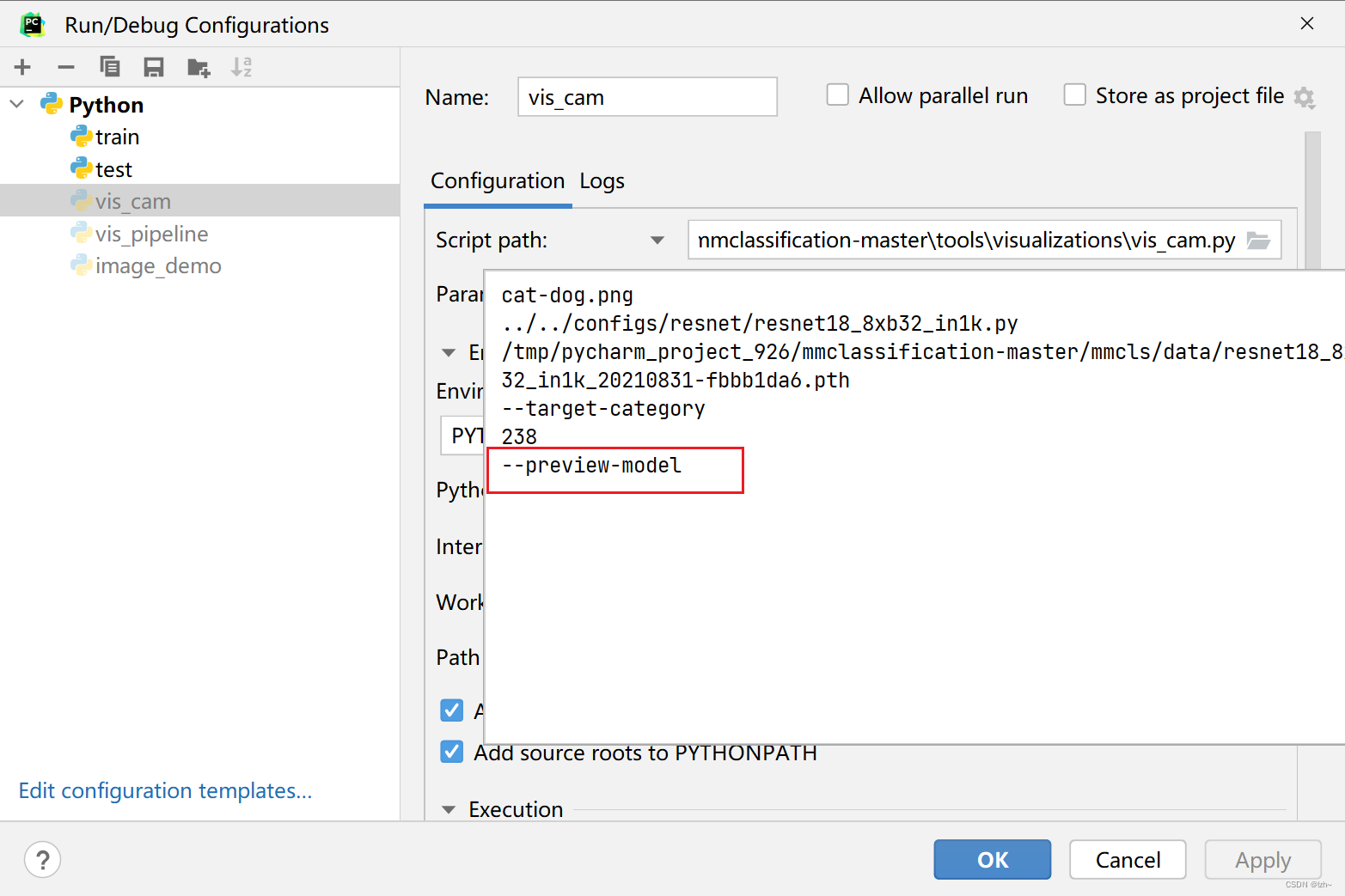
打印出模型的原因

输出结果ImageClassifier( (backbone): ResNet( (conv1): Conv2d(3, 64, kernel_size=(7, 7), stride=(2, 2), padding=(3, 3), bias=False) (bn1): BatchNorm2d(64, eps=1e-05, momentum=0.1, affine=True, track_running_stats=True) (relu): ReLU(inplace=True) (maxpool): MaxPool2d(kernel_size=3, stride=2, padding=1, dilation=1, ceil_mode=False) (layer1): ResLayer( (0): BasicBlock( (conv1): Conv2d(64, 64, kernel_size=(3, 3), stride=(1, 1), padding=(1, 1), bias=False) (bn1): BatchNorm2d(64, eps=1e-05, momentum=0.1, affine=True, track_running_stats=True) (conv2): Conv2d(64, 64, kernel_size=(3, 3), stride=(1, 1), padding=(1, 1), bias=False) (bn2): BatchNorm2d(64, eps=1e-05, momentum=0.1, affine=True, track_running_stats=True) (relu): ReLU(inplace=True) (drop_path): Identity() ) (1): BasicBlock( (conv1): Conv2d(64, 64, kernel_size=(3, 3), stride=(1, 1), padding=(1, 1), bias=False) (bn1): BatchNorm2d(64, eps=1e-05, momentum=0.1, affine=True, track_running_stats=True) (conv2): Conv2d(64, 64, kernel_size=(3, 3), stride=(1, 1), padding=(1, 1), bias=False) (bn2): BatchNorm2d(64, eps=1e-05, momentum=0.1, affine=True, track_running_stats=True) (relu): ReLU(inplace=True) (drop_path): Identity() ) ) (layer2): ResLayer( (0): BasicBlock( (conv1): Conv2d(64, 128, kernel_size=(3, 3), stride=(2, 2), padding=(1, 1), bias=False) (bn1): BatchNorm2d(128, eps=1e-05, momentum=0.1, affine=True, track_running_stats=True) (conv2): Conv2d(128, 128, kernel_size=(3, 3), stride=(1, 1), padding=(1, 1), bias=False) (bn2): BatchNorm2d(128, eps=1e-05, momentum=0.1, affine=True, track_running_stats=True) (relu): ReLU(inplace=True) (downsample): Sequential( (0): Conv2d(64, 128, kernel_size=(1, 1), stride=(2, 2), bias=False) (1): BatchNorm2d(128, eps=1e-05, momentum=0.1, affine=True, track_running_stats=True) ) (drop_path): Identity() ) (1): BasicBlock( (conv1): Conv2d(128, 128, kernel_size=(3, 3), stride=(1, 1), padding=(1, 1), bias=False) (bn1): BatchNorm2d(128, eps=1e-05, momentum=0.1, affine=True, track_running_stats=True) (conv2): Conv2d(128, 128, kernel_size=(3, 3), stride=(1, 1), padding=(1, 1), bias=False) (bn2): BatchNorm2d(128, eps=1e-05, momentum=0.1, affine=True, track_running_stats=True) (relu): ReLU(inplace=True) (drop_path): Identity() ) ) (layer3): ResLayer( (0): BasicBlock( (conv1): Conv2d(128, 256, kernel_size=(3, 3), stride=(2, 2), padding=(1, 1), bias=False) (bn1): BatchNorm2d(256, eps=1e-05, momentum=0.1, affine=True, track_running_stats=True) (conv2): Conv2d(256, 256, kernel_size=(3, 3), stride=(1, 1), padding=(1, 1), bias=False) (bn2): BatchNorm2d(256, eps=1e-05, momentum=0.1, affine=True, track_running_stats=True) (relu): ReLU(inplace=True) (downsample): Sequential( (0): Conv2d(128, 256, kernel_size=(1, 1), stride=(2, 2), bias=False) (1): BatchNorm2d(256, eps=1e-05, momentum=0.1, affine=True, track_running_stats=True) ) (drop_path): Identity() ) (1): BasicBlock( (conv1): Conv2d(256, 256, kernel_size=(3, 3), stride=(1, 1), padding=(1, 1), bias=False) (bn1): BatchNorm2d(256, eps=1e-05, momentum=0.1, affine=True, track_running_stats=True) (conv2): Conv2d(256, 256, kernel_size=(3, 3), stride=(1, 1), padding=(1, 1), bias=False) (bn2): BatchNorm2d(256, eps=1e-05, momentum=0.1, affine=True, track_running_stats=True) (relu): ReLU(inplace=True) (drop_path): Identity() ) ) (layer4): ResLayer( (0): BasicBlock( (conv1): Conv2d(256, 512, kernel_size=(3, 3), stride=(2, 2), padding=(1, 1), bias=False) (bn1): BatchNorm2d(512, eps=1e-05, momentum=0.1, affine=True, track_running_stats=True) (conv2): Conv2d(512, 512, kernel_size=(3, 3), stride=(1, 1), padding=(1, 1), bias=False) (bn2): BatchNorm2d(512, eps=1e-05, momentum=0.1, affine=True, track_running_stats=True) (relu): ReLU(inplace=True) (downsample): Sequential( (0): Conv2d(256, 512, kernel_size=(1, 1), stride=(2, 2), bias=False) (1): BatchNorm2d(512, eps=1e-05, momentum=0.1, affine=True, track_running_stats=True) ) (drop_path): Identity() ) (1): BasicBlock( (conv1): Conv2d(512, 512, kernel_size=(3, 3), stride=(1, 1), padding=(1, 1), bias=False) (bn1): BatchNorm2d(512, eps=1e-05, momentum=0.1, affine=True, track_running_stats=True) (conv2): Conv2d(512, 512, kernel_size=(3, 3), stride=(1, 1), padding=(1, 1), bias=False) (bn2): BatchNorm2d(512, eps=1e-05, momentum=0.1, affine=True, track_running_stats=True) (relu): ReLU(inplace=True) (drop_path): Identity() ) ) ) init_cfg=[{'type': 'Kaiming', 'layer': ['Conv2d']}, {'type': 'Constant', 'val': 1, 'layer': ['_BatchNorm', 'GroupNorm']}] (neck): GlobalAveragePooling( (gap): AdaptiveAvgPool2d(output_size=(1, 1)) ) (head): LinearClsHead( (compute_loss): CrossEntropyLoss() (compute_accuracy): Accuracy() (fc): Linear(in_features=512, out_features=1000, bias=True) ) init_cfg={'type': 'Normal', 'layer': 'Linear', 'std': 0.01} ) Please remove `--preview-model` to get the CAM. Process finished with exit code 0- 1
- 2
- 3
- 4
- 5
- 6
- 7
- 8
- 9
- 10
- 11
- 12
- 13
- 14
- 15
- 16
- 17
- 18
- 19
- 20
- 21
- 22
- 23
- 24
- 25
- 26
- 27
- 28
- 29
- 30
- 31
- 32
- 33
- 34
- 35
- 36
- 37
- 38
- 39
- 40
- 41
- 42
- 43
- 44
- 45
- 46
- 47
- 48
- 49
- 50
- 51
- 52
- 53
- 54
- 55
- 56
- 57
- 58
- 59
- 60
- 61
- 62
- 63
- 64
- 65
- 66
- 67
- 68
- 69
- 70
- 71
- 72
- 73
- 74
- 75
- 76
- 77
- 78
- 79
- 80
- 81
- 82
- 83
- 84
- 85
- 86
- 87
- 88
- 89
- 90
- 91
- 92
- 93
- 94
- 95
- 96
- 97
- 98
- 99
- 100
- 101
- 102
- 103
- 104
- 105
- 106
- 107
重新选择层数配置参数


输出结果

数据集分享
flower_data数据集
链接:https://pan.baidu.com/s/10NdA6nJZC5xK5ozq5ADaPA
提取码:wuts -
-
相关阅读:
Altium Designer实用系列(一)----原理图导入PCB、PCB板子外形、多层板绘制等
医学影像信息(PACS)系统软件源码
动态sql和分页
101 - The Blocks Problem (UVA)
C/C++数据结构课程设计安排
RabbitMQ小结
docker部署多个node-red操作过程
UE4 碰撞射线检测
极客时间 - Vim学习
大一学生《web课程设计》用DIV+CSS技术设计的个人网页(网页制作课作业)
- 原文地址:https://blog.csdn.net/weixin_44635198/article/details/127596446


