本篇参考:
GitHub - trailheadapps/dreamhouse-lwc: Sample application for Lightning Web Components on Salesforce Platform. Part of the sample gallery. Real estate use case. Get inspired and learn best practices.
Salesforce LWC学习(三十) lwc superbadge项目实现
背景描述: 我们今天看的demo是salesforce的dream house的UI,这个demo在 salesforce developer gallary中可以查询到,上述的git hub是它的源代码。主要功能是一个卖房的应用,可以通过条件查询需要的房源,点击房源可以查看到房源详情以及中介详情等信息,和我们之前做的superbadge整体功能很相似,使用到的技术以及排版等基本相同,即一个 lightning app builder中有几个 lwc component,通过message channel进行组件间通讯。大概UI如下图所示
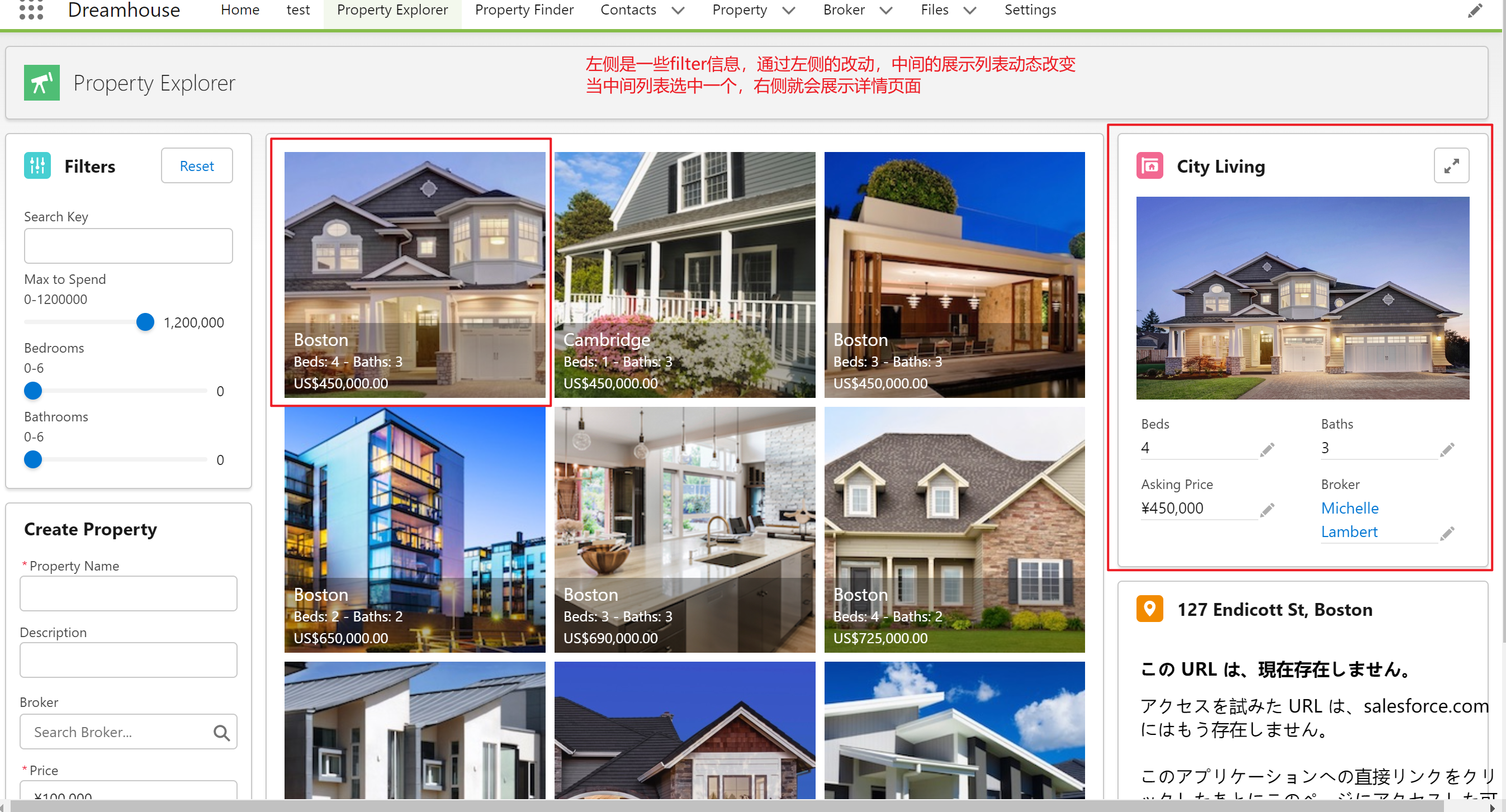
本来这个是一个没啥好说的demo,但是眼神好的我看到了右侧的详情页面是可以编辑的。因为详情页的组件使用的 lightning-record-form,只要有权限,就会展示编辑页面。问题就来了。
1. 如果右侧的信息更改了,中间的内容是否可以动态改变呢?
2. 如果中间内容不能级联改变的话,需要什么样的交互方式可以通知他进行动态改变呢?
针对以上的两个问题,第一个是当前的代码肯定没法动态改变,所以我们需要改变我们的代码。第二个问题,我们可以使用message channel,但除了 message channel以外,我们还有没有其他的方式进行跨组件交互呢? 这里引出了我们今天的主角: Dynamic Interaction.
一. Dynamic Interaction
我们应该在今年年初的新闻中,就可能看到过salesforce针对 lightning app builder要推出一个low code工具用来实现不同组件之间的交互。使用Dynamic Interaction,Lightning页面上某个组件中发生的事件,例如用户单击列表视图中的某个item,可以更新页面上的其他组件。Dynamic Interactions允许管理员使用基于用户交互的组件创建应用程序,所有这些组件都在Lightning App Builder UI中进行通信和转换。官方的demo中,举得是列表点击,详情页展示的demo,类似于了 message channel的功能。那Dynamic Interaction 有什么需要考虑的?
- 当目标组件的属性显示在事件属性编辑器中时,将忽略目标组件中的信息组件。
- 如果为包含动态交互的页面切换页面模板,则可用模板列表仅显示支持动态交互的模板。
- 当触发以Aura Component为目标的交互时,Aura Component会重新渲染。
- 在富文本编辑器中输入表达式时,autocomplete不起作用。
- 组件的事件元数据在Lightning页面上使用或作为托管包的一部分发布后,不允许进行某些破坏性更改,例如删除事件、重命名属性或更改属性类型。
有什么限制呢?
- Dynamic interaction 目前只支持在 app page
- 只有LWC自定义组件可以是事件源,但页面上出现的任何组件(Aura或LWC)都可以是目标组件。
- 基于自定义页面模板的页面不支持Dynamic Interaction(目前只能使用官方的那几个标准的 app template)。
- 只有String和Rich Text类型的属性可以使用表达式来定义它们的值。
- Event是交互中表达式支持的唯一上下文。
- 只能对String、Integer和Boolean类型的属性使用表达式。
- 不能将目标属性值设置为数组或列表,例如多选选择列表。
- 可以使用metadata API将String属性的目标属性值设置为空,但不能在Lightning App Builder UI中设置。
- Dynamic Interaction在Salesforce移动应用程序或传统平板电脑移动体验中的Mobile Only应用程序中不起作用。
- 当依赖属性根据所做的选择或在另一个属性中输入的值自动填充时,除非通过单击或tab 去 focus在依赖属性字段,否则不会保存自动填充的值。
所以使用之前需要注意了解这些限制,否则配置完成以后很容易产生困惑为什么不生效。
二. Dynamic Interaction的使用方法
我们以下面的demo进行讲解,下图是 Dream House的组件组成部分。我们所需要用到以及改动的是propertyTileList以及 proprtySummary

我们先修改一下 propertySummary的代码。
propertySummary.html: lightning-record-form 增加了 onsuccess逻辑

<lightning-record-form
      object-api-name="Property__c"
      record-id={propertyId}
      fields={propertyFields}
      columns="2"
      onsuccess={handleSuccessAction}
>
lightning-record-form>
propertySummary.js: 增加这个方法,创建一个自定义的事件。
handleSuccessAction(event) {
        let updatePropertyId = JSON.stringify(new Date());
        const itemUpdated = new CustomEvent('itemUpdated', {
            detail: {updateTimeStamp: updatePropertyId}
        });
        this.dispatchEvent(itemUpdated);
}
propertySummary.js-meta.xml:在 targetConfig 为 lightning_AppPage下,增加以下粗体的 event属性以及schema属性。其中 property内容设置我们要传递的参数
xml version="1.0" encoding="UTF-8" ?>
<LightningComponentBundle xmlns="http://soap.sforce.com/2006/04/metadata">
    <apiVersion>55.0apiVersion>
    <isExposed>trueisExposed>
    <masterLabel>Property SummarymasterLabel>
    <targets>
        <target>lightning__AppPagetarget>
        <target>lightning__RecordPagetarget>
    targets>
    <targetConfigs>
        <targetConfig targets="lightning__AppPage">
            <supportedFormFactors>
                <supportedFormFactor type="Large" />
                <supportedFormFactor type="Small" />
            supportedFormFactors>
            <event name="itemUpdated" label="Item Updated" description="This event fires when an item is Updated.">
                <schema>
                    {
                        "type": "object",
                        "properties": {
                            "updateTimeStamp": {
                                "type": "string",
                                "title": "Update timestamp",
                                "description": "changed time stamp value"
                            }
                       }
                    }
                schema>
            event>

        targetConfig>
        <targetConfig targets="lightning__RecordPage">
            <objects>
                <object>Property__cobject>
            objects>
            <supportedFormFactors>
                <supportedFormFactor type="Large" />
                <supportedFormFactor type="Small" />
            supportedFormFactors>
        targetConfig>
    targetConfigs>
LightningComponentBundle>
propertyTileList.js:
import { LightningElement, wire,track,api } from 'lwc';
import {
    publish,
    subscribe,
    unsubscribe,
    MessageContext
} from 'lightning/messageService';
import FILTERSCHANGEMC from '@salesforce/messageChannel/FiltersChange__c';
import PROPERTYSELECTEDMC from '@salesforce/messageChannel/PropertySelected__c';
import getPagedPropertyList from '@salesforce/apex/PropertyController.getPagedPropertyList';
import { refreshApex } from '@salesforce/apex';

const PAGE_SIZE = 9;

export default class PropertyTileList extends LightningElement {
    pageNumber = 1;
    pageSize = PAGE_SIZE;

    searchKey = '';
    maxPrice = 9999999;
    minBedrooms = 0;
    minBathrooms = 0;

    @track clickedPropertyId;

    @track previousTimeStamp;

    @api set updateTimeStamp(value) {
        if(this.previousTimeStamp != value) {
            refreshApex(this.properties);
            this.previousTimeStamp = value;
        }
    }

    get updateTimeStamp() {
        return this.previousTimeStamp;
    }


    @wire(MessageContext)
    messageContext;

    properties;

    @wire(getPagedPropertyList, {
        searchKey: '$searchKey',
        maxPrice: '$maxPrice',
        minBedrooms: '$minBedrooms',
        minBathrooms: '$minBathrooms',
        pageSize: '$pageSize',
        pageNumber: '$pageNumber'
    })
    wiredProperties(result) {
        this.properties = result;
    }


    connectedCallback() {
        this.subscription = subscribe(
            this.messageContext,
            FILTERSCHANGEMC,
            (message) => {
                this.handleFilterChange(message);
            }
        );
    }


    disconnectedCallback() {
        unsubscribe(this.subscription);
        this.subscription = null;
    }

    handleFilterChange(filters) {
        this.searchKey = filters.searchKey;
        this.maxPrice = filters.maxPrice;
        this.minBedrooms = filters.minBedrooms;
        this.minBathrooms = filters.minBathrooms;
    }

    handlePreviousPage() {
        this.pageNumber = this.pageNumber - 1;
    }

    handleNextPage() {
        this.pageNumber = this.pageNumber + 1;
    }

    handlePropertySelected(event) {
        const message = { propertyId: event.detail };
        this.clickedPropertyId = message;
        this.updateTimeStamp = message;
        publish(this.messageContext, PROPERTYSELECTEDMC, message);
    }
}
propertyTileList.js-meta.xml
xml version="1.0" encoding="UTF-8" ?>
<LightningComponentBundle xmlns="http://soap.sforce.com/2006/04/metadata">
    <apiVersion>55.0apiVersion>
    <isExposed>trueisExposed>
    <masterLabel>Property Tile ListmasterLabel>
    <targets>
        <target>lightning__AppPagetarget>
    targets>
    <targetConfigs>
        <targetConfig targets="lightning__AppPage">
            <property name="updateTimeStamp" type="String">property>
            <supportedFormFactors>
                <supportedFormFactor type="Large" />
                <supportedFormFactor type="Small" />
            supportedFormFactors>
        targetConfig>
    targetConfigs>
LightningComponentBundle>
以上是代码改动部分。接下来是配置部分。因为这个是自定义的 template的 lightning app page,所以并不支持 dynamic interaction。

我们使用标准的 template,然后将这两个组件拖动出来。这里选中了 propertyTileSummary组件以后,右侧就可以显示 Interaction 这个 Tab,我们就可以点击 Add Interaction去设置 dynamic interaction.
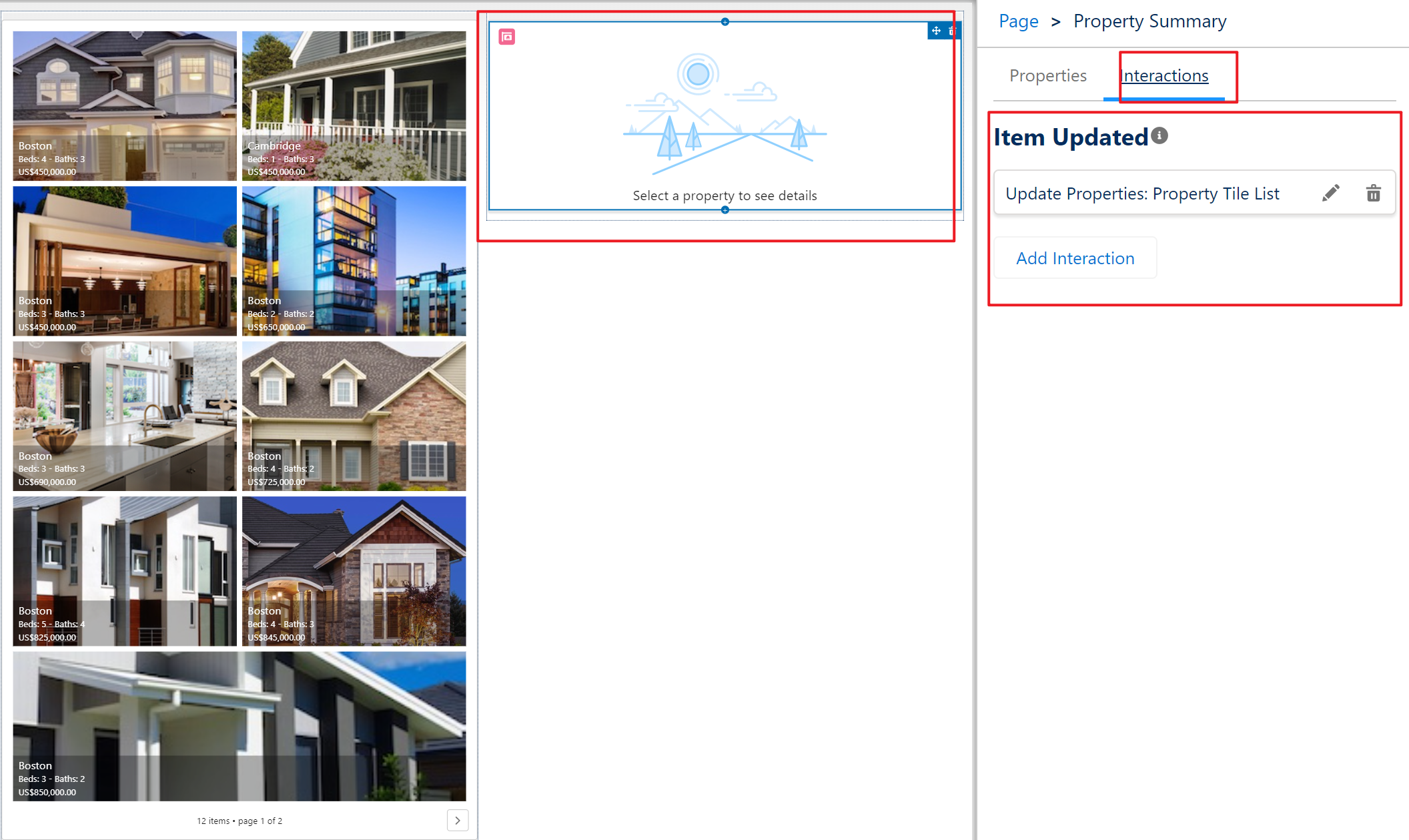
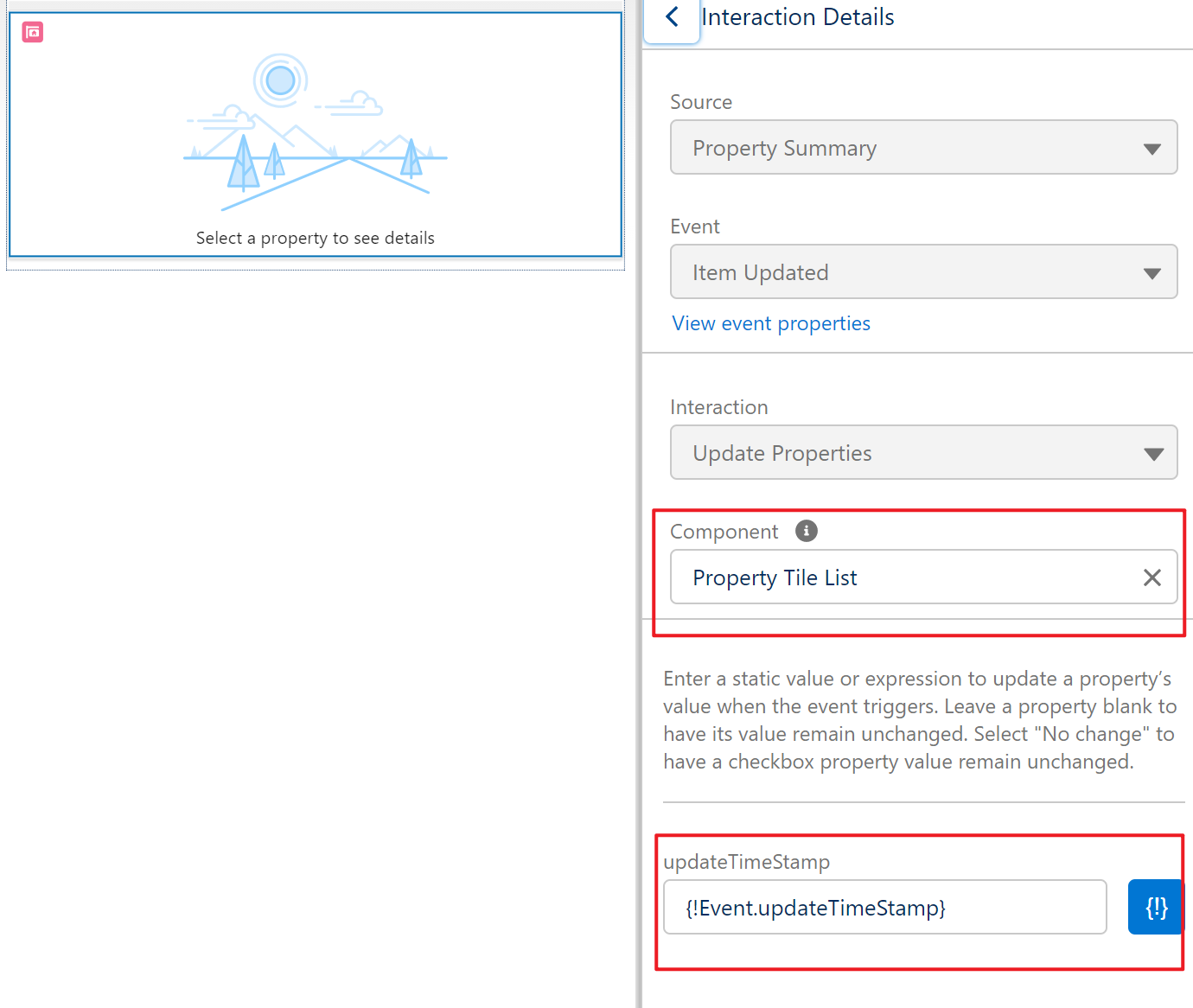
这里source以及event是没法更改的,目前 interaction只支持Update Properties,后续有可能会新增。updateTimeStamp使用 {!event.}的方式进行动态的赋值。实现propertySummary的事件注册以后,就会将变量动态交互赋值给 propertyTileList的updateTimeStamp变量。我们将这个字段设置了set,只要有变量,就refreshApex,从而实现只要右侧组件更新,左侧的列表也会自动的更新。
至此配置完成。结果展示如下:
1. 我们点击了一个item,右侧进行编辑,将3更改成2.
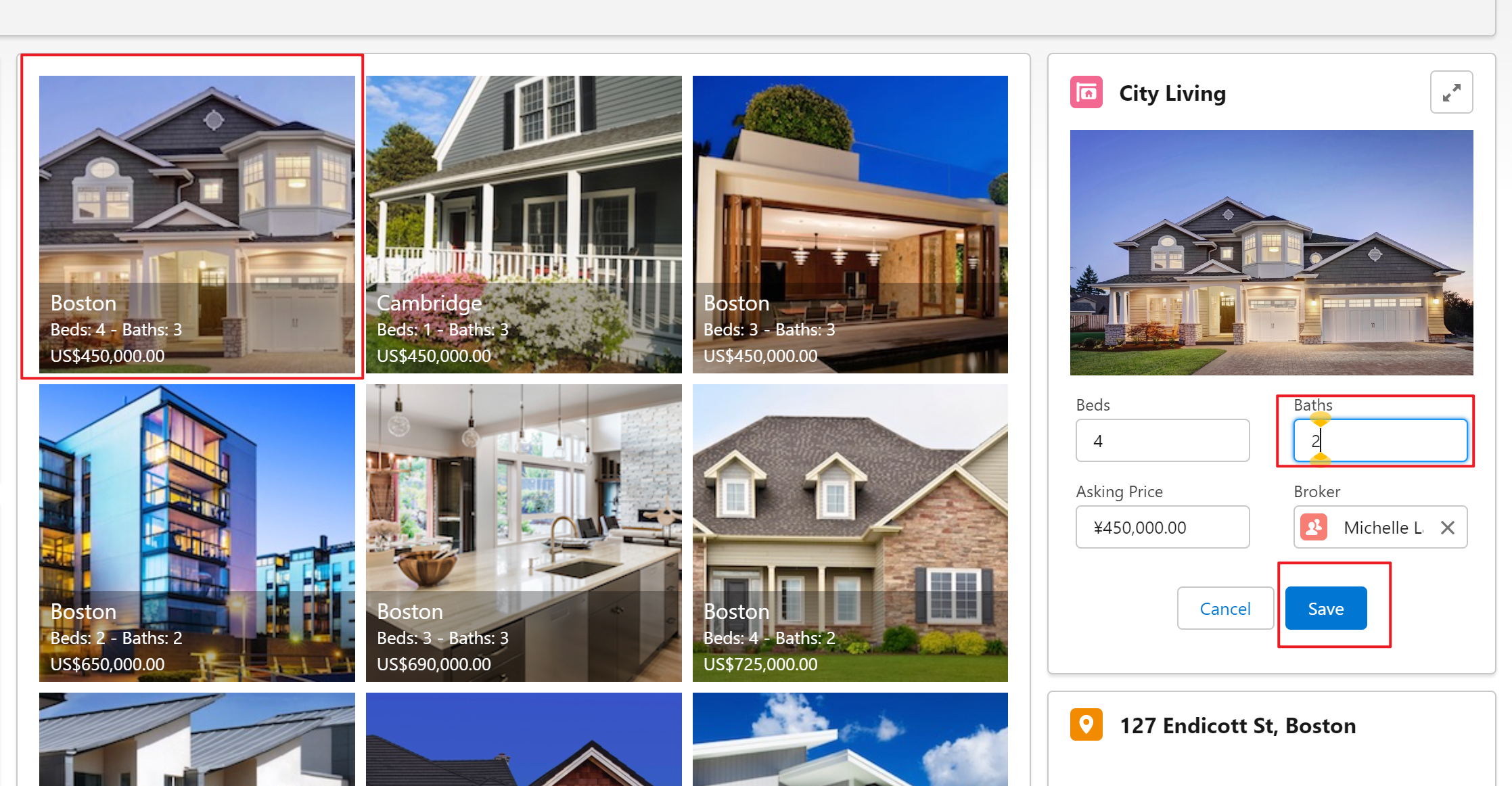
2. save以后,左侧的列表也会自动的变更。

总结: dynamic interaction目前支持性还是有限,但是salesforce按照目前的情况后续还会不断的增强。了解目前的限制以及如何实现就OK,期待后续可以更多的使用场景以及更少的限制。篇中有错误欢迎指出,有不懂欢迎留言。