-
移动端页面如何现实简单切换,vat3组件的标签栏如何使用及图标有哪些属性
Vant 3 - Lightweight Mobile UI Components built on Vue
在我们已经配置好移动端的框架的基础上, 我们来现实页面的切换~


首先了解一下图标:
- 基于字体的图标集,可以通过 Icon 组件使用,也可以在其他组件中通过
icon属性引用。
你也可以直接在
name属性中传入一个图片 URL 来作为图标。<van-icon name="https://fastly.jsdelivr.net/npm/@vant/assets/icon-demo.png" />设置
dot属性后,会在图标右上角展示一个小红点;设置badge属性后,会在图标右上角展示相应的徽标。- <van-icon name="chat-o" dot />
- <van-icon name="chat-o" badge="9" />
- <van-icon name="chat-o" badge="99+" />

通过
color属性来设置图标的颜色。- <van-icon name="cart-o" color="#1989fa" />
- <van-icon name="fire-o" color="#ee0a24" />
通过
size属性来设置图标的尺寸大小,可以指定任意 CSS 单位。- <van-icon name="chat-o" size="40" />
- <van-icon name="chat-o" size="3rem" />
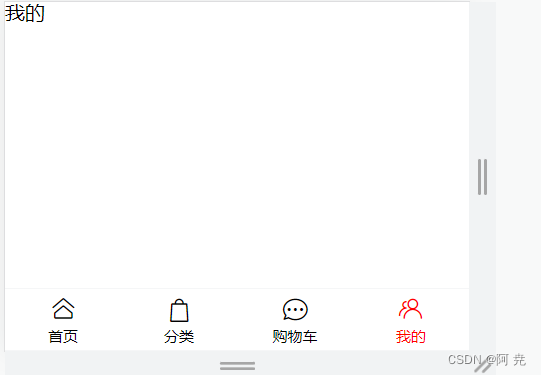
首先我们写一个根页面:
- <div>
- <router-view>router-view>
- <van-tabbar route active-color="red" inactive-color="black">
- <van-tabbar-item icon="home-o" to="/home">首页van-tabbar-item>
- <van-tabbar-item icon="bag-o" to="/category">分类van-tabbar-item>
- <van-tabbar-item icon="chat-o" to="/cart">购物车van-tabbar-item>
- <van-tabbar-item icon="friends-o" to="/my">我的van-tabbar-item>
- van-tabbar>
- div>
路由模式
标签栏支持路由模式,用于搭配
vue-router使用。路由模式下会匹配页面路径和标签的to属性,并自动选中对应的标签。- <router-view />
- <van-tabbar route>
- <van-tabbar-item replace to="/home" icon="home-o">标签</van-tabbar-item>
- <van-tabbar-item replace to="/search" icon="search">标签</van-tabbar-item>
- </van-tabbar>
此时我们在Views页面中,新增加几个文件夹,每个文件下面放index,里面放着首页、我的、购物车、分类的相关页面,我这里面比较简单,只放了对应的文字。

接下来我们在router下的文件中引入

不难看出,首页、我的、购物车、分类的相关根属性首页的子页面

完整代码如下:
- import { createRouter, createWebHistory } from 'vue-router'
- import Layout from "@/views/Layout.vue";
- import Home from "@/views/Home/index.vue"
- import My from "@/views/My/index.vue"
- import Category from "@/views/Category/index.vue"
- import Cart from "@/views/Cart/index.vue"
- const router = createRouter({
- history: createWebHistory(import.meta.env.BASE_URL),
- routes: [
- {
- path: '/',
- name: 'layout',
- component: Layout,
- children:[
- {
- path: '/home',
- name: 'home',
- component: Home,
- },
- {
- path: '/my',
- name: 'my',
- component: My,
- },
- {
- path: '/category',
- name: 'category',
- component: Category,
- },
- {
- path: '/cart',
- name: 'cart',
- component: Cart,
- },
- ]
- },
- ]
- })
- export default router
- 基于字体的图标集,可以通过 Icon 组件使用,也可以在其他组件中通过
-
相关阅读:
UE修改千年数据库的地址
第五章 多态
IOS 提取系统库
骨传导有没有副作用?骨传导耳机有什么优点吗?
npx expo start -c 屏幕白屏
与C语言不同的基础语法
【MAC工具】一个关于最好用虚拟机Parallels Desktop的悲伤的故事
Java基础面试题50题
防抖和节流是什么?防抖和节流的使用场景(附源代码分享)
xLua背包实践
- 原文地址:https://blog.csdn.net/qq_63322025/article/details/127572626
