-
【OpenCv】相机标定介绍及python/c++实现
针孔相机内外参标定简单介绍
之前有一个项目需要公司标内参,之前对这方面没有接触过,网上找了很多资料,记录下相机标定的基础知识。文章是个人浅显理解。如有错误还请指正,非常感谢!
参考链接:
- 坐标系转换:相机参数标定(camera calibration)及标定结果如何使用_Aoulun的博客-CSDN博客
- 标定opencv代码:Opencv 相机内参标定及使用_Gene_2022的博客-CSDN博客_相机内参标定
- opencv标定函数介绍:【OpenCV3学习笔记 】相机标定函数 calibrateCamera( ) 使用详解(附相机标定程序和数据)_ZealCV的博客-CSDN博客_calibratecamera参数
- 标定的数学原理:相机标定之张正友标定法数学原理详解(含python源码) - 知乎 (zhihu.com)
- 流程及代码:Opencv——相机标定 - 一抹烟霞 - 博客园 (cnblogs.com)
- 相机模型介绍:相机模型-鱼眼模型/Omnidirectional Camera(1)_苏源流的博客-CSDN博客_davide scaramuzza
- 图像去畸变,对极约束之undistort,initUndistortRectifyMap,undistort
相机标定的目的是找到三维空间与二维空间转换的关系,也称为几何模型,这个几何模型就是相机标定要求解的参数。
1. 坐标系转换
首先需要了解几个坐标系:像素坐标系、图像坐标系、相机坐标系、世界坐标系。
像素坐标系
通常从相机采集到的图像以
像素为单位。一般处理时都是以图像的左上角为原点,水平是u方向,竖直是v方向,就是像素坐标系,如下u-v坐标系,某一点在像素坐标系中的位置为 ( u i , v j ) (u_i,v_j) (ui,vj)。
图像坐标系
图像坐标系以图像中心为原点,以尺寸为单位,通常一个像素的尺寸为 d x ∗ d y dx*dy dx∗dy。那么像素坐标系与图像坐标系之间就有一个转换关系,图像坐标系以x为水平方向,y为竖直方向。

像素坐标系与图像坐标系的转换关系如下:
{ x = u d x − u 0 d x y = v d y − v 0 d y \left\{\right. {x=udx−u0dxy=vdy−v0dyx = u d x − u 0 d x y = v d y − v 0 d y
转换为矩阵格式并转换为齐次坐标:
[ x y 1 ] = [ d x 0 0 0 d y 0 0 0 0 ] [ u v 0 ] + [ − u 0 d x − v 0 d y 1 ]=[ x y 1 ] [ d x 0 0 0 d y 0 0 0 0 ] +[ u v 0 ] ⎣ ⎡xy1⎦ ⎤=⎣ ⎡dx000dy0000⎦ ⎤⎣ ⎡uv0⎦ ⎤+⎣ ⎡−u0dx−v0dy1⎦ ⎤[ − u 0 d x − v 0 d y 1 ] 齐次坐标可以区分点和向量,便于计算机做图像处理时进行放射变换。 点和向量的区分方式是最后一个数值是否为1,如果为1是点,如果是0是向量。 普通坐标系变换到齐次坐标系: - 点(x,y,z)变换为(x,y,z,1); - 向量(x,y,z)变换为(x,y,z,0); 齐次坐标系变换到普通坐标系: - 点(x,y,z,1)变换为(x,y,z); - 向量(x,y,z,0)变换为(x,y,z);- 1
- 2
- 3
- 4
- 5
- 6
- 7
- 8
相机坐标系
相机坐标系是一个三维的坐标系,以相机的光轴为 z z z轴,光线在相机光学系统的中心位置是原点 O c O_c Oc,相机坐标系的 x c x_c xc轴与图像坐标系的 x x x轴平行,相机坐标系的 y c y_c yc轴与图像坐标系的 y y y轴平行,如下:

在相机坐标系与图像坐标系转换前要了解一下什么是虚平面。我们都知道小孔成像:用一个带小孔的板遮挡在墙体和物之间,墙上就会出现倒立的实像。
本来成像平面在小孔的后面,为了方便计算,我们在物体与小孔中间设置一个虚平面,虚平面到小孔的距离与成像平面到小孔的距离相等,在虚平面上得到的图像就是正的,且与成像平面的大小一致。

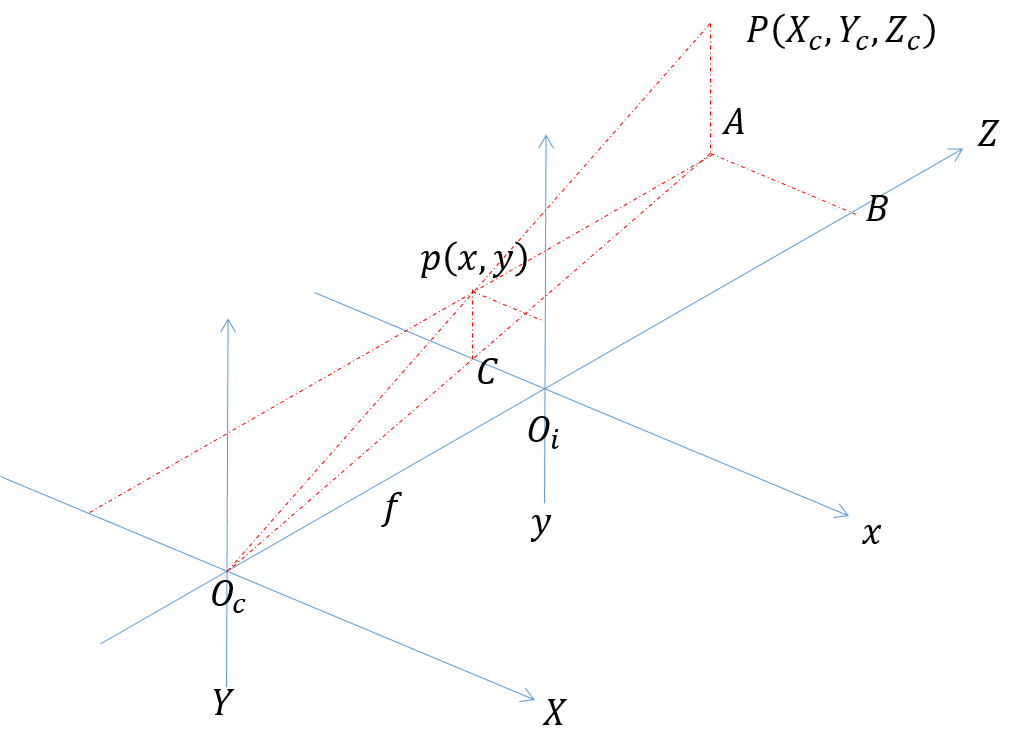
根据相似三角形可以得到:
O c O i O c B = O c C O c A = p C P A = O i p A B \frac{O_cO_i}{O_cB} = \frac{O_cC}{O_cA} = \frac{pC}{PA} = \frac{O_ip}{AB} OcBOcOi=OcAOcC=PApC=ABOip
=> f Z = x X c = y Y c \frac {f}{Z} = \frac {x}{X_c} = \frac{y}{Y_c} Zf=Xcx=Ycy
=> X c = x Z c f X_c = \frac {xZ_c}{f} Xc=fxZc, Y c = y Z c f Y_c = \frac {yZ_c}{f} Yc=fyZc
=>
[ Y c X c Z c 1 ] = [ Z c f 0 0 0 Z c f 0 0 0 Z c 0 0 1 ] [ x y 1 ]=[ Y c X c Z c 1 ] [ Z c f 0 0 0 Z c f 0 0 0 Z c 0 0 1 ] ⎣ ⎡YcXcZc1⎦ ⎤=⎣ ⎡fZc0000fZc0000Zc1⎦ ⎤⎣ ⎡xy1⎦ ⎤[ x y 1 ] 世界坐标系
世界坐标系是现实世界的坐标。世界坐标系反映了图像与真实物体之间的一个映射关系。对于单目,是物体真实尺寸与图像尺寸之间的关系,对于双目,需要知道多个相机之间的关系。
世界坐标系的原点是 O w O_w Ow,且世界坐标系的 X w , Y w , Z w Xw,Y_w,Z_w Xw,Yw,Zw轴与其它三个坐标系不是平行的,有一定的旋转和平移。

旋转后坐标系与原来坐标系关系如下:

旋转参数可以表示为:
{ X w = R x X c Y w = R y Y c Z w = R z Z c \left\{\right. ⎩ ⎨ ⎧Xw=RxXcYw=RyYcZw=RzZcX w = R x X c Y w = R y Y c Z w = R z Z c
平移可以表示为:
{ X w = X c + t x Y w = Y c + t y Z w = Z c + t z \left\{\right. ⎩ ⎨ ⎧Xw=Xc+txYw=Yc+tyZw=Zc+tzX w = X c + t x Y w = Y c + t y Z w = Z c + t z
旋转和平移表示为:
{ X w = R x X c + t x Y w = R y Y c + t y Z w = R z Z c + t z \left\{\right. ⎩ ⎨ ⎧Xw=RxXc+txYw=RyYc+tyZw=RzZc+tzX w = R x X c + t x Y w = R y Y c + t y Z w = R z Z c + t z 2. 内参和外参
由上面的各个坐标系的变换我们最终可以得到世界坐标系和像素坐标系之间的转换关系:
[ X w Y w Z w 1 ] = [ R T 0 1 ] [ Z c f 0 0 0 Z c f 0 0 0 Z c 0 0 1 ] [ d x 0 − u 0 d x 0 d y − v 0 d y 0 0 1 ] [ u v 1 ]=[ X w Y w Z w 1 ] [ R T 0 1 ] [ Z c f 0 0 0 Z c f 0 0 0 Z c 0 0 1 ] \[ d x 0 − u 0 d x 0 d y − v 0 d y 0 0 1 ] ⎣ ⎡ XwYwZw1⎦ ⎤=[R0T1]⎣ ⎡fZc0000fZc0000Zc1⎦ ⎤⎣ ⎡dx000dy0−u0dx−v0dy1⎦ ⎤ ⎣ ⎡uv1⎦ ⎤[ u v 1 ]
=>
[ X w Y w Z w 1 ] = [ R T 0 1 ] [ Z c d x f 0 − Z c u 0 d x f 0 Z c d y f − Z c v 0 d y f 0 0 Z c 0 0 1 ] [ u v 1 ]=[ X w Y w Z w 1 ] [ R T 0 1 ] [ Z c d x f 0 − Z c u 0 d x f 0 Z c d y f − Z c v 0 d y f 0 0 Z c 0 0 1 ] ⎣ ⎡ XwYwZw1⎦ ⎤=[R0T1]⎣ ⎡fZcdx0000fZcdy00−fZcu0dx−fZcv0dyZc1⎦ ⎤⎣ ⎡uv1⎦ ⎤[ u v 1 ]
其中 [ R T 0 1 ][R0T1]表示相机外参, [ Z c d x f 0 − Z c u 0 d x f 0 Z c d y f − Z c v 0 d y f 0 0 Z c 0 0 1 ][ R T 0 1 ] ⎣ ⎡fZcdx0000fZcdy00−fZcu0dx−fZcv0dyZc1⎦ ⎤表示相机内参。[ Z c d x f 0 − Z c u 0 d x f 0 Z c d y f − Z c v 0 d y f 0 0 Z c 0 0 1 ] 3. 畸变
畸变总结起来可以分为两类:径向畸变和切向畸变。
径向畸变

校正公式:
x d r = x ( 1 + k 1 r 2 + k 2 r 4 + k 3 r 6 ) y d r = y ( 1 + k 1 r 2 + k 2 r 4 + k 3 r 6 ) r 2 = x 2 + y 2 x_{dr} = x(1+k_1r^2 + k_2r^4 + k_3r^6) \\ y_{dr} = y(1 + k_1r^2 + k_2r^4 + k_3r^6) \\ r^2 = x^2 + y^2 xdr=x(1+k1r2+k2r4+k3r6)ydr=y(1+k1r2+k2r4+k3r6)r2=x2+y2
切向畸变
校正公式:
x d t = 2 p 1 x y + p 2 ( r 2 + 2 x 2 ) + 1 y d t = 2 p 1 ( r 2 + 2 y 2 ) + 2 p 2 x y + 1 x_{dt} = 2p_1xy + p_2(r^2 + 2x^2) +1 \\ y_{dt} = 2p_1(r^2+2y^2) + 2p_2xy + 1 xdt=2p1xy+p2(r2+2x2)+1ydt=2p1(r2+2y2)+2p2xy+1
畸变校正:
x d = x d r + x d t y d = y d r + y d t x_d = x_{dr} + x{dt} \\ y_d = y_{dr} + y_{dt} xd=xdr+xdtyd=ydr+ydt3. 标定
目的:获取到相机内参和每一幅图像的外参(旋转和平移参数),有了内参和外参就可以对之后拍摄的图像进行校正。
输入:图像上所有内角点的坐标,标定板上所有内角点的空间三维坐标。
输出:相机的内参和外参。
流程:
- 准备标定板/chart图,拍摄图片,建议10~20张,不能少于3张;
- 对每一张标定图片提取角点信息
findChessboardCorners(); - 对每一张标定图片进一步提取亚像素角点信息
cornerSubPix()/ find4QuadCornerSubpix(); - 找到每一张标定图片上的内角点(为了显示用)
find4QuadCornerSubpix(); - 标定(调用函数)
calibrateCamera(); - 对标定结果进行评价
calibrateCamera();得到内外参后,对空间的三维点进行重新投影计算,得到空间三维点在图像上新的投影点的坐标,计算投影坐标和亚像素角点坐标之间的偏差,偏差越小,标定结果越好; - 查看标定效果,利用标定结果对拍摄到的图像进行校正
**initUndistortRectifyMap()+remap()/undistort();
CPP代码:#include#include #include #include #include #include #include using namespace std; using namespace cv; void GetAllFormatFiles(string path, vector<string>& files, string format) { //文件句柄 //long hFile = 0;//win7使用 intptr_t hFile = 0;//win10使用 //文件信息 struct _finddata_t fileinfo; string p; if ((hFile = _findfirst(p.assign(path).append("\\*" + format).c_str(), &fileinfo)) != -1) { do { if ((fileinfo.attrib & _A_SUBDIR)) { if (strcmp(fileinfo.name, ".") != 0 && strcmp(fileinfo.name, "..") != 0) { //files.push_back(p.assign(path).append("\\").append(fileinfo.name) ); GetAllFormatFiles(p.assign(path).append("\\").append(fileinfo.name), files, format); } } else { //files.push_back(p.assign(path).append("\\").append(fileinfo.name));//将文件路径保存 files.push_back(p.assign(fileinfo.name)); //只保存文件名: } } while (_findnext(hFile, &fileinfo) == 0); _findclose(hFile); } } void m_calibration(vector<string> &FilesName, Size board_size, Size square_size, Mat &cameraMatrix, Mat &distCoeffs, vector<Mat> &rvecsMat, vector<Mat> &tvecsMat) { ofstream fout("caliberation_result.txt"); // 保存标定结果的文件 cout << "开始提取角点………………" << endl; int image_count = 0; // 图像数量 Size image_size; // 图像的尺寸 vector<Point2f> image_points; // 缓存每幅图像上检测到的角点 vector<vector<Point2f>> image_points_seq; // 保存检测到的所有角点 for (int i = 0;i < FilesName.size();i++) { image_count++; // 用于观察检验输出 cout << "image_count = " << image_count << endl; Mat imageInput = imread(FilesName[i]); if (image_count == 1) //读入第一张图片时获取图像宽高信息 { image_size.width = imageInput.cols; image_size.height = imageInput.rows; cout << "image_size.width = " << image_size.width << endl; cout << "image_size.height = " << image_size.height << endl; } /* 提取角点 */ bool ok = findChessboardCorners(imageInput, board_size, image_points, cv::CALIB_CB_ADAPTIVE_THRESH | cv::CALIB_CB_NORMALIZE_IMAGE); if (0 == ok) { cout <<"第"<< image_count <<"张照片提取角点失败,请删除后,重新标定!"<<endl; //找不到角点 imshow("失败照片", imageInput); waitKey(0); } else { Mat view_gray; cout << "imageInput.channels()=" << imageInput.channels() << endl; cvtColor(imageInput, view_gray, cv::COLOR_RGB2GRAY); /* 亚像素精确化 */ //find4QuadCornerSubpix(view_gray, image_points, Size(5, 5)); //对粗提取的角点进行精确化 cv::cornerSubPix(view_gray, image_points, cv::Size(11, 11), cv::Size(-1, -1), cv::TermCriteria( TermCriteria::EPS + TermCriteria::COUNT, 20, 0.01)); image_points_seq.push_back(image_points); //保存亚像素角点 /* 在图像上显示角点位置 */ drawChessboardCorners(view_gray, board_size, image_points, true); //imshow("Camera Calibration", view_gray);//显示图片 //waitKey(100);//暂停0.1S } } cout << "角点提取完成!!!" << endl; /*棋盘三维信息*/ vector<vector<Point3f>> object_points_seq; // 保存标定板上角点的三维坐标 for (int t = 0;t < image_count;t++) { vector<Point3f> object_points; for (int i = 0;i < board_size.height;i++) { for (int j = 0;j < board_size.width;j++) { Point3f realPoint; /* 假设标定板放在世界坐标系中z=0的平面上 */ realPoint.x = i*square_size.width; realPoint.y = j*square_size.height; realPoint.z = 0; object_points.push_back(realPoint); } } object_points_seq.push_back(object_points); } /* 运行标定函数 */ double err_first = calibrateCamera(object_points_seq, image_points_seq, image_size, cameraMatrix, distCoeffs, rvecsMat, tvecsMat, cv::CALIB_FIX_K3); fout << "重投影误差1:" << err_first << "像素" << endl << endl; cout << "标定完成!!!" << endl; cout << "开始评价标定结果………………"; double total_err = 0.0; // 所有图像的平均误差的总和 double err = 0.0; // 每幅图像的平均误差 double totalErr = 0.0; double totalPoints = 0.0; vector<Point2f> image_points_pro; // 保存重新计算得到的投影点 for (int i = 0;i < image_count;i++) { projectPoints(object_points_seq[i], rvecsMat[i], tvecsMat[i], cameraMatrix, distCoeffs, image_points_pro); //通过得到的摄像机内外参数,对角点的空间三维坐标进行重新投影计算 err = norm(Mat(image_points_seq[i]), Mat(image_points_pro), NORM_L2); totalErr += err*err; totalPoints += object_points_seq[i].size(); err /= object_points_seq[i].size(); //fout << "第" << i + 1 << "幅图像的平均误差:" << err << "像素" << endl; total_err += err; } fout << "重投影误差2:" << sqrt(totalErr / totalPoints) << "像素" << endl << endl; fout << "重投影误差3:" << total_err / image_count << "像素" << endl << endl; //保存定标结果 cout << "开始保存定标结果………………" << endl; Mat rotation_matrix = Mat(3, 3, CV_32FC1, Scalar::all(0)); /* 保存每幅图像的旋转矩阵 */ fout << "相机内参数矩阵:" << endl; fout << cameraMatrix << endl << endl; fout << "畸变系数:\n"; fout << distCoeffs << endl << endl << endl; for (int i = 0; i < image_count; i++) { fout << "第" << i + 1 << "幅图像的旋转向量:" << endl; fout << rvecsMat[i] << endl; /* 将旋转向量转换为相对应的旋转矩阵 */ Rodrigues(rvecsMat[i], rotation_matrix); fout << "第" << i + 1 << "幅图像的旋转矩阵:" << endl; fout << rotation_matrix << endl; fout << "第" << i + 1 << "幅图像的平移向量:" << endl; fout << tvecsMat[i] << endl << endl; } cout << "定标结果完成保存!!!" << endl; fout << endl; } void m_undistort(const string &path,vector<string> &FilesName, Size image_size, Mat &cameraMatrix, Mat &distCoeffs) { Mat mapx = Mat(image_size, CV_32FC1); //X 坐标重映射参数 Mat mapy = Mat(image_size, CV_32FC1); //Y 坐标重映射参数 Mat R = Mat::eye(3, 3, CV_32F); cout << "保存矫正图像" << endl; string imageFileName; //校正后图像的保存路径 stringstream StrStm; string temp; for (int i = 0; i < FilesName.size(); i++) { Mat imageSource = imread(FilesName[i]); Mat newimage = imageSource.clone(); //方法一:使用initUndistortRectifyMap和remap两个函数配合实现 //initUndistortRectifyMap(cameraMatrix,distCoeffs,R, Mat(),image_size,CV_32FC1,mapx,mapy); // remap(imageSource,newimage,mapx, mapy, INTER_LINEAR); //方法二:不需要转换矩阵的方式,使用undistort函数实现 undistort(imageSource, newimage, cameraMatrix, distCoeffs); StrStm << i + 1; StrStm >> temp; imageFileName = path + temp + "_d.jpg"; imwrite(imageFileName, newimage); StrStm.clear(); imageFileName.clear(); } std::cout << "保存结束" << endl; } void main() { vector<string> imageFilesName; vector<string> files; imageFilesName.clear(); files.clear(); string filePath = "D:\\chess_image"; string format = ".jpg"; GetAllFormatFiles(filePath, imageFilesName, format); cout << "找到的文件有" << endl; for (int i = 0; i < imageFilesName.size(); i++) { files.push_back(filePath + "\\" + imageFilesName[i]); cout << files[i] << endl; } string calibrateDir = filePath + "\\calibrateImage\\"; _mkdir(calibrateDir.c_str()); Size board_size = Size(7, 6); // 标定板上每行、列的角点数 根据实际标定板上的角点个数填写 Size square_size = Size(30, 30); // 实际测量得到的标定板上每个棋盘格的物理尺寸,单位mm 根据实际标定的尺寸填写 Mat cameraMatrix = Mat(3, 3, CV_32FC1, Scalar::all(0)); // 摄像机内参数矩阵 Mat distCoeffs = Mat(1, 5, CV_32FC1, Scalar::all(0)); // 摄像机的5个畸变系数:k1,k2,p1,p2,k3 vector<Mat> rvecsMat; // 存放所有图像的旋转向量,每一副图像的旋转向量为一个mat vector<Mat> tvecsMat; // 存放所有图像的平移向量,每一副图像的平移向量为一个mat m_calibration(files, board_size, square_size, cameraMatrix, distCoeffs, rvecsMat, tvecsMat); cv::Size image_size(640, 480); m_undistort(calibrateDir,files, image_size, cameraMatrix, distCoeffs); return; } - 1
- 2
- 3
- 4
- 5
- 6
- 7
- 8
- 9
- 10
- 11
- 12
- 13
- 14
- 15
- 16
- 17
- 18
- 19
- 20
- 21
- 22
- 23
- 24
- 25
- 26
- 27
- 28
- 29
- 30
- 31
- 32
- 33
- 34
- 35
- 36
- 37
- 38
- 39
- 40
- 41
- 42
- 43
- 44
- 45
- 46
- 47
- 48
- 49
- 50
- 51
- 52
- 53
- 54
- 55
- 56
- 57
- 58
- 59
- 60
- 61
- 62
- 63
- 64
- 65
- 66
- 67
- 68
- 69
- 70
- 71
- 72
- 73
- 74
- 75
- 76
- 77
- 78
- 79
- 80
- 81
- 82
- 83
- 84
- 85
- 86
- 87
- 88
- 89
- 90
- 91
- 92
- 93
- 94
- 95
- 96
- 97
- 98
- 99
- 100
- 101
- 102
- 103
- 104
- 105
- 106
- 107
- 108
- 109
- 110
- 111
- 112
- 113
- 114
- 115
- 116
- 117
- 118
- 119
- 120
- 121
- 122
- 123
- 124
- 125
- 126
- 127
- 128
- 129
- 130
- 131
- 132
- 133
- 134
- 135
- 136
- 137
- 138
- 139
- 140
- 141
- 142
- 143
- 144
- 145
- 146
- 147
- 148
- 149
- 150
- 151
- 152
- 153
- 154
- 155
- 156
- 157
- 158
- 159
- 160
- 161
- 162
- 163
- 164
- 165
- 166
- 167
- 168
- 169
- 170
- 171
- 172
- 173
- 174
- 175
- 176
- 177
- 178
- 179
- 180
- 181
- 182
- 183
- 184
- 185
- 186
- 187
- 188
- 189
- 190
- 191
- 192
- 193
- 194
- 195
- 196
- 197
- 198
- 199
- 200
- 201
- 202
- 203
- 204
- 205
- 206
- 207
- 208
- 209
- 210
- 211
- 212
- 213
- 214
- 215
- 216
- 217
- 218
- 219
- 220
- 221
- 222
- 223
- 224
- 225
- 226
- 227
- 228
- 229
- 230
- 231
- 232
- 233
- 234
- 235
- 236
- 237
- 238
- 239
- 240
- 241
- 242
- 243
python代码:import argparse from argparse import RawTextHelpFormatter import numpy as np import cv2 def cam_calib_find_corners(img, rlt_dir, img_idx, col, row): gray = cv2.cvtColor(img, cv2.COLOR_BGR2GRAY) ret, corners = cv2.findChessboardCorners(gray, (col, row), None) # 为了得到稍微精确一点的角点坐标,进一步对角点进行亚像素寻找 corners2 = cv2.cornerSubPix(gray, corners, (5, 5), (-1, -1), (cv2.TERM_CRITERIA_EPS + cv2.TERM_CRITERIA_COUNT, 10, 0.001)) if ret == True: # 保存角点图像 sav_path = rlt_dir + "\\" + str(img_idx) + "_corner.jpg" cv2.drawChessboardCorners(img, (col, row), corners2, ret) cv2.imwrite(sav_path, img) return (ret, corners2) def cam_calib_calibrate(img_dir, rlt_dir, col, row, img_num): w = 0 h = 0 all_corners = [] patterns = [] # 标定相机,先搞这么一个假想的板子,标定就是把图像中的板子往假想的板子上靠,靠的过程就是计算参数的过程 x, y = np.meshgrid(range(col), range(row)) prod = row * col pattern_points = np.hstack((x.reshape(prod, 1), y.reshape(prod, 1), np.zeros((prod, 1)))).astype(np.float32) for i in range(1, img_num + 1): img_path = img_dir + "\\" + str(i) + ".jpg" print(img_path) # 读取图像 img = cv2.imread(img_path) (h, w) = img.shape[:2] # 提取角点 ret, corners = cam_calib_find_corners(img, rlt_dir, i, col, row) # 合并所有角点 all_corners.append(corners) patterns.append(pattern_points) rms, cameraMatrix, distCoeffs, rvecs, tvecs = cv2.calibrateCamera(patterns, all_corners, (w, h), None, None) return (cameraMatrix, distCoeffs) def cam_calib_correct_img(crct_img_dir, cameraMatrix, distCoeffs): for i in range(1, 3): crct_img_path = crct_img_dir + "\\" + str(i) + ".jpg" img = cv2.imread(crct_img_path) (h1, w1) = img.shape[:2] # 对参数做处理,使得最后的输出的矫正图像去表不必要的边缘。 newcameramtx, roi = cv2.getOptimalNewCameraMatrix(cameraMatrix, distCoeffs, (w1, h1), 1, (w1, h1)) # 矫正 dst = cv2.undistort(img, cameraMatrix, distCoeffs, None, newcameramtx) # 保存矫正图像 x, y, w, h = roi dst = dst[y:y + h, x:x + w] rlt_path = crct_img_dir + "\\rlt\\" + str(i) + "_crct.jpg" cv2.imwrite(rlt_path, dst) if __name__ == "__main__": parser = argparse.ArgumentParser(description="读取标定的图片并保存结果", formatter_class=RawTextHelpFormatter) parser.add_argument("--img_dir", help="标定图片路径", type=str, metavar='', default="D:\\calib_img") parser.add_argument("--rlt_dir", help="保存路径", type=str, metavar='', default="D:\\calib_img\\rlt") parser.add_argument("--crct_img_dir", help="待矫正图像路径", type=str, metavar='', default="D:\\calib_img\\crct_img") parser.add_argument("--row_num", help="每一行有多少个角点,边缘处的不算", type=int, metavar='', default="7") # 根据实际标定板填写 parser.add_argument("--col_num", help="每一列有多少个角点,边缘处的不算", type=int, metavar='', default="6") # 根据实际标定板填写 parser.add_argument("--img_num", help="多少幅图像", type=int, metavar='', default="21") args = parser.parse_args() # 标定相机 cameraMatrix, distCoeffs = cam_calib_calibrate(args.img_dir, args.rlt_dir, args.row_num, args.col_num, args.img_num) # 矫正图片 cam_calib_correct_img(args.crct_img_dir, cameraMatrix, distCoeffs)- 1
- 2
- 3
- 4
- 5
- 6
- 7
- 8
- 9
- 10
- 11
- 12
- 13
- 14
- 15
- 16
- 17
- 18
- 19
- 20
- 21
- 22
- 23
- 24
- 25
- 26
- 27
- 28
- 29
- 30
- 31
- 32
- 33
- 34
- 35
- 36
- 37
- 38
- 39
- 40
- 41
- 42
- 43
- 44
- 45
- 46
- 47
- 48
- 49
- 50
- 51
- 52
- 53
- 54
- 55
- 56
- 57
- 58
- 59
- 60
- 61
- 62
- 63
- 64
- 65
- 66
- 67
- 68
- 69
- 70
- 71
- 72
- 73
- 74
- 75
- 76
- 77
- 78
- 79
- 80
- 81
- 82
- 83
- 84
- 85
-
相关阅读:
如何熟练掌握计算流体力学 ANSYS FIuent软件
第2周学习:卷积神经网络基础
JavaWeb基础7——会话技术
SpringMVC第一天
java教师教学质量评估系统计算机毕业设计MyBatis+系统+LW文档+源码+调试部署
若依微服务版的快速构建
软件工程之总体设计
OneFlow v0.9.0正式发布
C语言典范编程
阿赵UE学习笔记——18、声音播放
- 原文地址:https://blog.csdn.net/sinat_41752325/article/details/127574235
