-
SpringBoot-7-对Web开发静态资源的处理
SpringBoot --> 七、Web开发静态资源的处理
ref. 狂神说
7. Spring Boot: Web开发静态资源的处理
Spring Boot 最大的特点就是自动装配,使用起来非常简单:
- 创建一个Spring Boot应用项目,选中需要的模块,Spring Boot就会默认将选中的模块自动配置好;
- 手动在配置文件中配置需要的配置,项目就可以运行起来了;
- 只需要专注于编写业务代码,不需要考虑之前那样一大堆的配置了;
总之,需要深入理解SpringBoot自动配置原理。
7.1 静态资源映射规则
需要考虑的一个问题:在Web项目中会涉及到许多静态资源,比如css、js、html等文件,Spring Boot 如何处理这些静态资源文件?
回顾以前的Web应用,一般main目录下会有一个文件夹webapp,将所有静态页面导入这个目录里的。但是,现在pom中的打包方式是jar,在这种方式下,Spring Boot应该在哪里放置静态资源文件实现页面呢?
-
在Spring Boot中,SpringMVC的web配置都在
WebMvcAutoConfiguration这个配置类中,在这个类中有一个静态内部类WebMvcAutoConfigurationAdapter中有很多配置方法,其中有一个方法:addResourceHandlers 添加资源处理,源码如下:@Override public void addResourceHandlers(ResourceHandlerRegistry registry) { if (!this.resourceProperties.isAddMappings()) { logger.debug("Default resource handling disabled"); return; } // 第一种方式:WebJars映射 addResourceHandler(registry, "/webjars/**", "classpath:/META-INF/resources/webjars/"); // 第二种方式:默认静态资源映射 addResourceHandler(registry, this.mvcProperties.getStaticPathPattern(), (registration) -> { registration.addResourceLocations(this.resourceProperties.getStaticLocations()); if (this.servletContext != null) { ServletContextResource resource = new ServletContextResource(this.servletContext, SERVLET_LOCATION); registration.addResourceLocations(resource); } }); }- 1
- 2
- 3
- 4
- 5
- 6
- 7
- 8
- 9
- 10
- 11
- 12
- 13
- 14
- 15
- 16
- 17
-
Spring Boot默认提供了以下3种静态资源映射规则:
- WebJars映射
- 默认资源映射
- 静态首页(欢迎页)映射
7.2 第一种方式:WebJar映射(不建议)
-
通过以上源码可以看出:所有的
/webjars/**, 都需要去classpath:/META-INF/resources/webjars/找对应的前端静态资源; -
WebJars 是将客户端(浏览器)资源(JavaScript,Css等)打成 Jar 包文件,以对资源进行统一依赖管理。WebJars 的 Jar 包部署在 Maven 中央仓库上;
-
WebJars官网WebJars - Web Libraries in Jars;
-
Webjars本质就是以jar包的方式引入项目的静态资源;
一个简单的测试,如要使用jQuery:
- 在项目中导入jQuery依赖·
pom.xml:
<dependency> <groupId>org.webjarsgroupId> <artifactId>jqueryartifactId> <version>3.6.0version> dependency>- 1
- 2
- 3
- 4
- 5
-
Spring Boot项目中引入的 jquery 的 jar包结构:

-
访问:只要是静态资源,SpringBoot就会去对应的路径寻找资源,这里访问http://localhost:8555/webjars/jquery/3.6.0/jquery.js:

7.3 第二种方式:默认静态资源映射(推荐)
-
Spring Boot默认提供了静态资源处理,使用WebMvcAutoConfiguration中的配置各种属性。还是查看上述源码进行分析:
进入
getStaticPathPattern方法:public String getStaticPathPattern() { return this.staticPathPattern; } //再继续进入staticPathPattern /** * Path pattern used for static resources. */ private String staticPathPattern = "/**";- 1
- 2
- 3
- 4
- 5
- 6
- 7
- 8
- 9
通过上述源码:找到staticPathPattern发现第二种映射规则 :/** 。即访问当前的项目任意资源,它会执行
resourceProperties.getStaticLocations(),进入getStaticLocations方法查看:public String[] getStaticLocations() { return this.staticLocations; } // 再继续进入staticLocations private String[] staticLocations = CLASSPATH_RESOURCE_LOCATIONS; // 再继续进入CLASSPATH_RESOURCE_LOCATIONS private static final String[] CLASSPATH_RESOURCE_LOCATIONS = { "classpath:/META-INF/resources/", "classpath:/resources/", "classpath:/static/", "classpath:/public/" };- 1
- 2
- 3
- 4
- 5
- 6
- 7
- 8
- 9
- 10
-
根据上述源码分析得出,当访问项目中的任意资源(即“/**”)时,Spring Boot 会默认从以下路径中查找资源文件:
// 优先级由高到低 classpath:/META-INF/resources/ classpath:/resources/ classpath:/static/ classpath:/public/- 1
- 2
- 3
- 4
- 5
如图所示:

一个简单的测试:
-
在
resources/static/这个目录下放一张照片:
-
启动项目访问http://localhost:8555/KeyNG.jpg:

-
其他三种位置类似,也是在
resources/目录下创建对应的文件夹,像上述一样直接访问静态资源即可。
7.4 自定义静态资源
方式一:在配置文件中配置静态资源路径
-
可以通过在配置文件中配置
spring.web.resources.static-locations属性来指定静态资源文件的路径,配置spring.mvc.static-path-pattern属性指定静态资源访问模式; -
一旦自己定义了静态文件夹的路径,原来的自动配置就都会失效了。
-
简单测试一下:
-
在
application.properties中配置:# 访问模式默认为/** spring.mvc.static-path-pattern=/** # static-locations可以通过英文逗号,分开配置多个路径 spring.web.resources.static-locations=classpath:/static/pics/- 1
- 2
- 3
- 4
- 5
-
在
resources/下创建路径/static/pics/,并放一张照片: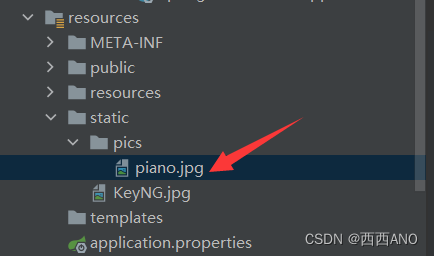
-
启动项目访问http://localhost:8555/piano.jpg:

-
测试再访问之前其他路径的静态资源,发现已经无法访问到了。
-
方式二:重写addResourceHandlers方法自定义资源映射目录
-
可以通过自定义一个配置类,实现WebMvcConfigurer接口,然后实现该接口的addResourceHandlers方法;
-
示例:
-
新建一个配置类如下:
package com.ano.hello.config; import org.springframework.context.annotation.Configuration; import org.springframework.web.servlet.config.annotation.ResourceHandlerRegistry; import org.springframework.web.servlet.config.annotation.WebMvcConfigurer; import org.springframework.web.servlet.config.annotation.WebMvcConfigurerAdapter; @Configuration public class PicsMvcConfig implements WebMvcConfigurer { /** * 通过addResourceHandler添加映射路径; * 再通过addResourceLocations来指定路径 * @param registry */ @Override public void addResourceHandlers(ResourceHandlerRegistry registry) { registry.addResourceHandler("pics/**") .addResourceLocations("classpath:/static/pics/"); } }- 1
- 2
- 3
- 4
- 5
- 6
- 7
- 8
- 9
- 10
- 11
- 12
- 13
- 14
- 15
- 16
- 17
- 18
- 19
- 20
- 21
-
重启项目访问http://localhost:8555/pics/piano.jpg
-
-
addResourceHandlers方法中,
addResourceLocations指的是静态文件放置的目录,addResoureHandler指的是对外暴露的访问路径; -
也可以指定外部的目录也很简单,也是直接在
addResourceLocations指定即可。
7.5 第三种方式:首页(欢迎页)映射
- 静态资源文件夹下的所有
index.html被称为静态首页或者欢迎页,会被 /** 映射,也就是说,当访问“/”或者“/index.html”时,都会跳转到该静态首页(欢迎页); - 注意,访问静态首页或欢迎页时,其查找顺序也遵循默认静态资源路径的优先级顺序进行查找,即先查找优先级高的目录,在查找优先级低的目录,直到找到 index.html 为止。
-
相关阅读:
LinkedIn领英开发客户方法大全(篇一)
Java开发学习(二十二)----Spring事务属性、事务传播行为
easyswoole ORM 对于having 连贯操作
y _hat[ [ 0, 1], y ]语法——pytorch张量花式索引
jsp页面出现“String cannot be resolved to a type”错误解决办法
docker nacos安装,注册,配置,测试
Analyze 菜单分析
HCIP 第十六天笔记(SVI、生成树协议)
冥想第六百一十天
一文读懂自动泊车的自动化等级
- 原文地址:https://blog.csdn.net/baidu_38126306/article/details/127568725