-
【无标题】
微服务搭建流程,无任何技术含量,记作个人学习笔记。
1.首先下载consul
Install | Consul | HashiCorp Developer
解压下载consul得压缩包,解压,到consul得根目录,在consul得根目录运行cmd,执行consul agent -dev 启动consul
打开consul得ui localhost:8500
2.创建项目,创建一个.net core web api项目和一个web mvc项目
首先Api端服务实例启动时需到Consul中进行服务注册,Web Client直接与Consul进行连接,从Consul中拿到服务实例并配置策略及发送http请求等。

Consul每隔一段时间就会调用一次注册的服务实例进行健康检查。
在Api项目中新建一个IConfiguration的扩展方法:
- public static void ConsulExtend(this IConfiguration configuration)
- {
- ConsulClient client = new ConsulClient(m =>
- {
- m.Address = new Uri("http://localhost:8500/");
- m.Datacenter = "dc1";
- });
- //启动的时候在consul中注册实例服务
- //在consul中注册的ip,port
- string ip = configuration["ip"];
- int port = int.Parse(configuration["port"]);
- int weight = string.IsNullOrWhiteSpace(configuration["weight"]) ? 1 : int.Parse(configuration["weight"]);
- client.Agent.ServiceRegister(new AgentServiceRegistration()
- {
- ID = "service" + Guid.NewGuid(),//唯一的
- Name = "MicroserviceAttempt",//组(服务)名称
- Address = ip,
- Port = port,//不同的端口=>不同的实例
- Tags = new string[] { weight.ToString() },//标签
- Check = new AgentServiceCheck()//服务健康检查
- {
- Interval = TimeSpan.FromSeconds(12),//间隔12s一次 检查
- HTTP = $"http://{ip}:{port}/Api/Health/Index",
- Timeout = TimeSpan.FromSeconds(5),//检测等待时间
- DeregisterCriticalServiceAfter = TimeSpan.FromSeconds(20)//失败后多久移除
- }
- });
- Console.WriteLine($"{ip}:{port}--weight:{weight}");
- }
心跳接口
- [ApiController]
- [Route("api/[controller]/[action]")]
- public class HealthController : Controller
- {
- readonly IConfiguration _configuration;
- public HealthController(IConfiguration configuration)
- {
- _configuration = configuration;
- }
- [HttpGet]
- public IActionResult Index()
- {
- //心跳,consul会每隔几秒调一次
- Console.WriteLine($"{ _configuration["port"]} Invoke");
- return Ok();
- }
- }
调用方法
builder.Services.AddControllers();注册服务
dotnet Service1.dll --urls="http://*:5726" --ip="127.0.0.1" --port=5726
dotnet Service1.dll --urls="http://*:5727" --ip="127.0.0.1" --port=5727
dotnet Service1.dll --urls="http://*:5728" --ip="127.0.0.1" --port=5728

客户端调用
- public class UserController : Controller
- {
- HttpSender _httpSender;
- public UserController()
- {
- }
- //暂不考虑线程安全
- private static int index = 0;
- public async Task
Index() - {
- #region nginx版 只知道nginx地址就行了
- //var str = await _httpSender.InvokeApi("http://localhost:8088/api/User/GetCustomerUser");
- #endregion
- #region consul
- //new一个consul实例
- ConsulClient client = new ConsulClient(m =>
- {
- new Uri("http://localhost:8500/");
- m.Datacenter = "dc1";
- });
- //与consul进行通信(连接),得到consul中所有的服务实例
- var response = client.Agent.Services().Result.Response;
- string url = "http://MicroserviceAttempt/Api/Health/Index";
- Uri uri = new Uri(url);
- string groupName = uri.Host;
- AgentService agentService = null;//服务实例
- var serviceDictionary = response.Where(m => m.Value.Service.Equals(groupName, StringComparison.OrdinalIgnoreCase)).ToArray();//找到的全部服务实例
- //{
- // agentService = serviceDictionary[0].Value;
- //}
- {
- //轮询策略=>达到负载均衡的目的
- agentService = serviceDictionary[index++ % 3].Value;
- }
- {
- //平均策略(随机获取索引--相对平均)=>达到负载均衡的目的
- agentService = serviceDictionary[new Random(index++).Next(0, serviceDictionary.Length)].Value;
- }
- {
- //权重策略,给不同的实例分配不同的压力,注册时提供权重
- List
- foreach (var item in keyValuePairs)
- {
- int count = int.Parse(item.Value.Tags?[0]);//在服务注册的时候给定权重数量
- for (int i = 0; i < count; i++)
- {
- keyValuePairs.Add(item);
- }
- }
- //agentService = keyValuePairs.ToArray()[0].Value;
- }
- url = $"{uri.Scheme}://{agentService.Address}:{agentService.Port}{uri.PathAndQuery}";
- _httpSender = new HttpSender();
- string content = await _httpSender.InvokeApi(url);
- #endregion
- return Ok(content);
- }
- }
- public async Task<string> InvokeApi(string url)
- {
- using (HttpClient client = new HttpClient())
- {
- HttpRequestMessage message = new HttpRequestMessage();
- message.Method = HttpMethod.Get;
- message.RequestUri = new Uri(url);
- var result = client.SendAsync(message).Result;
- string content = result.Content.ReadAsStringAsync().Result;
- return content;
- }
- }
启动这个web项目,访问User /Index 就可以读取服务得结果了
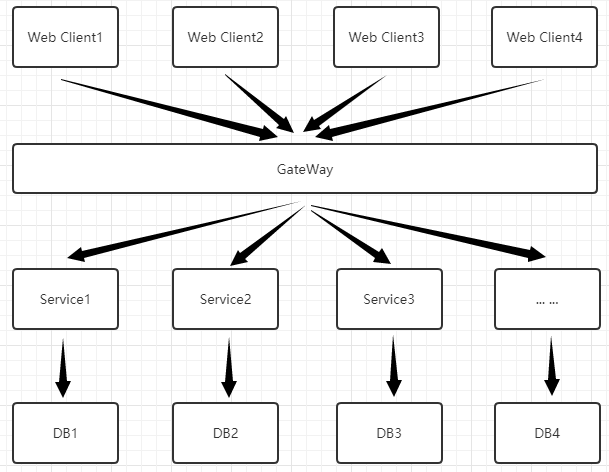
但是这样做不好,客户端都需要和Consul进行连接,拿到所有的服务实例,直接和服务实例进行交互,服务实例就暴露了--所以需要网关。
网关将服务实例与客户端进行隔离,是所有Api请求的入口。因此可以统一鉴权。当然微服务网关的作用有很多,大家可自行百度了解。
新建一个网关的项目,请求先到达网关,再由网关分发请求到不同的实例。如图:
创建一个网关服务OceletDemo引用NuGet包:Ocelot、Ocelot.Provider.Consul
- private static void Main(string[] args)
- {
- var builder = WebApplication.CreateBuilder(args);
- builder.Host.ConfigureAppConfiguration(conf =>
- {
- conf.AddJsonFile("appsettings.json", optional: false,
- reloadOnChange: true);
- });
- // Add services to the container.
- // builder.Services.AddControllers();
- builder.Services.AddOcelot().AddConsul();
- // Learn more about configuring Swagger/OpenAPI at https://aka.ms/aspnetcore/swashbuckle
- // builder.Services.AddEndpointsApiExplorer();
- // builder.Services.AddSwaggerGen();
- var app = builder.Build();
- app.UseOcelot();
- app.Run();
- // Configure the HTTP request pipeline.
- // if (app.Environment.IsDevelopment())
- //{
- // app.UseSwagger();
- /// app.UseSwaggerUI();
- // }
- // app.UseAuthorization();
- // app.MapControllers();
- }
- {
- "Logging": {
- "LogLevel": {
- "Default": "Information",
- "Microsoft.AspNetCore": "Warning"
- }
- },
- "Routes": [
- {
- //GeteWay转发=>Downstream
- "DownstreamPathTemplate": "/api/{url}", //服务地址--url变量
- "DownstreamScheme": "http",
- //http://localhost:6299/T5/User/GetCustomerUser
- "UpstreamPathTemplate": "/T5/{url}", //网关地址--url变量 冲突的还可以加权重Priority
- "UpstreamHttpMethod": [ "Get", "Post" ],
- "UseServiceDiscovery": true, //使用服务发现
- "ServiceName": "MicroserviceAttempt", //Consul服务名称
- "LoadBalancerOptions": {
- "Type": "RoundRobin" //轮询 //"LeastConnection":最少连接数服务器 "NoloadBalance":不负载均衡 "CookieStickySession":会话粘滞
- }
- }
- ],
- "GlobalConfiguration": {
- "BaseUrl": "http://127.0.0.1:6299",
- "ServiceDiscoveryProvider": {
- "Host": "127.0.0.1",
- "Port": 8500,
- "Type": "Consul" //由Consul提供服务发现,每次请求去Consul
- }
- },
- "AllowedHosts": "*"
- }
运行网关服务
dotnet OceletDemo.dll --urls="http://*:6299" --ip="127.0.0.1" --port=6299
调用:127.0.0.1:6299/T5/Health/Index
到此微服务就算搭建好了,至于服务治理什么的,个人感觉这些东西需要实践,仅靠demo成不了事的
-
相关阅读:
程序员怎样才能学好算法,推荐好书送给大家
基于CRC64的通用哈希表(HashMap)的实现(使用golang)
总结git常用命令
RxJS 实做: 自定义 operator - switchMapBy
手写验证码(附代码)
JS 之 常用内置类的使用
RNA-seq——四、根据序列比对结果筛选差异基因
图扑数字孪生智慧加油站,构建安全防护网
怎么使用 Flink 向 Apache Doris 表中写 Bitmap 类型的数据
怎么写好宣传稿件?纯干货
- 原文地址:https://blog.csdn.net/qq_40098572/article/details/127554686
