-
SpringBoot自定义starter
目录
自定义starter
统计独立IP访问次数
需求分析:
1、数据记录位置:Map/Redis
2|功能触发位置:每次web请求(拦截器)
- 步骤1:降低难度,主动调用,仅统计单一操作访问次数(例如查询)
- 步骤2:开发拦截器
3、业务参数(配置项)
- 输出频度:默认10秒
- 数据特征:累计数据/阶段数据,默认累计数据
- 输出格式:详细模式(显示ip和次数)/极简模式(只显示ip)
创建一个模块
pom.xml中
- "1.0" encoding="UTF-8"?>
- <project xmlns="http://maven.apache.org/POM/4.0.0" xmlns:xsi="http://www.w3.org/2001/XMLSchema-instance"
- xsi:schemaLocation="http://maven.apache.org/POM/4.0.0 https://maven.apache.org/xsd/maven-4.0.0.xsd">
- <modelVersion>4.0.0modelVersion>
- <groupId>com.kcgroupId>
- <artifactId>springboot_ipcount_starterartifactId>
- <version>0.0.1-SNAPSHOTversion>
- <properties>
- <java.version>1.8java.version>
- <project.build.sourceEncoding>UTF-8project.build.sourceEncoding>
- <project.reporting.outputEncoding>UTF-8project.reporting.outputEncoding>
- <spring-boot.version>2.4.1spring-boot.version>
- properties>
- <dependencies>
- <dependency>
- <groupId>org.springframework.bootgroupId>
- <artifactId>spring-boot-starter-webartifactId>
- dependency>
- dependencies>
- <dependencyManagement>
- <dependencies>
- <dependency>
- <groupId>org.springframework.bootgroupId>
- <artifactId>spring-boot-dependenciesartifactId>
- <version>${spring-boot.version}version>
- <type>pomtype>
- <scope>importscope>
- dependency>
- dependencies>
- dependencyManagement>
- project>
写入主要的类
- package com.kc.service;
- import com.kc.properties.IpProperties;
- import org.springframework.beans.factory.annotation.Autowired;
- import org.springframework.scheduling.annotation.Scheduled;
- import javax.servlet.http.HttpServletRequest;
- import java.util.HashMap;
- import java.util.Map;
- public class IpCountService {
- private HashMap
- //当前的request对象的注入工作由使用当前starter的工程提供自动装配
- @Autowired
- private HttpServletRequest httpServletRequest;
- public void count(){
- //每次调用当前操作,就记录当前访问的IP,然后累加访问次数
- //1、获取当前操作的ip地址
- String ip=httpServletRequest.getRemoteAddr();
- //2、根据ip地址从Map取值,并递增
- Integer value = ipCountMap.get(ip);
- //判断当前ip否存在
- if(value==null){
- ipCountMap.put(ip, 1);
- }else {
- ipCountMap.put(ip, value+1);
- }
- }
- //注入配置类
- @Autowired
- private IpProperties ipProperties;
- //打印
- @Scheduled(cron = "0/2 * * * * ?") //2秒执行一次
- public void show(){
- System.out.println(" IP访问监控 ");
- if (ipProperties.getModel().equals(IpProperties.LogModel.DETAIL.getValue())) {
- System.out.println("+-----ip-address-----+--num--+");
- //同时获取key和value
- for (Map.Entry
- String key = entry.getKey();
- Integer value = entry.getValue();
- //format格式输出,%18s是给字符串占18位和%5d是给数字占5位符
- System.out.println(String.format("|%18s |%5d |", key,value));
- }
- System.out.println("+--------------------+-------+");
- }else if (ipProperties.getModel().equals(IpProperties.LogModel.SIMPLE.getValue())){
- System.out.println("+-----ip-address-----+");
- //同时获取key和value
- for (String key : ipCountMap.keySet()) {
- System.out.println(String.format("|%18s |", key));
- }
- System.out.println("+--------------------+-------+");
- }
- //是否清除数据
- if (ipProperties.getCycleReset()){
- ipCountMap.clear();
- }
- }
- }
配置类下
- package com.kc.properties;
- import org.springframework.boot.context.properties.ConfigurationProperties;
- import org.springframework.stereotype.Component;
- @Component
- @ConfigurationProperties(prefix = "ip")
- public class IpProperties {
- /**
- * 日志显示周期
- */
- private long cycle=5L;
- /**
- * 是否重置周期数据
- */
- private boolean cycleReset=false;
- /**
- * 日志输出模式 detail :详细模式 simple 极简模式
- */
- private String model=LogModel.DETAIL.value;
- /**
- * 使用枚举来存储
- */
- public enum LogModel{
- DETAIL("detail"),
- SIMPLE("simple");
- private String value;
- LogModel(String value) {
- this.value=value;
- }
- public String getValue() {
- return value;
- }
- }
- public boolean getCycleReset() {
- return cycleReset;
- }
- public void setCycleReset(boolean cycleReset) {
- this.cycleReset = cycleReset;
- }
- public String getModel() {
- return model;
- }
- public void setModel(String model) {
- this.model = model;
- }
- }
自动配置信息类
- package com.kc.autoConfig;
- import com.kc.service.IpCountService;
- import org.springframework.context.annotation.Import;
- import org.springframework.scheduling.annotation.EnableScheduling;
- @EnableScheduling//开启定义任务调度
- @Import(IpCountService.class)
- public class IpAutoConfiguration {
- }
在资源中新建
META-INF下的spring.factories
- #要自动配置的类写在这
- org.springframework.boot.autoconfigure.EnableAutoConfiguration=\
- com.kc.autoConfig.IpAutoConfiguration
这个自定义starter就完成了
使用自定义starter

导入对应的坐标即可

注入和使用对应的方法

设置拦截器

- package com.kc.interceptor;
- import com.kc.service.IpCountService;
- import org.springframework.beans.factory.annotation.Autowired;
- import org.springframework.web.servlet.HandlerInterceptor;
- import javax.servlet.http.HttpServletRequest;
- import javax.servlet.http.HttpServletResponse;
- public class IpCountInterceptor implements HandlerInterceptor {
- @Autowired
- private IpCountService ipCountService;
- @Override
- public boolean preHandle(HttpServletRequest request, HttpServletResponse response, Object handler) throws Exception {
- ipCountService.count();
- ipCountService.show();
- return true;
- }
- }
为了能被springmvc识别还得写个配置
- package com.kc.interceptor;
- import org.springframework.context.annotation.Bean;
- import org.springframework.context.annotation.Configuration;
- import org.springframework.web.servlet.config.annotation.InterceptorRegistry;
- import org.springframework.web.servlet.config.annotation.WebMvcConfigurer;
- @Configuration(proxyBeanMethods = true)//保证bean创建的对象唯一
- //告诉springMVC拦截器的位置
- public class SpringMvcConfig implements WebMvcConfigurer {
- @Override
- //添加一个拦截器
- public void addInterceptors(InterceptorRegistry registry) {
- registry.addInterceptor(ipCountInterceptor()).addPathPatterns("/**");//"/**表示所有请求"
- }
- @Bean
- public IpCountInterceptor ipCountInterceptor(){
- return new IpCountInterceptor();
- }
- }
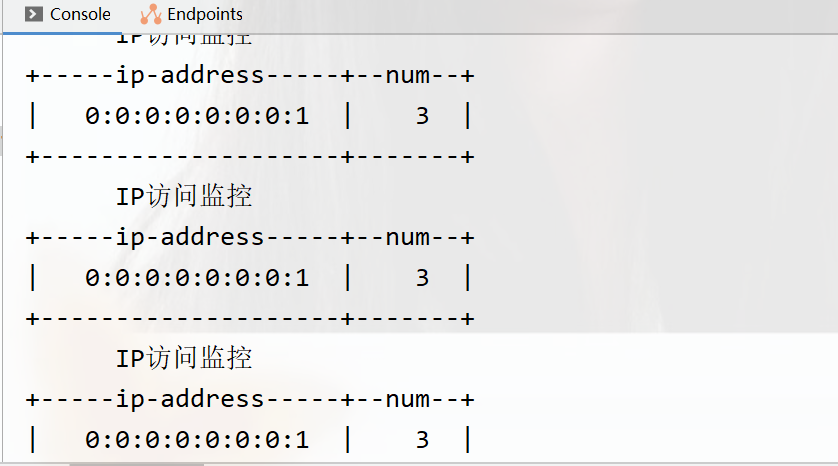
运行之后 ,访问任意的功能都可以计数

开启yml提示功能
在自定义starter中pom.xml中加入,mavenclean和install之后可以删除此坐标
- <dependency>
- <groupId>org.springframework.bootgroupId>
- <artifactId>spring-boot-configuration-processorartifactId>
- dependency>
然后在maven中点击clean和install重新编译

就会多出一个json文件
在使用这个starter的yaml配置文件中

就已经可以出现提示了,这些后面的中文都是之前写入的文档注释,所以得多写文档注释
输出之后,没有提示我们要写入的值

在前面生成的json文件中
- "hints": [
- {
- "name": "properties.ip.model",
- "values": [
- {
- "value": "detail",
- "description": "详细模式."
- },
- {
- "value": "simple",
- "description": "简略模式."
- }
- ]
- }
- ]

这样就可以得出提示了

-
相关阅读:
Redis 排障:你永远不知道告警和下班,谁先到来?
技术分享 | mysql 客户端对配置文件的读取顺序
硬核性感!沉浸式体验 ZStack Cube 超融合的7大亮点功能
C语言 ,不用string.h的函数,实现A+B A-B的字符串处理功能。
springboot异常(一):springboot自定义全局异常处理
数据结构与算法:二叉树的中序遍历
Linux shell 处理文件路径文件名和后缀截取(basename和dirname无法满足的操作)
3DEXPERIENCE许可合规性:确保企业设计流程的合法与安全
【数据库】Redis
Python学习笔记第四十三天(NumPy 数学函数)
- 原文地址:https://blog.csdn.net/weixin_60719453/article/details/127554793
