-
MybatisPlus【SpringBoot】 6 插件 6.3 乐观锁
MybatisPlus【SpringBoot】
【【尚硅谷】2022版MyBatisPlus教程(一套玩转mybatis-plus)】
6 插件
6.3 乐观锁
6.3.1 一个场景
一件商品,成本价是80元,售价是100元。老板先是通知小李,说你去把商品价格增加50元。
小李正在玩游戏,耽搁了一个小时。正好一个小时后,老板觉得商品价格增加到150元,价格太高,可能会影响销量。又通知小王,你把商品价格降低30元。
此时,小李和小王同时操作商品后台系统。
小李操作的时候,系统先取出商品价格100元;小王也在操作,取出的商品价格也是100元。小李将价格加了50元,并将100+50=150元存入了数据库;小王将商品减了30元,并将100-30=70元存入了数据库。是的,如果没有锁,小李的操作就完全被小王的覆盖了。
现在商品价格是70元,比成本价低10元。几分钟后,这个商品很快出售了1千多件商品,老板亏1万多。【好栗子】
6.3.2 乐观锁与悲观锁
上面的栗子,如果是乐观锁,小王保存价格前,会检查下价格是否被人修改过了。如果被修改过了,则重新取出的被修改后的价格,150元,这样他会将120元存入数据库。
如果是悲观锁,小李取出数据后,小王只能等小李操作完之后,才能对价格进行操作,也会保证最终的价格是120元。
6.3.3 模拟修改冲突
【数据库中增加商品表】
create table t_product ( id bigint(20) not null comment '主键ID', name varchar(30) null default null comment '商品名称', price int(11) default 0 comment '价格', VERSION int(11) default 0 comment '乐观锁版本号', primary key (id) );- 1
- 2
- 3
- 4
- 5
- 6
- 7
- 8
【添加数据】
insert into t_product (id, name, price) values (1, '外星人笔记本', 100);- 1

【添加实体】
package com.dingjiaxiong.mybatisplus.domain; import lombok.Data; /** * ClassName: Product * date: 2022/10/14 12:34 * * @author DingJiaxiong */ @Data public class Product { private Long id; private String name; private Integer price; private Integer version; }- 1
- 2
- 3
- 4
- 5
- 6
- 7
- 8
- 9
- 10
- 11
- 12
- 13
- 14
- 15
- 16
- 17
- 18
【添加mapper】
package com.dingjiaxiong.mybatisplus.mapper; import com.baomidou.mybatisplus.core.mapper.BaseMapper; import com.dingjiaxiong.mybatisplus.domain.Product; /** * ClassName: ProductMapper * date: 2022/10/14 12:35 * * @author DingJiaxiong */ @Mapper public interface ProductMapper extends BaseMapper<Product> { }- 1
- 2
- 3
- 4
- 5
- 6
- 7
- 8
- 9
- 10
- 11
- 12
- 13
- 14
- 15
【测试】
@Test public void testConcurrentUpdate(){ //1. 小丁 Product p1 = productMapper.selectById(1L); System.out.println("小丁取出的价格:" + p1.getPrice()); //2. 小王 Product p2 = productMapper.selectById(1L); System.out.println("小王取出的价格:" + p2.getPrice()); //3. 小丁将价格提高了50元,存入了数据库 p1.setPrice(p1.getPrice() + 50); int result1 = productMapper.updateById(p1); System.out.println("小丁修改结果:" + result1); //4. 小王将价格下降了30元,存入了数据库 p2.setPrice(p2.getPrice() - 30); int result2 = productMapper.updateById(p2); System.out.println("小王修改结果:" + result2); //最后的结果 Product p3 = productMapper.selectById(1L); //价格覆盖,最后的结果是 70 System.out.println("最后的结果:" + p3.getPrice()); }- 1
- 2
- 3
- 4
- 5
- 6
- 7
- 8
- 9
- 10
- 11
- 12
- 13
- 14
- 15
- 16
- 17
- 18
- 19
- 20
- 21
- 22
- 23
- 24
- 25
笔者这里把日志关了,看得清楚些

这样问题就很清晰了
6.3.4 乐观锁实现流程
① 数据库中添加version 字段

② 取出记录时,获取当前version
SELECT id,`name`,price,`version` FROM product WHERE id=1- 1
③ 更新时,version + 1,如果where语句中的version版本不对,则更新失败
UPDATE product SET price=price+50, `version`=`version` + 1 WHERE id=1 AND `version`=1- 1
- 2
6.3.5 Mybatis-Plus 实现乐观锁
【修改实体类】

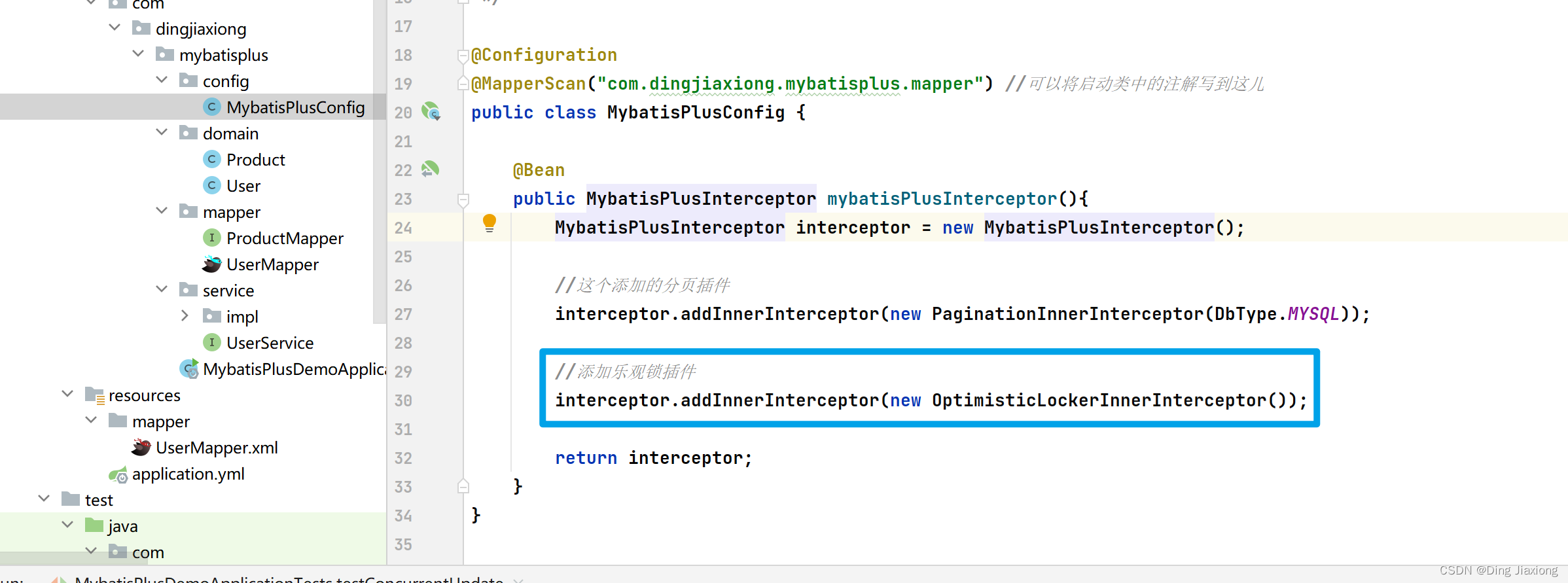
【添加乐观锁插件配置】
package com.dingjiaxiong.mybatisplus.config; import com.baomidou.mybatisplus.annotation.DbType; import com.baomidou.mybatisplus.extension.plugins.MybatisPlusInterceptor; import com.baomidou.mybatisplus.extension.plugins.inner.OptimisticLockerInnerInterceptor; import com.baomidou.mybatisplus.extension.plugins.inner.PaginationInnerInterceptor; import org.mybatis.spring.annotation.MapperScan; import org.springframework.context.annotation.Bean; import org.springframework.context.annotation.Configuration; /** * ClassName: MybatisPlusConfig * date: 2022/10/14 10:56 * * @author DingJiaxiong */ @Configuration @MapperScan("com.dingjiaxiong.mybatisplus.mapper") //可以将启动类中的注解写到这儿 public class MybatisPlusConfig { @Bean public MybatisPlusInterceptor mybatisPlusInterceptor(){ MybatisPlusInterceptor interceptor = new MybatisPlusInterceptor(); //这个添加的分页插件 interceptor.addInnerInterceptor(new PaginationInnerInterceptor(DbType.MYSQL)); //添加乐观锁插件 interceptor.addInnerInterceptor(new OptimisticLockerInnerInterceptor()); return interceptor; } }- 1
- 2
- 3
- 4
- 5
- 6
- 7
- 8
- 9
- 10
- 11
- 12
- 13
- 14
- 15
- 16
- 17
- 18
- 19
- 20
- 21
- 22
- 23
- 24
- 25
- 26
- 27
- 28
- 29
- 30
- 31
- 32
- 33
- 34
【测试修改冲突】

把日志打开看一下执行过程

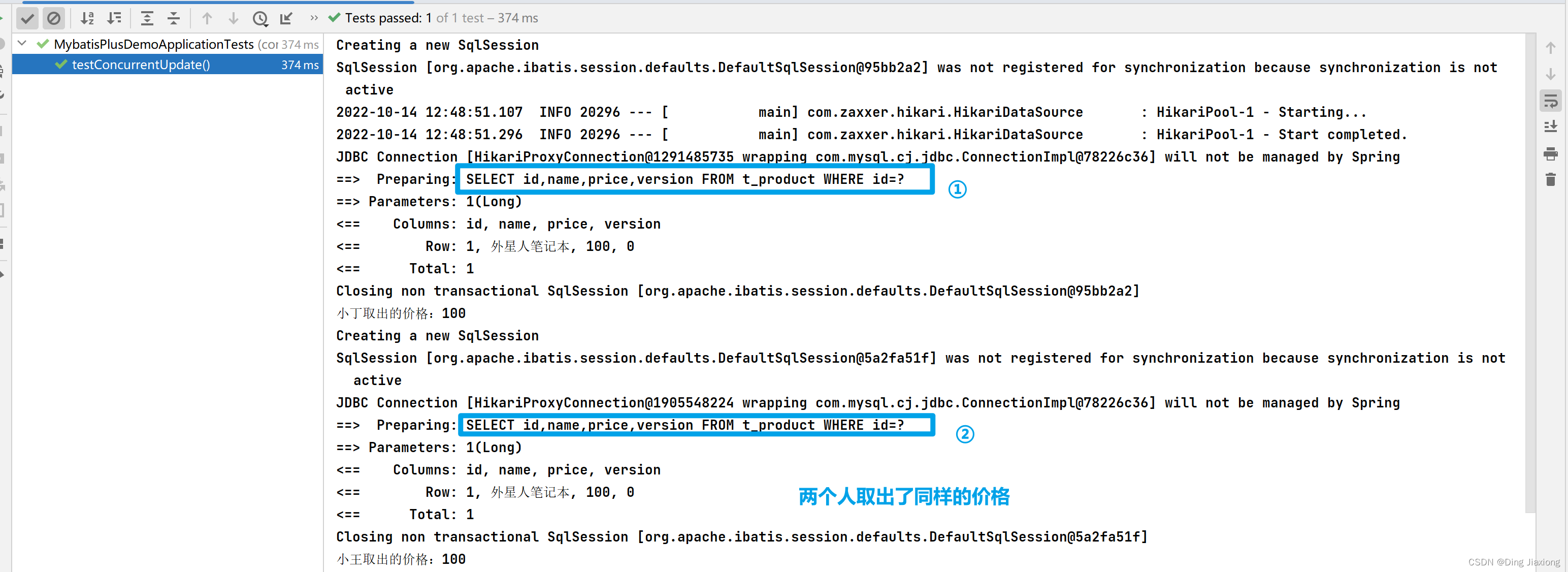
此时,两人拿到的version 都是0

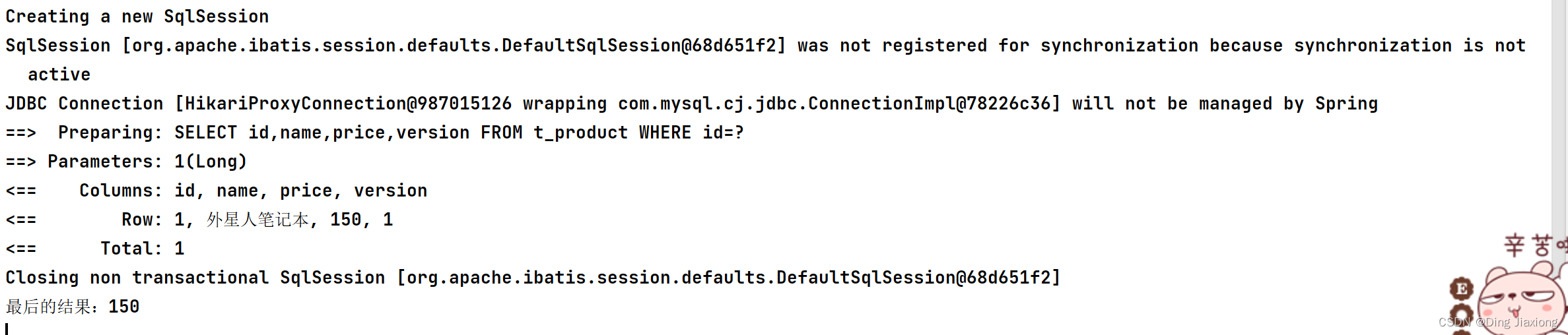
所以最终的结果为150,version版本为1。
【优化流程】

先手动将数据恢复
@Test public void testConcurrentVersionUpdate(){ //小丁取数据 Product p1 = productMapper.selectById(1L); //小王取数据 Product p2 = productMapper.selectById(1L); //小丁修改 + 50 p1.setPrice(p1.getPrice() + 50); int result1 = productMapper.updateById(p1); System.out.println("小丁的修改结果:" + result1); //小王修改 -30 p2.setPrice(p2.getPrice() - 30); int result2 = productMapper.updateById(p2); System.out.println("小王修改的结果:" + result2); if (result2 == 0){ //失败重试,重新获取version并更新 p2 = productMapper.selectById(1L); p2.setPrice(p2.getPrice() - 30); result2 = productMapper.updateById(p2); } System.out.println("小王修改重试的结果:" + result2); //老板最后查看商品价格 Product p3 = productMapper.selectById(1L); System.out.println("老板看价格:" + p3.getPrice()); }- 1
- 2
- 3
- 4
- 5
- 6
- 7
- 8
- 9
- 10
- 11
- 12
- 13
- 14
- 15
- 16
- 17
- 18
- 19
- 20
- 21
- 22
- 23
- 24
- 25
- 26
- 27
- 28
- 29
- 30
- 31
笔者这里又先把日志关了,方便查看
测试结果:

OK。
-
相关阅读:
Python 中对_call__()方法的理解
【C++修炼秘籍】C++入门,初入山门(下)
java基本数据类型的包装类[34]
654. Maximum Binary Tree
复制控制 copy control(非平凡的类)
HTM5网页设计作业成品 HTML+CSS校园安全公益网站制作
硬件性能评估指标-DMIPS、MFLOPS、MAC、TOPS
文件系统数据
【Linux】让笔记本发挥余热,Ubuntu20.04设置WiFi热点
动态主机配置协议(DHCP)解密:网络自动化与管理的关键
- 原文地址:https://blog.csdn.net/weixin_44226181/article/details/127456933
