-
MybatisPlus【SpringBoot】 3 基本CRUD
MybatisPlus【SpringBoot】
【【尚硅谷】2022版MyBatisPlus教程(一套玩转mybatis-plus)】
3 基本CRUD
3.1 BaseMapper
MyBatis-Plus中的基本CRUD在内置的BaseMapper中都已得到了实现,我们可以直接使用,接口如
下:
package com.baomidou.mybatisplus.core.mapper; public interface BaseMapper<T> extends Mapper<T> { /** * 插入一条记录 * * @param entity 实体对象 */ int insert(T entity); /** * 根据 ID 删除 * * @param id 主键ID */ int deleteById(Serializable id); /** * 根据实体(ID)删除 * * @param entity 实体对象 * @since 3.4.4 */ int deleteById(T entity); /** * 根据 columnMap 条件,删除记录 * * @param columnMap 表字段 map 对象 */ int deleteByMap(@Param(Constants.COLUMN_MAP) Map<String, Object> columnMap); /** * 根据 entity 条件,删除记录 * * @param queryWrapper 实体对象封装操作类(可以为 null,里面的 entity 用于生成 where * 语句) */ int delete(@Param(Constants.WRAPPER) Wrapper<T> queryWrapper); /** * 删除(根据ID 批量删除) * * @param idList 主键ID列表(不能为 null 以及 empty) */ int deleteBatchIds(@Param(Constants.COLLECTION) Collection<? extends Serializable> idList); /** * 根据 ID 修改 * * @param entity 实体对象 */ int updateById(@Param(Constants.ENTITY) T entity); /** * 根据 whereEntity 条件,更新记录 * * @param entity 实体对象 (set 条件值,可以为 null) * @param updateWrapper 实体对象封装操作类(可以为 null,里面的 entity 用于生成 * where 语句) */ int update(@Param(Constants.ENTITY) T entity, @Param(Constants.WRAPPER) Wrapper<T> updateWrapper); /** * 根据 ID 查询 * * @param id 主键ID */ T selectById(Serializable id); /** * 查询(根据ID 批量查询) * * @param idList 主键ID列表(不能为 null 以及 empty) */ List<T> selectBatchIds(@Param(Constants.COLLECTION) Collection<? extends Serializable> idList); /** * 查询(根据 columnMap 条件) * * @param columnMap 表字段 map 对象 */ List<T> selectByMap(@Param(Constants.COLUMN_MAP) Map<String, Object> columnMap); /** * 根据 entity 条件,查询一条记录 *查询一条记录,例如 qw.last("limit 1") 限制取一条记录, 注意:多条数据会报异常 *
* * @param queryWrapper 实体对象封装操作类(可以为 null) */ default T selectOne(@Param(Constants.WRAPPER) Wrapper<T> queryWrapper) { List<T> ts = this.selectList(queryWrapper); if (CollectionUtils.isNotEmpty(ts)) { if (ts.size() != 1) { throw ExceptionUtils.mpe("One record is expected, but the query result is multiple records"); } return ts.get(0); } return null; } /** * 根据 Wrapper 条件,查询总记录数 * * @param queryWrapper 实体对象封装操作类(可以为 null) */ Long selectCount(@Param(Constants.WRAPPER) Wrapper<T> queryWrapper); /** * 根据 entity 条件,查询全部记录 * * @param queryWrapper 实体对象封装操作类(可以为 null) */ List<T> selectList(@Param(Constants.WRAPPER) Wrapper<T> queryWrapper); /** * 根据 Wrapper 条件,查询全部记录 * * @param queryWrapper 实体对象封装操作类(可以为 null) */ List<Map<String, Object>> selectMaps(@Param(Constants.WRAPPER) Wrapper<T> queryWrapper); /** * 根据 Wrapper 条件,查询全部记录 *注意: 只返回第一个字段的值
* * @param queryWrapper 实体对象封装操作类(可以为 null) */ List<Object> selectObjs(@Param(Constants.WRAPPER) Wrapper<T> queryWrapper); /** * 根据 entity 条件,查询全部记录(并翻页) * * @param page 分页查询条件(可以为 RowBounds.DEFAULT) * @param queryWrapper 实体对象封装操作类(可以为 null) */ <P extends IPage<T>> P selectPage(P page, @Param(Constants.WRAPPER) Wrapper<T> queryWrapper); /** * 根据 Wrapper 条件,查询全部记录(并翻页) * * @param page 分页查询条件 * @param queryWrapper 实体对象封装操作类 */ <P extends IPage<Map<String, Object>>> P selectMapsPage(P page,@Param(Constants.WRAPPER) Wrapper<T> queryWrapper); }- 1
- 2
- 3
- 4
- 5
- 6
- 7
- 8
- 9
- 10
- 11
- 12
- 13
- 14
- 15
- 16
- 17
- 18
- 19
- 20
- 21
- 22
- 23
- 24
- 25
- 26
- 27
- 28
- 29
- 30
- 31
- 32
- 33
- 34
- 35
- 36
- 37
- 38
- 39
- 40
- 41
- 42
- 43
- 44
- 45
- 46
- 47
- 48
- 49
- 50
- 51
- 52
- 53
- 54
- 55
- 56
- 57
- 58
- 59
- 60
- 61
- 62
- 63
- 64
- 65
- 66
- 67
- 68
- 69
- 70
- 71
- 72
- 73
- 74
- 75
- 76
- 77
- 78
- 79
- 80
- 81
- 82
- 83
- 84
- 85
- 86
- 87
- 88
- 89
- 90
- 91
- 92
- 93
- 94
- 95
- 96
- 97
- 98
- 99
- 100
- 101
- 102
- 103
- 104
- 105
- 106
- 107
- 108
- 109
- 110
- 111
- 112
- 113
- 114
- 115
- 116
- 117
- 118
- 119
- 120
- 121
- 122
- 123
- 124
- 125
- 126
- 127
- 128
- 129
- 130
- 131
- 132
- 133
- 134
- 135
- 136
- 137
- 138
- 139
- 140
- 141
- 142
- 143
- 144
- 145
- 146
- 147
- 148
- 149
- 150
- 151
- 152
- 153
- 154
- 155
3.2 插入
先补一个构造器。

//插入测试 @Test public void testInsert(){ User user = new User(null,"张三",23,"zhangsan@atguigu.com"); int result = userMapper.insert(user); System.out.println("受影响行数:" + result); System.out.println("id自动获取" + user.getId()); }- 1
- 2
- 3
- 4
- 5
- 6
- 7
- 8
测试结果

最终执行的结果,所获取的id为xxxxxxxxxxxxxxxxxxxx
这是因为MyBatis-Plus在实现插入数据时,会默认基于雪花算法的策略生成id3.3 删除
3.3.1 通过id 删除记录
//通过id删除记录 @Test public void testDeleteById(){ int result = userMapper.deleteById(1580164951486169090L); System.out.println("受影响行数:" + result); }- 1
- 2
- 3
- 4
- 5
- 6
测试结果

3.3.2 通过id 批量删除记录
//通过id批量删除记录 @Test public void testDeleteBatchIds() { List<Long> idList = Arrays.asList(1L, 2L, 3L); int result = userMapper.deleteBatchIds(idList); System.out.println("受影响行数:" + result); }- 1
- 2
- 3
- 4
- 5
- 6
- 7
测试结果

3.3.3 通过map 条件删除记录
//通过map条件删除记录 @Test public void testDeleteByMap() { Map<String, Object> map = new HashMap<>(); map.put("age", 23); map.put("name", "张三"); int result = userMapper.deleteByMap(map); System.out.println("受影响行数:" + result); }- 1
- 2
- 3
- 4
- 5
- 6
- 7
- 8
- 9
测试结果
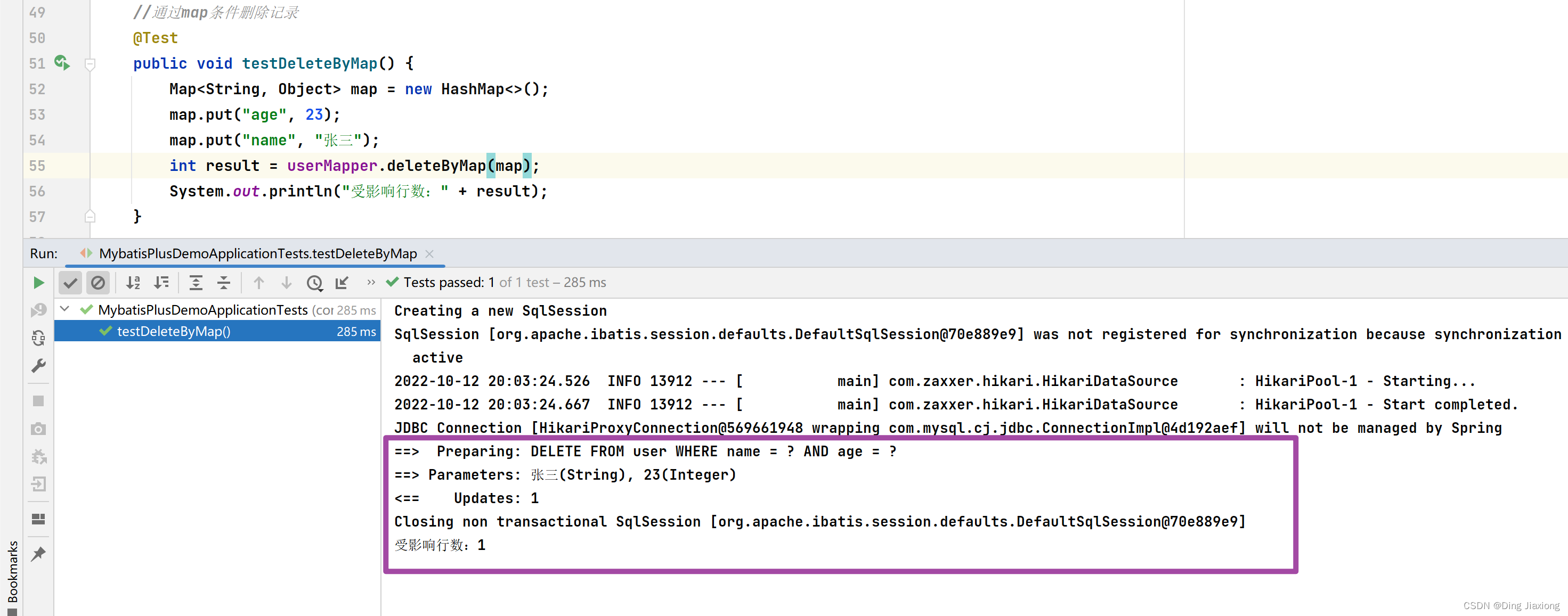
可以看到是一个组合条件查询
3.4 修改
//修改 @Test public void testUpdateById(){ User user = new User(4L,"admin",22,null); int result = userMapper.updateById(user); System.out.println("受影响行数:" + result); }- 1
- 2
- 3
- 4
- 5
- 6
- 7
测试结果

3.5 查询
3.5.1 根据id 查询用户信息
//根据id查询用户信息 @Test public void testSelectById(){ User user = userMapper.selectById(4L); System.out.println(user); }- 1
- 2
- 3
- 4
- 5
- 6
测试结果

3.5.2 根据多个id 查询多个用户信息
//根据多个id查询多个用户信息 @Test public void testSelectBatchIds(){ List<Long> idList = Arrays.asList(4L,5L); List<User> list = userMapper.selectBatchIds(idList); list.forEach(System.out::println); }- 1
- 2
- 3
- 4
- 5
- 6
- 7
测试结果

3.5.3 通过map 条件查询用户信息
//通过map 条件查询用户信息 @Test public void testSelectByMap() { Map<String, Object> map = new HashMap<>(); map.put("age",22); map.put("name","admin"); List<User> list = userMapper.selectByMap(map); list.forEach(System.out::println); }- 1
- 2
- 3
- 4
- 5
- 6
- 7
- 8
- 9
测试结果:

3.5.4 查询所有数据
//查询所有数据 @Test public void testSelectList(){ List<User> list = userMapper.selectList(null); list.forEach(System.out::println); }- 1
- 2
- 3
- 4
- 5
- 6
测试结果

通过观察BaseMapper中的方法,大多方法中都有Wrapper类型的形参,此为条件构造器,可针对于SQL语句设置不同的条件,若没有条件,则可以为该形参赋值null,即查询(删除/修改)所有数据
3.6 通用Service
说明:
通用 Service CRUD 封装IService接口,进一步封装 CRUD 采用 get 查询单行 remove 删
除 list 查询集合 page 分页 前缀命名方式区分 Mapper 层避免混淆,
泛型 T 为任意实体对象
建议如果存在自定义通用 Service 方法的可能,请创建自己的 IBaseService 继承
Mybatis-Plus 提供的基类:
官网地址:https://baomidou.com/pages/49cc81/#service-crud-%E6%8E%A5%E5%8F%A3
3.6.1 IService
MyBatis-Plus中有一个接口 IService和其实现类 ServiceImpl,封装了常见的业务层逻辑
3.6.2 创建Service 接口和实现类
package com.dingjiaxiong.mybatisplus.service; import com.baomidou.mybatisplus.extension.service.IService; import com.dingjiaxiong.mybatisplus.domain.User; /** * ClassName: UserService * date: 2022/10/12 20:17 * * @author DingJiaxiong */ public interface UserService extends IService<User> { }- 1
- 2
- 3
- 4
- 5
- 6
- 7
- 8
- 9
- 10
- 11
- 12
- 13
- 14
package com.dingjiaxiong.mybatisplus.service.impl; import com.baomidou.mybatisplus.extension.service.impl.ServiceImpl; import com.dingjiaxiong.mybatisplus.domain.User; import com.dingjiaxiong.mybatisplus.mapper.UserMapper; import com.dingjiaxiong.mybatisplus.service.UserService; import org.springframework.stereotype.Service; /** * ClassName: UserServiceImpl * date: 2022/10/12 20:17 * * @author DingJiaxiong */ @Service public class UserServiceImpl extends ServiceImpl<UserMapper, User> implements UserService { }- 1
- 2
- 3
- 4
- 5
- 6
- 7
- 8
- 9
- 10
- 11
- 12
- 13
- 14
- 15
- 16
- 17
- 18
3.6.3 测试查询记录数
@Autowired private UserService userService; @Test public void testGetCount(){ long count = userService.count(); System.out.println("总记录数:" + count); }- 1
- 2
- 3
- 4
- 5
- 6
- 7
- 8
测试结果:

3.6.4 测试批量插入
先加一个无参构造方法

//测试批量插入 @Test public void testSaveBatch(){ ArrayList<User> users = new ArrayList<>(); for (int i = 0 ; i < 5 ; i++){ User user = new User(); user.setName("dingjiaxiong" + i); user.setAge(20 + i); users.add(user); } userService.saveBatch(users); }- 1
- 2
- 3
- 4
- 5
- 6
- 7
- 8
- 9
- 10
- 11
- 12
测试结果:

OK。
-
相关阅读:
设计模式的理解
Node.js躬行记(17)——UmiJS版本升级
MyBatis开荒
安装Ubuntu系统并搭建C语言环境(超详细教程)
【系统架构】系统质量属性与架构评估
git命令行学习
拼搏一周!刷了1000道Java高频面试题喜提阿里offer,定级P7
使用TS进行Vue-Router的Meta类型扩展
Java对象内存模型
js--promise、async 和 await 相关知识总结
- 原文地址:https://blog.csdn.net/weixin_44226181/article/details/127440571
