-
黑马SSM学习笔记
1.Spring
❤️🔥B站学习视频:https://www.bilibili.com/video/BV1WZ4y1P7Bp
本人记录学习笔记,谢谢各位关注❤️🔥Spring优势:
- 方便解耦,简化开发
- AOP编程的支持
- 生命式事物的支持
- 方便程序的测试
- 方便集成各种优秀的框架
- 降低 JavaEE API 的使用难度
- Java源码是经典学习范例
Spring体系结构

SSM框架
1.在JavaWeb中的三层架构
- 变现层(Web层):主要的框架SpringMVC 、Struts2 、展示的页面(JSP页面)。
- 业务层(Service层):实现业务逻辑。
- 持久层(Dao层):主要的框架:Hibernate、MyBatis。负责与数据库的交互,封装数据库的访问细节。
- 从数据库表中读取加载数据并实例化领域对象(Domian Objecty )就是从数据库中读取数据
- 或者将领域对象实例化到数据库中,就是将数据写入数据库中。
2.在SSM中的三层架构
轻量级开发中,常对Web分为以下几层:
- POJO层:由一组POJO组成,主要对系统各种对象的抽象表达,也就是存放实体类比如 User 实体
- Dao层(mapper层):负责数据库的访问,增、删、改、查等操作。MyBatis框架中被定义为Mapper层
- Service层:由业务逻辑对象组成,是不同系统的业务逻辑的具体实现。
- Controller层:由控制器组成,对来自浏览器的用户进行拦截,并调用Service层的响应的业务逻辑组件处理用户请求,并转发结果返回到View层。
- View层:由Jsp页面,PDF文档等组件组成 ,用于显示系统对用户请求的处理结果
3.在SSM中包的作用:
包名 名称 作用 dao 数据访问层(创建接口) 封装对数据库的操作,与数据库有关的操作都存放在这个包下面 Entity 实例类 一般与数据库的表相对应,封装dao层取出来的数据为一个对象 Service 业务逻辑(接口) 写业务逻辑的 Service-impl 业务逻辑的实现 实现业务的接口,事务控制一般都写在这里 Controller MVC控制器 SpringMVC就是在这里发挥作用的 Mapper 数据库具体操作 包含xxxMapper.xml 和xxxMapper.java二者互相对应 说明:
- dao:里面可以是数据库的操作,也可以是文件读写操作,甚至是Redis缓存操作。(数据持久层)。由于Mybatis可以直接在配置文件中实现接口的每个方法,所以不需要 dao-imple
- dto :用于service与web层之间的传输。一般我们使用dto类来继承entity实体类,在dto类里面方一些业务字段,并提供get、set方法。当我们在业务逻辑层或者交互层用到一些数据库中不存在的字段时,我们就需要在DTO类里面放这些字段,这些字段的一样就相当于一些经处理过的数据库字段,实质意义就是方便数据交互,提高效率。
- Entity:一般与数据库表相对应,封装dao层取出来的数据做为一个对象,也就是pojo,一般只在dao与service层之间传输
other 包:
- Exception:自定义异常
- Utils:即utility,工具辅助层,一组通用的代码集合(比如处理多语言功能,网站非法信息过滤等等功能的代码集)
- resource:存放后端配置文件
4.在SSM中的配置文件
文件名 文件名解释 内容(说明) spring-dao.xml spring数据链接配置 配置数据连接池、sqlSessionFactory对象、扫描dao接口 spring-service.xml spring服务配置 扫描service包下注解、配置事务管理器、基于注解的事务 spring-mvc.xml Spring MVC配置 开启框架注解模式、处理静态资源、配置jsp、扫描controller jdbc.proties 数据库链接参数 配置jdbc、数据库URL、用户名、密码等 mybatis-config.xml myBatis配置文件 开启自增主键、使用列别名、驼峰转换 log4j.properties web日志输出参数 web输出参数 application.xml Spring与Mybatis整合配置 数据库连接池、sqlSeesionFactory对象、扫描dao接口 webapp 前端与配置文件 web.xml 配置Spring需要加载的配置文件、启用disapatcher转发处理所有的请求、指定编码格式 5.SSM中包之间的关系
- controller包是SpringMVC的主要文件,对来自浏览器的各种请求进行转发和处理。在controller中内置各种Service包中的对象,当接收到新的请求时,就会解析URL,根据注解调用相应的服务来完成请求。
- entity包常与数据库表 一 一 对应,dao包中定义了数据库的基本操作,并在mapper包中的xml配置文件中完成数据操作的具体实现(增、删、改、查)。MyBatis可以实现到与 .xml 的自动匹配,这时就要把 xxxMapper.xml 和 xxxMapper.java 放在同一个包下。
- Service包中定义了各种服务接口,通过Service-impl包中对接口进行实现,在实现接口的时候会 内置一个dao包中的对象(web服务的实现肯定会设计数据访问的,而数据访问被抽象称dao包中的对象,所以服务的实现必须借助dao包)借助到中的对象所实现的各种数据访问处理对象来实现具体的服务。
6.SSM框架中各框架的作用
- MyBatis:持久层框架,负责数据库的访问
- Spring MVC:表现层框架,把模型、视图、控制器分离,组合成一个灵活的系统
- Spring:整合项目的所有框架,管理各种Java Bean(mapper、service、controller)事务控制。
Spring程序开发步骤
-
导入 Spring 开发的基本包坐标
-
编写 Dao 接口和实现类
-
创建 Spring 核心配置文件 xml
-
在 Spring 配置文件中配置 UserDaoImpl
-
使用 Spring 的 API 获得 Bean 实例
-
导入坐标
-
编辑Bean
-
创建applicationContext.xml
-
获得Bean实例
1.1Spring配置文件
Bean标签范围配置
- 当scope = singleton时 Bean的实例化个数:1个
Bean的实例化时机:当Spring核心文件被加载时,实例化配置的Bean实例
- 当scope = prototype时 Bean的实例化个数:多个
Bean的实例化时机:当调用getBean()方法时实例化Bean
Bean生命周期配置
- init-method : 初始化方法
- destory-method :销毁方法
Bean实例化三种方法
- 无参构造方法实例化 重点
- 工厂静态方法实例化
- 工厂实例方法实例化
Bean依赖注入概念
依赖注入:是Spring 框架核心Ioc的具体实现
Bean依赖输入方式
-
构造方法 (有参和无参)
配置文件

-
set方法
引入命名空间

配置文件的设置 (简便方式)

Bean依赖输入的数据类型
- 普通数据类型
- 引用数据类型
- 集合数据类型
引入其他配置文件(分模块开发)
实际开发中配置文件比较多,导致Spring配置繁杂,不方便读取,so将其进行部分配置拆解到其他配置文件中 通过 import标签加载,根据业务进行拆解配置文件

总结

1.2 Spring的API
1.2.1ApplicationContext的继承体系
接口

1.2.2 ApplicationContext的实现类

1.2.3 getBean()方法使用
通过id获取
- 使用场景:某一类型的bean存在多个
通过类型获取
- 使用场景:某一个类型的bean只存在一个
2.Spring配置数据源
2.数据源(连接池)的作用
- 提高程序性能如何实现的
- 实例化数据源,初始化部分链接资源
- 使用连接资源时从数据源中获取
- 使用完连接资源后归还数据源
常见的数据源 : DBCP , C2P0 , BoneCP 、Druid等
底层=不一样,API的修改
2.1数据源开发步骤
里面的数据账号密码必须的本机的账号和密码
- 导入数据源的坐标和数据库的驱动坐标
- 创建数据源对象
- 设置数据源基本连接数据
- 使用数据源获取连接资源、归还连接数据
让容器产生getBean
2.2Spring配置数据源
- 将DataSource的创建权由Spring容器完成
3.Spring注解开发
注解配置提高开发效率
Spring原始注解主要是代替的配置
- 使用注解进行开发是,需要在xml文件中配置组件扫描:是之u顶哪个包及其子包下的Bean需要进行扫描以便识别使用注解配置的类、字段、方法
原始注解

Spring新注解

4.Spring整合Junit
- SpringJunit负责创建容器,配置文件的名称要知道
- 直接将测试的Bean在测试类注入
步骤
- 导入spring集成Junit的坐标
- 使用@Runwith注解替换原来的运行期
- 使用@contextConfiguration指定配置文件或配置类
- 使用@Autowired注入需要测试的对象
- 创建测试方法进行测试
Spring与Web环境集成
ApplicationContext应用获取上下文
在Web项目中
使用ServletContextListener监听Web应用的启动,Web应用启动时,就加载Spring的配置文件,创建应用上下文对象ApplicationContext,
在将其存储到最大的域servletContext域中,则可以在任意位置从域中获得应用上下文ApplicationContext对象。
Spring提供获取上下文的工具
- 在web.xml中配置ContextLoaderListner监听器(导入Spring-web坐标)
- 使用WebApplicationContextUtils获得应用上下文对象ApplicationContext
2.SpringMVC
概述: 基于java实现的MVC设计模型的请求驱动请谅解Web框架 , 通过一套注解 使用一个简单的Java类成为请求的控制器,无需实现任何接口,还具有RESTful编程风格请求。
访问控制图:

1.1MVC开发步骤 √
- 导入SpringMVC包 导入SpringMVC相关坐标
- 配置Servlet 配置SpringMVC核心控制器DispathcerServlet(前端控制器)
- 编写Controller 创建Controller类和视图页面
- 将Controller使用注解配置到Spring容器中(@Controller) 使用注解配置Controller类中业务方法的映射地址
- 配置spring-mvc.xml文件(配置组件扫描) 配置SpringMVC核心文件spring-mvc.xml
- 客户端发起请求测试

访问过程

执行流程

2.SpringMVC注解解析
@RequestMapping :用于建立请求URL与处理请求方法之间的对应关系
- 类上
- 方法上 用于区分不同的方法请求
属性 :
-
value: 用于指定请求的URL
-
method:指定请求的方式 GET/POST
-
params : 用于指定限制请求参数的条件 只能支持简单的表达式
-
params = {"username"} // 必须携带有username 参数- 1
-
3.SpringMVC组件解析
3.1.视图解析器
SpringMVC的相关组件
- 前端控制器: DispatcherServlet 调用其他工作组件
- 处理器映射器:HandlerMapping
- 处理器适配器:HandlerAdapter
- 处理器:Handler
- 视图解析器:View Resolver 渲染试图
- 视图:View
SpringMVC注解和配置
- @RequestMapping :请求映射注解
4.SpringMVC的数据响应
4.1响应方式
-
页面跳转
- 直接返回字符串形式
- 通过ModelAndView 对象返回
-
回写数据
- 直接返回字符串
- 返回对象或集合
-
直接返回字符串形式

-
返回ModelandView
-
直接返回字符串(回写数据)
-
通过SpringMVC框架注入的response对象,使用response.getWriter().print(“hello world”) 回写数据,不需要进行页面跳转
-
✔若是直接返回字符串,需要通过**@ResponseBody注解告知SpringMVC框架**,方法返回的字符串不是跳转,而是直接在http响应体中返回
-
-
返回对象和集合
- 使用mvc注解取代@ResponseBody 在xml文件中配置
- 使用mvc注解取代@ResponseBody 在xml文件中配置
5. Spring 获得请求参数
5.1获得请求参数
格式:name = value & name= value … …
SpringMVC可以接受以下参数类型
- 基本类型参数
- 简单POJO类型参数
- 数组类型参数
- 集合类型参数
5.1.1获得基本类型参数
-
Controller中的业务方法的参数名称要与请求参数的name一致,参数值会自动映射匹配。
-
在业务方法中的参数就是想要得到的参数内容 例如下面的代码
@RequestMapping(value="/quick11") @ResponseBody // 不进行页面跳转 在控制台得到输出的内容 public void save11(String username,int age) throws IOException { System.out.println(username); System.out.println(age); }- 1
- 2
- 3
- 4
- 5
- 6
-
5.1.2获得POJO类型参数
-
Controller中的业务方法的POJO参数的属性名与请求参数的name一致,参数值会自动映射匹配。
-
先定义一个User类 有String username,int age 两个私有变量
@RequestMapping(value="/quick12") @ResponseBody public void save12(User user) throws IOException { System.out.println(user); }- 1
- 2
- 3
- 4
- 5
-
5.1.3获得数据类型参数
-
Controller中的业务方法的数组名称与请求参数的name一致,参数值会自动映射匹配。
-
访问的形式localhost:8080/quick13?username = zhangsan &age = 13
@RequestMapping(value="/quick13") @ResponseBody public void save13(String[] strs) throws IOException { System.out.println(Arrays.asList(strs)); }- 1
- 2
- 3
- 4
- 5
-
5.1.4获得集合类型参数
-
1 获取集合参数时,要将集合参数包装到一个POJO对象中 ,称为View对象
- 创建一个VO类型包装好集合 private List userlist
-
2 当使用ajax提交时,可以指定contentType为json形式,那么在方法参数位置使用**@RequestBody可以直接接收集合数据而无需使用POJO进行包装**。
-
在xml文件中要**设置开放资源(一般是静态资源)访问:
-
在创建一个ajax.jsp文件
<%-- 引入jQuery--%>- 1
- 2
- 3
- 4
- 5
- 6
- 7
- 8
- 9
- 10
- 11
- 12
- 13
- 14
- 15
-
在控制台的访问形式:在方法参数中添加@RequestBody 存放数据在指定的集合中 List userList
@RequestMapping(value="/quick15") @ResponseBody public void save15(@RequestBody List<User> userList) throws IOException { System.out.println(userList); }- 1
- 2
- 3
- 4
- 5
-
-
开启静态资源的方式
-
1.相对具体文件来进行比较麻烦每一个静态的文件都要设置一次 资源访问
<mvc:resources mapping="/js/**" location="/js/"/> <mvc:resources mapping="/img/**" location="/img/"/>- 1
- 2
- 3
- 4
-
2.简单粗暴形式 就能把所有的静态资源权限都打开都能访问到
<mvc:default-servlet-handler/>- 1
-
5.2请求数据乱码问题
-
设置一个过滤器进行过滤代码
-
配置全局的filter
<filter> <filter-name>CharacterEncodingFilterfilter-name> <filter-class>org.springframework.web.filter.CharacterEncodingFilterfilter-class> <init-param> <param-name>encodingparam-name> <param-value>UTF-8param-value> init-param> filter> <filter-mapping> <filter-name>CharacterEncodingFilterfilter-name> <url-pattern>/*url-pattern> filter-mapping>- 1
- 2
- 3
- 4
- 5
- 6
- 7
- 8
- 9
- 10
- 11
- 12
- 13
- 14
-
5.3参数绑定注解@requestParam
- 当请求的参数名称与Controller的业务方法参数名称不一致时,就需要通过@RequestParam注解显示的绑定。
- @requestParam的参数 :
- **value:**请求参数的名称
- **required:**指定请求的参数是否必须包括,默认是TRUE 提交时若是没有此参数会报错
- **defaultValue:**没有指定请求参数时,则使用默认的值赋值
@RequestMapping(value="/quick16") @ResponseBody // required = false 没有name 参数 也可以进行 ,若是true 没有name 则会报错 public void save16(@RequestParam(value="name",required = false,defaultValue = "itcast") String username) throws IOException { System.out.println(username); }- 1
- 2
- 3
- 4
- 5
- 6
5.4获得Restful风格的参数
Restful是一种软件架构风格、设计风格,而不是标准,只是提供了一组设计原则和约束条件。主要用于客户端和服务器交互类的软件,基于这个风格设计的软件可以更简洁,更有层次,更易于实现缓存机制等。
-
Restful风格的请求方式:“url + 请求方式” 有以下四种
- GET:用于获取资源
- POST:用于新建资源
- PUT:用于更新资源
- DELETE:用于删除资源

上述url地址/user/1中的1就是要获得的请求参数,在SpringMVC中可以使用占位符进行参数绑定。地址/user/1可以写成/user/[id),占位符lid)对应的就是1的值。在业务方法中我们可以使用**@PathVariable注解进行占位符的匹配获取工作**。
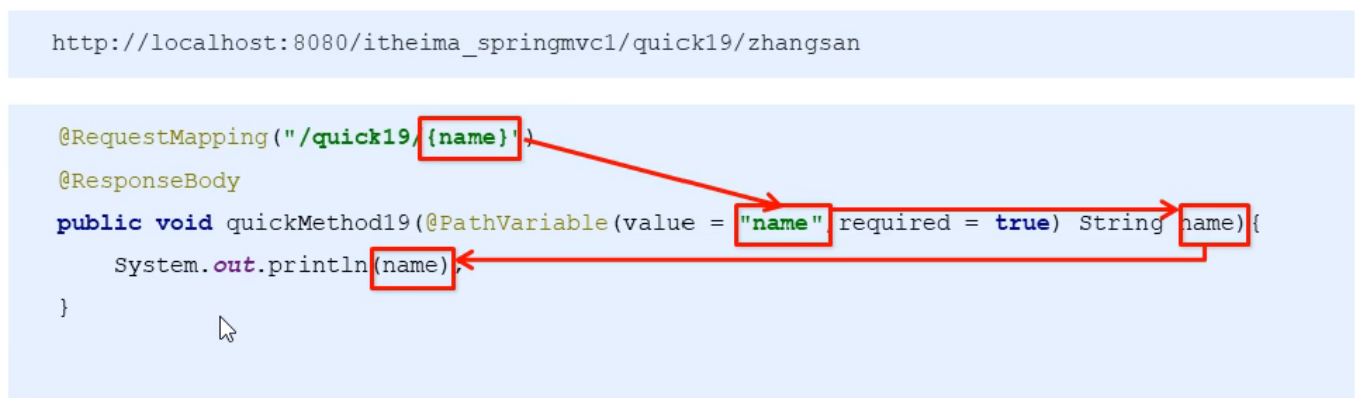
@RequestMapping(value="/quick17/{name}",method = POST) //method获取请求方式 @ResponseBody public void save17(@PathVariable(value="name") String username) throws IOException { System.out.println(username); }- 1
- 2
- 3
- 4
- 5
5.5自定义类型转换器
- SpringMVC默认已经提供了一些常用的类型转换器,例如客户端提交的字符串转换成int型进行参数设置。
- 但是不是所有的数据类型都提供了转换器,没有提供的就需要自定义转换器,例如:日期类型的数据就需要自定义转换器。
自定义类型转换器的步骤:
- 定义转换器类实现Converter接口
- 在配置文件中声明转换器
- 在中引用转挨器
第一步:定义转换器类实现Converter接口
import org.springframework.core.convert.converter.Converter; import java.text.ParseException; import java.text.SimpleDateFormat; import java.util.Date; public class DateConverter implements Converter<String, Date> { @Override public Date convert(String dateStr) { //将日期字符串转换成日期对象 返回 SimpleDateFormat format = new SimpleDateFormat("yyyy-MM-dd"); Date date = null; try { date = format.parse(dateStr); } catch (ParseException e) { e.printStackTrace(); } return date; } }- 1
- 2
- 3
- 4
- 5
- 6
- 7
- 8
- 9
- 10
- 11
- 12
- 13
- 14
- 15
- 16
- 17
- 18
- 19
- 20
第二步:在配置文件中声明转换器
<bean id="conversionService" class="org.springframework.context.support.ConversionServiceFactoryBean"> <property name="converters"> <list> <bean class="com.itheima.converter.DateConverter">bean> list> property> bean>- 1
- 2
- 3
- 4
- 5
- 6
- 7
- 8
第三步:在中引用转挨器
<mvc:annotation-driven conversion-service="conversionService"/>- 1
- 2
@RequestMapping(value="/quick18") @ResponseBody public void save18(Date date) throws IOException { System.out.println(date); }- 1
- 2
- 3
- 4
- 5
5.6获得Servlet相关API
SpringMVC支持使用原始ServletAPl对象作为控制器方法的参数进行注入,常用的对象如下:
- HttpServletRequest
- HttpServletResponse
- HttpSession
在方法中注释这些参数(形参)
例如:
@RequestMapping(value="/quick19") @ResponseBody public void save19(HttpServletRequest request, HttpServletResponse response, HttpSession session) throws IOException { System.out.println(request); System.out.println(response); System.out.println(session); }- 1
- 2
- 3
- 4
- 5
- 6
- 7
5.7获得请求头
-
@RequestHeader注解
-
属性:
-
value:请求头的名称
-
required:是否必须携带此请求头 true 的时候,当不是这个头会报错,
@RequestMapping(value="/quick20") @ResponseBody public void save20(@RequestHeader(value = "User-Agent",required = false) String user_agent) throws IOException { System.out.println(user_agent); }- 1
- 2
- 3
- 4
- 5
-
-
@CookieValue
直接从cookie的名称获得cookie的值
-
属性
-
value:指定cookie的名称
-
required:是否必须携带此cookie
@RequestMapping(value="/quick21") @ResponseBody public void save21(@CookieValue(value = "JSESSIONID") String jsessionId) throws IOException { System.out.println(jsessionId); }- 1
- 2
- 3
- 4
- 5
-
5.8文件上传
文件上传客户端的三要素
- 表单项type=“file"
- 表单的提交方式是post
- 表单的enctype属性是多部分表单形式,及enctype=“multipart/form-data” 多表单形式
原理:
- 当form表单修改为多部分表单时,request.getParameter()将失效。
- enctype= "application/x-www-form-urlencoded”时,form表单的正文内容格式是:key=value&key=value&key=value
- 当form表单的enctype取值为Mutilpart/form-data时,请求正文内容就变成多部分形式
5.8.1单文件上传步骤
upload.jsp文件
代码 里面是两个表单文件
- 1
- 2
- 3
- 4
- 5
- 6
-
导入fileupload和io坐标
-
代码
<dependency> <groupId>commons-fileuploadgroupId> <artifactId>commons-fileuploadartifactId> <version>1.3.1version> dependency> <dependency> <groupId>commons-iogroupId> <artifactId>commons-ioartifactId> <version>2.3version> dependency>- 1
- 2
- 3
- 4
- 5
- 6
- 7
- 8
- 9
- 10
-
-
配置文件上传解析器
-
代码
<bean id="multipartResolver" class="org.springframework.web.multipart.commons.CommonsMultipartResolver"> <property name="defaultEncoding" value="UTF-8"/> <property name="maxUploadSize" value="500000"/> bean>- 1
- 2
- 3
- 4
- 5
-
-
编写文件上传代码
-
代码
@RequestMapping(value="/quick22") @ResponseBody //在参数中的上传的文件名字要与表单中设置的value的名字一样 public void save22(String username, MultipartFile uploadFile,MultipartFile uploadFile2) throws IOException { System.out.println(username); //保存/存储文件 //1.获得上传文件的名称 String originalFilename = uploadFile.getOriginalFilename();//上传文件原始名称 uploadFile.transferTo(new File("C:\\upload\\"+originalFilename));//将文件到转移到 C:\\upload\\或者是转移到某个服务器上 //这个是另外的文件 String originalFilename2 = uploadFile2.getOriginalFilename(); uploadFile2.transferTo(new File("C:\\upload\\"+originalFilename2)); }- 1
- 2
- 3
- 4
- 5
- 6
- 7
- 8
- 9
- 10
- 11
- 12
-
5.8.2多文件上传
表单
- 1
- 2
- 3
- 4
- 5
- 6
//使用数组上传文件
@RequestMapping(value="/quick23") @ResponseBody public void save23(String username, MultipartFile[] uploadFile) throws IOException { System.out.println(username); for (MultipartFile multipartFile : uploadFile) { String originalFilename = multipartFile.getOriginalFilename(); multipartFile.transferTo(new File("C:\\upload\\"+originalFilename)); } }- 1
- 2
- 3
- 4
- 5
- 6
- 7
- 8
- 9
3.Spring jdbcTemplate基本使用
3.1jdcbTemplate概述
它是spring框架中提供的一个对象,是对原始繁琐的JdbcAPI对象的简单封装。spring框架为我们提供了很多的操作模板类。
- **例如:**操作关系型数据的JdbcTemplate和ltbernateTemplate,操作nosqI数据库的RedisTemplate,操作消息队列的JmsTemplate等等。
3.2 jdbcTemplate开发步骤
- 导入spring-jdbc和spring-tx坐标
- 创建数据库表和实体
- 创建JdbcTemplate对象
- 执行数据库操作
3.3Spring产生jdbcTemplate对象
配置文件
<context:property-placeholder location="classpath:jdbc.properties"/> <bean id="dataSource" class="com.mchange.v2.c3p0.ComboPooledDataSource"> <property name="driverClass" value="${jdbc.driver}"/> <property name="jdbcUrl" value="${jdbc.url}"/> <property name="user" value="${jdbc.username}"/> <property name="password" value="${jdbc.password}"/> bean> <bean id="jdbcTemplate" class="org.springframework.jdbc.core.JdbcTemplate"> <property name="dataSource" ref="dataSource"/> bean>- 1
- 2
- 3
- 4
- 5
- 6
- 7
- 8
- 9
- 10
- 11
- 12
- 13
- 14
- 15
- 16
jdbc.properties
jdbc.driver=com.mysql.jdbc.Driver jdbc.url=jdbc:mysql://localhost:3306/test?&useUnicode=true&characterEncoding=utf8 jdbc.username=root jdbc.password=123456- 1
- 2
- 3
- 4
public void test2() throws PropertyVetoException { ApplicationContext app = new ClassPathXmlApplicationContext("applicationContext.xml"); JdbcTemplate jdbcTemplate = app.getBean(JdbcTemplate.class); int row = jdbcTemplate.update("insert into account values(?,?)", "lisi", 5000); System.out.println(row); }- 1
- 2
- 3
- 4
- 5
- 6
3.4 jdbcTemplate的常用操作
@RunWith(SpringJUnit4ClassRunner.class) @ContextConfiguration("classpath:applicationContext.xml") public class JdbcTemplateCRUDTest { @Autowired private JdbcTemplate jdbcTemplate; @Test public void testQueryCount(){ Long count = jdbcTemplate.queryForObject("select count(*) from account", Long.class); System.out.println(count); } //查询一个 @Test public void testQueryOne(){ Account account = jdbcTemplate.queryForObject("select * from account where name=?", new BeanPropertyRowMapper(Account.class), "tom"); System.out.println(account); } //查询 @Test public void testQueryAll(){ List accountList = jdbcTemplate.query("select * from account", new BeanPropertyRowMapper (Account.class)); System.out.println(accountList); } //更新 @Test public void testUpdate(){ jdbcTemplate.update("update account set money=? where name=?",10000,"tom"); } //删除 @Test public void testDelete(){ jdbcTemplate.update("delete from account where name=?","tom"); } } - 1
- 2
- 3
- 4
- 5
- 6
- 7
- 8
- 9
- 10
- 11
- 12
- 13
- 14
- 15
- 16
- 17
- 18
- 19
- 20
- 21
- 22
- 23
- 24
- 25
- 26
- 27
- 28
- 29
- 30
- 31
- 32
- 33
- 34
- 35
- 36
- 37
- 38
- 39
-
导入spring-jdbc和spring-tx坐标
-
创建数据库表和实体
-
创建JdbcTemplate对象
- JdbcTemplate jdbcTemplate = new JdbcTemplate () ;
- jdbcTemplate.setDatasource (datasource) ;
-
执行数据库操作
-
更新操作:
jdbcTemplate.update (sql,params)
-
查询操作:
jdbcTemplate.query (sql,Mapper,params)
jdbcTemplate.queryForobject ( sql,Mapper,params)
-
Spring练习
1.spring练习环境搭建
1.1步骤
- 创建工程(Project&Module)
- 导入静态页面(见资料jsp页面)
- 导入需要坐标(见资料中的pom.xml)
- 创建包结构(controller、service、dao、domain、utils)
- 导入数据库脚本(见资料testsql)
- 创建POJO类(见资料User.java和Role.java)
- 创建配置文件(applicationContext.xml、 spring-mvc.xml、jdbc.properties、log4j.properties)
2.用户与角色分析

2.1角色列表
- 点击角色管理菜单发送请求到服务器端(修改角色管理菜单的url地址)
- 创建RoleController和showList()方法
- 创建RoleService和showList()方法
- 创建RoleDao和findAll)方法
- 使用JdbcTemplate完成查询操作
- 将查询数据存储到Model中转
- 发到role-list.jsp页面进行展示
4.SpringMCV拦截器
4.1拦截器作用
- Spring MVC的拦截器类似于Servlet开发中的过滤器Filter,用于对处理器进行预处理和后处理。
- 将拦截器按照一定顺序链接称一条链,拦截器链。
4.2过滤器和拦截器的区别
- 过滤器(Filter)
- 是servlet规范中的一部分,任何Java Web工程都可以使用
- 在url-pattern中配置了/*之后,可以对所有要访问的资源拦截
- 拦截器(Interceptor)
- 是 SpringMVC框架自己的,只有使用了SpringMVC框架的工程才能用
- 在
4.3拦截器使用步骤
-
创建拦截器类实现Handlerlnterceptor接口
-
配置拦截器
-
<mvc:interceptors> <mvc:interceptor> <mvc:mapping path="/**"/> 对所有的 <bean class="com.itheima.interceptor.MyInterceptor2"/> 对应的拦截器的包 mvc:interceptor> <mvc:interceptor> <mvc:mapping path="/**"/> <bean class="com.itheima.interceptor.MyInterceptor1"/> mvc:interceptor> mvc:interceptors>- 1
- 2
- 3
- 4
- 5
- 6
- 7
- 8
- 9
- 10
- 11
- 12
- 13
- 14
-
-
测试拦截器的拦截效果
4.4拦截器的方法说明
- preHandle0 ✔
- 返回值类型boolean类型的
- 返回false 后面的intercepor和Controller都不会执行
- 返回true 则会继续执行下一个interceptor和controller方法
- postHandle()
- 在目标方法执行之前进行执行,必须得preHandle方法返回值是true下,但是在DispatcherService进行视图渲染之前被调用,可以在对Controller处理之后的ModelAndView对象进行操作
- afterCompletion()
- 该方法会在渲染了对应的视图之后执行,前提也是preHandle的返回值是true
5.SpringMVC异常处理机制
1.异常处理思路
- 预期异常
- 通过捕获异常获取异常信息
- 运行时异常RuntimeException
- 通过规范代码开发、测试等手段减少运行时异常
异常抛出的顺序

2.异常处理的两种方式
-
使用SpringMVC提供的简单异常处理器SimpleMappingExceptionResolver
-
配置简单异常处理器 :根据情况进行相应异常与视图的映射配置
-

-
<bean class="org.springframework.web.servlet.handler.SimpleMappingExceptionResolver"> <property name="exceptionMappings"> <map> <entry key="java.lang.ClassCastException" value="error1"/> <entry key="com.itheima.exception.MyException" value="error2"/> map> property> bean>- 1
- 2
- 3
- 4
- 5
- 6
- 7
- 8
- 9
- 10
- 11
- 12
-
-
使用Spring的异常处理接口HandleExceptionResolver自定义异常
步骤
- 创建异常处理器类实现HandlerExceptionResolver
- 配置异常处理器
- 编写异常页面
- 编写页面跳转
6.Spring的AOP
- AOP为Aspect Oriented Programming的缩写,意思为面向切面编程,是通过预编译方式和运行期动态代理实现程序功能的统一维护的一种技术。
- AOP可以对业务逻辑各个部分进行隔离(解耦合),使各个业务逻辑各部分之间的耦合度降低,提高程序的复用,提高效率。
6.1AOP的作用和优势
- 作用:在程序运行期间,在不修改源码的情况下对方法进行功能增强
- 优势:减少重复代码,提高开发效率,并且便于维护
不用修改方法代码,只要通过修改日志控制方法代码就能控制到目标方法
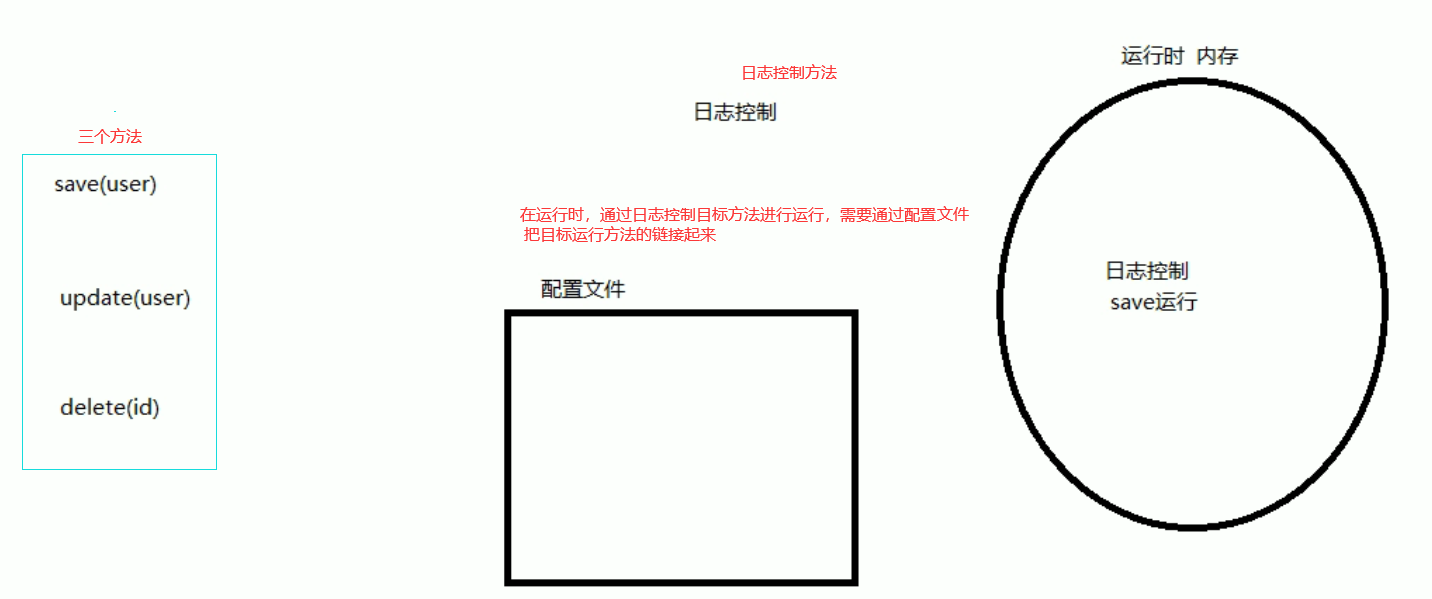
6.2AOP的底层实现
- 通过Spring提供的动态代理技术实现
- 运行期间Spring通过动态代理技术生成代理对象
6.3AOP动态代理技术
常用代理对象
-
JDK代理: 基于接口的动态代理技术
-
目标对象必须要有接口
-

-
public class ProxyTest { public static void main(String[] args) { //目标对象 final Target target = new Target(); //增强对象 里面有before()和afterReturning()方法 final Advice advice = new Advice(); //返回值 就是动态生成的代理对象 TargetInterface proxy = (TargetInterface) Proxy.newProxyInstance( target.getClass().getClassLoader(), //目标对象类加载器 target.getClass().getInterfaces(), //目标对象相同的接口字节码对象数组 new InvocationHandler() { //调用代理对象的任何方法 实质执行的都是invoke方法 @Override public Object invoke(Object proxy, Method method, Object[] args) throws Throwable { advice.before(); //前置增强 Object invoke = method.invoke(target, args);//执行目标方法 advice.afterReturning(); //后置增强 return invoke; } } ); //调用代理对象的方法 proxy.save(); } }- 1
- 2
- 3
- 4
- 5
- 6
- 7
- 8
- 9
- 10
- 11
- 12
- 13
- 14
- 15
- 16
- 17
- 18
- 19
- 20
- 21
- 22
- 23
- 24
- 25
- 26
- 27
- 28
- 29
-
-
**cglib代理:**基于父类的动态代理技术
-
第三方的代理 可以没有接口
-
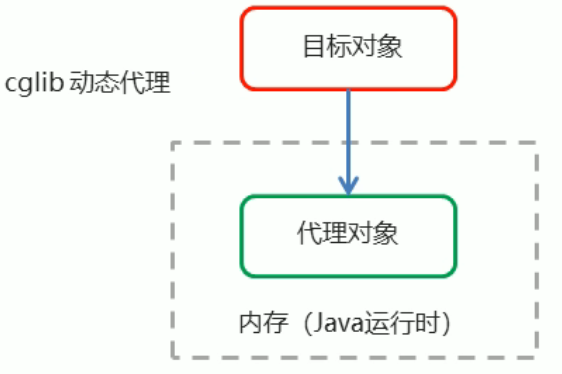
-
public class ProxyTest { public static void main(String[] args) { //目标对象 final Target target = new Target(); //增强对象 final Advice advice = new Advice(); //返回值 就是动态生成的代理对象 基于cglib //1、创建增强器 Enhancer enhancer = new Enhancer(); //2、设置父类(目标) enhancer.setSuperclass(Target.class); //3、设置回调 enhancer.setCallback(new MethodInterceptor() { @Override public Object intercept(Object proxy, Method method, Object[] args, MethodProxy methodProxy) throws Throwable { advice.before(); //执行前置 Object invoke = method.invoke(target, args);//反射 执行目标 advice.afterReturning(); //执行后置 return invoke; } }); //4、创建代理对象 Target proxy = (Target) enhancer.create(); proxy.save(); } }- 1
- 2
- 3
- 4
- 5
- 6
- 7
- 8
- 9
- 10
- 11
- 12
- 13
- 14
- 15
- 16
- 17
- 18
- 19
- 20
- 21
- 22
- 23
- 24
- 25
- 26
- 27
- 28
- 29
- 30
-
6.4AOP概念
- Spring的AOP实现底层: 是对上面的动态代理的代码进行封装,封装后只要关注的部分进行代码编写,并通过配置的方式完成指定目标的方法增强。
常用术语:
- Target(目标对象):代理的目标对象
- Proxy(代理):类被AOP织入增强后,就会产生一个结果代理类
- Joinpoint(连接点):指被拦截到的点。在Spring中,这些点指的是方法,Spring只支持方法的连接点。(可以被增强的方法,是链接点)
- Pointcut(切入点):切入点就是对Joinpoint进行拦截的定义(要被增强的方法)
- Advice(通知/增强):拦截到Jointpoint之后所做的事情就是通知
- Aspect(切面):切入点 (Pointcut)+ 通知(Advice)
- Weavng(织入):指切入点与通知结合的过程就是织入过程。是指把增强应用到目标对象来创建新的代理对象的过程。
6.5AOP明确事项
- 为了做什么:目标对象->代理对象
- 怎么做:找到连接点(即方法)经过拦截方法定义后真正拦截到的使之成为切入点 经过一定的操作成为切面
- 什么样的操作:通过织入把通知/增强引入切入点 成为切面 最终的效果
6.5.1需要编写的内容
- 编写核心业务代码(目标类的目标方法)
- 编写切面类,切面类中有通知(增强功能方法)
- 在配置文件中,配置织入关系,即将哪些通知与哪些连接点进行结合
6.5.2AOP技术实现的内容
- 配置切点,监控切入点的执行,创建代理对象进行增强
- Spring框架监控切入点方法的执行。
- 一旦监控到切入点方法被运行,使用代理机制,动态创建目标对象的代理对象,根据通知类别,在代理对象的对应位置,将通知对应的功能织入,完成完整的代码逻辑运行。
6.5.3AOP底层使用哪种的代理方式
- 框架会目标类会判断是否实现了接口来觉得采用哪种动态代理方式
- jdk代理:实现接口
- **cglib代理:**基于父类的动态代理技术
6.6知识要点
-
aop:面向切面编程
-
aop底层实现:基于JDK的动态代理和基于Cglib的动态代理
-
aop的重点概念:
- Pointcut(切入点)︰被增强的方法
- Advice(通知/增强)︰封装增强业务逻辑的方法
- Aspect(切面)︰切点+通知
- Weaving (织入)︰将切点与通知结合的过程
-
开发明确事项:
-
谁是切点(切点表达式配置)
-
谁是通知(切面类中的增强方法)
-
将切点和通知进行织入配置
-
6.7基于xml的AOP开发
6.7.1快速入门
- 导入AOP相关坐标
- 创建目标接口和目标类(内部有切点)
- 创建切面类(内部有增强方法)
- 将目标类和切面类的对象创建权交给spring
- 在applicationContext.xml中配置织入关系
- 测试代码
实现的代码:
-
导入AOP相关坐标 在pom.xml中
<dependency> <groupId>org.aspectjgroupId> <artifactId>aspectjweaverartifactId> <version>1.8.4version> dependency>- 1
- 2
- 3
- 4
- 5
- 6
-
创建目标接口和目标类(内部有切点)

接口代码
public interface TargetInterface { public void save(); }- 1
- 2
- 3
- 4
- 5
目标类代码
public class Target implements TargetInterface { @Override public void save() { System.out.println("save running....."); //int i = 1/0; } }- 1
- 2
- 3
- 4
- 5
- 6
- 7
-
创建切面类(内部有增强方法)
切面类代码:
public class MyAspect { public void before(){ System.out.println("前置增强.........."); } public void afterReturning(){ System.out.println("后置增强.........."); } //Proceeding JoinPoint: 正在执行的连接点===切点 public Object around(ProceedingJoinPoint pjp) throws Throwable { System.out.println("环绕前增强...."); Object proceed = pjp.proceed();//切点方法 System.out.println("环绕后增强...."); return proceed; } public void afterThrowing(){ System.out.println("异常抛出增强.........."); } public void after(){ System.out.println("最终增强.........."); } }- 1
- 2
- 3
- 4
- 5
- 6
- 7
- 8
- 9
- 10
- 11
- 12
- 13
- 14
- 15
- 16
- 17
- 18
- 19
- 20
- 21
- 22
- 23
- 24
- 25
- 26
- 27
-
将目标类和切面类的对象创建权交给spring
引用applicationContext.xml文件
<beans xmlns="http://www.springframework.org/schema/beans" xmlns:xsi="http://www.w3.org/2001/XMLSchema-instance" xmlns:aop="http://www.springframework.org/schema/aop" aop命名空间在 xsi:schemaLocation=" http://www.springframework.org/schema/beans http://www.springframework.org/schema/beans/spring-beans.xsd http://www.springframework.org/schema/aop http://www.springframework.org/schema/aop/spring-aop.xsd "> <bean id="target" class="com.itheima.aop.Target">bean> <bean id="myAspect" class="com.itheima.aop.MyAspect">bean> beans>- 1
- 2
- 3
- 4
- 5
- 6
- 7
- 8
- 9
- 10
- 11
- 12
-
在applicationContext.xml中配置织入关系
引用applicationContext.xml文件
<aop:config> <aop:aspect ref="myAspect"> <aop:pointcut id="myPointcut" expression="execution(* com.itheima.aop.*.*(..))">aop:pointcut> 指定com.itheima.aop下的Target类的save()方法 指定com.itheima.aop下的任意类下的任意方法 <aop:around method="around" pointcut-ref="myPointcut"/> <aop:after method="after" pointcut-ref="myPointcut"/> aop:aspect> aop:config>- 1
- 2
- 3
- 4
- 5
- 6
- 7
- 8
- 9
- 10
- 11
- 12
- 13
- 14
- 15
- 16
- 17
- 18
- 19
- 20
- 21
- 22
-
测试代码
@RunWith(SpringJUnit4ClassRunner.class) @ContextConfiguration("classpath:applicationContext.xml")//指定配置文件 public class AopTest { @Autowired private TargetInterface target; @Test public void test1(){ target.save(); } }- 1
- 2
- 3
- 4
- 5
- 6
- 7
- 8
- 9
- 10
切点表达式的格式:
语句:
execution([修饰符] 返回值类型.包名.类名.方法名(参数列表))
- 修饰符可以省略不写
- 返回值类型、包名、类名、方法名可以使用星号*表示任意
- 包名与类名之间一个点.代表当前包下的类,两个点…表示当前包及其子包下的类
- 参数列表可以使用两个点…表示任意个数,任意类型的参数列表
切点表达式的抽取、
- 当多个增强的切点表达式相同时,可以将切点表达式进行抽取,在增强中使用pointcut-ref属性代替pointcut属性来引用抽取后的切点表达式。
<aop:pointcut id="myPointcut" expression="execution(* com.itheima.aop.*.*(..))">aop:pointcut> <aop:around method="around" pointcut-ref="myPointcut"/> <aop:after method="after" pointcut-ref="myPointcut"/>- 1
- 2
- 3
- 4
- 5
- 6
6.7.3XMl配置AOP详解
通知的类型
语法
< aop:通知类型method=“切面类中方法名”pointcut=“切点表达式"> < /aop:通知类型>
名称 标签 说明 前置通知 < aop:before> 用于配置前置通知。指定增强的方法在切入点方法之前执行 后置通知 用于配置后置通知。指定增强的方法在切入点方法之后执行 环绕通知 用于配置环绕通知。指定增强的方法在切入点方法之前和之后都执行 异常抛出通知 用于配置异常抛出通知。指定增强的方法在出现异常时执行 最终通知 用于配置最终通知。无论增强方式执行是否有异常都会执行 6.8AOP的注解开发
步骤
-
创建目标接口和目标类(内部有切点)
-
创建切面类(内部有增强方法)
-
将目标类和切面类的对象创建权交给spring
[外链图片转存失败,源站可能有防盗链机制,建议将图片保存下来直接上传(img-Kuvm81JX-1666272835950)(ssm.assets/image-20220312181945759.png)]
[外链图片转存失败,源站可能有防盗链机制,建议将图片保存下来直接上传(img-Iv9QZp0z-1666272835951)(ssm.assets/image-20220312181924100.png)]
-
在切面类中使用注解配置织入关系
-
在配置文件中开启组件扫描和AOP的自动代理
<context:component-scan base-package="com.itheima.anno"/> <aop:aspectj-autoproxy/>- 1
- 2
- 3
- 4
- 5
-
测试
6.8.1注解通知的类型
通知配置语法:@通知注解(“切点表达式”)。
名称 标签 说明 前置通知 < aop:before> 用于配置前置通知。指定增强的方法在切入点方法之前执行 后置通知 用于配置后置通知。指定增强的方法在切入点方法之后执行 环绕通知 用于配置环绕通知。指定增强的方法在切入点方法之前和之后都执行 异常抛出通知 用于配置异常抛出通知。指定增强的方法在出现异常时执行 最终通知 用于配置最终通知。无论增强方式执行是否有异常都会执行 6.8.2切点表达式的抽取
同xml配置aop一样,我们可以将切点表达式抽取。抽取方式是在切面内定义方法,在该方法上使用@Pointcut注解定义切点表达式,然后在在增强注解中进行引用。
在对应的通知使用注解@通知类.抽取的方法
例如:

7.Spring的事务控制
- 过程: 底层部分原理 -> xml方式 -> 注解方式
7.1 编程式事务控制(了解)
事务的实现+事务的定义===(运行起来形成了)===事务的状态
了解三个事务控制对象
- 通过写代码控制事务,要写代码
-
PlatformTransactionManager(平台事务管理器)
- PlatformTransactionManager接口是spring的事务管理器,它里面提供了我们常用的操作事务的方法。
-
TransactionDefinition (事务定义对象)
-
是事务的定义信息对象 定义的是参数或者是对象的信息
方法 说明 int getIsolationLevel() 获得事务的隔离级别 int getPropogationBehavior ( ) 称得事务的传播行为 int getTimeout () 获得超时时间 boolean isReadonly () 是否只读 - 事务隔离级别
- 设置隔离级别,可以解决事务并发产生的问题,如脏读、不可重复读和虚读 () 。
- 事务传播行为
- 解决调用事务方法的统一性
- REQUIRED:
- SUPPORTS:
- 超时时间:默认值是-1,没有超时限制。如果有,以秒为单位进行设置
- 事务隔离级别
-
-
TransactionStatus
被动的添加,不用我们自己添加
-
提供的是事务的具体运行状态
-
方法 说明 boolean hassavepoint ( ) 是否存储回滚点 boolean iscompleted ( ) 事务是否完成 boolean isNewTransaction ( ) 是否是新事务 boolean sRollbackonly () 事务是否回滚
-
7.2基于xml的声明式事务控制
采用声明的方式来处理事务 是在配置文件声明,用配置文件中声明事务来代替代码式处理事务
作用:
- 事务管理不侵入开发组件。解耦性
- 不需事务管理的时候,只需在设置文件上修改,即可去除事务管理事务,无需修改源码
Spring声明式事务控制底层就是AOP
7.2.1声明式事务控制的实现
- 把所有的业务逻辑对象当做连接点
- 某些需要事务管理的业务逻辑对象视为切入点
- 事务管理视为增强/通知
需要引入命名空间
[外链图片转存失败,源站可能有防盗链机制,建议将图片保存下来直接上传(img-GHPhoeab-1666272835953)(ssm.assets/image-20220314214228102.png)]
<bean id="accountService" class="com.itheima.service.impl.AccountServiceImpl"> <property name="accountDao" ref="accountDao"/> bean> <bean id="transactionManager" class="org.springframework.jdbc.datasource.DataSourceTransactionManager"> <property name="dataSource" ref="dataSource"/> bean> <tx:advice id="txAdvice" transaction-manager="transactionManager"> <tx:attributes> 下面的切点是说要对哪些方法进行增强,这里的method就是说针对某个method应该如何设置事务的属性 <tx:method name="transfer" isolation="REPEATABLE_READ" propagation="REQUIRED" read-only="false"/> <tx:method name="save" isolation="REPEATABLE_READ" propagation="REQUIRED" read-only="false"/> <tx:method name="findAll" isolation="REPEATABLE_READ" propagation="REQUIRED" read-only="true"/> <tx:method name="update*" isolation="REPEATABLE_READ" propagation="REQUIRED" read-only="true"/> <tx:method name="*"/> tx:attributes> tx:advice> <aop:config> <aop:pointcut id="txPointcut" expression="execution(* com.itheima.service.impl.*.*(..))"/> <aop:advisor advice-ref="txAdvice" pointcut-ref="txPointcut"/> aop:config>- 1
- 2
- 3
- 4
- 5
- 6
- 7
- 8
- 9
- 10
- 11
- 12
- 13
- 14
- 15
- 16
- 17
- 18
- 19
- 20
- 21
- 22
- 23
- 24
- 25
- 26
- 27
- 28
- 29
- 30
- 31
- 32
- 33
要点
- 平台事务管理器
- 事务通知配置
- 事务aop配置织入
7.3注解的声明式事务控制
xml配置文件
- 必须加入事务的注解驱动,才能把事务给控制住
<tx:annotation-driven transaction-manager="transactionManager"/>- 1
- 2
- 3
service层的文件
@Service("accountService") @Transactional(isolation = Isolation.REPEATABLE_READ) public class AccountServiceImpl implements AccountService { @Autowired //注入 private AccountDao accountDao; /** * 上面也有一个Transaction一般以就近的为主 */ @Override @Transactional(isolation = Isolation.READ_COMMITTED, propagation = Propagation.REQUIRED) public void transfer(String outMan, String inMan, double money) { accountDao.out(outMan, money); int i = 1 / 0; accountDao.in(inMan, money); } //多个方法时 一样定义注解 //@Transactional(isolation = Isolation.DEFAULT) public void xxx() { } }- 1
- 2
- 3
- 4
- 5
- 6
- 7
- 8
- 9
- 10
- 11
- 12
- 13
- 14
- 15
- 16
- 17
- 18
- 19
- 20
- 21
- 22
- 23
7.3.1注解解析
- 使用@Transactional在需要进行事务控制的类或是方法上修饰,注解可用的属性同xml配置方式,仍隔离级别、传播行为等。
- 注解使用在类上,那么该类下的所有方法都使用同一套注解参数配置。
- 使用在方法上,不同的方法可以采用不同的事务参数配置。
- Xml配置文件中要开启事务的注解驱动
7.3.2注解知识要点
- 平台事务管理器 (xml方式)
- 事务通知的配置 (@Transaction注解配置)
- 事务aop配置织入 < tx:annotation-driven transaction-manager=“id名” />
8.MyBatis
官网: Mybatis https://mybatis.org/mybatis-3/
8.1概念
- MyBatis是一款优秀的持久层框架,用于简化JDBC开发 ,隐藏jdbc的繁杂操作
- 负责将数据保存到数据库的那一层代码
- JavaEE三层架构:表现层、业务层、持久层
- 框架
- 框架就是一个半成品软件,是一套可重用的、通用的、软件基础代码模型
- 在框架的基础之上构建软件编写更加高效、规范、通用、可扩展。
- JDBC缺点
- 硬编码 配置文件
- 注册驱动、获取链接 写了一堆链接字符串
- SQL语句 也写了一堆代码字符串
- 操作繁琐 自动完成
- 手动设置参数
- 手动封装结果集
- 硬编码 配置文件
- 解决jdbc开发存在的问题
- 使用数据库连接池初始化连接资源
- 将sql语句抽取到xml配置文件中
- 使用反射、内省等底层技术,自动将实体与表进行属性与字段的自动映射
8.2MyBatis 快速入门
步骤
- 创建user表,添加数据
- 创建模块,导入坐标
- 编写MyBatis核心配置文件 –> 替换链接信息,解决硬编码问题
- 编写SQL映射文件 -->统一管理Sql语句,解决硬编码问题
- 编码
- 定义POJO类
- 加载核心配置文件,获取SqlSessionFactory对象
- 获取SqlSession对象,执行SQL语句
- 释放资源
- 编写测试类
代码
pom.xml配置文件
<dependency> <groupId>org.mybatisgroupId> <artifactId>mybatisartifactId> <version>3.5.5version> dependency> <dependency> <groupId>mysqlgroupId> <artifactId>mysql-connector-javaartifactId> <version>5.1.46version> dependency> <dependency> <groupId>junitgroupId> <artifactId>junitartifactId> <version>4.13version> <scope>testscope> dependency> <dependency> <groupId>org.slf4jgroupId> <artifactId>slf4j-apiartifactId> <version>1.7.20version> dependency> <dependency> <groupId>ch.qos.logbackgroupId> <artifactId>logback-classicartifactId> <version>1.2.3version> dependency> <dependency> <groupId>ch.qos.logbackgroupId> <artifactId>logback-coreartifactId> <version>1.2.3version> dependency>- 1
- 2
- 3
- 4
- 5
- 6
- 7
- 8
- 9
- 10
- 11
- 12
- 13
- 14
- 15
- 16
- 17
- 18
- 19
- 20
- 21
- 22
- 23
- 24
- 25
- 26
- 27
- 28
- 29
- 30
- 31
- 32
- 33
- 34
- 35
- 36
- 37
- 38
- 39
- 40
mybatis-config.xml
<typeAliases> 目标对象的包 <package name="com.itheima.pojo"/> typeAliases> <environments default="development"> <environment id="development"> <transactionManager type="JDBC"/> <dataSource type="POOLED"> <property name="driver" value="com.mysql.cj.jdbc.Driver"/> <property name="url" value="jdbc:mysql:///mybatis?useSSL=false"/> <property name="username" value="root"/> <property name="password" value="123456"/> dataSource> environment> <environment id="test"> <transactionManager type="JDBC"/> <dataSource type="POOLED"> <property name="driver" value="com.mysql.jdbc.Driver"/> <property name="url" value="jdbc:mysql:///mybatis?useSSL=false"/> <property name="username" value="root"/> <property name="password" value="123456"/> dataSource> environment> environments> <mappers> 类路径 <package name="com.itheima.mapper"/> mappers>- 1
- 2
- 3
- 4
- 5
- 6
- 7
- 8
- 9
- 10
- 11
- 12
- 13
- 14
- 15
- 16
- 17
- 18
- 19
- 20
- 21
- 22
- 23
- 24
- 25
- 26
- 27
- 28
- 29
- 30
- 31
- 32
- 33
- 34
- 35
- 36
- 37
- 38
- 39
- 40
Demo.java
/** * Mybatis 快速入门代码 2、3两点就把之前的jdbc给替换了 */ public class MyBatisDemo { public static void main(String[] args) throws IOException { //1. 加载mybatis的核心配置文件,获取 SqlSessionFactory //从官网复制过来 String resource = "mybatis-config.xml"; InputStream inputStream = Resources.getResourceAsStream(resource); SqlSessionFactory sqlSessionFactory = new SqlSessionFactoryBuilder().build(inputStream); //2. 获取SqlSession对象,用它来执行sql SqlSession sqlSession = sqlSessionFactory.openSession(); //3. 执行sql 参数是命名空间的名称 test是上一级的名称 selectAll才是想要的查询名称,一级级通过,方便查询 List<User> users = sqlSession.selectList("test.selectAll"); System.out.println(users); //4. 释放资源 sqlSession.close(); } }- 1
- 2
- 3
- 4
- 5
- 6
- 7
- 8
- 9
- 10
- 11
- 12
- 13
- 14
- 15
- 16
- 17
- 18
- 19
- 20
- 21
- 22
- 23
- 24
8.3Mybatis.xml核心配置为文件
要安装官方文件的顺序 进行配置
<environments default="development"> <environment id="development"> <transactionManager type="JDBC"/> <dataSource type="POOLED"> <property name="driver" value="com.mysql.cj.jdbc.Driver"/> <property name="url" value="jdbc:mysql:///mybatis?useSSL=false"/> <property name="username" value="root"/> <property name="password" value="123456"/> dataSource> environment> <environment id="test"> <transactionManager type="JDBC"/> <dataSource type="POOLED"> <property name="driver" value="com.mysql.jdbc.Driver"/> <property name="url" value="jdbc:mysql:///mybatis?useSSL=false"/> <property name="username" value="root"/> <property name="password" value="123456"/> dataSource> environment> environments>- 1
- 2
- 3
- 4
- 5
- 6
- 7
- 8
- 9
- 10
- 11
- 12
- 13
- 14
- 15
- 16
- 17
- 18
- 19
- 20
- 21
- 22
- 23
- 24
- 25
- 26
- 27
- 28
- configuration配置
- oproperties属性
- settings设置
- typeAliases类型别名
- typeHandlers类型处理器
- objectFactory对象工厂
- plugins插件
- environnents环境 ✔
- environment环境变量
- transactionManager 事务管理器
- dataSource数据源
- databaseldProvider数据库厂商标识 ✘
- mappers映对器
8.3.1MyBatis常用的配置解析
1.environments标签
配置文件
- 事务管理器
- JDBC:多
- MANAGED:少
- 数据源配置
- POOLED:使用连接池将JDBC链接对象组织起来
- UNPOOLED :每次使用连接池都要设置打开和关闭链接
- JNDI:
2.mappers标签
- 加载映射的方法
- 使用相对于类路径的资源引用,例如: ✔
- 使用完全限定资源定位符(URL),例如:
- 使用映射器接口实现类的完全限定类名,例如:
- 将包内的映射器接口实现全部注册为映射器,例如:
3.Properties标签
实际开发中,习惯将数据源的配置信息单独抽取成一个properties文件,该标签可以加载额外配置的properties文件
- 也就是链接数据库的信息,在另外创建一个jdbc.properties 在配置文件中使用properties标签引入jdbc.properties文件
4.typeAliases标签
- 设置类型别名
- 顺序需要注意
8.4MyBatis的映射文件概述

8.5MyBatis的增删改查
前提是必须创建有了user数据库
8.5.1增
在mapper.xml文件中进行对SQL语句的编写
<insert id="save" parameterType="com.itheima.domain.User"> insert into user values(#{id},#{username},#{password}) insert>- 1
- 2
- 3
- 4
测试文件java代码
@Test //插入操作 public void test2() throws IOException { //模拟user对象 User user = new User(); user.setUsername("DashaX"); user.setPassword("123456789"); //获得核心配置文件 InputStream resourceAsStream = Resources.getResourceAsStream("sqlMapConfig.xml"); //获得session工厂对象 SqlSessionFactory sqlSessionFactory = new SqlSessionFactoryBuilder().build(resourceAsStream); //获得session回话对象 SqlSession sqlSession = sqlSessionFactory.openSession(true); //执行操作 参数:namespace+id sqlSession.insert("userMapper.save",user); //mybatis执行更新操作 提交事务 要有事务的提交才能把数据插入到数据库的表中。 sqlSession.commit(); //释放资源 sqlSession.close(); }- 1
- 2
- 3
- 4
- 5
- 6
- 7
- 8
- 9
- 10
- 11
- 12
- 13
- 14
- 15
- 16
- 17
- 18
- 19
- 20
- 21
- 22
- 23
- 24
插入时要注意的问题
- 插入语句使用insert标签
- 在映射文件中使用parameterType属性指定要插入的数据类型
- Sql语句中使用#{实体属性名}方式引用实体中的属性值
- 插入操作使用的API是sqlSession.insert(“命名空间.id”,实体对象);
- 插入操作涉及数据库数据变化,所以要使用sqlSession对象显示的提交事务,即sqlSession.commit)
8.5.2改
<update id="update" parameterType="com.itheima.domain.User"> update user set username=#{username},password=#{password} where id=#{id} update>- 1
- 2
- 3
- 4
测试代码 只要修改执行的操作代码 使用执行对应的增删改查的方法
@Test //修改操作 public void test3() throws IOException { //模拟user对象 User user = new User(); user.setId(7); user.setUsername("lucy"); user.setPassword("123"); //获得核心配置文件 InputStream resourceAsStream = Resources.getResourceAsStream("sqlMapConfig.xml"); //获得session工厂对象 SqlSessionFactory sqlSessionFactory = new SqlSessionFactoryBuilder().build(resourceAsStream); //获得session回话对象 SqlSession sqlSession = sqlSessionFactory.openSession(); //执行操作 参数:namespace+id sqlSession.update("userMapper.update",user); //mybatis执行更新操作 提交事务 sqlSession.commit(); //释放资源 sqlSession.close(); }- 1
- 2
- 3
- 4
- 5
- 6
- 7
- 8
- 9
- 10
- 11
- 12
- 13
- 14
- 15
- 16
- 17
- 18
- 19
- 20
- 21
- 22
- 23
注意
- 修改语句使用update标签
- 修改操作使用的API是sqlSession.update(“命名空间.id”,id);
8.5.2删
<delete id="delete" parameterType="com.itheima.domain.User"> delete from user where id=#{abc} delete>- 1
- 2
- 3
- 4
测试代码
@Test //删除操作 public void test4() throws IOException { //获得核心配置文件 InputStream resourceAsStream = Resources.getResourceAsStream("sqlMapConfig.xml"); //获得session工厂对象 SqlSessionFactory sqlSessionFactory = new SqlSessionFactoryBuilder().build(resourceAsStream); //获得session回话对象 SqlSession sqlSession = sqlSessionFactory.openSession(); //执行操作 参数:namespace+id 后面的数字是id的值 namespace:命名空间 sqlSession.delete("userMapper.delete",8); //mybatis执行更新操作 提交事务 sqlSession.commit(); //释放资源 sqlSession.close(); }- 1
- 2
- 3
- 4
- 5
- 6
- 7
- 8
- 9
- 10
- 11
- 12
- 13
- 14
- 15
- 16
- 17
注意
- 删除语句使用delete标签
- Sql语句中使用#{任意字符串}方式引用传递的单个参数
- 删除操作使用的API是sqlSession.delete(“命名空间.id”,Object);
8.5.3查
<select id="findAll" resultType="com.itheima.domain.User"> select * from user select>- 1
- 2
- 3
- 4
测试代码
@Test //查询操作 public void test1() throws IOException { //获得核心配置文件 InputStream resourceAsStream = Resources.getResourceAsStream("sqlMapConfig.xml"); //获得session工厂对象 SqlSessionFactory sqlSessionFactory = new SqlSessionFactoryBuilder().build(resourceAsStream); //获得session回话对象 SqlSession sqlSession = sqlSessionFactory.openSession(); //执行操作 参数:namespace+id List<User> userList = sqlSession.selectList("userMapper.findAll"); //打印数据 System.out.println(userList); //释放资源 sqlSession.close(); }- 1
- 2
- 3
- 4
- 5
- 6
- 7
- 8
- 9
- 10
- 11
- 12
- 13
- 14
- 15
- 16
8.6MyBatis的API
8.6.1SqlSession工厂构建器SqlSessionFactoryBuilder
- API : SqlSessionFactory builder(InputStream inputStream)

- SqlSessionFactory的API
- openSession() : 获得打开绘画 ,默认会开启事务 但是不会自动提交,需要手动提交
- openSession(boolean autoCommit) : 参数是否自动提交,设置true 就会自动提交事务
✔SqlSession sqlSession = sqlSessionFactory.openSession(true);- 1
8.6.2SqlSession会话对象 ✔

- 1
- 2
- 3
- 4
8.7Mybatis的Dao层实现
8.7.1传统的开发方式
-
编写UserDao接口
-
[外链图片转存失败,源站可能有防盗链机制,建议将图片保存下来直接上传(img-YlrOhMoB-1666272835957)(ssm.assets/image-20220317202102478.png)]
-
//传统方式 比较繁琐 要写接口 实现接口的方法 UserMapper mapper = sqlSession.getMapper(); List<User> all = mapper.findAll(); System.out.println(all);- 1
- 2
- 3
- 4
8.7.2代理开发方式
-
采用Mybatis的代理开发方式实现DAO层的开发,企业的主流
-
Mapper接口开发方法只需要程序员编写Mapper接口(相当于Dao接口),由Mybatis框架根据按口疋乂创建按口的动态代理对象,代理对象的方法体同上边Dao接口,实现类方法。
Mapper接口开发需要遵循以下规范:
- Mapper.xml文件中的namespace与mapper接口的全限定名相同
- Mapper接口方法名和Mapper.xml中定义的每个statement的id相同
- Mapper接口方法的输入参数类型和mapper.xml中定义的每个sql的parameterType的类型相同
- Mapper接口方法的输出参数类型和mapper.xml中定义的每个sql的resultType的类型相同
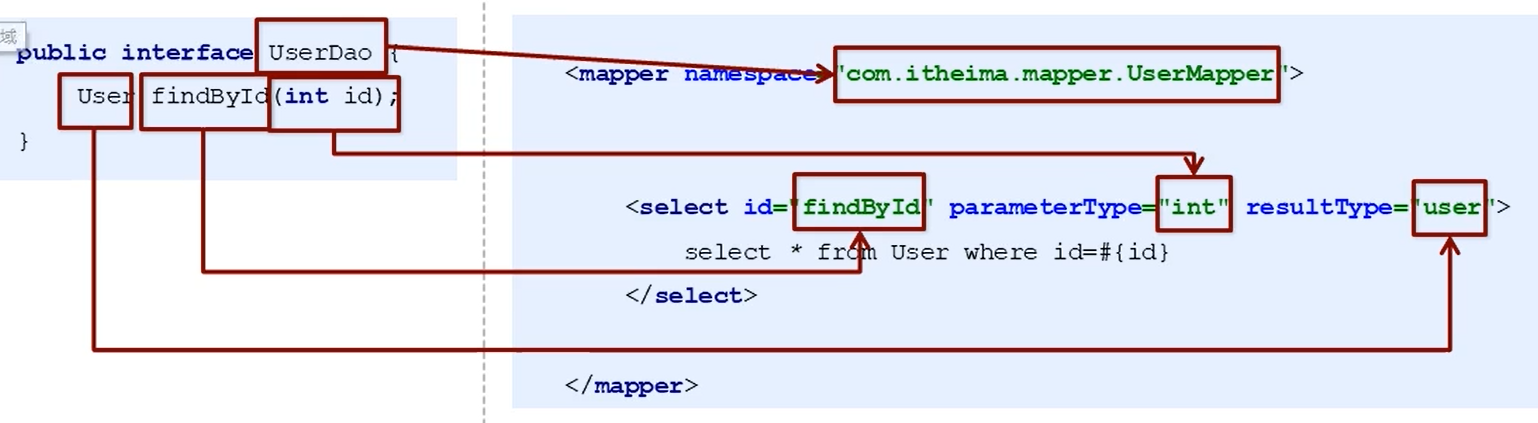
测试代理方式
public class ServiceDemo { public static void main(String[] args) throws IOException { InputStream resourceAsStream = Resources.getResourceAsStream("sqlMapConfig.xml"); //创建SqlSessionFactory工厂 SqlSessionFactory sqlSessionFactory = new SqlSessionFactoryBuilder().build(resourceAsStream); SqlSession sqlSession = sqlSessionFactory.openSession(); //代理方式对Dao层实现 UserMapper mapper = sqlSession.getMapper(UserMapper.class); //查询所有 List<User> all = mapper.findAll(); System.out.println(all); //通过id查询 User user = mapper.findById(1); System.out.println(user); } }- 1
- 2
- 3
- 4
- 5
- 6
- 7
- 8
- 9
- 10
- 11
- 12
- 13
- 14
- 15
- 16
- 17
- 18
- 19
- 20
总结
-
传统的开发形式 (手动dao层实现)
-
编写接口
-
实现接口
-
配置文件中
-
-
代理方式开发
- 编写接口
- 不需要实现接口
- 接口中的方法名、参数类型、返回值类型和配置文件中的一样即可
9.MyBatis映射文件深入
9.1动态sql语句
以前的简单的不能满足比较复杂的业务逻辑
-
Dynamic SQl
主要是使用 if 语句 在实际开发中使用的比较多
- if ✔
- choose (when, otherwise)
- trim (where, set)
- foreach
SQl环境
测试
public class MapperTest { @Test public void test1() throws IOException { InputStream resourceAsStream = Resources.getResourceAsStream("sqlMapConfig.xml"); SqlSessionFactory sqlSessionFactory = new SqlSessionFactoryBuilder().build(resourceAsStream); SqlSession sqlSession = sqlSessionFactory.openSession(); UserMapper mapper = sqlSession.getMapper(UserMapper.class); //模拟条件user User condition = new User(); condition.setId(1); condition.setUsername("zhangsan"); condition.setPassword("123"); List<User> userList = mapper.findByCondition(condition); System.out.println(userList); //模拟ids的数据 这个foreach执行sql语句 List<Integer> ids = new ArrayList<Integer>(); ids.add(1); ids.add(2); List<User> userList = mapper.findByIds(ids); System.out.println(userList); } }- 1
- 2
- 3
- 4
- 5
- 6
- 7
- 8
- 9
- 10
- 11
- 12
- 13
- 14
- 15
- 16
- 17
- 18
- 19
- 20
- 21
- 22
- 23
- 24
- 25
- 26
- 27
- 28
动态SQL在xml中的抽取
<sql id="selectUser">select * from usersql>- 1
- 2
所以在下面的if、foreach语句中的多了include标签 有一个属性refid 就是在抽取中的 id 值
9.2动态sql语句 if
- 根据实体类的取值不同,使用不同的sql语句进行查询。 if 判断是否是当前对应的值
- where 元素只会在子元素返回任何内容的情况下才插入 “WHERE” 子句。而且,若子句的开头为 “AND” 或 “OR”,where 元素也会将它们去除
mapper.xml配置文件
- 在接口类中 创建有方法 findByCondition 参数类型值是 user 返回值是user
<select id="findByCondition" parameterType="user" resultType="user"> <include refid="selectUser">include> <where> <if test="id!=0"> and id=#{id} if> <if test="username!=null"> and username=#{username} if> <if test="password!=null"> and password=#{password} if> where> select>- 1
- 2
- 3
- 4
- 5
- 6
- 7
- 8
- 9
- 10
- 11
- 12
- 13
- 14
- 15
9.3 动态sql语句 foreach
-
查询多个内容
-
在接口类中 创建有方法 findByIds 参数类型值是 list 返回值是user
<select id="findByIds" parameterType="list" resultType="user"> <include refid="selectUser">include> <where> <foreach collection="list" open="id in(" close=")" item="id" separator=","> #{id} foreach> where> select>- 1
- 2
- 3
- 4
- 5
- 6
- 7
- 8
- 9
9.4typeHandlers标签
- MyBatis在预处理语句(PreparedStatement)中设置一个参数,或者是从结果中取出一个值时,都会使用类型处理器的值合适的方式转换成Java类型。以下是一些默认的处理器:

若是以上的默认处理器不能满足要求,则自己自定义处理器
步骤:
- 定义转换类继承类BaseTypeHandler< T > 泛型
- 覆盖4个未实现的方法,其中setNonNullParameter为java程序设置数据到数据库的回调方法,getNullableResult为查询时,mysql的字符串类型转换成java的Type类型的方法
- 在MyBatis核心配置文件中进行注册
- 测试转换是否正确
1.定义TypeHandler
public class DateTypeHandler extends BaseTypeHandler<Date> { //将java类型 转换成 数据库需要的类型 //参数i表示表中第几个字段,参数s表示表中的字段名,两种表示方式 @Override public void setNonNullParameter(PreparedStatement preparedStatement, int i, Date date, JdbcType jdbcType) throws SQLException { // getTime()获取时间的毫秒值 long time = date.getTime(); preparedStatement.setLong(i,time); } //将数据库中的类型 转换成java类型 //String参数 : 要转换的字段名称 //ResultSet : 查询出的结果集 @Override public Date getNullableResult(ResultSet resultSet, String s) throws SQLException { //获得结果集中需要的数据(long) 转换成Date类型 返回 long aLong = resultSet.getLong(s); Date date = new Date(aLong); return date; } //将数据库中类型 转换成java类型 @Override public Date getNullableResult(ResultSet resultSet, int i) throws SQLException { long aLong = resultSet.getLong(i); Date date = new Date(aLong); return date; } //将数据库中类型 转换成java类型 @Override public Date getNullableResult(CallableStatement callableStatement, int i) throws SQLException { long aLong = callableStatement.getLong(i); Date date = new Date(aLong); return date; } }- 1
- 2
- 3
- 4
- 5
- 6
- 7
- 8
- 9
- 10
- 11
- 12
- 13
- 14
- 15
- 16
- 17
- 18
- 19
- 20
- 21
- 22
- 23
- 24
- 25
- 26
- 27
- 28
- 29
- 30
- 31
- 32
- 33
- 34
- 35
- 36
- 37
- 38
2.注册配置文件
<typeHandlers> <typeHandler handler="com.itheima.handler.DateTypeHandler">typeHandler> typeHandlers>- 1
- 2
- 3
- 4
3.mapper中的方法 要创建有user数据表
<insert id="save" parameterType="user"> insert into user values(#{id},#{username},#{password},#{birthday}) insert> <select id="findById" parameterType="int" resultType="user"> select * from user where id=#{id} select>- 1
- 2
- 3
- 4
- 5
- 6
- 7
- 8
4.测试
//插入数据 @Test public void test1() throws IOException { InputStream resourceAsStream = Resources.getResourceAsStream("sqlMapConfig.xml"); SqlSessionFactory sqlSessionFactory = new SqlSessionFactoryBuilder().build(resourceAsStream); SqlSession sqlSession = sqlSessionFactory.openSession(); UserMapper mapper = sqlSession.getMapper(UserMapper.class); //创建user User user = new User(); user.setUsername("ceshi"); user.setPassword("abc"); user.setBirthday(new Date());//当前时间 //执行保存造作 mapper.save(user); sqlSession.commit(); sqlSession.close(); } //查询 @Test public void test2() throws IOException { InputStream resourceAsStream = Resources.getResourceAsStream("sqlMapConfig.xml"); SqlSessionFactory sqlSessionFactory = new SqlSessionFactoryBuilder().build(resourceAsStream); SqlSession sqlSession = sqlSessionFactory.openSession(); UserMapper mapper = sqlSession.getMapper(UserMapper.class); User user = mapper.findById(15); System.out.println("user中的birthday:"+user.getBirthday()); sqlSession.commit(); sqlSession.close(); }- 1
- 2
- 3
- 4
- 5
- 6
- 7
- 8
- 9
- 10
- 11
- 12
- 13
- 14
- 15
- 16
- 17
- 18
- 19
- 20
- 21
- 22
- 23
- 24
- 25
- 26
- 27
- 28
- 29
- 30
- 31
- 32
- 33
- 34
- 35
- 36
9.5Plugins标签
MyBatis可以使用第三方的插件来对功能进行扩展,分页助手PageHelper是将分页的复杂操作进行封装,使用简单的方式即可获得分页的相关数据
开发步骤:
- 导入通用PageHelper的坐标
- 在mybatis核心配置文件中配置PageHelper插件
- 测试分页数据获取
首先要把表的全部内容查看以下,方便设置分页
<dependency> <groupId>com.github.pagehelpergroupId> <artifactId>pagehelperartifactId> <version>3.7.5version> dependency> <dependency> <groupId>com.github.jsqlparsergroupId> <artifactId>jsqlparserartifactId> <version>0.9.1version> dependency>- 1
- 2
- 3
- 4
- 5
- 6
- 7
- 8
- 9
- 10
- 11
2.配置PageHelper插件
<plugins> <plugin interceptor="com.github.pagehelper.PageHelper"> <property name="dialect" value="mysql">property> plugin> plugins>- 1
- 2
- 3
- 4
- 5
- 6
- 7
4.测试代码
//分页plugins插件 @Test public void test3() throws IOException { InputStream resourceAsStream = Resources.getResourceAsStream("sqlMapConfig.xml"); SqlSessionFactory sqlSessionFactory = new SqlSessionFactoryBuilder().build(resourceAsStream); SqlSession sqlSession = sqlSessionFactory.openSession(); UserMapper mapper = sqlSession.getMapper(UserMapper.class); //设置分页相关参数 当前页(页码) 每页显示的条数(显示的条数) PageHelper.startPage(3,3); List<User> userList = mapper.findAll(); for (User user : userList) { System.out.println(user); } //获得与分页相关参数 对象pageInfo PageInfo<User> pageInfo = new PageInfo<User>(userList); System.out.println("当前页:"+pageInfo.getPageNum()); System.out.println("每页显示条数:"+pageInfo.getPageSize()); System.out.println("总条数:"+pageInfo.getTotal()); System.out.println("总页数:"+pageInfo.getPages()); System.out.println("上一页:"+pageInfo.getPrePage()); System.out.println("下一页:"+pageInfo.getNextPage()); System.out.println("是否是第一个:"+pageInfo.isIsFirstPage()); System.out.println("是否是最后一个:"+pageInfo.isIsLastPage()); sqlSession.close(); }- 1
- 2
- 3
- 4
- 5
- 6
- 7
- 8
- 9
- 10
- 11
- 12
- 13
- 14
- 15
- 16
- 17
- 18
- 19
- 20
- 21
- 22
- 23
- 24
- 25
- 26
- 27
- 28
小结:
MyBatis映射文件配置 标签
- < select > : 查询
- < insert> : 插入
- < uodate> : 修改
- < delect > : 删除
- < where> : where条件
- < if > : if判断
- < foreach > : 循环
- < sql > : sql片段抽取
标签
- properties标签:该标签可以加载外部的
- properties文件typeAliases标签∶设置类型别名
- environments标签:数据源环境配置标签
- typeHandlers标签:配置自定义类型处理器
- plugins标签:配置MyBatis的插件
10.MyBatis的多表操作
- 多对多 :
- 多对一 :
- 一对多 :
10.1 一对一查询
- 用户表和订单表的关系为,一个用户有多个订单,一个订单只从属于一个用户
- 一对一查询的需求:查询一个订单,就能查询出该订单的所有用户
环境搭建
-
创建Order、User、Role实体
-
OrderMapper、UserMapper接口
-
创建UserMapper.xml 、 OrderMapper.xml 配置文件
[外链图片转存失败,源站可能有防盗链机制,建议将图片保存下来直接上传(img-sLaWROzm-1666272835959)(ssm.assets/image-20220318212205284.png)]
-
加载映射文件
-
<mappers> <mapper resource="com/itheima/mapper/UserMapper.xml">mapper> <mapper resource="com/itheima/mapper/OrderMapper.xml">mapper> mappers>- 1
- 2
- 3
- 4
- 5
-
OrderMappper配置文件
<mapper namespace="com.itheima.mapper.OrderMapper"> <select id="findAll" resultMap="orderMap"> SELECT *,o.id oid FROM orders o,USER u WHERE o.uid=u.id select> <resultMap id="orderMap" type="order"> <id column="oid" property="id">id> <result column="ordertime" property="ordertime">result> <result column="total" property="total">result> <association property="user" javaType="user"> <id column="uid" property="id">id> <result column="username" property="username">result> <result column="password" property="password">result> <result column="birthday" property="birthday">result> association> resultMap> mapper>- 1
- 2
- 3
- 4
- 5
- 6
- 7
- 8
- 9
- 10
- 11
- 12
- 13
- 14
- 15
- 16
- 17
- 18
- 19
- 20
- 21
- 22
- 23
- 24
- 25
- 26
- 27
- 28
- 29
- 30
- 31
- 32
- 33
- 34
- 35
10.2一对多查询
- 用户表和订单表的关系为,一个用户有多个订单,一个订单只从属于一个用户
- 一对多查询的需求:查询一个用户,就能查询出该用户具有的订单
User中的订单集合
//描述的是当前用户存在哪些订单 多个订单用集合存储 private List<Order> orderList;- 1
- 2
UserMappper.xml
<resultMap id="userMap" type="user"> <id column="uid" property="id">id> <result column="username" property="username">result> <result column="password" property="password">result> <result column="birthday" property="birthday">result> <collection property="orderList" ofType="order"> <id column="oid" property="id">id> <result column="ordertime" property="ordertime">result> <result column="total" property="total">result> collection> resultMap> <select id="findAll" resultMap="userMap"> SELECT *,o.id oid FROM USER u,orders o WHERE u.id=o.uid select>- 1
- 2
- 3
- 4
- 5
- 6
- 7
- 8
- 9
- 10
- 11
- 12
- 13
- 14
- 15
- 16
- 17
- 18
- 19
- 20
- 21
测试代码:
@Test public void test2() throws IOException { InputStream resourceAsStream = Resources.getResourceAsStream("sqlMapConfig.xml"); SqlSessionFactory sqlSessionFactory = new SqlSessionFactoryBuilder().build(resourceAsStream); SqlSession sqlSession = sqlSessionFactory.openSession(); //一对多模型 UserMapper mapper = sqlSession.getMapper(UserMapper.class); List<User> userList = mapper.findAll(); for (User user : userList) { System.out.println(user); } sqlSession.close(); }- 1
- 2
- 3
- 4
- 5
- 6
- 7
- 8
- 9
- 10
- 11
- 12
- 13
- 14
- 15
10.3多对多查询
- 用户表和订单表的关系为,一个用户有多个角色,一个角色被多个用户使用
- 多对多查询的需求:查询用户同时查询出该用户的所有角色

- 创建实体Role:包括 id 、roleName roleDesc
- 创建实体User:包括:userName、id
配置文件中的自定义别名
<typeAliases> <typeAlias type="com.itheima.domain.User" alias="user">typeAlias> <typeAlias type="com.itheima.domain.Order" alias="order">typeAlias> <typeAlias type="com.itheima.domain.Role" alias="role">typeAlias> typeAliases>- 1
- 2
- 3
- 4
- 5
- 6
User中的角色集合
//描述的是当前用户具备哪些角色 private List<Role> roleList;- 1
- 2
UserMappper.xml
<resultMap id="userRoleMap" type="user"> <id column="userId" property="id">id> <result column="username" property="username">result> <result column="password" property="password">result> <result column="birthday" property="birthday">result> <collection property="roleList" ofType="role"> <id column="roleId" property="id">id> <result column="roleName" property="roleName">result> <result column="roleDesc" property="roleDesc">result> collection> resultMap> <select id="findUserAndRoleAll" resultMap="userRoleMap"> SELECT * FROM USER u,sys_user_role ur,sys_role r WHERE u.id=ur.userId AND ur.roleId=r.id select>- 1
- 2
- 3
- 4
- 5
- 6
- 7
- 8
- 9
- 10
- 11
- 12
- 13
- 14
- 15
- 16
- 17
- 18
- 19
10.4MyBatis多表配置总结
- 一对一配置:使用 +做配置
- 一对多配置:使用 + 做配置
- 多对多配置:使用 + 做配置 , 多出一张中间表
11.MyBatis的注解开发
常用的注解
- @Insert:实现新增
- @Update:实现更新
- @Delete:实现删除
- @Select:实现查询
- @Result:实现结果集封装
- @Results: 可以与@Result一起使用,封装多个结果集
- @One:实现一对一结果集封装
- @Many:实现一对多结果集封装
11.1MyBatis的增删改查操作
测试代码
public class MyBatisTest { private UserMapper mapper; @Before public void before() throws IOException { //数据源 InputStream resourceAsStream = Resources.getResourceAsStream("sqlMapConfig.xml"); //构建工厂 SqlSessionFactory sqlSessionFactory = new SqlSessionFactoryBuilder().build(resourceAsStream); //事务自动提交 SqlSession sqlSession = sqlSessionFactory.openSession(true); mapper = sqlSession.getMapper(UserMapper.class); } //保存操作 @Test public void testSave(){ User user = new User(); user.setUsername("tom"); user.setPassword("abc"); mapper.save(user); } //更新操作 @Test public void testUpdate(){ User user = new User(); user.setId(18); user.setUsername("lucy"); user.setPassword("123"); mapper.update(user); } //删除操作 @Test public void testDelete(){ mapper.delete(18); } //根据id查询 @Test public void testFindById(){ User user = mapper.findById(2); System.out.println(user); } //查询所有 @Test public void testFindAll(){ List<User> all = mapper.findAll(); for (User user : all) { System.out.println(user); } } }- 1
- 2
- 3
- 4
- 5
- 6
- 7
- 8
- 9
- 10
- 11
- 12
- 13
- 14
- 15
- 16
- 17
- 18
- 19
- 20
- 21
- 22
- 23
- 24
- 25
- 26
- 27
- 28
- 29
- 30
- 31
- 32
- 33
- 34
- 35
- 36
- 37
- 38
- 39
- 40
- 41
- 42
- 43
- 44
- 45
- 46
- 47
- 48
- 49
- 50
- 51
- 52
- 53
sqlMapConfig.xml的配置文件
<mappers> <package name="com.itheima.mapper">package> mappers>- 1
- 2
- 3
- 4
- 5
UserMapper接口 里面的增删改查的注解
public interface UserMapper { @Insert("insert into user values(#{id},#{username},#{password},#{birthday})") public void save(User user); @Update("update user set username=#{username},password=#{password} where id=#{id}") public void update(User user); @Delete("delete from user where id=#{id}") public void delete(int id); @Select("select * from user where id=#{id}") public User findById(int id); @Select("select * from user") public List<User> findAll(); }- 1
- 2
- 3
- 4
- 5
- 6
- 7
- 8
- 9
- 10
- 11
- 12
- 13
- 14
- 15
- 16
- 17
11.2MyBatis的注解实现复杂映射开发
- 使用的注解主要是@Results 、@Result 、@One 、@Many注解
测试代码
public class MyBatisTest2 { //OrderMapper private OrderMapper mapper; @Before public void before() throws IOException { InputStream resourceAsStream = Resources.getResourceAsStream("sqlMapConfig.xml"); SqlSessionFactory sqlSessionFactory = new SqlSessionFactoryBuilder().build(resourceAsStream); SqlSession sqlSession = sqlSessionFactory.openSession(true); mapper = sqlSession.getMapper(OrderMapper.class); } @Test public void testSave(){ List<Order> all = mapper.findAll(); for (Order order : all) { System.out.println(order); } } }- 1
- 2
- 3
- 4
- 5
- 6
- 7
- 8
- 9
- 10
- 11
- 12
- 13
- 14
- 15
- 16
- 17
- 18
- 19
- 20
- 21
OrderMapper接口 注解方式
这个查询效率比较低,每个结果还要去查询user表
//方式一 //o.id字段的别名oid @Select("select *,o.id oid from orders o,user u where o.uid=u.id") @Results({ @Result(column = "oid",property = "id"), @Result(column = "ordertime",property = "ordertime"), @Result(column = "total",property = "total"), @Result(column = "uid",property = "user.id"), @Result(column = "username",property = "user.username"), @Result(column = "password",property = "user.password") }) public List<Order> findAll(); //方式二 @Select("select * from orders") @Results({ @Result(column = "id",property = "id"), @Result(column = "ordertime",property = "ordertime"), @Result(column = "total",property = "total"), @Result( property = "user", //要封装的属性名称 column = "uid", //根据那个 字段 去查询user表的数据 javaType = User.class, //要封装的实体类型 //select属性 代表查询那个接口的方法获得数据 从UserMapper中获得id数据 也就是对方的id,使用别人的接口的方法 one = @One(select = "com.itheima.mapper.UserMapper.findById") ) })- 1
- 2
- 3
- 4
- 5
- 6
- 7
- 8
- 9
- 10
- 11
- 12
- 13
- 14
- 15
- 16
- 17
- 18
- 19
- 20
- 21
- 22
- 23
- 24
- 25
- 26
- 27
11.3MyBtais的一对多的查询注解开发
UserMapper接口中的@Result注解方式
@Select("select * from user") @Results({ //id = true 标识下面的@Result是id @Result(id=true ,column = "id",property = "id"), @Result(column = "username",property = "username"), @Result(column = "password",property = "password"), @Result( property = "orderList", column = "id",//当前的id来使用对方的id javaType = List.class, many = @Many(select = "com.itheima.mapper.OrderMapper.findByUid") ) }) public List<User> findUserAndOrderAll();- 1
- 2
- 3
- 4
- 5
- 6
- 7
- 8
- 9
- 10
- 11
- 12
- 13
- 14
- 15
测试
public class MyBatisTest2 { //OrderMapper private OrderMapper mapper; @Before public void before() throws IOException { InputStream resourceAsStream = Resources.getResourceAsStream("sqlMapConfig.xml"); SqlSessionFactory sqlSessionFactory = new SqlSessionFactoryBuilder().build(resourceAsStream); SqlSession sqlSession = sqlSessionFactory.openSession(true); mapper = sqlSession.getMapper(OrderMapper.class); } @Test public void testSave(){ List<Order> all = mapper.findAll(); for (Order order : all) { System.out.println(order); } } }- 1
- 2
- 3
- 4
- 5
- 6
- 7
- 8
- 9
- 10
- 11
- 12
- 13
- 14
- 15
- 16
- 17
- 18
- 19
- 20
- 21
11.4MyBatis的多对多查询
RoleMapper的接口方法
@Select("SELECT * FROM sys_user_role ur,sys_role r WHERE ur.roleId=r.id AND ur.userId=#{uid}") public List<Role> findByUid(int uid);- 1
- 2
通过在UserMapper中通过USER的id值,查询到Role中的id值 (对多查询)
UserMapper接口方法
@Select("SELECT * FROM USER") @Results({ @Result(id = true,column = "id",property = "id"), @Result(column = "username",property = "username"), @Result(column = "password",property = "password"), @Result( property = "roleList", column = "id",//是上面sql语句查询出的id值 javaType = List.class, many = @Many(select = "com.itheima.mapper.RoleMapper.findByUid") ) }) //User public List<User> findUserAndRoleAll();- 1
- 2
- 3
- 4
- 5
- 6
- 7
- 8
- 9
- 10
- 11
- 12
- 13
- 14
测试
public class MyBatisTest4 { private UserMapper mapper; @Before public void before() throws IOException { InputStream resourceAsStream = Resources.getResourceAsStream("sqlMapConfig.xml"); SqlSessionFactory sqlSessionFactory = new SqlSessionFactoryBuilder().build(resourceAsStream); SqlSession sqlSession = sqlSessionFactory.openSession(true); mapper = sqlSession.getMapper(UserMapper.class); } @Test public void testSave(){ List<User> userAndRoleAll = mapper.findUserAndRoleAll(); for (User user : userAndRoleAll) { System.out.println(user); } } }- 1
- 2
- 3
- 4
- 5
- 6
- 7
- 8
- 9
- 10
- 11
- 12
- 13
- 14
- 15
- 16
- 17
- 18
- 19
- 20
- 21
12.SSM整合
步骤:
- 准备工作
- 原始方式整合
- 创建数据表表
- 创建Maven工程
- 带入Maven坐标
- spring、mybatis等坐标
- 编写实体类
- Account 实体
- 编写mapper接口(dao层)
- 方法:save()、findAll()
- 编写Service接口
- AccountService:save()、findAll();
- 编写Service接口实现
- 编写Controller(web层)
- 编写添加页面
- 编写列表展示页面
- 编写相应的配置文件
- Spring配置文件:applicationContext.xml
- SpringMVC配置文件:Spring-mvc.xml
- MyBatis映射文件:AccountMapper.xml
- MyBatis核心文件:sqlMapConfig.xml
- 数据库链接信息文件:jdbc.properties
- Web.xml文件:web.xml
- 日志文件:log4j.xml
- 测试添加账户
- 测试账户列表
- 原始方式整合
2.Spring整合MyBatis
- 整合思路
- 将SqlSessionFactory配置到Spring容器中
- 扫描Mapper,让Spring容器产生Mapper实现类
- 配置声明式事务控制
- 修改Service实现类代码
(column = “password”,property = “password”),
@Result(
property = “orderList”,
column = “id”,//当前的id来使用对方的id
javaType = List.class,
many = @Many(select = “com.itheima.mapper.OrderMapper.findByUid”)
)
})public List findUserAndOrderAll();
测试 ```java public class MyBatisTest2 { //OrderMapper private OrderMapper mapper; @Before public void before() throws IOException { InputStream resourceAsStream = Resources.getResourceAsStream("sqlMapConfig.xml"); SqlSessionFactory sqlSessionFactory = new SqlSessionFactoryBuilder().build(resourceAsStream); SqlSession sqlSession = sqlSessionFactory.openSession(true); mapper = sqlSession.getMapper(OrderMapper.class); } @Test public void testSave(){ Listall = mapper.findAll(); for (Order order : all) { System.out.println(order); } } } - 1
- 2
- 3
- 4
- 5
- 6
- 7
- 8
- 9
- 10
- 11
- 12
- 13
- 14
- 15
- 16
- 17
- 18
- 19
- 20
- 21
- 22
- 23
- 24
- 25
11.4MyBatis的多对多查询
RoleMapper的接口方法
@Select("SELECT * FROM sys_user_role ur,sys_role r WHERE ur.roleId=r.id AND ur.userId=#{uid}") public List<Role> findByUid(int uid);- 1
- 2
通过在UserMapper中通过USER的id值,查询到Role中的id值 (对多查询)
UserMapper接口方法
@Select("SELECT * FROM USER") @Results({ @Result(id = true,column = "id",property = "id"), @Result(column = "username",property = "username"), @Result(column = "password",property = "password"), @Result( property = "roleList", column = "id",//是上面sql语句查询出的id值 javaType = List.class, many = @Many(select = "com.itheima.mapper.RoleMapper.findByUid") ) }) //User public List<User> findUserAndRoleAll();- 1
- 2
- 3
- 4
- 5
- 6
- 7
- 8
- 9
- 10
- 11
- 12
- 13
- 14
测试
public class MyBatisTest4 { private UserMapper mapper; @Before public void before() throws IOException { InputStream resourceAsStream = Resources.getResourceAsStream("sqlMapConfig.xml"); SqlSessionFactory sqlSessionFactory = new SqlSessionFactoryBuilder().build(resourceAsStream); SqlSession sqlSession = sqlSessionFactory.openSession(true); mapper = sqlSession.getMapper(UserMapper.class); } @Test public void testSave(){ List<User> userAndRoleAll = mapper.findUserAndRoleAll(); for (User user : userAndRoleAll) { System.out.println(user); } } }- 1
- 2
- 3
- 4
- 5
- 6
- 7
- 8
- 9
- 10
- 11
- 12
- 13
- 14
- 15
- 16
- 17
- 18
- 19
- 20
- 21
12.SSM整合
步骤:
- 准备工作
- 原始方式整合
- 创建数据表表
- 创建Maven工程
- 带入Maven坐标
- spring、mybatis等坐标
- 编写实体类
- Account 实体
- 编写mapper接口(dao层)
- 方法:save()、findAll()
- 编写Service接口
- AccountService:save()、findAll();
- 编写Service接口实现
- 编写Controller(web层)
- 编写添加页面
- 编写列表展示页面
- 编写相应的配置文件
- Spring配置文件:applicationContext.xml
- SpringMVC配置文件:Spring-mvc.xml
- MyBatis映射文件:AccountMapper.xml
- MyBatis核心文件:sqlMapConfig.xml
- 数据库链接信息文件:jdbc.properties
- Web.xml文件:web.xml
- 日志文件:log4j.xml
- 测试添加账户
- 测试账户列表
- 原始方式整合
2.Spring整合MyBatis
- 整合思路
- 将SqlSessionFactory配置到Spring容器中
- 扫描Mapper,让Spring容器产生Mapper实现类
- 配置声明式事务控制
- 修改Service实现类代码
-
相关阅读:
关于archlinux的使用
【单细胞高级绘图】08.细胞通讯_两组比较_气泡图
Springboot+vue+java幼儿园管理系统
LabVIEW无法与GPIB仪器通信
PON串口链接上网步骤
TCP三次握手和四次挥手
ElasticSearch集群shard均衡策略
Python学习之路-爬虫提高:selenium
vue路由传参的几种方式
C语言常用基础知识总结
- 原文地址:https://blog.csdn.net/qq_56098191/article/details/127435653