-
搭建免登录sftp和java代码调试获取数据
一、SFTP免登录搭建
sftp使用的端口是22端口,一般默认开启,如果没有开启,需要手动开启22端口和ssh服务,可以使用 netstat -tnlp | grep 22 查看端口是否正常启用了

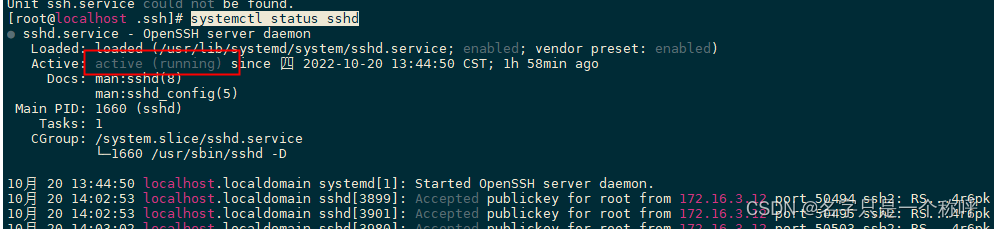
获取使用 systemctl status sshd 查看ssh运行状态,running就是正常运行了
使用root用户进行sftp登录的话,可以直接在root用户下直接使用 ssh-keygen -t rsa 命令,然后直接回车,就会生成两个文件 id_rsa和id_rsa.pub文件
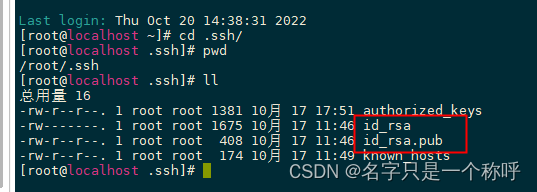
可以将 id_rsa.pub的内容复制到authorized_keys文件里面,如果没有这个文件,就手动创建这个文件,这里只是将root本地免登录复制到里面而已
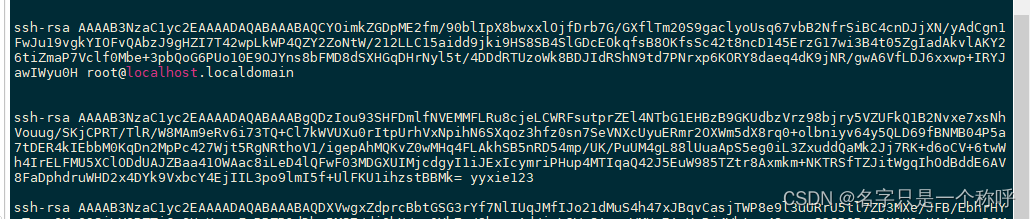
如果想要其他服务器免登录到这台机器上,就需要吧其他服务器的 id_rsa.pub文件的内容添加到 authorized_keys 里面,如下图:
至于创建非root用户免登录的,可以自行百度下,道理很简单,也就是创建个用户,然后登录所创建的用户,再按照以上步骤进行,就可以实现其他用户免登录,当然了,用其他用户所存取的文件属组都是属于其他用户的了
二、java免登录调用:
这里使用的jcraft的包进行操作,具体的maven如下:
- <dependency>
- <groupId>com.jcraftgroupId>
- <artifactId>jschartifactId>
- <version>0.1.55version>
- dependency>
实现思路:使用已配置好的 私钥内容、服务器ip、用户名进行认证登录
私钥对应的公钥需要提现配置在服务器的authorized_keys里面,如何配置请看上面搭建免登录sftp操作
具体代码示例:
- import com.jcraft.jsch.*;
- import org.apache.commons.lang3.StringUtils;
- import java.io.*;
- import java.nio.charset.StandardCharsets;
- import java.util.*;
- /**
- * @Author yyxie
- */
- public class LSTTutils {
- private static ChannelSftp sftp = null;
- private static Session session = null;
- /**
- * 连接sftp服务器
- *
- * @param username
- * @param password
- * @param host
- * @param port
- * @param privateKey
- * @return
- */
- public static ChannelSftp sftpConnect(String username, String password, String host, int port, String privateKey, byte[] privateKeyStr) throws Exception {
- JSch jsch = new JSch();
- if (privateKey != null && !"".equals(privateKey)) {
- //jsch.addIdentity(privateKey);// 设置私钥,如果使用文件读取的话,就直接使用这个就可以,吧下面的注释掉
- jsch.addIdentity("", privateKeyStr, null, null);//如果直接使用读取后的内容,那么就把上面注释掉,
- //为了方便后面服务器迁移,推荐直接使用存在数据库中,然后读取私钥的方式
- }
- //用户名,主机,端口号
- session = jsch.getSession(username, host, port);
- //密码
- //session.setPassword(password);//因用了私钥登录,所以就不需要密码了,如果想要密码登录的,就把上面那个添加私钥的去掉就可以
- session.setConfig("StrictHostKeyChecking", "no");
- // 设置timeout时间
- session.setTimeout(30000);
- session.connect();
- Channel channel = session.openChannel("sftp");
- channel.connect();
- sftp = (ChannelSftp) channel;
- return sftp;
- }
- /**
- * 列出目录下的文件
- *
- * @param directory 要列出的目录
- */
- public static Vector listFiles(String directory) throws SftpException {
- return sftp.ls(directory);
- }
- /**
- * 判断是否是.txt 和 .csv 文件
- *
- * @param fileName 文件名称
- * @return
- */
- public static boolean getFileStatus(String fileName) {
- boolean resutl = false;
- if (StringUtils.isNotBlank(fileName)) {
- int index = fileName.lastIndexOf(".");
- if (index > 0) {
- String fileFormat = fileName.substring(index);
- if (".txt".equalsIgnoreCase(fileFormat) || ".csv".equalsIgnoreCase(fileFormat)) {
- resutl = true;
- }
- }
- }
- return resutl;
- }
- /**
- * 获取sftp 文件内容
- *
- * @param fileName
- * @param ftpPath
- * @return
- * @throws SftpException
- * @throws IOException
- */
- public static String getFtpData(String fileName, String ftpPath) throws SftpException, IOException {
- try {
- if (null == sftp) {
- return null;
- }
- sftp.cd(ftpPath);
- } catch (Exception e) {
- e.printStackTrace();
- }
- InputStream in = sftp.get(fileName);
- BufferedReader br = new BufferedReader(new InputStreamReader(in));
- String line;
- StringBuilder sb = new StringBuilder();
- while ((line = br.readLine()) != null) {
- sb.append(line + "\n");
- }
- return sb.toString();
- }
- /**
- * 关闭ftp连接
- */
- public static void closeChannel() {
- if (sftp != null) {
- sftp.disconnect();
- }
- if (session != null) {
- if (session.isConnected()) {
- session.disconnect();
- }
- }
- }
- public static void main(String[] args) throws Exception {
- String host = "172.16.3.110";//要登录的服务器ip
- int port = 22;
- String username = "root";//用户
- String passwords = "123456";//用户登录密码
- String ftpPath = "/home/sftp_upload";//文件读取路径
- //下面 privateKey和testkeys实际上是同个数据,只是一个是文件路径,一个是直接读取出来的内容
- String privateKey = "C:\\Users\\admin\\Desktop\\新建文件夹\\id_rsa";
- String testkeys = "-----BEGIN RSA ***Y-----\n" +
- "MIIEowIBAAKCAQEA11cIMWXaa3AW7Rkht62H+zZSFKiTHyCaNtXTLkuIeO8SQarw\n" +
- .....
- "jmrxj4DbwDnk4iNSD1NCBczqjuBmoX+SmUktdcmAIItFtSLuPp6S\n" +
- "-----END RSA P****Y-----";
- byte[] keybyte = testkeys.getBytes(StandardCharsets.UTF_8);
- try {
- //创建连接
- sftpConnect(username, passwords, host, port, privateKey, keybyte);
- } catch (Exception e) {
- e.printStackTrace();
- }
- try {
- //获取文件列表
- Vector vector = listFiles(ftpPath);
- Iterator iterator = vector.iterator();
- System.out.println("文件列表:");
- while (iterator.hasNext()) {
- ChannelSftp.LsEntry file = (ChannelSftp.LsEntry) iterator.next();
- //文件名称
- if (getFileStatus(file.getFilename())) {
- System.out.println(file.getFilename());
- }
- }
- System.out.println();
- String fileName = "123.txt";
- //提取文件内容
- String data = getFtpData(fileName, ftpPath);
- System.out.println("如下文件内容:");
- System.out.println(data);
- } catch (SftpException e) {
- e.printStackTrace();
- } catch (IOException e) {
- e.printStackTrace();
- } finally {
- LSTTutils.closeChannel();
- }
- }
- }
-
相关阅读:
7.3 服务端漏洞:密码找回逻辑漏洞检测和重现
念一句咒语 AI 就帮我写一个应用,我人麻了...
Kotlin笔记(二):标准函数,静态方法,延迟初始化,密封类
shell中算术运算小结
C++求最大公因数(gcd)的六重境界
我开源了团队内部基于SpringBoot Web快速开发的API脚手架stater
第5章 总体设计【软件设计一般分为总体设计和详细设计,它们之间的关系是全局与局部】
人工智能考证初步探索
Canonical标签在SEO中重要作用
解决HBuilderX无法登录的问题
- 原文地址:https://blog.csdn.net/qq_32003379/article/details/127429968
