-
【C#】【FFmpeg】获取电脑可用音视频设备并输出到下拉列表框
【重要】不要边看文本边操作,本文有错误纠正,先看完一遍再说。
要使用的FFmpeg命令
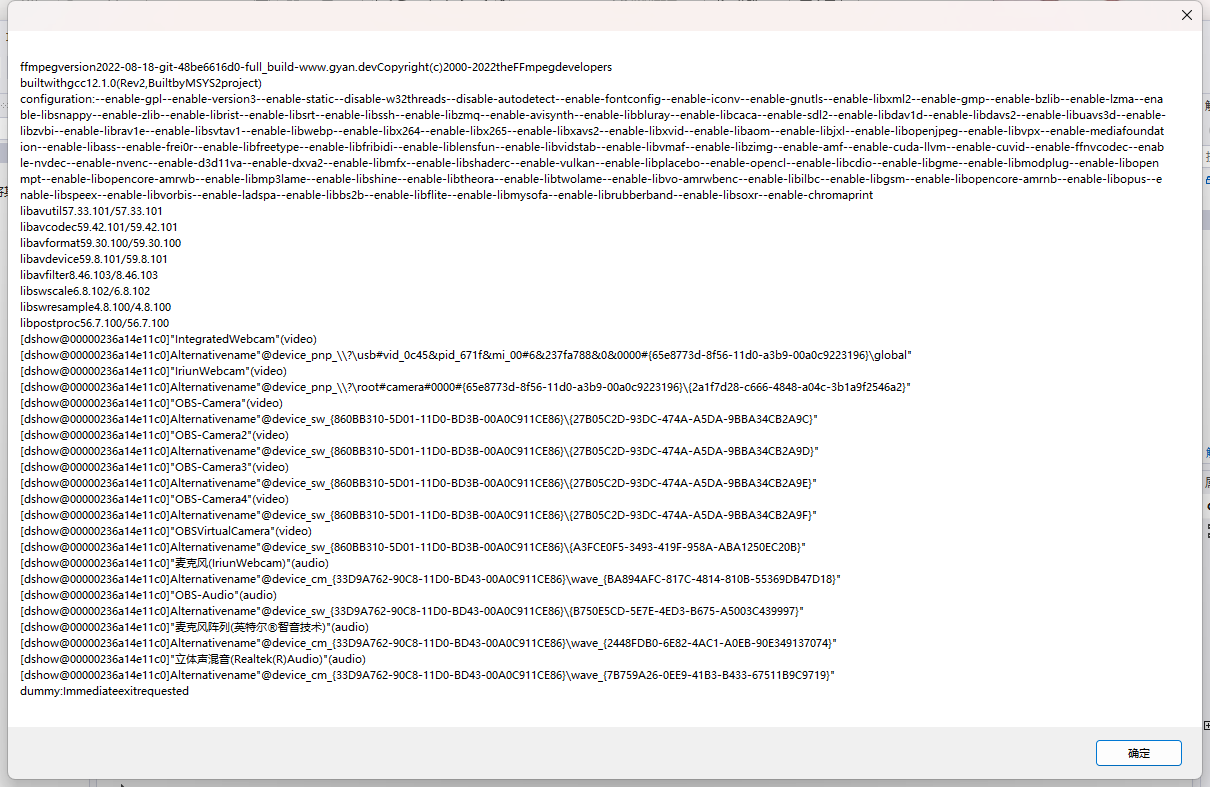
ffmpeg -list_devices true -f dshow -i dummy会输出的信息
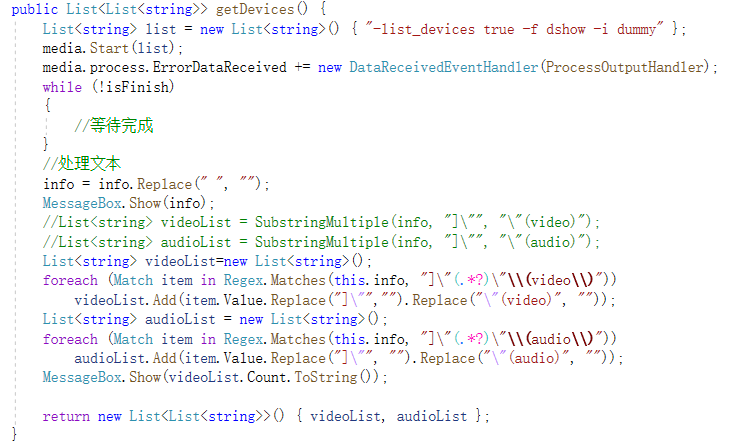
通过正则取出设备名称
- List<string> videoList=new List<string>();
- foreach (Match item in Regex.Matches(this.info, "] \"(.*?)\" \\(video\\)"))
- videoList.Add(item.Value.Replace("]\"","").Replace("\"(video)", ""));
- List<string> audioList = new List<string>();
- foreach (Match item in Regex.Matches(this.info, "] \"(.*?)\" \\(audio\\)"))
- audioList.Add(item.Value.Replace("]\"", "").Replace("\"(audio)", ""));
1.完全不了解正则表达式的去看看C# 正则表达式 | 菜鸟教程
2.我本来想的是,加了括号(.*?),匹配出来的应该不包括
]"和"(video)但是它又确实包括了,于是我只能使用替换的方式将我不要的内容给替换掉
- using System;
- using System.Collections.Generic;
- using System.Diagnostics;
- using System.Linq;
- using System.Text;
- using System.Text.RegularExpressions;
- using System.Threading.Tasks;
- namespace why_not_fly
- {
- internal class MediaInfo
- {
- public string info = null;
- public string error = null;
- public bool isFinish = false;
- Media media = new Media();
- public List
- List<string> list = new List<string>() { "-list_devices true -f dshow -i dummy" };
- media.Start(list);
- media.process.ErrorDataReceived += new DataReceivedEventHandler(ProcessOutputHandler);
- while (!isFinish)
- {
- //等待完成
- }
- MessageBox.Show(info);
- List<string> videoList=new List<string>();
- foreach (Match item in Regex.Matches(this.info, "] \"(.*?)\" \\(video\\)"))
- videoList.Add(item.Value.Replace("] \"","").Replace("\" (video)", ""));
- List<string> audioList = new List<string>();
- foreach (Match item in Regex.Matches(this.info, "] \"(.*?)\" \\(audio\\)"))
- audioList.Add(item.Value.Replace("] \"", "").Replace("\" (audio)", ""));
- return new List
- }
- //设置回调,读取指令的返回值
- private void ProcessOutputHandler(object sendingProcess, DataReceivedEventArgs outLine)
- {
- try
- {
- //进程间通信,解决线程中调用控件错误
- Control.CheckForIllegalCrossThreadCalls = false;
- if (!String.IsNullOrEmpty(outLine.Data))
- {
- info += outLine.Data + Environment.NewLine;
- }
- else
- {
- isFinish = true;
- }
- }
- catch (Exception ex)
- {
- error = ex.ToString();
- }
- }
- }
- }
3.注意符号之间的空格
如下图,是有空格的

你要是空格没写或者写的不对,就取不出来了。
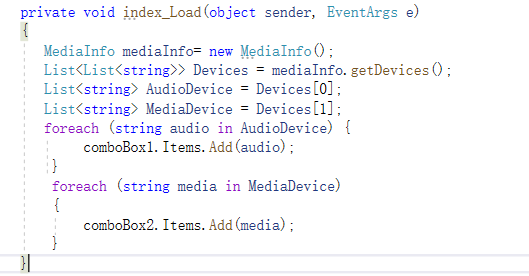
然后准备两个下拉列表框,载入窗口的时候就读取设备信息

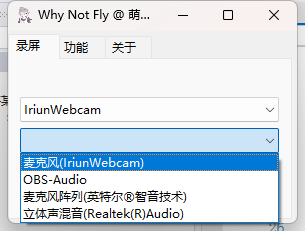
读取完成!
难点的话其实也就是正则表达式提取内容,只要内容能提取出来,那一切都比较好办了。
然后关于读取设备遇到乱码问题,请看【C#】【ffmpeg】外部调用线程执行ffmepg读取返回的信息乱码问题
我估计可能获取的这些信息还不够,后面再更新。
-
相关阅读:
Maven 跳过测试的几种方式
GitHub Copilot Chat
【C++杂货铺】探索list的底层实现
计算机视觉实战项目(图像分类+目标检测+目标跟踪+姿态识别+车道线识别+车牌识别)
【算法小记】接雨水的不同解法
Java面向对象进阶7——代码块
ICDE‘22推荐系统论文梳理之Industry篇
基于SpringBoot的协同过滤算法商品推荐系统
vue中引入高德地图Loca数据可视化
【软件与系统安全笔记】三、基础技术
- 原文地址:https://blog.csdn.net/ks2686/article/details/127388878