-
Spring AOP案例:测试业务层接口万次执行效率
目录
1.MyAdvise通知类(做通知,切入点,切入点与通知进行绑定)
2.SpringConfig Spring配置类(识别bean,与Aspect)
3.jdbcConfig (加载properties文件内的数据)
7.AccountServiceImpl(Service业务层,组装Dao的操作)
9.jdbc.properties(druid的配置信息,被SpringConfig加载,被JdbcConfig所引用)
11.pom.xml(这个也比较重要,在总结里面会讲,自己看也能明白,我写注释了)
案例:测量业务层接口的执行效率
需求:任意业务层接口执行,均可显示其执行效率(执行时长)
分析:
1.业务功能:业务层接口执行前后,分别记录时间,求差值得到执行效率
2.通知类型选择前后均可以增强的类型-----环绕通知
补充说明:当前测试的接口执行效率仅仅是个理论值,并不是一次完整的执行过程
案例:
1.MyAdvise通知类(做通知,切入点,切入点与通知进行绑定)
- package com.itheima.aop;
- import org.aspectj.lang.ProceedingJoinPoint;
- import org.aspectj.lang.Signature;
- import org.aspectj.lang.annotation.Around;
- import org.aspectj.lang.annotation.Aspect;
- import org.aspectj.lang.annotation.Pointcut;
- import org.springframework.stereotype.Component;
- @Component
- @Aspect
- public class ServiceAdvise {
- //定义切入点,切入点时Service里面的所有方法,
- @Pointcut("execution(* com.itheima.service.*Service.*(..))")
- private void servicePt(){}
- //把切入点servicePt()与通知runSpeed()进行绑定
- @Around("ServiceAdvise.servicePt()")
- public void runSpeed(ProceedingJoinPoint proceedingJoinPoint) throws Throwable {
- long star = System.currentTimeMillis();
- Signature signature = proceedingJoinPoint.getSignature();//代表了一次执行的签名信息
- String name = signature.getName(); //方法名
- Class declaringType = signature.getDeclaringType(); //表示方法的接口名
- for (int i = 0; i < 10000; i++) {
- proceedingJoinPoint.proceed();
- }
- Object proceed = proceedingJoinPoint.proceed();//调取原始操作,即时AccountServiceImpl的返回值
- long end = System.currentTimeMillis();
- System.out.println("业务层接口"+declaringType+"的"+name+"方法,执行万次的测试为"+(end - star)+"ms");
- }
- }
2.SpringConfig Spring配置类(识别bean,与Aspect)
- package com.itheima.config;
- import org.springframework.context.annotation.*;
- @Configuration //代表了这是个配置类,以此与applicationContext.xml基础配置文件相当
- @ComponentScan("com.itheima") //包扫描
- @PropertySource("jdbc.properties") //加载properties配置文件
- @Import({JdbcConfig.class,MybatisConfig.class}) //加载JdbcConfig,MybatisConfig配置类
- @EnableAspectJAutoProxy //启动AOP的注解,切面
- public class SpringConfig {
- }
3.jdbcConfig (加载properties文件内的数据)
- package com.itheima.config;
- import com.alibaba.druid.pool.DruidDataSource;
- import org.springframework.beans.factory.annotation.Value;
- import org.springframework.context.annotation.Bean;
- import javax.sql.DataSource;
- public class JdbcConfig {
- @Value("${jdbc.driver}")
- private String driver;
- @Value("${jdbc.url}")
- private String url;
- @Value("${jdbc.username}")
- private String username;
- @Value("${jdbc.password}")
- private String password;
- //1.定义一个方法获取响应的bean
- //2.添加@Bean,表示当前方法的返回值是一个bean
- @Bean
- public DataSource dataSource(){
- DruidDataSource ds = new DruidDataSource();
- ds.setDriverClassName(driver);
- ds.setUrl(url);
- ds.setUsername(username);
- ds.setPassword(password);
- return ds;
- }
- }
4.MyBatisConfig (MyBatis配置信息)
- package com.itheima.config;
- import org.mybatis.spring.SqlSessionFactoryBean;
- import org.mybatis.spring.mapper.MapperScannerConfigurer;
- import org.springframework.context.annotation.Bean;
- import javax.sql.DataSource;
- public class MybatisConfig {
- //定义bean,SqlSessionFactoryBean,用于产生SqlSessionFactory对象
- @Bean
- public SqlSessionFactoryBean sqlSessionFactory(DataSource dataSource){
- SqlSessionFactoryBean ssfb = new SqlSessionFactoryBean();
- ssfb.setTypeAliasesPackage("com.itheima.domain");//问实体类的位置,,扫描类型别名的包
- ssfb.setDataSource(dataSource);//替代的是jdbcConfig中的DataSource,也就是详细配置信息
- return ssfb;
- }
- //定义bean,返回MapperScannerConfigurer对象
- @Bean
- public MapperScannerConfigurer mapperScannerConfigurer(){
- MapperScannerConfigurer msc = new MapperScannerConfigurer();
- msc.setBasePackage("com.itheima.dao");//问映射在什么位置,由于注解完成了执行语句,所以不需要有映射文件
- return msc;
- }
- }
5.AccountDao(数据连接层,持久层)
- package com.itheima.dao;
- import com.itheima.domain.Account;
- import org.apache.ibatis.annotations.Delete;
- import org.apache.ibatis.annotations.Insert;
- import org.apache.ibatis.annotations.Select;
- import org.apache.ibatis.annotations.Update;
- import java.util.List;
- public interface AccountDao {
- @Insert("insert into account(username,password)values(#{username},#{password})")
- void save(Account account);
- @Delete("delete from account where id = #{id} ")
- void delete(Integer id);
- @Update("update account set username = #{username} , password = #{password} where id = #{id} ")
- void update(Account account);
- @Select("select * from account")
- List
findAll(); - @Select("select * from account where id = #{id} ")
- Account findById(Integer id);
- }
6.domain(实体类)
- package com.itheima.domain;
- import java.io.Serializable;
- public class Account implements Serializable {
- private Integer id;
- private String name;
- private Double money;
- public Integer getId() {
- return id;
- }
- public void setId(Integer id) {
- this.id = id;
- }
- public String getName() {
- return name;
- }
- public void setName(String name) {
- this.name = name;
- }
- public Double getMoney() {
- return money;
- }
- public void setMoney(Double money) {
- this.money = money;
- }
- @Override
- public String toString() {
- return "Account{" +
- "id=" + id +
- ", name='" + name + '\'' +
- ", money=" + money +
- '}';
- }
- }
7.AccountServiceImpl(Service业务层,组装Dao的操作)
- package com.itheima.service.impl;
- import com.itheima.dao.AccountDao;
- import com.itheima.domain.Account;
- import com.itheima.service.AccountService;
- import org.springframework.beans.factory.annotation.Autowired;
- import org.springframework.stereotype.Service;
- import java.util.List;
- @Service
- public class AccountServiceImpl implements AccountService {
- @Autowired
- private AccountDao accountDao;
- public void save(Account account) {
- accountDao.save(account);
- }
- public void update(Account account){
- accountDao.update(account);
- }
- public void delete(Integer id) {
- accountDao.delete(id);
- }
- public Account findById(Integer id) {
- return accountDao.findById(id);
- }
- public List
findAll() { - return accountDao.findAll();
- }
- }
8.AccountService(业务层接口)
- package com.itheima.service;
- import com.itheima.domain.Account;
- import java.util.List;
- public interface AccountService {
- void save(Account account);
- void delete(Integer id);
- void update(Account account);
- List
findAll(); - Account findById(Integer id);
- }
9.jdbc.properties(druid的配置信息,被SpringConfig加载,被JdbcConfig所引用)
- jdbc.driver=com.mysql.jdbc.Driver
- jdbc.url= jdbc:mysql://localhost:3306/db1?useSSL=false
- jdbc.username=root
- jdbc.password=root
10.AccountServiceTest(测试类)
- package com.itheima.service;
- import com.itheima.config.SpringConfig;
- import org.junit.Test;
- import org.junit.runner.RunWith;
- import org.springframework.beans.factory.annotation.Autowired;
- import org.springframework.test.context.ContextConfiguration;
- import org.springframework.test.context.junit4.SpringJUnit4ClassRunner;
- @RunWith(SpringJUnit4ClassRunner.class) //设置专用的类运行器
- @ContextConfiguration(classes = SpringConfig.class) //指定Spring文件的配置类
- public class AccountServiceTest {
- @Autowired
- private AccountService accountService;
- @Test
- public void testFindById(){
- System.out.println(accountService.findById(2));
- }
- @Test
- public void testFindAll(){
- System.out.println(accountService.findAll());
- }
- }
11.pom.xml(这个也比较重要,在总结里面会讲,自己看也能明白,我写注释了)
- "1.0" encoding="UTF-8"?>
- <project xmlns="http://maven.apache.org/POM/4.0.0"
- xmlns:xsi="http://www.w3.org/2001/XMLSchema-instance"
- xsi:schemaLocation="http://maven.apache.org/POM/4.0.0 http://maven.apache.org/xsd/maven-4.0.0.xsd">
- <modelVersion>4.0.0modelVersion>
- <groupId>org.examplegroupId>
- <artifactId>Spring-demo1-lifeCycleartifactId>
- <version>1.0-SNAPSHOTversion>
- <properties>
- <maven.compiler.source>18maven.compiler.source>
- <maven.compiler.target>18maven.compiler.target>
- properties>
- <dependencies>
- <dependency>
- <groupId>org.springframeworkgroupId>
- <artifactId>spring-contextartifactId>
- <version>5.3.23version>
- dependency>
- <dependency>
- <groupId>javax.annotationgroupId>
- <artifactId>javax.annotation-apiartifactId>
- <version>1.3.2version>
- dependency>
- <dependency>
- <groupId>com.alibabagroupId>
- <artifactId>druidartifactId>
- <version>1.2.11version>
- dependency>
- <dependency>
- <groupId>org.mybatisgroupId>
- <artifactId>mybatisartifactId>
- <version>3.5.6version>
- dependency>
- <dependency>
- <groupId>mysqlgroupId>
- <artifactId>mysql-connector-javaartifactId>
- <version>5.1.46version>
- dependency>
- <dependency>
- <groupId>org.springframeworkgroupId>
- <artifactId>spring-jdbcartifactId>
- <version>5.0.0.RELEASEversion>
- dependency>
- <dependency>
- <groupId>org.mybatisgroupId>
- <artifactId>mybatis-springartifactId>
- <version>1.3.0version>
- dependency>
- <dependency>
- <groupId>junitgroupId>
- <artifactId>junitartifactId>
- <version>4.12version>
- <scope>testscope>
- dependency>
- <dependency>
- <groupId>org.springframeworkgroupId>
- <artifactId>spring-testartifactId>
- <version>5.2.10.RELEASEversion>
- dependency>
- <dependency>
- <groupId>org.aspectjgroupId>
- <artifactId>aspectjweaverartifactId>
- <version>1.8.8version>
- dependency>
- dependencies>
- project>
12.效果:

13 .总结:
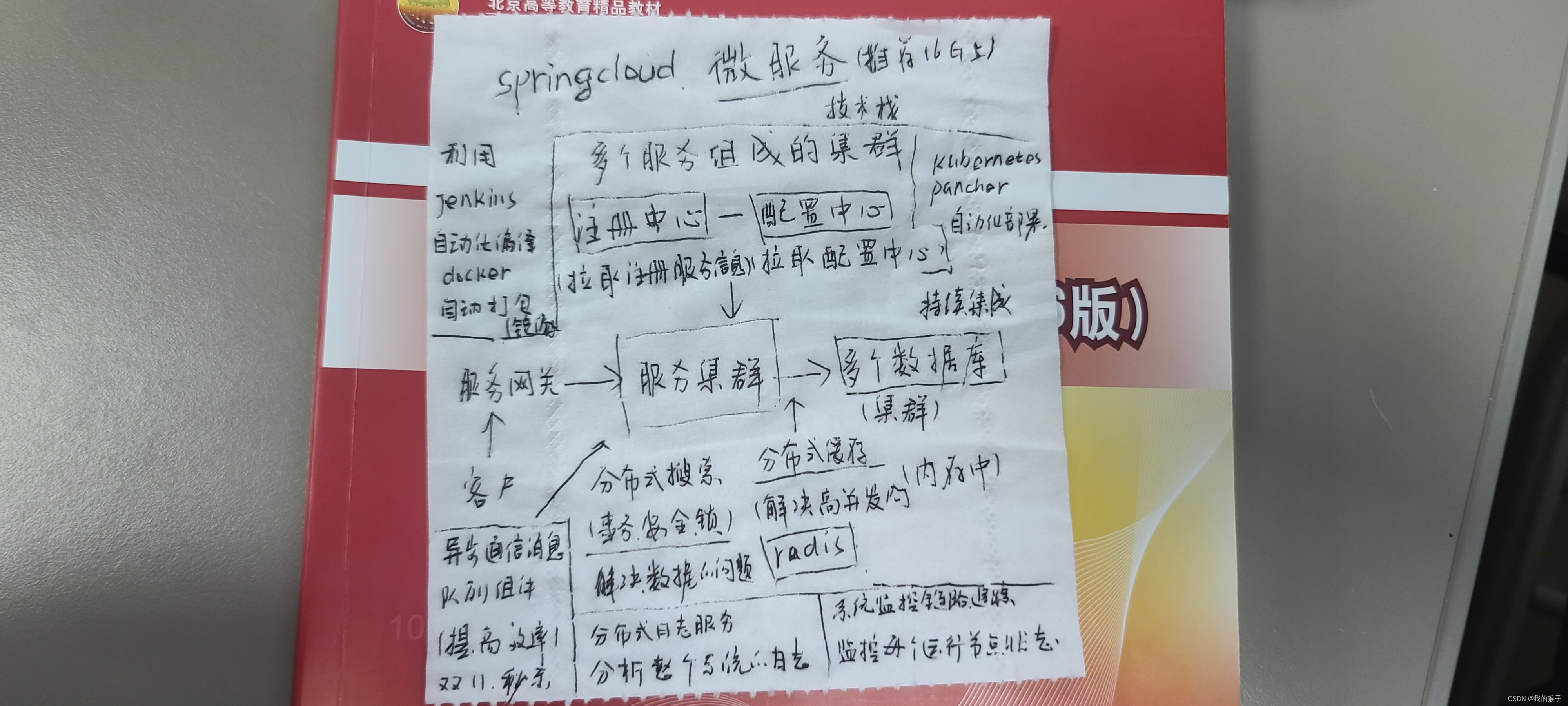
我们学了两个模块,1是切入点的设置,2.是通知类型的学习,根据AOP的思想之下,感觉学的没什么难度,只是注解很难被记住,如果以后常常学习,这方面的模块的话,我感觉其实还是很简单的,毕竟,才刚刚学习Spring,后面的SpringCloud其实才是真正的难学习,抓紧时间赶进度吧,同志们。我们学习完Spring的两大核心内容之后,后面仅仅只有事务了,然后就是SpringMVC,然后就是SpringBoot,SpringCloud,任重道远同志们,我看到SpringCloud是真的多,给你们贴个图片。加油加油努力努力。

-
相关阅读:
R语言ggplot2可视化:使用ggpubr包的ggpie函数可视化饼图(pie chart)、为饼图不同区域添加标签
面试汇总:这是一份全面&详细的Android面试指南
Centos7通过SSH使用密钥实现免密登录
SpringBoot:速成总结+实战——员工管理系统
Navicat运行sql文件导入数据不全或导入失败
二叉搜索树、B-树、B+树
对KMP算法的一点碎碎念——上篇
技术分享 | Jenkins 节点该如何管理?
R语言爬虫程序自动爬取图片并下载
docker安装gitlab 并dump出表结构
- 原文地址:https://blog.csdn.net/qq_51272114/article/details/127393520
